Internet Explorer 10 - Enable 32-bit or 64-bit IE10 in Windows 7

How to Enable 32-bit or 64-bit Internet Explorer 10 (IE10) in Windows 7


   Information
In 32-bit Windows 7, Internet Explorer 10 (IE10) is still only a 32-bit browser.

In 64-bit Windows 7, Internet Explorer 10 (IE10) has 32-bit and 64-bit together in one browser now. The IE10 browser frame process runs 64-bit, but for compatibility with plug-ins, IE10 runs 32-bit tabs by default. If the user turns onEnhanced Protected Mode, they will have 64-bit tabs by default for IE10.

This tutorial will show you how to enable using 32-bit IE10 or 64-bit IE10 in Windows 7 by showing you how to turn on or off Enhanced Protected Mode in IE10.

For more information about IE10 for Windows 7, see:
   Note
Internet Explorer 10 is now available through Windows Update in Windows 7. If you wish, you can also download the standalone IE10 installer at the link below.
Download standalone Internet Explorer 10 Installer

Internet Explorer 10 system requirements
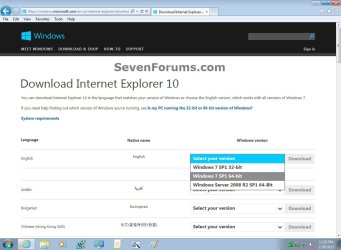
  • If you have 64-bit Windows 7, then you need to use the Windows 7 SP1 64-bit installer for IE10.
  • If you have 32-bit Windows 7, then you need to use the Windows 7 SP1 32-bit installer for IE10.
Windows_7_IE10-1.jpg

   Warning
You will only be able to have 64-bit IE10 if User Account Control (UAC) is not set to Never notify (disabled) or the EnableLUA registry DWORD to "0".

If you enable Enhanced Protected Mode (EPM) in IE10, all of your add-ons must be 64-bit and EPM compatible for all open IE10 processes to be 64-bit.

UAC must be enabled to be able to have 64-bit IE10. Otherwise, it will be 32-bit IE10 even if set to 64-bit in the tutorial below.


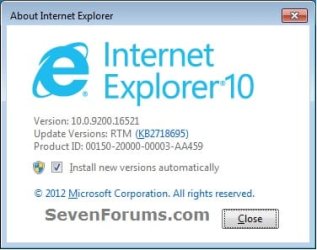
EXAMPLE: About Internet Explorer 10 (IE10)
NOTE: You will notice that the about IE10 is the same whether you open iexplorer.exe from either the "Program Files" or "Program Files (x86)" location.
about_IE10_W7.jpg


Here's How:

1. Do step 2 or 3 below for how you would like to open Internet Options.

2. Open the Control Panel (icons view), click/tap on the Internet Options icon, and go to step 4 below.

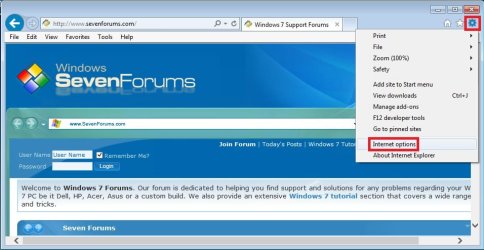
3. Open IE10, click on the gear icon and Internet options, then go to step 4 below. (see screenshot below)
W7_IE10_1.jpg
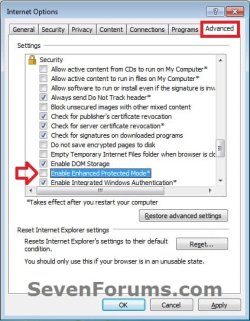
4. Click on the Advanced tab, scroll down to the Security section, and do step 5 or 6 below for what you would like to do. (see screenshot below)
W7_IE10_2.jpg
5. Turn On "Enhanced Protected Mode" for 64-bit IE10 in Windows 7
NOTE: See red warning box at the top of the tutorial.
A) Check the Enable Enhanced Protected Mode box. (see screenshot below step 4)

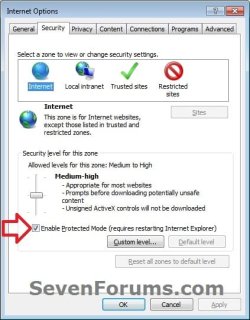
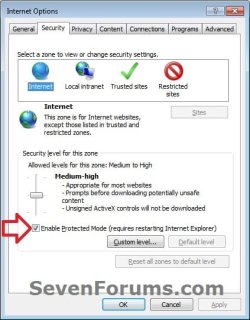
B) Click/tap on the Security tab, and if not already, check the Enable Protected Mode box for the Internet zone. (see screenshot below)
NOTE: This box is checked by default.
IE10_Security.jpg
C) Click on OK, and go to step 7 below.
6 Turn Off "Enhanced Protected Mode" for 32-bit IE10 in Windows 7
NOTE: This is the default setting.
A) Uncheck the Enable Enhanced Protected Mode box, click on OK, and go to step 7 below. (see screenshot below step 4)
7. Restart the computer to apply.


That's it,
Shawn


Last edited:
Thanks Shawn on the money again;)
 

My Computer

Computer type
PC/Desktop
Computer Manufacturer/Model Number
Own build (new) Desk1 / Asus ROG Win 7 / Desk2 1st build
OS
Desk1 7 Home Prem / Desk2 10 Pro / Main lap Asus ROG 10 Pro 2 laptop Toshiba 7 Pro Asus P2520 7 & 10
CPU
Desk1 i5 3750K / Laptop i7 GTX 860M / Desk2 i5 2500
Motherboard
Desk1 Asus P877-V / Desk2 Gigabyte H67 UD3H / Laptop ?
Memory
Desk1 8GB (1866) / Desk2 16GB (1333) / Laptop 8Gb DDR3
Graphics Card(s)
Desk 1& 2NVidia GTX 650 & Laptops on board Intel
Sound Card
Desk 1 & 2 -XONAR DG Realtek High Def audio Laptop
Monitor(s) Displays
Desk 1 Benq HD 2450 / Desk2 Philips 24" / Laptop 17.5"
Screen Resolution
1920x1080 D1 & D2 & Laptop 1
Hard Drives
Desk1 Samsung 120GB 830 SSD
Asus ROG 256GB 850 Pro SSD
Desk2 Samsung 840 256 SSD
Toshiba 120GB EVO
PSU
Desk 1 Corsair HX 1050/ Laptop ? / Desk 2 Corsair HX 650
Case
Desk 1 Cooler HAF XM ? Toshiba laptop / Desk2 Coolermaster
Cooling
Fans on all Desk1 -2 Desk2 - all Coolermasters 5 Laptop ?
Keyboard
Desk 1 MS Sidewinder X6 Desk 2 MS Sidewinder X 4
Mouse
Desk 1&2 - Gigabyte MS 900 gamer - laptop - Logitec wireless
Internet Speed
ADSL2+
Other Info
One other Desktop (tester) and spare Toshba laptop both with SSD's
Running Kaspersky 2016 ISS on all machines config'd identically
Logitec audio stereo systems on each machine (x3)
Canon MG5250MFC
Router/modem TP-Link running WPA2SK
You're welcome John. Hope it can help. :)
 

My Computer

Computer type
PC/Desktop
Computer Manufacturer/Model Number
Self built custom
OS
64-bit Windows 11 Pro for Workstations
CPU
Intel i7-8700K OC'd to 5 GHz
Motherboard
ASUS ROG Maximus XI Formula Z390
Memory
64 GB (4x16GB) G.SKILL TridentZ RGB DDR4 3600 MHz
Graphics Card(s)
ASUS ROG-STRIX-GTX1080TI-O11G-GAMING
Sound Card
Integrated
Monitor(s) Displays
2 x Samsung Odyssey G7 27"
Screen Resolution
2560x1440
Hard Drives
1TB Samsung 990 PRO M.2,
4TB Samsung 990 PRO PRO M.2,
TerraMaster F8 SSD Plus NAS
PSU
Seasonic Prime Titanium 850W
Case
Thermaltake Core P3
Cooling
Corsair Hydro H115i
Keyboard
Logitech wireless K800
Mouse
Logitech MX Master 4
Internet Speed
2 Gb/s Download and 100 Mb/s Upload
Antivirus
Malwarebyte Anti-Malware Premium
Browser
Google Chrome
Other Info
Logitech Z625 speaker system,
Logitech BRIO 4K Pro webcam,
HP Color LaserJet Pro MFP M477fdn,
APC SMART-UPS RT 1000 XL - SURT1000XLI,
Galaxy S23 Plus phone
A funny thing happened to me on the way to making a new thread...
...I found this tut :-)

I had searched for this info last week before you posted this tutorial and I made a video today for my new thread to show these "32bit tabs"... but I forgot that I had the video quality settings on max - so while the 600MB file uploaded to YouTube, I searched the forums once again.

Well, I'm not one to let a video go to waste... so I made another one that shows the "64bit tabs" after doing the steps in this tut. In the videos, IE10 is running inside of a W7 pro 64bit VM since I'm waiting a little while longer before moving to IE10 on the host.

At least the geeks will understand why I'm showing the path to the exe.

Before:


After:


Best viewed @720p and the full screen mode.

Thx Shawn for the tut.
 

My Computer

Computer type
Laptop
Computer Manufacturer/Model Number
Employer provided Dell Latitude
OS
W7 Pro SP1 64bit
CPU
i7
Memory
8GB
Graphics Card(s)
Intel HD Graphics
Hard Drives
crappy SSD
Antivirus
Employer mandated Symantec Endpoint Protection
Browser
Pale Moon 64bit, IE11 64bit & Chrome 64bit
You're welcome UsernameIssues, and thank you for posting the videos. :)
 

My Computer

Computer type
PC/Desktop
Computer Manufacturer/Model Number
Self built custom
OS
64-bit Windows 11 Pro for Workstations
CPU
Intel i7-8700K OC'd to 5 GHz
Motherboard
ASUS ROG Maximus XI Formula Z390
Memory
64 GB (4x16GB) G.SKILL TridentZ RGB DDR4 3600 MHz
Graphics Card(s)
ASUS ROG-STRIX-GTX1080TI-O11G-GAMING
Sound Card
Integrated
Monitor(s) Displays
2 x Samsung Odyssey G7 27"
Screen Resolution
2560x1440
Hard Drives
1TB Samsung 990 PRO M.2,
4TB Samsung 990 PRO PRO M.2,
TerraMaster F8 SSD Plus NAS
PSU
Seasonic Prime Titanium 850W
Case
Thermaltake Core P3
Cooling
Corsair Hydro H115i
Keyboard
Logitech wireless K800
Mouse
Logitech MX Master 4
Internet Speed
2 Gb/s Download and 100 Mb/s Upload
Antivirus
Malwarebyte Anti-Malware Premium
Browser
Google Chrome
Other Info
Logitech Z625 speaker system,
Logitech BRIO 4K Pro webcam,
HP Color LaserJet Pro MFP M477fdn,
APC SMART-UPS RT 1000 XL - SURT1000XLI,
Galaxy S23 Plus phone
Staying on top again! :D

One thing to know about IE10 over any previous version of IE however is that now Flash Player is embedded in this new version in case you are looking to dump Adobe, Java, and Flash due to concerns about Zero Day bugs. Just thought I would mention it here.

Adobe and Java can still go however while I never have any worries about Flash or Shock Players on any browser. I got 10 going on now finally and wanted a look at the guide here when noticing it. Meanwhile time to reboot! IE10 install prompting... have to go... ;)
 

My Computers

System One System Two

  • Computer type
    PC/Desktop
    Computer Manufacturer/Model Number
    Custom builds = 2
    OS
    W7 Ultimate x64/W10 Pro x64/W11 Pro Triple Boot - Main PC W7 Remote PC Micro ATX W7 Pro x64/W11 Pro
    CPU
    AMD Phenom II X4 975 Deneb 3.6ghz - 965 2nd remote pc
    Motherboard
    Gigabyte GA-790XTA-UD4-Gigabyte GA-880GM-D2H remote pc
    Memory
    Kingston Hyper X DDR3 1600 1.5v 16gb - Hyper X Fury 8gb 2nd
    Graphics Card(s)
    MSI HD Radeon 5750 1gb - MSI HD Radeon 6450 on mini tower
    Sound Card
    Creative Labs X-Fi Xtreme Audio P - Realtek onooard 2nd case
    Monitor(s) Displays
    ASUS VW199T-P 19" HP 2082a Main-HP 2082a 20" remote pc
    Screen Resolution
    Asus 1440x900 - HP 1600x900
    Hard Drives
    WD Black 1TB HD per OS W7, W10, and pending W11 presently on 500gb OS Drive - Pending Triple 1TB HDs for Spanned Storage/backup volume
    Single 2TB external USB enclosure, single 1TB System 7 Host/Boot drive, Pending 8TB external HD for system image b
    PSU
    Corsair 750TX - primary / Corsair CX600 - second
    Case
    Antec 900-2 - SSD compatible / NZXT Vulcan mini tower
    Cooling
    Zalman CNPS9900A
    Keyboard
    AZIO L70 Backlit Letters Gaming - ONN Cordless/USB
    Mouse
    MSI DS200 Programmable, Logitech Cordless
    Internet Speed
    30mbps upgrade - primary hard wired - mini tower usb WiFi
    Antivirus
    GFI VIPRE Internet Security 2014 on W7 2016 beta on W10,
    Browser
    Cyberfox, WaterFox 64bit FF variants, FireFox x64, Pale Moon
    Other Info
    Accomdata fan cooled usb 2.0 PIDE/Sata II, III external enclosure.
    Sambient usb/eSata PATA/Sata II, III external enclosure.
  • Computer type
    PC/Desktop
    System Manufacturer/Model Number
    CUSTOM ASSEMBLY
    OS
    W7 Pro x64/W11 Pro
    CPU
    AMD Deneb 3.6ghz - 965
    Motherboard
    Gigabyte GA-880GM-D2H remote pc
    Memory
    Kingston Hyper X Fury 8gb
    Graphics Card(s)
    MSI HD Radeon 6450 DVI Output
    Sound Card
    Realtek onooard Creative or Other separate PENDING
    Monitor(s) Displays
    VIZIO 32" LCD TV Separate LCD Pending
    Screen Resolution
    1600x1080
    Hard Drives
    WD 500GB OS Host/Boot WD Green 1TB Storage/Backup
    PSU
    Corsair 600W - THERMALTAKE 600W spare case
    Case
    NZXT Vulcan mini tower
    Cooling
    Twin 120mm Top Fans - 240mm Side Cover
    Keyboard
    ONN Cordless/USB Logitech Cordless
    Mouse
    ONN USB/Cordless - Logitech Cordless
    Internet Speed
    DSL 5G
    Browser
    MS Edge, FireFox, WaterFox x64, FireFox Nightly
    Other Info
    OS Testing-Remote Access to Main TeamViewer

My Computer

Computer type
PC/Desktop
Computer Manufacturer/Model Number
Self built custom
OS
64-bit Windows 11 Pro for Workstations
CPU
Intel i7-8700K OC'd to 5 GHz
Motherboard
ASUS ROG Maximus XI Formula Z390
Memory
64 GB (4x16GB) G.SKILL TridentZ RGB DDR4 3600 MHz
Graphics Card(s)
ASUS ROG-STRIX-GTX1080TI-O11G-GAMING
Sound Card
Integrated
Monitor(s) Displays
2 x Samsung Odyssey G7 27"
Screen Resolution
2560x1440
Hard Drives
1TB Samsung 990 PRO M.2,
4TB Samsung 990 PRO PRO M.2,
TerraMaster F8 SSD Plus NAS
PSU
Seasonic Prime Titanium 850W
Case
Thermaltake Core P3
Cooling
Corsair Hydro H115i
Keyboard
Logitech wireless K800
Mouse
Logitech MX Master 4
Internet Speed
2 Gb/s Download and 100 Mb/s Upload
Antivirus
Malwarebyte Anti-Malware Premium
Browser
Google Chrome
Other Info
Logitech Z625 speaker system,
Logitech BRIO 4K Pro webcam,
HP Color LaserJet Pro MFP M477fdn,
APC SMART-UPS RT 1000 XL - SURT1000XLI,
Galaxy S23 Plus phone
I likely already have it on. I would need to check the version number for the Mozilla version however for the 64bit WaterFox meaning the update for Opera and FF there. The latest variant I would use for WF is the "install_flashplayer11x64_mssd_aih.exe" file still coming from Adobe while at the WF plugins page. Now to see if both that and the one for IE can each go on or just one.

Update both installers went right on as soon as I closed up all browser windows as I suspected. Flash Player comes prepackaged with IE10 however according to someone who explains all that in one report. http://www.sevenforums.com/security...curity-risks-lived-without-java-reader-f.html
 
Last edited:

My Computers

System One System Two

  • Computer type
    PC/Desktop
    Computer Manufacturer/Model Number
    Custom builds = 2
    OS
    W7 Ultimate x64/W10 Pro x64/W11 Pro Triple Boot - Main PC W7 Remote PC Micro ATX W7 Pro x64/W11 Pro
    CPU
    AMD Phenom II X4 975 Deneb 3.6ghz - 965 2nd remote pc
    Motherboard
    Gigabyte GA-790XTA-UD4-Gigabyte GA-880GM-D2H remote pc
    Memory
    Kingston Hyper X DDR3 1600 1.5v 16gb - Hyper X Fury 8gb 2nd
    Graphics Card(s)
    MSI HD Radeon 5750 1gb - MSI HD Radeon 6450 on mini tower
    Sound Card
    Creative Labs X-Fi Xtreme Audio P - Realtek onooard 2nd case
    Monitor(s) Displays
    ASUS VW199T-P 19" HP 2082a Main-HP 2082a 20" remote pc
    Screen Resolution
    Asus 1440x900 - HP 1600x900
    Hard Drives
    WD Black 1TB HD per OS W7, W10, and pending W11 presently on 500gb OS Drive - Pending Triple 1TB HDs for Spanned Storage/backup volume
    Single 2TB external USB enclosure, single 1TB System 7 Host/Boot drive, Pending 8TB external HD for system image b
    PSU
    Corsair 750TX - primary / Corsair CX600 - second
    Case
    Antec 900-2 - SSD compatible / NZXT Vulcan mini tower
    Cooling
    Zalman CNPS9900A
    Keyboard
    AZIO L70 Backlit Letters Gaming - ONN Cordless/USB
    Mouse
    MSI DS200 Programmable, Logitech Cordless
    Internet Speed
    30mbps upgrade - primary hard wired - mini tower usb WiFi
    Antivirus
    GFI VIPRE Internet Security 2014 on W7 2016 beta on W10,
    Browser
    Cyberfox, WaterFox 64bit FF variants, FireFox x64, Pale Moon
    Other Info
    Accomdata fan cooled usb 2.0 PIDE/Sata II, III external enclosure.
    Sambient usb/eSata PATA/Sata II, III external enclosure.
  • Computer type
    PC/Desktop
    System Manufacturer/Model Number
    CUSTOM ASSEMBLY
    OS
    W7 Pro x64/W11 Pro
    CPU
    AMD Deneb 3.6ghz - 965
    Motherboard
    Gigabyte GA-880GM-D2H remote pc
    Memory
    Kingston Hyper X Fury 8gb
    Graphics Card(s)
    MSI HD Radeon 6450 DVI Output
    Sound Card
    Realtek onooard Creative or Other separate PENDING
    Monitor(s) Displays
    VIZIO 32" LCD TV Separate LCD Pending
    Screen Resolution
    1600x1080
    Hard Drives
    WD 500GB OS Host/Boot WD Green 1TB Storage/Backup
    PSU
    Corsair 600W - THERMALTAKE 600W spare case
    Case
    NZXT Vulcan mini tower
    Cooling
    Twin 120mm Top Fans - 240mm Side Cover
    Keyboard
    ONN Cordless/USB Logitech Cordless
    Mouse
    ONN USB/Cordless - Logitech Cordless
    Internet Speed
    DSL 5G
    Browser
    MS Edge, FireFox, WaterFox x64, FireFox Nightly
    Other Info
    OS Testing-Remote Access to Main TeamViewer
ive followed this tut and seen it on many websites... yet when you do this the tabs are still *32 in Task Manager? why is this?

Iam running Windows 7 Pro x64 and installed IE10 for x64 OS (you cant install 32-bit cos tried too install both)

I would have thought that if the tabs were really running in 64-Bit then iexplorer.exe processes would not have the *32 affix on them...which they have on my comp...

I urge everyone who has done this too check theirs in task manager - open two tabs with pages and you will see 1 iexplorer.exe and 2 iexplorer.exe *32 which shows that each Tab is a 32-Bit process.
 

My Computer

Computer type
PC/Desktop
Computer Manufacturer/Model Number
GT1000
OS
Windows 7 Pro x64
CPU
Intel Core-i5 3470 @ 3.67Ghz (Ivy-Bridge)
Motherboard
Gigabyte H77M-D3H
Memory
8Gb (2x4) 1616Mhz Crucial Ballistix
Graphics Card(s)
nVidia GTX650
Sound Card
Via 2021T
Monitor(s) Displays
19" LG Flatron
Screen Resolution
1440x900
Hard Drives
2 x 120Gb Samsung 840 EVO in RAID '0' (1GB/s - 800MB/s - 140k IOPS)
500Gb Seagate Barracuda HDD
PSU
XFX 450 Pro Core Edition
Case
NXZT
Cooling
Arctic 7 Freezer Pro
Keyboard
Q-Connect Wi-Fi
Mouse
Q-Connect Wi-Fi
Internet Speed
16Mbps
Antivirus
(none) - Private Firewall + WinPatrol
Browser
Chrome
Other Info
Home-Built Computer
~~~
I urge everyone who has done this too check theirs in task manager - open two tabs with pages and you will see 1 iexplorer.exe and 2 iexplorer.exe *32 which shows that each Tab is a 32-Bit process.

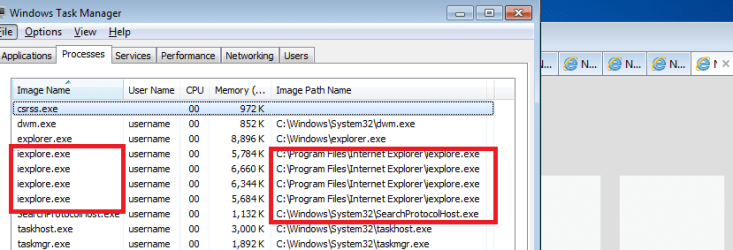
That is not what I see:

IE10-64bit-tabs.png

You can also turn on the image path column to see where the children are launching from.
 

My Computer

Computer type
Laptop
Computer Manufacturer/Model Number
Employer provided Dell Latitude
OS
W7 Pro SP1 64bit
CPU
i7
Memory
8GB
Graphics Card(s)
Intel HD Graphics
Hard Drives
crappy SSD
Antivirus
Employer mandated Symantec Endpoint Protection
Browser
Pale Moon 64bit, IE11 64bit & Chrome 64bit
ive followed this tut and seen it on many websites... yet when you do this the tabs are still *32 in Task Manager? why is this?

Iam running Windows 7 Pro x64 and installed IE10 for x64 OS (you cant install 32-bit cos tried too install both)

I would have thought that if the tabs were really running in 64-Bit then iexplorer.exe processes would not have the *32 affix on them...which they have on my comp...

I urge everyone who has done this too check theirs in task manager - open two tabs with pages and you will see 1 iexplorer.exe and 2 iexplorer.exe *32 which shows that each Tab is a 32-Bit process.


Hello Snadge,

Just to double check, when you turned on Enhanced Protected Mode, did you restart the computer afterwards to apply?


In 64-bit Windows 7, Internet Explorer 10 (IE10) has 32-bit and 64-bit together in one browser now. The IE10 browser frame process runs 64-bit, but for compatibility with plug-ins, IE10 runs 32-bit tabs by default. If the user turns on “Enhanced Protected Mode”, they will have 64-bit tabs by default for IE10.

This means that the IE10 itself always runs in 64-bit in 64-bit W7 whether you have Enhanced Protected Mode turned on or not. This would be the first iexplorer.exe process you see listed in Task Manager. Only when you turn on Enhanced Protected Mode are when the tabs use 64-bit instead of 32-bit.

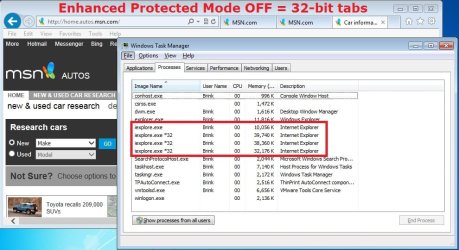
Enhanced Protected Mode ON = First process listed is iexplorer.exe (64-bit), and each iexplorer.exe process listed after that is a for a 64-bit tab opened in IE10 like below.
64-bit.jpg
Enhanced Protected Mode OFF = First process listed is iexplorer.exe (64-bit), and each iexplorer.exe *32 process listed after that is a for a 32-bit tab opened in IE10 like below.
32-bit.jpg
 

My Computer

Computer type
PC/Desktop
Computer Manufacturer/Model Number
Self built custom
OS
64-bit Windows 11 Pro for Workstations
CPU
Intel i7-8700K OC'd to 5 GHz
Motherboard
ASUS ROG Maximus XI Formula Z390
Memory
64 GB (4x16GB) G.SKILL TridentZ RGB DDR4 3600 MHz
Graphics Card(s)
ASUS ROG-STRIX-GTX1080TI-O11G-GAMING
Sound Card
Integrated
Monitor(s) Displays
2 x Samsung Odyssey G7 27"
Screen Resolution
2560x1440
Hard Drives
1TB Samsung 990 PRO M.2,
4TB Samsung 990 PRO PRO M.2,
TerraMaster F8 SSD Plus NAS
PSU
Seasonic Prime Titanium 850W
Case
Thermaltake Core P3
Cooling
Corsair Hydro H115i
Keyboard
Logitech wireless K800
Mouse
Logitech MX Master 4
Internet Speed
2 Gb/s Download and 100 Mb/s Upload
Antivirus
Malwarebyte Anti-Malware Premium
Browser
Google Chrome
Other Info
Logitech Z625 speaker system,
Logitech BRIO 4K Pro webcam,
HP Color LaserJet Pro MFP M477fdn,
APC SMART-UPS RT 1000 XL - SURT1000XLI,
Galaxy S23 Plus phone
You can immediately see the differences since both have 4 items with the size. The 64bit will see the 53kb while the 32bit is about 30kb. That stands to reason since the 64bit would be larger. The download however would be for the 64bit Windows when selecting the 64bit option on the MS download page.

One thing I noticed here that seems a bit odd however is only seeing two not four processes when opening the processes tab. The first is only 10kb with the second showing at 34kb. The Enhanced Protected Mode is enabled since that was seen to when first installing 10 last week.

u2989.jpg
 

My Computers

System One System Two

  • Computer type
    PC/Desktop
    Computer Manufacturer/Model Number
    Custom builds = 2
    OS
    W7 Ultimate x64/W10 Pro x64/W11 Pro Triple Boot - Main PC W7 Remote PC Micro ATX W7 Pro x64/W11 Pro
    CPU
    AMD Phenom II X4 975 Deneb 3.6ghz - 965 2nd remote pc
    Motherboard
    Gigabyte GA-790XTA-UD4-Gigabyte GA-880GM-D2H remote pc
    Memory
    Kingston Hyper X DDR3 1600 1.5v 16gb - Hyper X Fury 8gb 2nd
    Graphics Card(s)
    MSI HD Radeon 5750 1gb - MSI HD Radeon 6450 on mini tower
    Sound Card
    Creative Labs X-Fi Xtreme Audio P - Realtek onooard 2nd case
    Monitor(s) Displays
    ASUS VW199T-P 19" HP 2082a Main-HP 2082a 20" remote pc
    Screen Resolution
    Asus 1440x900 - HP 1600x900
    Hard Drives
    WD Black 1TB HD per OS W7, W10, and pending W11 presently on 500gb OS Drive - Pending Triple 1TB HDs for Spanned Storage/backup volume
    Single 2TB external USB enclosure, single 1TB System 7 Host/Boot drive, Pending 8TB external HD for system image b
    PSU
    Corsair 750TX - primary / Corsair CX600 - second
    Case
    Antec 900-2 - SSD compatible / NZXT Vulcan mini tower
    Cooling
    Zalman CNPS9900A
    Keyboard
    AZIO L70 Backlit Letters Gaming - ONN Cordless/USB
    Mouse
    MSI DS200 Programmable, Logitech Cordless
    Internet Speed
    30mbps upgrade - primary hard wired - mini tower usb WiFi
    Antivirus
    GFI VIPRE Internet Security 2014 on W7 2016 beta on W10,
    Browser
    Cyberfox, WaterFox 64bit FF variants, FireFox x64, Pale Moon
    Other Info
    Accomdata fan cooled usb 2.0 PIDE/Sata II, III external enclosure.
    Sambient usb/eSata PATA/Sata II, III external enclosure.
  • Computer type
    PC/Desktop
    System Manufacturer/Model Number
    CUSTOM ASSEMBLY
    OS
    W7 Pro x64/W11 Pro
    CPU
    AMD Deneb 3.6ghz - 965
    Motherboard
    Gigabyte GA-880GM-D2H remote pc
    Memory
    Kingston Hyper X Fury 8gb
    Graphics Card(s)
    MSI HD Radeon 6450 DVI Output
    Sound Card
    Realtek onooard Creative or Other separate PENDING
    Monitor(s) Displays
    VIZIO 32" LCD TV Separate LCD Pending
    Screen Resolution
    1600x1080
    Hard Drives
    WD 500GB OS Host/Boot WD Green 1TB Storage/Backup
    PSU
    Corsair 600W - THERMALTAKE 600W spare case
    Case
    NZXT Vulcan mini tower
    Cooling
    Twin 120mm Top Fans - 240mm Side Cover
    Keyboard
    ONN Cordless/USB Logitech Cordless
    Mouse
    ONN USB/Cordless - Logitech Cordless
    Internet Speed
    DSL 5G
    Browser
    MS Edge, FireFox, WaterFox x64, FireFox Nightly
    Other Info
    OS Testing-Remote Access to Main TeamViewer

My Computer

Computer type
Laptop
Computer Manufacturer/Model Number
Employer provided Dell Latitude
OS
W7 Pro SP1 64bit
CPU
i7
Memory
8GB
Graphics Card(s)
Intel HD Graphics
Hard Drives
crappy SSD
Antivirus
Employer mandated Symantec Endpoint Protection
Browser
Pale Moon 64bit, IE11 64bit & Chrome 64bit
Actually I disable tabbed browsing to see each new instance open in a separate window. Presently IE is not even the default browser. That was simply what you see right away with one instance open and then looking at the processes there.

Now when opening up 3 IE windows just now I see the four items listed the first being 13kb with the second and fourth 33kb and the third 34kb. This is with the Enhanced Protection Mode enabled suggesting the tabbed browsing is why the larger portion of ram is being seen over the first impression. That would explain the jump upto 54kb somewhat where the 64bit IE is concerned due to one additional process at work.
 

My Computers

System One System Two

  • Computer type
    PC/Desktop
    Computer Manufacturer/Model Number
    Custom builds = 2
    OS
    W7 Ultimate x64/W10 Pro x64/W11 Pro Triple Boot - Main PC W7 Remote PC Micro ATX W7 Pro x64/W11 Pro
    CPU
    AMD Phenom II X4 975 Deneb 3.6ghz - 965 2nd remote pc
    Motherboard
    Gigabyte GA-790XTA-UD4-Gigabyte GA-880GM-D2H remote pc
    Memory
    Kingston Hyper X DDR3 1600 1.5v 16gb - Hyper X Fury 8gb 2nd
    Graphics Card(s)
    MSI HD Radeon 5750 1gb - MSI HD Radeon 6450 on mini tower
    Sound Card
    Creative Labs X-Fi Xtreme Audio P - Realtek onooard 2nd case
    Monitor(s) Displays
    ASUS VW199T-P 19" HP 2082a Main-HP 2082a 20" remote pc
    Screen Resolution
    Asus 1440x900 - HP 1600x900
    Hard Drives
    WD Black 1TB HD per OS W7, W10, and pending W11 presently on 500gb OS Drive - Pending Triple 1TB HDs for Spanned Storage/backup volume
    Single 2TB external USB enclosure, single 1TB System 7 Host/Boot drive, Pending 8TB external HD for system image b
    PSU
    Corsair 750TX - primary / Corsair CX600 - second
    Case
    Antec 900-2 - SSD compatible / NZXT Vulcan mini tower
    Cooling
    Zalman CNPS9900A
    Keyboard
    AZIO L70 Backlit Letters Gaming - ONN Cordless/USB
    Mouse
    MSI DS200 Programmable, Logitech Cordless
    Internet Speed
    30mbps upgrade - primary hard wired - mini tower usb WiFi
    Antivirus
    GFI VIPRE Internet Security 2014 on W7 2016 beta on W10,
    Browser
    Cyberfox, WaterFox 64bit FF variants, FireFox x64, Pale Moon
    Other Info
    Accomdata fan cooled usb 2.0 PIDE/Sata II, III external enclosure.
    Sambient usb/eSata PATA/Sata II, III external enclosure.
  • Computer type
    PC/Desktop
    System Manufacturer/Model Number
    CUSTOM ASSEMBLY
    OS
    W7 Pro x64/W11 Pro
    CPU
    AMD Deneb 3.6ghz - 965
    Motherboard
    Gigabyte GA-880GM-D2H remote pc
    Memory
    Kingston Hyper X Fury 8gb
    Graphics Card(s)
    MSI HD Radeon 6450 DVI Output
    Sound Card
    Realtek onooard Creative or Other separate PENDING
    Monitor(s) Displays
    VIZIO 32" LCD TV Separate LCD Pending
    Screen Resolution
    1600x1080
    Hard Drives
    WD 500GB OS Host/Boot WD Green 1TB Storage/Backup
    PSU
    Corsair 600W - THERMALTAKE 600W spare case
    Case
    NZXT Vulcan mini tower
    Cooling
    Twin 120mm Top Fans - 240mm Side Cover
    Keyboard
    ONN Cordless/USB Logitech Cordless
    Mouse
    ONN USB/Cordless - Logitech Cordless
    Internet Speed
    DSL 5G
    Browser
    MS Edge, FireFox, WaterFox x64, FireFox Nightly
    Other Info
    OS Testing-Remote Access to Main TeamViewer
I have enabled it correctly and restarted the computer many times

heres what I get with it enabled (same when disabled)

sy52pAn.png


are you running windows 7? im wondering if it works in Windows 8 but not in Windows 7?
 

My Computer

Computer type
PC/Desktop
Computer Manufacturer/Model Number
GT1000
OS
Windows 7 Pro x64
CPU
Intel Core-i5 3470 @ 3.67Ghz (Ivy-Bridge)
Motherboard
Gigabyte H77M-D3H
Memory
8Gb (2x4) 1616Mhz Crucial Ballistix
Graphics Card(s)
nVidia GTX650
Sound Card
Via 2021T
Monitor(s) Displays
19" LG Flatron
Screen Resolution
1440x900
Hard Drives
2 x 120Gb Samsung 840 EVO in RAID '0' (1GB/s - 800MB/s - 140k IOPS)
500Gb Seagate Barracuda HDD
PSU
XFX 450 Pro Core Edition
Case
NXZT
Cooling
Arctic 7 Freezer Pro
Keyboard
Q-Connect Wi-Fi
Mouse
Q-Connect Wi-Fi
Internet Speed
16Mbps
Antivirus
(none) - Private Firewall + WinPatrol
Browser
Chrome
Other Info
Home-Built Computer
It's the same in Windows 7 and Windows 8. The screenshots I posted above were from Windows 7.

Not sure why IE10 still giving you 32-bit tabs when you have Enhanced Protected Mode turned on.

As a test, you might see if uninstalling IE10, and using the standalone .exe may help.
 
Last edited:

My Computer

Computer type
PC/Desktop
Computer Manufacturer/Model Number
Self built custom
OS
64-bit Windows 11 Pro for Workstations
CPU
Intel i7-8700K OC'd to 5 GHz
Motherboard
ASUS ROG Maximus XI Formula Z390
Memory
64 GB (4x16GB) G.SKILL TridentZ RGB DDR4 3600 MHz
Graphics Card(s)
ASUS ROG-STRIX-GTX1080TI-O11G-GAMING
Sound Card
Integrated
Monitor(s) Displays
2 x Samsung Odyssey G7 27"
Screen Resolution
2560x1440
Hard Drives
1TB Samsung 990 PRO M.2,
4TB Samsung 990 PRO PRO M.2,
TerraMaster F8 SSD Plus NAS
PSU
Seasonic Prime Titanium 850W
Case
Thermaltake Core P3
Cooling
Corsair Hydro H115i
Keyboard
Logitech wireless K800
Mouse
Logitech MX Master 4
Internet Speed
2 Gb/s Download and 100 Mb/s Upload
Antivirus
Malwarebyte Anti-Malware Premium
Browser
Google Chrome
Other Info
Logitech Z625 speaker system,
Logitech BRIO 4K Pro webcam,
HP Color LaserJet Pro MFP M477fdn,
APC SMART-UPS RT 1000 XL - SURT1000XLI,
Galaxy S23 Plus phone
tried running IE10 from the 64-bit install folder but results are the same?

I will uninstall it and re-install
 

My Computer

Computer type
PC/Desktop
Computer Manufacturer/Model Number
GT1000
OS
Windows 7 Pro x64
CPU
Intel Core-i5 3470 @ 3.67Ghz (Ivy-Bridge)
Motherboard
Gigabyte H77M-D3H
Memory
8Gb (2x4) 1616Mhz Crucial Ballistix
Graphics Card(s)
nVidia GTX650
Sound Card
Via 2021T
Monitor(s) Displays
19" LG Flatron
Screen Resolution
1440x900
Hard Drives
2 x 120Gb Samsung 840 EVO in RAID '0' (1GB/s - 800MB/s - 140k IOPS)
500Gb Seagate Barracuda HDD
PSU
XFX 450 Pro Core Edition
Case
NXZT
Cooling
Arctic 7 Freezer Pro
Keyboard
Q-Connect Wi-Fi
Mouse
Q-Connect Wi-Fi
Internet Speed
16Mbps
Antivirus
(none) - Private Firewall + WinPatrol
Browser
Chrome
Other Info
Home-Built Computer
Not getting the same results...

A funny thing happened to me on the way to making a new thread...
...I found this tut :-)

I had searched for this info last week before you posted this tutorial and I made a video today for my new thread to show these "32bit tabs"... but I forgot that I had the video quality settings on max - so while the 600MB file uploaded to YouTube, I searched the forums once again.

Well, I'm not one to let a video go to waste... so I made another one that shows the "64bit tabs" after doing the steps in this tut. In the videos, IE10 is running inside of a W7 pro 64bit VM since I'm waiting a little while longer before moving to IE10 on the host.

At least the geeks will understand why I'm showing the path to the exe.


I'm using IE 10 & followed Shawn's tutorial on enabling 64-bit tabs by checking "Enable Enhanced Protection Mode" & restarting Windows. I used Process Explorer to check, but I am still getting 32-bit image when opening a new tab!

I even uninstalled IE 10 & reinstalled using the 64-bit standalone download from MS (I originally used the Win Update route). This changed nothing! Enhanced Protection Mode was already enabled in the 2nd install, so I unchecked it, restarted, then checked EPM again & restarted. I'm still getting 32-bit tabs. The first is 64-bit, but that is the only one.

Any ideas?
 

My Computer

Computer type
PC/Desktop
Computer Manufacturer/Model Number
Custom Build
OS
Windows 7 Professional 64 Bit SP1
CPU
Intel i7-3770K. Mild Overclock to 4.2 Ghz
Motherboard
ASUS Sabertooth Z77
Memory
Crucial Ballistix Sport 32GB DDR3-1600 (PC3-12800)
Graphics Card(s)
Intel 4000 - On CPU
Sound Card
On Board
Monitor(s) Displays
HP w2408h
Screen Resolution
1920 x 1200
Hard Drives
Samsung 840 Pro 256Gb SSD, --
Two - WDC WD1001FALS-00J7B0 SATA
PSU
Antec EarthWatts Green Series 650 Watt ATX
Case
Fractal Design Core 3000 ATX
Cooling
Corsair H80i Water Cooled
Keyboard
Logitech Illuminated
Mouse
Logitech Wireless Trackball M570 + Touchpad T650
Internet Speed
9.5 Mbps down - 25.4 Mbps upload
Antivirus
MSE
Browser
IE 10, Chrome
snadge and Tom,

I think I found what the issue may be, and added it to the tutorial. Double check in Internet Options -> "Security" tab, and make sure that Enable Protected Mode is checked for the "Internet" zone like below. Click on OK, and restart IE10 to apply.

IE10_Security.jpg
 
Last edited:

My Computer

Computer type
PC/Desktop
Computer Manufacturer/Model Number
Self built custom
OS
64-bit Windows 11 Pro for Workstations
CPU
Intel i7-8700K OC'd to 5 GHz
Motherboard
ASUS ROG Maximus XI Formula Z390
Memory
64 GB (4x16GB) G.SKILL TridentZ RGB DDR4 3600 MHz
Graphics Card(s)
ASUS ROG-STRIX-GTX1080TI-O11G-GAMING
Sound Card
Integrated
Monitor(s) Displays
2 x Samsung Odyssey G7 27"
Screen Resolution
2560x1440
Hard Drives
1TB Samsung 990 PRO M.2,
4TB Samsung 990 PRO PRO M.2,
TerraMaster F8 SSD Plus NAS
PSU
Seasonic Prime Titanium 850W
Case
Thermaltake Core P3
Cooling
Corsair Hydro H115i
Keyboard
Logitech wireless K800
Mouse
Logitech MX Master 4
Internet Speed
2 Gb/s Download and 100 Mb/s Upload
Antivirus
Malwarebyte Anti-Malware Premium
Browser
Google Chrome
Other Info
Logitech Z625 speaker system,
Logitech BRIO 4K Pro webcam,
HP Color LaserJet Pro MFP M477fdn,
APC SMART-UPS RT 1000 XL - SURT1000XLI,
Galaxy S23 Plus phone
Protected mode is already checked in my Security tab in the Internet Zone, Brink. It is not checked in the Trusted Sites Zone. I checked it, restarted, but it didn't help.

I saw "google crash handler" running in the Process Explorer & thought it might have something to do with the problem. I uninstalled everything Google & cleaned the registry of all Google entries. It still made no difference!
 
Last edited:

My Computer

Computer type
PC/Desktop
Computer Manufacturer/Model Number
Custom Build
OS
Windows 7 Professional 64 Bit SP1
CPU
Intel i7-3770K. Mild Overclock to 4.2 Ghz
Motherboard
ASUS Sabertooth Z77
Memory
Crucial Ballistix Sport 32GB DDR3-1600 (PC3-12800)
Graphics Card(s)
Intel 4000 - On CPU
Sound Card
On Board
Monitor(s) Displays
HP w2408h
Screen Resolution
1920 x 1200
Hard Drives
Samsung 840 Pro 256Gb SSD, --
Two - WDC WD1001FALS-00J7B0 SATA
PSU
Antec EarthWatts Green Series 650 Watt ATX
Case
Fractal Design Core 3000 ATX
Cooling
Corsair H80i Water Cooled
Keyboard
Logitech Illuminated
Mouse
Logitech Wireless Trackball M570 + Touchpad T650
Internet Speed
9.5 Mbps down - 25.4 Mbps upload
Antivirus
MSE
Browser
IE 10, Chrome
Back
Top