
Gadgets – Creating a Custom clock gadget.

For this you will need:
- An orb of any kind (Circle) to use as the gadget clock (Browse DeviantArt)
- Photo Editing Software
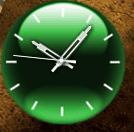
- Pre made clock (Attached)
First install the gadget. This is done by unzipping the ZIP file and placing the folder in the zip file in shell:gadgets (Seach from start menu)
Now go the gadget folder (Shell:gadgets folder), and go to the folder of the gadget (Which in this case is: GreenClock.gadget)
Now there should be 3 images in that folder. Drag.png, icon.png and logo.png (logo.png is the logo for the details, So it doesn’t need to be changed). The icon.png is for the gadget icon in the gadget library. The drag.png is for the gadget itself.
Inside the images folder there should be 2 images called GTA4_settings and GTA4. Also here is the clock arms. The clock arms has to applied correctly on the GTA4_settings orb.
To make it easier for you to apply the clock arms correctly on the GTA4_settings.png orb, I have attached the clock arms for you, they just need to be placed/inserted in the orb.
Now make 3 orbs. 2x clean 131x131(One called drag.png and one called GTA4.png) and 1x With clock arms 131x131 (Called GTA4_settings.png)
Remember to make the background transparent and save as .png
The last orb (icon.png) is the one that shows for the gadget in the gadget library. Choose any image you want, but remember it has to 71x71 (Might work with a bigger size).
Now when you are done with making the orbs, replace the original files in the gadget folder (Clo2c2k.gadget)
Now the custom clock should show correctly. If it doesn’t, try again

Now to editing the XML info (optional):
First go to the Shell:gadgets folder (search for the folder via the start menu search) and select the folder of the gadget you want to edit.
Now open the XML file called Gadget.xml with notepad (This file might be in a ‘en-us’ folder)
Now you should see this (This can be different from gadget to gadget)
Here’s the info from my custom gadget clock:
Code:
<?xml version="1.0" encoding="utf-8"?>
<gadget>
<name>Red Fusion v2</name>
<namespace><!--_locComment_text="{Locked}"-->microsoft.windows</namespace>
<version><!--_locComment_text="{Locked}"-->2.0</version>
<author name="sergiogarcia9">
<info url="https://www.sevenforums.com/" text="www.sevenforums.com"/>
<logo src="logo.png"/>
</author>
<copyright><!--_locComment_text="{Locked}"-->© 2009</copyright>
<description>Watch the Red Fusion clock in your time zone. Designed by sergiogarcia9 from Seven Forums.</description>
<icons>
<icon height="48" width="48" src="icon.png"/>
</icons>
<hosts>
<host name="sidebar">
<autoscaleDPI><!--_locComment_text="{Locked}"-->true</autoscaleDPI>
<base type="html" apiVersion="2.0.0" src="clock.html"/>
<permissions><!--_locComment_text="{Locked}"-->full</permissions>
<platform minPlatformVersion="1.0"/>
<defaultImage src="drag.png"/>
</host>
</hosts>
</gadget>Edit these as you wish to, but remember do not take credit for other peoples work, if you are going to upload them and share them at least mention the original artist, or email the artist and ask for permeation to publish the gadget.
Enjoy
And please comment.Clock arms White:

Clock arms Black:

Pre made Clock Download:
Download
Credit to the original maker of the clock provided: Pauliewog
Attachments



Last edited by a moderator:


