Windows Movie Maker 6.0 - Install on Windows 7

How to Install Windows Movie Maker 6.0 on Windows 7


   Information
In Windows 7, it is preferred for you to download and install the newer Windows Live Movie Maker. If you would prefer the older Windows Movie Maker 6.0 from Windows Vista instead, then this will show you how to install it over to Windows 7.
   Note
These are the things you are going to need for this tutorial:
  • Windows Movie Maker 6.0 Files from Windows Vista
  • The .cmd file to register Movie Maker DLL's to Windows 7 (Check the attachments)
  • and of course, a PC running Windows 7
   Tip

  • If you did a custom install from Windows Vista, you can find your Movie Maker files from the Windows.old folder. (Thanks to Wii Master 64)


Here's How:
1. First, you must copy Windows Movie Maker 6.0 files from a computer with Vista installed.
Important: If you are going to install WMM on a Windows 7 64-bit, make sure that the WMM files you will use came from a 64-bit version of Windows Vista.

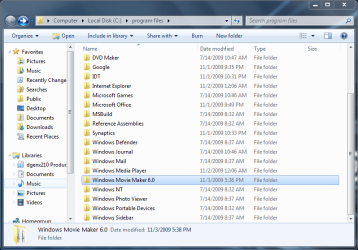
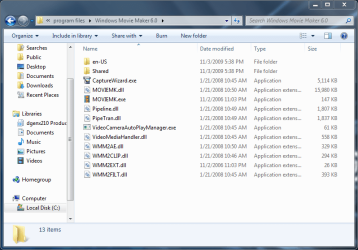
2. Go to "C:\Program Files". Make a folder named "Windows Movie Maker 6.0" then paste the WMM files inside that folder.
34933d1257351135-windows-movie-maker-6-0-install-windows-7-3-program-files-pasted.png

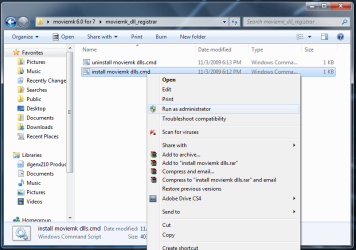
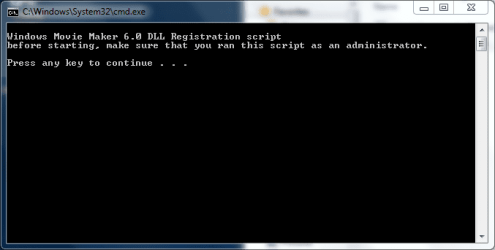
3. Click on the Download button below to download and save moviemk_dll_registrar.zip. Extract and run the install moviemk dlls.cmd file with Run as Administrator and follow the instructions.

Download


34934d1257351135-windows-movie-maker-6-0-install-windows-7-4-run-admin.png

34935d1257351238-windows-movie-maker-6-0-install-windows-7-5-dll_1.png

4. Add a shortcut to Windows Movie Maker on your desktop for easy access.

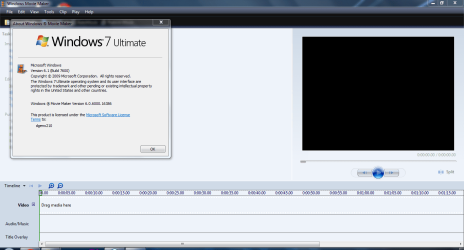
5. That's it! You're done :D
34936d1257351284-windows-movie-maker-6-0-install-windows-7-6-proof.png


Attachments

  • moviemk_dll_registrar.zip
    moviemk_dll_registrar.zip
    702 bytes · Views: 111,597
  • 2 - program files.PNG
    2 - program files.PNG
    40.7 KB · Views: 148
  • 3 - program files pasted.PNG
    3 - program files pasted.PNG
    36.3 KB · Views: 453,729
  • 4 - run as admin.png
    4 - run as admin.png
    40.1 KB · Views: 452,300
  • 5 - dll_1.PNG
    5 - dll_1.PNG
    9.3 KB · Views: 448,337
  • 6 - proof.PNG
    6 - proof.PNG
    42.7 KB · Views: 466,801
Last edited by a moderator:
Dondeeble,
- What's your WMM's Version?!
- Have you tried to create a video with 2.6? I just need to know whether you had or not, good sound quality !! this is my problem :confused:

Greetings ...
 

My Computer My Computer

At a glance

Windows 7
OS
Windows 7
My MM is from an early version of Vista. I have no problems with video or audio with my version and the 2.6. You may have a codec problem or need an upgrade on your video card?
I did use the link you sent for the 2.6 and plug-ins and have good audio.
Good Luck
 

My Computer My Computer

At a glance

W-7 StarterIntel atom N4502 GBIntel Grapics media 3150
Computer Manufacturer/Model Number
ASUS 1001P
OS
W-7 Starter
CPU
Intel atom N450
Memory
2 GB
Graphics Card(s)
Intel Grapics media 3150
Sound Card
Realtek HD
Screen Resolution
1024x600
Hard Drives
Hitachi 160GB
Hi there. I went through the instructions to install Movie Maker in Windows 7 and it seems to have worked for the most part. My problem is that though I can bring up Movie Maker, I can't import any files to it. Any suggestions?
Thank you!
 

My Computer My Computer

At a glance

Windows home 64 bit
OS
Windows home 64 bit
Can anyone tell me where I can download WMM files from Windows Vista because I'm afraid to lose important files... Plsssss... :rolleyes:
 

My Computer My Computer

At a glance

32 bit
OS
32 bit
Windowns Movie Maker 6.0 (64 bit) for W 7 Home Premium 64 bit

My PC is a W 7 home premium 64 bit (always was). I did a WMM 6.0 (Vista)-64 bit download some time ago.* Many problems with this my wmm 6.0 -64 bit! I checked this thread forum and i did the steps from the 1st page -basically i did the step 3 -that download; Then i extracted the zip content into my c:\Programs\ Movie Maker folder -not the (x86). Then i «run as administrator» the install moviemk dlls.cmd, but the cmd told me something like this: "can't find the binary way" (sorry, my PC is in portuguese & i'm not so good with english ó.ò). After read too many posts in here, i kinda went confuse (& i'm kinda noob); So, please, anyone can simplify to me wich attachments or downloads do i have to get for this my particular quest (remember the issue above in this my post*). Thank you.
 

My Computer My Computer

At a glance

Windows 7 Home Premium 64 bit
OS
Windows 7 Home Premium 64 bit
PS: from the place i did my WMM 6.0 download, it says:

Many people have tried Windows "Live" Movie Maker and complained about the lack of a traditional timeline, loss of narration ability, no view of music waveform, etc. In addition, if you have been building up a library of custom titles/transitions/effects under Windows Movie Maker 6.0 (from Vista), you've probably found you can't use these in WLMM since the rendering architecture has changed again.

The good news is you can still use the latest version of Windows Movie Maker 6.0 from Vista. You can do this manually by copying the files from a Vista machine, registering some DLLs and creating a shortcut in your start menu. Or you can just use the installers I created below: (and below there was: Movie Maker 6.0 for Windows 7 (64-bit) and MM 6.0 for W7 (32-bit) Downloads. ___/ So i didn't even had to copy any file, i simply made the download (the 64-bit) and automatically it went into C:\Program Files\Movie Maker (not the (x86) program folder). For this, does my WMM 6.0 problems got something to do with any download or "extra-step", administrator issue, etc i also must do?:confused:
 

My Computer My Computer

At a glance

Windows 7 Home Premium 64 bit
OS
Windows 7 Home Premium 64 bit
Also, may I add, if you do a custom install over a Vista installation, you can find the Movie Maker folder in the windows.old folder.

I have copied the movie maker files from a windows.old folder.
however, movie maker doesnt want to seem to import videos.

any help??
 

My Computer My Computer

At a glance

windows 7 home premium x64
OS
windows 7 home premium x64
does the target folder for copying the windows.old moviemaker files have to be c:/Program files ????
 

My Computer My Computer

At a glance

windows 7 home premium x64
OS
windows 7 home premium x64
Help!!!

I had Vista 32 bit and now I have Windows 7 64 bit, I followed the instructions and I get an error when click the shortcut. The only thing that is different is that I was not able to copy the 2 folders (Shared and en-US), for some reason they are not copy. I assume is the 32 vs 64, what can I do? Can you please help me??? I need Windows Movie Maker 6.0!!
 

My Computer My Computer

At a glance

Windows 7 64
OS
Windows 7 64
now have moviemaker sorted thanks to the dll script... thanks!

how can i get the movie maker project file (mswmm) to open iin movie maker by default. (at the moment it isnt opened by anything)
 

My Computer My Computer

At a glance

windows 7 home premium x64
OS
windows 7 home premium x64
No sound on video clips!

I have followed the instructions in this thread and successfully installed Windows Movie Maker 6.0.

However, when I import an .mpg file, there is no sound, though there is a visible waveform in the timeline.

Please help! :cry:
 

My Computer My Computer

At a glance

Windows 7 Home Professional 32bit
OS
Windows 7 Home Professional 32bit

My Computer My Computer

At a glance

Originally Win 7 Hm Prem x64 Ver 6.1.7600 Bui...Intel i3 530 2.93GHz, 2933MHz 2 Cores 4 Logic...6GB of 1,333MHz DDR3 SDRAM32MB Intel Graphics Media Accelerator HD IGChip
Computer type
PC/Desktop
Computer Manufacturer/Model Number
Gateway DX4831-01e (Mid-Tower Desktop)
OS
Originally Win 7 Hm Prem x64 Ver 6.1.7600 Build 7601-SP1 | Upgraded to Windows 10 December 14, 2019
CPU
Intel i3 530 2.93GHz, 2933MHz 2 Cores 4 Logical Processors
Motherboard
Gateway H57M01 133 megahertz
Memory
6GB of 1,333MHz DDR3 SDRAM
Graphics Card(s)
32MB Intel Graphics Media Accelerator HD IGChip
Sound Card
Realtek High Definition Audio
Monitor(s) Displays
Gateway HX2000 20inch TFT active matrix TN
Screen Resolution
1600 x 900 x 59 hertz
Hard Drives
WDC WD10EADS-00M2B0 [HDD] (1000.20 GB) -- drive 0,
HL-DT-ST DVDRAM GH41N [CD-ROM dr]
Four card readers, and Four USB 2.0
PSU
300watts.
Case
Mid-Tower Desktop
Cooling
Stock from Gateway
Keyboard
Natural Ergonomic Keyboard 4000, see Other Info
Mouse
Orig. Gateway wore out now using Insignia USB wired optical
Internet Speed
Vz FIOS 10ms png 57.64Mbps down 65.53Mbps up Speedtest.org
Antivirus
Zamana Anti-logger with Anti-malware, MSE, Windows Firewall,
Browser
IE11.0.9600.19399-Upd ver11.0.135, Firefox 68.0.1 x64
Other Info
System Specs by Belarc.

BIOS: American Megatrends Inc. P01-A0 11/17/2009

Replaced the MS 'Natural' Standard PS/2 Enhanced 101-102 Keyboard with a new Natural Ergonomic Keyboard 4000 on August 1st 2014.

Canon Pixma MG3222 Printer.

Updated to IE11 on 12102015 | Fios Quantum Router g1100

Additional AV: SpywareBlaster, manual Mbam, SAS
i wish that this can run in window 7 ? :)
so helpful ;)

thankyou!:)
 

My Computer My Computer

At a glance

64 bit
OS
64 bit
the wmm 6.0 .exe installation works fine but when i try to import files or open a project it doesnt work.
 

My Computer My Computer

At a glance

Windows 8 Consumer Preview 64 bit
OS
Windows 8 Consumer Preview 64 bit
Can anybody get the original wmm folder from vista 64bit plz cause the wmm 6.0 program gives me errors when trying to import media.
 

My Computer My Computer

At a glance

Windows 8 Consumer Preview 64 bit
OS
Windows 8 Consumer Preview 64 bit
Hi wolfy1339, welcome to 7F! :)

See if this helps: How to Install Windows Movie Maker 6.0 on Windows 7
Pay particular attention to SIW2, and whs's posts. SIW2 starts at post #11, and whs at post #13

SIW2 can get the 32bit version to run on x64 machines follow his instructions. Install it in Program Files(x86), register the .dlls

whs has a link to the files at post #13, and SWI2 has some .zip files at post #28.

Read the whole Tutorial.
 

My Computer My Computer

At a glance

Originally Win 7 Hm Prem x64 Ver 6.1.7600 Bui...Intel i3 530 2.93GHz, 2933MHz 2 Cores 4 Logic...6GB of 1,333MHz DDR3 SDRAM32MB Intel Graphics Media Accelerator HD IGChip
Computer type
PC/Desktop
Computer Manufacturer/Model Number
Gateway DX4831-01e (Mid-Tower Desktop)
OS
Originally Win 7 Hm Prem x64 Ver 6.1.7600 Build 7601-SP1 | Upgraded to Windows 10 December 14, 2019
CPU
Intel i3 530 2.93GHz, 2933MHz 2 Cores 4 Logical Processors
Motherboard
Gateway H57M01 133 megahertz
Memory
6GB of 1,333MHz DDR3 SDRAM
Graphics Card(s)
32MB Intel Graphics Media Accelerator HD IGChip
Sound Card
Realtek High Definition Audio
Monitor(s) Displays
Gateway HX2000 20inch TFT active matrix TN
Screen Resolution
1600 x 900 x 59 hertz
Hard Drives
WDC WD10EADS-00M2B0 [HDD] (1000.20 GB) -- drive 0,
HL-DT-ST DVDRAM GH41N [CD-ROM dr]
Four card readers, and Four USB 2.0
PSU
300watts.
Case
Mid-Tower Desktop
Cooling
Stock from Gateway
Keyboard
Natural Ergonomic Keyboard 4000, see Other Info
Mouse
Orig. Gateway wore out now using Insignia USB wired optical
Internet Speed
Vz FIOS 10ms png 57.64Mbps down 65.53Mbps up Speedtest.org
Antivirus
Zamana Anti-logger with Anti-malware, MSE, Windows Firewall,
Browser
IE11.0.9600.19399-Upd ver11.0.135, Firefox 68.0.1 x64
Other Info
System Specs by Belarc.

BIOS: American Megatrends Inc. P01-A0 11/17/2009

Replaced the MS 'Natural' Standard PS/2 Enhanced 101-102 Keyboard with a new Natural Ergonomic Keyboard 4000 on August 1st 2014.

Canon Pixma MG3222 Printer.

Updated to IE11 on 12102015 | Fios Quantum Router g1100

Additional AV: SpywareBlaster, manual Mbam, SAS
Same thing for Windows Photo Gallery???

Is there something similar I can do to get the old version of Windoes Photo Gallery to run on my Windows 7? I have the old files from vista but I have no clue how to make them work on my new computer's windows 7.

Please help!!
 

My Computer My Computer

At a glance

windows
OS
windows
Hi burdok33, welcome to 7F! :)

An interesting concept, you would of course have to use the pertinent files for Windows Photo Gallery (WPG).

Try following this tutorial: http://www.sevenforums.com/tutorials/35151-windows-movie-maker-6-0-install-windows-7-a.html, only substitute the WPG from the Vista disk, the one problem?

You need a Photo Gallery_dll_registrar.zip download file instead of the moviemk_dll_registrar.zip listed there.

See if the instructions here help: http://www.sevenforums.com/software/163403-windows-photo-gallery-install.html#post1474324

I believe this is similar, but clearer to the instructions in the above link: Where is Windows Photo Gallery in Windows 7?
 

My Computer My Computer

At a glance

Originally Win 7 Hm Prem x64 Ver 6.1.7600 Bui...Intel i3 530 2.93GHz, 2933MHz 2 Cores 4 Logic...6GB of 1,333MHz DDR3 SDRAM32MB Intel Graphics Media Accelerator HD IGChip
Computer type
PC/Desktop
Computer Manufacturer/Model Number
Gateway DX4831-01e (Mid-Tower Desktop)
OS
Originally Win 7 Hm Prem x64 Ver 6.1.7600 Build 7601-SP1 | Upgraded to Windows 10 December 14, 2019
CPU
Intel i3 530 2.93GHz, 2933MHz 2 Cores 4 Logical Processors
Motherboard
Gateway H57M01 133 megahertz
Memory
6GB of 1,333MHz DDR3 SDRAM
Graphics Card(s)
32MB Intel Graphics Media Accelerator HD IGChip
Sound Card
Realtek High Definition Audio
Monitor(s) Displays
Gateway HX2000 20inch TFT active matrix TN
Screen Resolution
1600 x 900 x 59 hertz
Hard Drives
WDC WD10EADS-00M2B0 [HDD] (1000.20 GB) -- drive 0,
HL-DT-ST DVDRAM GH41N [CD-ROM dr]
Four card readers, and Four USB 2.0
PSU
300watts.
Case
Mid-Tower Desktop
Cooling
Stock from Gateway
Keyboard
Natural Ergonomic Keyboard 4000, see Other Info
Mouse
Orig. Gateway wore out now using Insignia USB wired optical
Internet Speed
Vz FIOS 10ms png 57.64Mbps down 65.53Mbps up Speedtest.org
Antivirus
Zamana Anti-logger with Anti-malware, MSE, Windows Firewall,
Browser
IE11.0.9600.19399-Upd ver11.0.135, Firefox 68.0.1 x64
Other Info
System Specs by Belarc.

BIOS: American Megatrends Inc. P01-A0 11/17/2009

Replaced the MS 'Natural' Standard PS/2 Enhanced 101-102 Keyboard with a new Natural Ergonomic Keyboard 4000 on August 1st 2014.

Canon Pixma MG3222 Printer.

Updated to IE11 on 12102015 | Fios Quantum Router g1100

Additional AV: SpywareBlaster, manual Mbam, SAS
Hi guys, there's a few threads, i hope this is useful in this one:

I just used this installer:

Videoconferencing and Video Capture Tools

I use w7x64, it installed here: "C:\Program Files\Movie Maker".

According to "Worthytips.com" it works for x64 and 32bit.
Fresh Install Windows Movie Maker 6.0 in Windows 7 with Windows Movie Maker Installer
Note: Both Windows Live Movie Maker and Windows Movie Maker 6.0 may be installed side-by-side if needed. This installer supports both 32-bit and 64-bit platforms.

Seems to work fine, but i haven't used it extensively as yet.

I ran MalwareBytes and MSE on the installer, then on the whole system: no issues detected. I always worry about such things.
 

My Computer My Computer

At a glance

Windows 7 64BitNo Current PCNo Current PCNo Current PC
Computer type
PC/Desktop
OS
Windows 7 64Bit
CPU
No Current PC
Motherboard
No Current PC
Memory
No Current PC
Graphics Card(s)
No Current PC
Sound Card
No Current PC
Monitor(s) Displays
No Current PC
Hard Drives
No Current PC
PSU
No Current PC
Case
No Current PC
Cooling
No Current PC
Other Info
No Current PC
This is very usefull. But how can I change the language to be more helpful?
Thank you! :)
 

My Computer My Computer

At a glance

Windows 7 Ultimate x64
Computer type
PC/Desktop
OS
Windows 7 Ultimate x64
Back
Top