
How to Restore Default Regional Format Settings in Windows 7 and Windows 8
Information
This will show you how to restore all of the Numbers and Measurements, Currency, Time, and Date format settings for the selected regional languageback to default in Windows 7 and Windows 8.
Here's How: 1. Open the Control Panel (icons view) in Windows 7 or Windows 8, and click on the Region and Language (Windows 7) or Region (Windows 8) icon.
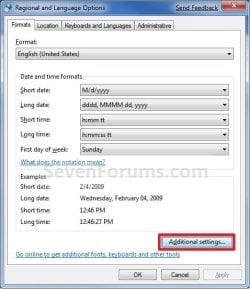
2. Under the Formats tab, select the format regional language that you want to use. (See screenshot below step 3)
3. Click/tap on the Additional Settings button. (See screenshot below)
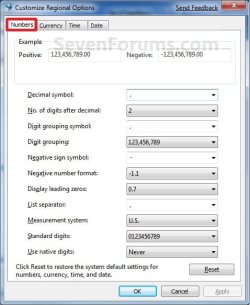
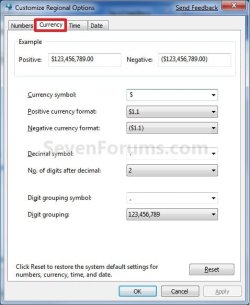
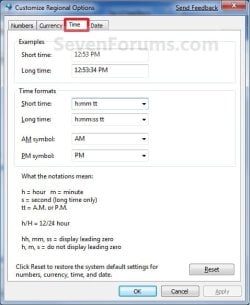
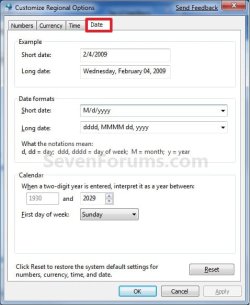
4. Click/tap on either the Numbers, Currency, Time, or Date tab, then click/tap on the Reset button at the bottom. (See screenshots below)
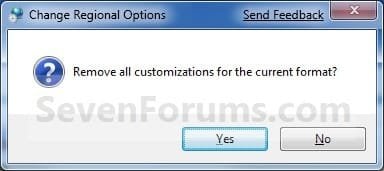
5. Click/tap on Yes to Confirm. (See screenshot below)
6. Click/tap on OK. (See screenshots below step 4)
7. Click/tap on OK. (See screenshot below step 3)
That's it,
Shawn
Related Tutorials
- How to Change Time Zone in Windows 7
- How to Change Date and Time in Windows 7
- How to Change Date and Time in Windows 8 and Windows 8.1
- How to Change Regional Language Format in Windows 7 and Windows 8
- How to Change Date Format in Windows 7
- How to Show Full Day and Month Names in Date on Taskbar System Tray in Windows
- How to Change Time Format in Windows 7
- How to Change Date and Time Format in Windows 8 and 8.1
- How to Change Numbers and Measurements Format in Windows 7 and Windows 8
- How to Change Currency Format in Windows 7 and Windows 8
Last edited:

