Windows Live Messenger - Taskbar or Notification Icon

How to Have Windows Live Messenger with a Windows 7 Taskbar or Tray Icon

   Information
This will show you how to have the Windows Live Messenger open window icon either as a Windows 7 taskbar icon or as a notification area tray icon.

By default, Windows Live Messenger uses a taskbar icon in Windows 7.
   Tip
You can get information on how to download the latest version of Windows Live Messenger here.

EXAMPLE: Windows Live Messenger taskbar icon
4496d1234297288-windows-live-messenger-taskbar-notification-icon-taskbar_icon.jpg

EXAMPLE: Windows Live Messenger notification area tray icon
NOTE: This is after you close (red x) the Windows Live Messenger window to minimize it to the taskbar notification area.
4497d1234297288-windows-live-messenger-taskbar-notification-icon-tray_icon.jpg


Here's How:
1. If open, close and exit Windows Live Messenger.

2. Right click on the Windows Live Messenger shortcut and click on Properties.

NOTE: If you do not have a shortcut, you can also right click on Windows Live Messenger's exe file below.
  • In a 64-bit Windows 7:
    • C:\Program Files (x86)\Windows Live\Messenger\msnmsgr.exe file.
  • In a 32-bit Windows 7:
    • C:\Program Files\Windows Live\Messenger\msnmsgr.exe file.
3. For Windows Live Messenger to Minimize to a System Tray Icon
NOTE: Whenever you open Windows Live Messenger it will have a icon on the taskbar until you close it again. Closing WLM doesn't exit you out of WLM, but just minimizes WLM to the system tray and removes the taskbar icon.

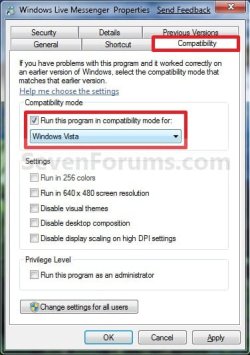
A) Under the Compatibilty tab, check the Run this program in compatibility mode for box and select Windows Vista. (See screenshot below)
Properties_Taskbar_Icon.jpg
B) Go to step 5.
4. For Windows Live Messenger to Use a Taskbar Icon
A) Under the Compatibilty tab, uncheck the Run this program in compatibility mode for box. (See screenshot below)
Properties_Tray_Icon.jpg
5. Click on OK. (See screenshot above or below step 3A)

6. Open Windows Live Messenger to see it's icon location now.
That's it,
Shawn


Attachments

  • Taskbar_Icon.jpg
    Taskbar_Icon.jpg
    16.5 KB · Views: 117,763
  • Tray_Icon.jpg
    Tray_Icon.jpg
    15.8 KB · Views: 118,148
Last edited:
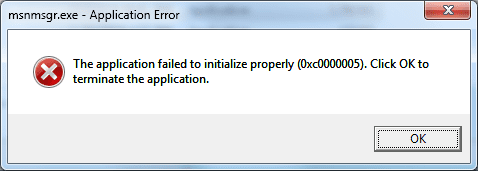
Doesn't work on the following PC:
Intel Core 2 Duo E6750
2GB DDR2 RAM
GeForce 8800 GT

Causes this error (attached)


Works fine on the PC in my specs though... Odd... Same build number of MSN and same OS version...
 

Attachments

  • 1.png
    1.png
    31.7 KB · Views: 3,067

My Computer

Computer Manufacturer/Model Number
Fx X04c
OS
Windows 7 Build 7100 (x64)
CPU
AMD Phenom 9950 Black Edition
Motherboard
ASUS M3A78-EM
Memory
4GB (2x2GB) OCZ Reaper
Graphics Card(s)
Palit Nvidia GeForce 9800GT 512MB
Sound Card
Onboard from M3A78-EM
Monitor(s) Displays
LG L206W
Screen Resolution
1680x1050x32bpp
Hard Drives
2.8TB of storage across 3 HDDs.
PSU
450W RaidMax
Case
Custom black w/ bluelight/blacklight
Cooling
Forced air intake
Keyboard
Logitech G15 MKII
Mouse
Logitech G5 Gaming Laser Mouse
Internet Speed
15mb dn/1mb up
Other Info
Enough spare parts to build another couple Windows-7-capable machines.
Some patches that remove the watermark have been known to break the compatibility mode and the only way you will fix it will be if you can uninstall the patch or do a system restore, one patch in particular that I used was a pluspatch from Orbit30 that caused that issue although I think he has since fixed that problem and there are some other ones that have also worked with no side effects.
 

My Computer

Computer Manufacturer/Model Number
Home Brew
OS
Windows 7 Ultimate Vista Ultimate x64
CPU
Core 2 Duo E8500 3.16Ghz @ 3.8Ghz
Motherboard
eVGA 750i FTW
Memory
2x2Gigs Patriot PC2-6400 LL
Graphics Card(s)
Inno3D GeForce GTX260 216 SP
Monitor(s) Displays
ASUS VW222U 22" 2ms Response time
Screen Resolution
1680x1050
Hard Drives
SATA 150GB
SATA II 250GB
USB IDE 750GB Ext.
PSU
HYTEC 600W & Thermaltake 650W Toughpower Power Exp
Case
Thermaltake Armor LCS (Liquid Cooling System)
Cooling
Liquid Cooling System
Keyboard
Logitech G15 Gaming Keyboard
Mouse
Logitech G9 Gaming Mouse
Apparently if you turn on and use the compatibility mode prior to removing the watermark, it continues to work fine. If you remove the watermark prior to using the compatibility mode, it'll crash out.

Both systems are using the same watermark-removal script with the same OS and MSN build, the only thing that differs is the order in which things were done. Maybe that'll help other people get this working properly.

Also, the 64-bit version of watermark removal doesn't cause the problems...
 

My Computer

Computer Manufacturer/Model Number
Fx X04c
OS
Windows 7 Build 7100 (x64)
CPU
AMD Phenom 9950 Black Edition
Motherboard
ASUS M3A78-EM
Memory
4GB (2x2GB) OCZ Reaper
Graphics Card(s)
Palit Nvidia GeForce 9800GT 512MB
Sound Card
Onboard from M3A78-EM
Monitor(s) Displays
LG L206W
Screen Resolution
1680x1050x32bpp
Hard Drives
2.8TB of storage across 3 HDDs.
PSU
450W RaidMax
Case
Custom black w/ bluelight/blacklight
Cooling
Forced air intake
Keyboard
Logitech G15 MKII
Mouse
Logitech G5 Gaming Laser Mouse
Internet Speed
15mb dn/1mb up
Other Info
Enough spare parts to build another couple Windows-7-capable machines.
It works for me, but I got used to the new way now.:D Just keep your mouse for a few seconds on the icon and the you can see 2 windows, the "main" window and the contacts window. So to close the program you click the X on the "main Window".
 

My Computer

OS
Windows 7 Build 7000
Pardon the necrobump, but since I started using Win7 as my OS with the RC's release, I've noticed the messenger annoyance myself. It kinda defeats the purpose of the taskbar to have dormant programs cluttering it up (that's the tray's purpose!!), and I was looking for just this solution via Google.

I just don't think this is a solution, though; it's merely a dirty hack to prevent Messenger from even knowing it's running on Win7. Isn't there some setting that can be changed? I'd think Microsoft would like to know about this kind of inconvenience!
 

My Computer

Computer Manufacturer/Model Number
Acer Extensa 4420
OS
Windows 7 x64 RC1
CPU
AMD Turion 64 x2 TL-58 1.9GHz/1MB
Memory
2.0GB Kingston HyperX SODIMM
Screen Resolution
1280x800
Hard Drives
160gb Hitachi 5400RPM SATA
Other Info
Designed for Vista, my ass.
Hello FalconFour,

Microsoft does know about it since they designed Windows Live Messenger to run that way on purpose to take advantage of the new taskbar in Windows 7. ;)

The something to be changed is what is in the tutorial. There is no other solution to this that I am aware of though.

Sorry,
Shawn
 
Last edited:

My Computer

Computer type
PC/Desktop
Computer Manufacturer/Model Number
Self built custom
OS
64-bit Windows 11 Pro for Workstations
CPU
Intel i7-8700K OC'd to 5 GHz
Motherboard
ASUS ROG Maximus XI Formula Z390
Memory
64 GB (4x16GB) G.SKILL TridentZ RGB DDR4 3600 MHz
Graphics Card(s)
ASUS ROG-STRIX-GTX1080TI-O11G-GAMING
Sound Card
Integrated
Monitor(s) Displays
2 x Samsung Odyssey G7 27"
Screen Resolution
2560x1440
Hard Drives
1TB Samsung 990 PRO M.2,
4TB Samsung 990 PRO PRO M.2,
TerraMaster F8 SSD Plus NAS
PSU
Seasonic Prime Titanium 850W
Case
Thermaltake Core P3
Cooling
Corsair Hydro H115i
Keyboard
Logitech wireless K800
Mouse
Logitech MX Master 4
Internet Speed
2 Gb/s Download and 100 Mb/s Upload
Antivirus
Malwarebyte Anti-Malware Premium
Browser
Google Chrome
Other Info
Logitech Z625 speaker system,
Logitech BRIO 4K Pro webcam,
HP Color LaserJet Pro MFP M477fdn,
APC SMART-UPS RT 1000 XL - SURT1000XLI,
Galaxy S23 Plus phone
What is needed is an option inside WLM to the effect of "Minimize/close WLM to system notification area" which could then allow the older behavior without the need for a "hack" like compatibility mode.

I'm personally really dissapointed with this new behavior; I think the Live team missed the memo about the Superbar being designed to be more intuitive and less cluttered... The new behavior looks more like a bug than a feature, and many users will see it as an annoyance.

I think the biggest problem is that the Beta and RC phases aren't being tested with the "common" demographic; Is the the 68-year-old grandfather that knows very little about computers going to try the beta? Unlikely. This (common) demographic is one of the ones that have the most trouble understanding computers, yet use applications like WLM most often to keep in touch with friends and family.

The Live team willingly decided to make their application appear to "misbehave", which will be overly confusing to people that don't follow the latest technology. Perhaps they'll hear the outcry of complaints (or more likely, will but won't care) but until then, it'll be up to us, the "power users", to "fix" this oddity for them.
 

My Computer

Computer Manufacturer/Model Number
Fx X04c
OS
Windows 7 Build 7100 (x64)
CPU
AMD Phenom 9950 Black Edition
Motherboard
ASUS M3A78-EM
Memory
4GB (2x2GB) OCZ Reaper
Graphics Card(s)
Palit Nvidia GeForce 9800GT 512MB
Sound Card
Onboard from M3A78-EM
Monitor(s) Displays
LG L206W
Screen Resolution
1680x1050x32bpp
Hard Drives
2.8TB of storage across 3 HDDs.
PSU
450W RaidMax
Case
Custom black w/ bluelight/blacklight
Cooling
Forced air intake
Keyboard
Logitech G15 MKII
Mouse
Logitech G5 Gaming Laser Mouse
Internet Speed
15mb dn/1mb up
Other Info
Enough spare parts to build another couple Windows-7-capable machines.
Just because everyone has gotten accustomed to throwing everything in the system tray doesn't mean that MS messed up on how they're developing their programs.

The changes in Live fit in with the rest of the ideas behind windows 7.

Primarily being : Once place for everything regarding a program.

If you introduce both a system tray and a task bar item for the same item, you're introducing clutter. All programs should behave the same in order to reduce confusion. That's been their ideology through out the development of windows 7.

If you use Live all the time, having it on the taskbar shouldn't be a problem, and if you don't use it all the time, then you really shouldn't have it pinned anyway.
 

My Computer

OS
7264x64/7260x86
I have another solution to this that I am currently using.

If you download the 8.1 version from this page:

http://www.microsoft.com/downloads/...f1-79ea-4066-8ba0-ddbed94864fc&displaylang=en

You can install messenger and it will function properly with the tray icon and no taskbar issues by default.

The latest version of messenger has the taskbar issue because of a change in the taskbar in 7 that vista did not have thus running the latest messenger in vista compatibility corrects it.
 

My Computer

Computer Manufacturer/Model Number
Custom
OS
Win7 64bit Ultimate
CPU
AMD Phenom II X6 1100T Black Edition Thuban 3.3GHz, 3.7GHz
Motherboard
Gigabyte GA-890FXA-UD5
Memory
CORSAIR DOMINATOR GT 8GB (2 x 4GB) 1866 DDR3
Graphics Card(s)
XFX HD-697A-CNDC Radeon HD6970 2GB 256-bit
Sound Card
Creative SoundBlaster X-Fi Platinum Fatal1ty Edition
Monitor(s) Displays
Dual 25 Inch Hanns-G HZ251
Screen Resolution
1920x1080 X 2
PSU
Corsair 850W Single Rail
Case
Thermaltake V9 BlacX w/ Dual HDD Docking Station
Cooling
Air lots and lots of air and copper...
Keyboard
Kensington (Low-Profile)
Mouse
Creative Fatal1ty
Internet Speed
15Gbit (15 Down 5 Up)
Other Info
XIGMATEK HDT-S1284F 120mm HYPRO Bearing CPU Cooler, LG Blu-Ray Burner.
what's wrong with having it run in compatibility mode? that's perfectly fine. if it crashes when you have the watermark remover patch, then blame the watermark remover. the watermark is meant to be there, it doesn't bug me at all.

plus, having it in the superbar makes it easier to manage your contacts. it takes to clicks in the tray and only one in the superbar. where's the annoyance?
 

My Computer

Computer Manufacturer/Model Number
averatec buddy 10.2" n1000
OS
vista 32bit - win 7 RC
CPU
Intel Atom 1.6Ghz
You're welcome Reidicus, and welcome to Seven Forums. :)

Shawn
 

My Computer

Computer type
PC/Desktop
Computer Manufacturer/Model Number
Self built custom
OS
64-bit Windows 11 Pro for Workstations
CPU
Intel i7-8700K OC'd to 5 GHz
Motherboard
ASUS ROG Maximus XI Formula Z390
Memory
64 GB (4x16GB) G.SKILL TridentZ RGB DDR4 3600 MHz
Graphics Card(s)
ASUS ROG-STRIX-GTX1080TI-O11G-GAMING
Sound Card
Integrated
Monitor(s) Displays
2 x Samsung Odyssey G7 27"
Screen Resolution
2560x1440
Hard Drives
1TB Samsung 990 PRO M.2,
4TB Samsung 990 PRO PRO M.2,
TerraMaster F8 SSD Plus NAS
PSU
Seasonic Prime Titanium 850W
Case
Thermaltake Core P3
Cooling
Corsair Hydro H115i
Keyboard
Logitech wireless K800
Mouse
Logitech MX Master 4
Internet Speed
2 Gb/s Download and 100 Mb/s Upload
Antivirus
Malwarebyte Anti-Malware Premium
Browser
Google Chrome
Other Info
Logitech Z625 speaker system,
Logitech BRIO 4K Pro webcam,
HP Color LaserJet Pro MFP M477fdn,
APC SMART-UPS RT 1000 XL - SURT1000XLI,
Galaxy S23 Plus phone
specifically Vista compatibilty Brink, not sp1 or sp2?
 

My Computer

OS
Windows 7 Ultimate 64Bit
CPU
AMD Athlon x4 650 3Ghz
Motherboard
ASUS
Memory
4gb
Graphics Card(s)
ATI Radeon 3000 series Onboard
Hello Matt,

You can use either one of the Vista options. They will all work fine. :)
 

My Computer

Computer type
PC/Desktop
Computer Manufacturer/Model Number
Self built custom
OS
64-bit Windows 11 Pro for Workstations
CPU
Intel i7-8700K OC'd to 5 GHz
Motherboard
ASUS ROG Maximus XI Formula Z390
Memory
64 GB (4x16GB) G.SKILL TridentZ RGB DDR4 3600 MHz
Graphics Card(s)
ASUS ROG-STRIX-GTX1080TI-O11G-GAMING
Sound Card
Integrated
Monitor(s) Displays
2 x Samsung Odyssey G7 27"
Screen Resolution
2560x1440
Hard Drives
1TB Samsung 990 PRO M.2,
4TB Samsung 990 PRO PRO M.2,
TerraMaster F8 SSD Plus NAS
PSU
Seasonic Prime Titanium 850W
Case
Thermaltake Core P3
Cooling
Corsair Hydro H115i
Keyboard
Logitech wireless K800
Mouse
Logitech MX Master 4
Internet Speed
2 Gb/s Download and 100 Mb/s Upload
Antivirus
Malwarebyte Anti-Malware Premium
Browser
Google Chrome
Other Info
Logitech Z625 speaker system,
Logitech BRIO 4K Pro webcam,
HP Color LaserJet Pro MFP M477fdn,
APC SMART-UPS RT 1000 XL - SURT1000XLI,
Galaxy S23 Plus phone
You're welcome iLachva, and welcome to Seven Forums. :)

Shawn
 

My Computer

Computer type
PC/Desktop
Computer Manufacturer/Model Number
Self built custom
OS
64-bit Windows 11 Pro for Workstations
CPU
Intel i7-8700K OC'd to 5 GHz
Motherboard
ASUS ROG Maximus XI Formula Z390
Memory
64 GB (4x16GB) G.SKILL TridentZ RGB DDR4 3600 MHz
Graphics Card(s)
ASUS ROG-STRIX-GTX1080TI-O11G-GAMING
Sound Card
Integrated
Monitor(s) Displays
2 x Samsung Odyssey G7 27"
Screen Resolution
2560x1440
Hard Drives
1TB Samsung 990 PRO M.2,
4TB Samsung 990 PRO PRO M.2,
TerraMaster F8 SSD Plus NAS
PSU
Seasonic Prime Titanium 850W
Case
Thermaltake Core P3
Cooling
Corsair Hydro H115i
Keyboard
Logitech wireless K800
Mouse
Logitech MX Master 4
Internet Speed
2 Gb/s Download and 100 Mb/s Upload
Antivirus
Malwarebyte Anti-Malware Premium
Browser
Google Chrome
Other Info
Logitech Z625 speaker system,
Logitech BRIO 4K Pro webcam,
HP Color LaserJet Pro MFP M477fdn,
APC SMART-UPS RT 1000 XL - SURT1000XLI,
Galaxy S23 Plus phone
Didn't work for me

I tried to move the Live Messenger as described. The instructions say to choose Windows Vista under compatability. I did this and my desktop went haywire. I was lucky I could do a restore and it fixed the appearance. (Everything was distorted, off color and faded). I thought about doing it again so this time I am letting you know that there were 3 different Vista choices under compatability. 1.) Windows Vista, (2.) Windows Vista Service Pack 1 . (3.) Windows Vista Service Pack 2. Should I have tried number 2 or 3 instead?? I am very good at following printed directions. I did EXACTLY as described above. Thanks in advance for your help.

Vince
 

My Computer

Computer Manufacturer/Model Number
Custom Built
OS
Windows 7 Ultimate x64
CPU
Intel E8400
Motherboard
ASUS P5Q SE PLUS
Memory
4GB Kingston HyperX (4x1gb) 1066Mhz Model# KHX8500D2K2/2GN
Graphics Card(s)
Galaxy GTS 450
Sound Card
Stock
Monitor(s) Displays
Dell 1908FP, SONY TV KDS-60A3000 via HDMI Cable
Screen Resolution
1280x1024 (Native), TV (1080p) 1920x1080 (Recommended)
Hard Drives
WD3000HLFS 300GB SATA VelociRaptor,
WD3200AAKS SATA HDD
PSU
Antec TP-650 (650 watts)
Case
Antec 300
Cooling
7-120mm case fans
Keyboard
Logitech Wired Slim Keyboard
Mouse
Gigabyte Wired Advanced Wheel Mouse
Internet Speed
DSL
Other Info
Installed 120mm heatsink over CPU with a 120mm case fan using Artic Silver 5 thermal paste. I downloaded and installed the Win 7 Graphics Driver From The Nvidia web site.
Hello Vince, and welcome to Seven Forums.

You would use the Windows Vista option like in the screenshot under step 4. Did you have WLM closed while doing this?
 

My Computer

Computer type
PC/Desktop
Computer Manufacturer/Model Number
Self built custom
OS
64-bit Windows 11 Pro for Workstations
CPU
Intel i7-8700K OC'd to 5 GHz
Motherboard
ASUS ROG Maximus XI Formula Z390
Memory
64 GB (4x16GB) G.SKILL TridentZ RGB DDR4 3600 MHz
Graphics Card(s)
ASUS ROG-STRIX-GTX1080TI-O11G-GAMING
Sound Card
Integrated
Monitor(s) Displays
2 x Samsung Odyssey G7 27"
Screen Resolution
2560x1440
Hard Drives
1TB Samsung 990 PRO M.2,
4TB Samsung 990 PRO PRO M.2,
TerraMaster F8 SSD Plus NAS
PSU
Seasonic Prime Titanium 850W
Case
Thermaltake Core P3
Cooling
Corsair Hydro H115i
Keyboard
Logitech wireless K800
Mouse
Logitech MX Master 4
Internet Speed
2 Gb/s Download and 100 Mb/s Upload
Antivirus
Malwarebyte Anti-Malware Premium
Browser
Google Chrome
Other Info
Logitech Z625 speaker system,
Logitech BRIO 4K Pro webcam,
HP Color LaserJet Pro MFP M477fdn,
APC SMART-UPS RT 1000 XL - SURT1000XLI,
Galaxy S23 Plus phone
Putting it in Vista compatibility mode also remove the red flasshing signal if somone posts something in a conversation... can be annoying.
 

My Computer

Computer type
PC/Desktop
Computer Manufacturer/Model Number
Custom build
OS
Windows 10 Professional 64-bit
CPU
Ryzen 9 5900X
Motherboard
Gigabyte X570 Aorus Master
Memory
G.Skill 3600Mhz CL16 16GB × 4
Graphics Card(s)
EVGA GeForce RTX 3070 Ti FTW3 Ultra Gaming
Sound Card
On-board
Monitor(s) Displays
Dell Alienware AW3418DW
Screen Resolution
3440x1440
Hard Drives
1×Sabrent Rocket 4 Plus 2TB nvme SSD (System, internal)
2x4TB Western Digital Blue (Internal)
1x4TB HDST 7200RPM (Internal)
PSU
Seasonic Focus Plus 850W Platinum
Case
Corsair 680X
Cooling
Stock fans + 3× Corsair QL120, Corsair H100i Platinum
Keyboard
Logitech K350
Mouse
Logitech M510
Internet Speed
120Mbits dl - 20Mbits up
Antivirus
ESET NOD32 Antivirus
Browser
Firefox (latest version)
Other Info
Headphones : Audio-Technica ATH-M50x
Scanner : Canon Canoscan LiDE 220 + Plustek OptiBook 4800
Back
Top