
Windows Live Messenger - Taskbar or Notification Icon

How to Have Windows Live Messenger with a Windows 7 Taskbar or Tray Icon

   Information
This will show you how to have the Windows Live Messenger open window icon either as a Windows 7 taskbar icon or as a notification area tray icon.

By default, Windows Live Messenger uses a taskbar icon in Windows 7.
   Tip
You can get information on how to download the latest version of Windows Live Messenger here.

EXAMPLE: Windows Live Messenger taskbar icon
4496d1234297288-windows-live-messenger-taskbar-notification-icon-taskbar_icon.jpg

EXAMPLE: Windows Live Messenger notification area tray icon
NOTE: This is after you close (red x) the Windows Live Messenger window to minimize it to the taskbar notification area.
4497d1234297288-windows-live-messenger-taskbar-notification-icon-tray_icon.jpg


Here's How:
1. If open, close and exit Windows Live Messenger.

2. Right click on the Windows Live Messenger shortcut and click on Properties.

NOTE: If you do not have a shortcut, you can also right click on Windows Live Messenger's exe file below.
  • In a 64-bit Windows 7:
    • C:\Program Files (x86)\Windows Live\Messenger\msnmsgr.exe file.
  • In a 32-bit Windows 7:
    • C:\Program Files\Windows Live\Messenger\msnmsgr.exe file.
3. For Windows Live Messenger to Minimize to a System Tray Icon
NOTE: Whenever you open Windows Live Messenger it will have a icon on the taskbar until you close it again. Closing WLM doesn't exit you out of WLM, but just minimizes WLM to the system tray and removes the taskbar icon.

A) Under the Compatibilty tab, check the Run this program in compatibility mode for box and select Windows Vista. (See screenshot below)
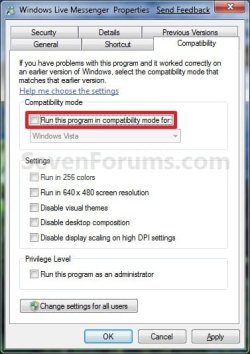
Properties_Taskbar_Icon.jpg
B) Go to step 5.
4. For Windows Live Messenger to Use a Taskbar Icon
A) Under the Compatibilty tab, uncheck the Run this program in compatibility mode for box. (See screenshot below)
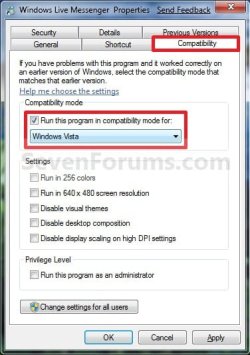
Properties_Tray_Icon.jpg
5. Click on OK. (See screenshot above or below step 3A)

6. Open Windows Live Messenger to see it's icon location now.
That's it,
Shawn


Attachments

  • Taskbar_Icon.jpg
    Taskbar_Icon.jpg
    8 KB · Views: 117,763
  • Tray_Icon.jpg
    Tray_Icon.jpg
    7.7 KB · Views: 118,148
Last edited:

My Computer My Computer

Computer type
PC/Desktop
Computer Manufacturer/Model Number
Self built custom
OS
64-bit Windows 11 Pro for Workstations
CPU
Intel i7-8700K OC'd to 5 GHz
Motherboard
ASUS ROG Maximus XI Formula Z390
Memory
64 GB (4x16GB) G.SKILL TridentZ RGB DDR4 3600 MHz
Graphics Card(s)
ASUS ROG-STRIX-GTX1080TI-O11G-GAMING
Sound Card
Integrated
Monitor(s) Displays
2 x Samsung Odyssey G7 27"
Screen Resolution
2560x1440
Hard Drives
1TB Samsung 990 PRO M.2,
4TB Samsung 990 PRO PRO M.2,
TerraMaster F8 SSD Plus NAS
PSU
Seasonic Prime Titanium 850W
Case
Thermaltake Core P3
Cooling
Corsair Hydro H115i
Keyboard
Logitech wireless K800
Mouse
Logitech MX Master 4
Internet Speed
2 Gb/s Download and 100 Mb/s Upload
Antivirus
Malwarebyte Anti-Malware Premium
Browser
Google Chrome
Other Info
Logitech Z625 speaker system,
Logitech BRIO 4K Pro webcam,
HP Color LaserJet Pro MFP M477fdn,
APC SMART-UPS RT 1000 XL - SURT1000XLI,
Galaxy S23 Plus phone
O yea, forget to ask, when you run it in vista mode, does it still combine the convo windows on the taskbar ? or they become separated ?
 

My Computer My Computer

Computer Manufacturer/Model Number
HP DV9000t
OS
Windows 7 Ultimate
CPU
2.0Ghz
Memory
2GB DDR2
Graphics Card(s)
Nvidia Go 7600
Screen Resolution
1680 x 1050
Mouse
Logitech
Internet Speed
8mb
Awjm,

Yes, a opened conversation window will still combine with the WLM taskbar icon in Vista Compatibility Mode to. :)
 

My Computer My Computer

Computer type
PC/Desktop
Computer Manufacturer/Model Number
Self built custom
OS
64-bit Windows 11 Pro for Workstations
CPU
Intel i7-8700K OC'd to 5 GHz
Motherboard
ASUS ROG Maximus XI Formula Z390
Memory
64 GB (4x16GB) G.SKILL TridentZ RGB DDR4 3600 MHz
Graphics Card(s)
ASUS ROG-STRIX-GTX1080TI-O11G-GAMING
Sound Card
Integrated
Monitor(s) Displays
2 x Samsung Odyssey G7 27"
Screen Resolution
2560x1440
Hard Drives
1TB Samsung 990 PRO M.2,
4TB Samsung 990 PRO PRO M.2,
TerraMaster F8 SSD Plus NAS
PSU
Seasonic Prime Titanium 850W
Case
Thermaltake Core P3
Cooling
Corsair Hydro H115i
Keyboard
Logitech wireless K800
Mouse
Logitech MX Master 4
Internet Speed
2 Gb/s Download and 100 Mb/s Upload
Antivirus
Malwarebyte Anti-Malware Premium
Browser
Google Chrome
Other Info
Logitech Z625 speaker system,
Logitech BRIO 4K Pro webcam,
HP Color LaserJet Pro MFP M477fdn,
APC SMART-UPS RT 1000 XL - SURT1000XLI,
Galaxy S23 Plus phone
Thanks a lot, it's working fine for me!!!
 

My Computer My Computer

Computer Manufacturer/Model Number
Custom PC
OS
Windows 7 Ultimate 64 Bit
CPU
Intel Core2 Duo E7200
Motherboard
Asus P5QL Pro
Memory
G.SKILL 2x2GB
Graphics Card(s)
ATI Radeon 4890
Sound Card
OnBoard Realtek
Monitor(s) Displays
CRT 21"
Screen Resolution
1280x1024
Hard Drives
1x 150GB Raptor
1x 500GB Seagate
2x 750GB Seagate
PSU
Corsair 620W
Case
Antec Sonata
Cooling
Arctic Cooling Freezer 7
Keyboard
Microsoft SideWinder X6
Mouse
Logitech MX518
Internet Speed
Cable 7.5M
Hello everyone.

I've been using Windows 7 for quite a while, and from the beginning i've been facing a rather frustrating issue. I've been running WLM on compatibility mode as i wanted to get rid of the icons on the taskbar and have them on the notification area instead. Problem is that if someone sends me a link in the form that includes the http:// thing (like "http://www.google.com") i won't be able to click it. If they send me the link as "www.google.com" it's clickable. I've tried reinstalling the messenger, but nothing. Plus the issue seems not to go away after formating and having a fresh installation of Windows. I've tried running it in compatibility mode choosing all available options of operating systems, and service packs, and still nothing. I also tried running it as an administrator but no luck. So my conclusion is that the compatibility mode is bugged for some reason.

I'd really appreciate your help on this. I'm so tired of copy-pasting links all the time. :(
 

My Computer My Computer

OS
Windows 7 Professional x64
CPU
Intel Q9550
Motherboard
Asus Rampage Formula
Memory
Corsair DDR2 4GB Dominator
Graphics Card(s)
XFX 8800GTS 512MB
Sound Card
Asus Xonar D2X
Monitor(s) Displays
Dell 2407WFP
Hard Drives
WD 300GB Velociraptor
WD 2x1TB Caviar Black
PSU
Silverstone Olypmia 650w
Case
Coolermaster Stacker 831
Cooling
Thermalright Ultra 120-Extreme
Hello Pappous Soulis, and welcome to Seven Forums.

Is the http:// type of link clickable for you when not using compatibilty mode with WLM, and having it on the taskbar instead?

If it is, then I don't know of any alternative. :(
 

My Computer My Computer

Computer type
PC/Desktop
Computer Manufacturer/Model Number
Self built custom
OS
64-bit Windows 11 Pro for Workstations
CPU
Intel i7-8700K OC'd to 5 GHz
Motherboard
ASUS ROG Maximus XI Formula Z390
Memory
64 GB (4x16GB) G.SKILL TridentZ RGB DDR4 3600 MHz
Graphics Card(s)
ASUS ROG-STRIX-GTX1080TI-O11G-GAMING
Sound Card
Integrated
Monitor(s) Displays
2 x Samsung Odyssey G7 27"
Screen Resolution
2560x1440
Hard Drives
1TB Samsung 990 PRO M.2,
4TB Samsung 990 PRO PRO M.2,
TerraMaster F8 SSD Plus NAS
PSU
Seasonic Prime Titanium 850W
Case
Thermaltake Core P3
Cooling
Corsair Hydro H115i
Keyboard
Logitech wireless K800
Mouse
Logitech MX Master 4
Internet Speed
2 Gb/s Download and 100 Mb/s Upload
Antivirus
Malwarebyte Anti-Malware Premium
Browser
Google Chrome
Other Info
Logitech Z625 speaker system,
Logitech BRIO 4K Pro webcam,
HP Color LaserJet Pro MFP M477fdn,
APC SMART-UPS RT 1000 XL - SURT1000XLI,
Galaxy S23 Plus phone
Thanks for the quick reply Brink.

Yes, when not in compatibility mode the http:// kind of links are clickable. :confused:
On my laptop which is running on Win 7 Pro 32bit, compatibility mode works just fine.
Could this issue, somehow, be connected to the hardware?

By the way, i'm using Eset Smart Security v.4.0.467 if that's of any use.
 

My Computer My Computer

OS
Windows 7 Professional x64
CPU
Intel Q9550
Motherboard
Asus Rampage Formula
Memory
Corsair DDR2 4GB Dominator
Graphics Card(s)
XFX 8800GTS 512MB
Sound Card
Asus Xonar D2X
Monitor(s) Displays
Dell 2407WFP
Hard Drives
WD 300GB Velociraptor
WD 2x1TB Caviar Black
PSU
Silverstone Olypmia 650w
Case
Coolermaster Stacker 831
Cooling
Thermalright Ultra 120-Extreme
You might see if temporarily disabling/uninstalling Eset may help see if it is the cause of it not working on this one vs the other.
 

My Computer My Computer

Computer type
PC/Desktop
Computer Manufacturer/Model Number
Self built custom
OS
64-bit Windows 11 Pro for Workstations
CPU
Intel i7-8700K OC'd to 5 GHz
Motherboard
ASUS ROG Maximus XI Formula Z390
Memory
64 GB (4x16GB) G.SKILL TridentZ RGB DDR4 3600 MHz
Graphics Card(s)
ASUS ROG-STRIX-GTX1080TI-O11G-GAMING
Sound Card
Integrated
Monitor(s) Displays
2 x Samsung Odyssey G7 27"
Screen Resolution
2560x1440
Hard Drives
1TB Samsung 990 PRO M.2,
4TB Samsung 990 PRO PRO M.2,
TerraMaster F8 SSD Plus NAS
PSU
Seasonic Prime Titanium 850W
Case
Thermaltake Core P3
Cooling
Corsair Hydro H115i
Keyboard
Logitech wireless K800
Mouse
Logitech MX Master 4
Internet Speed
2 Gb/s Download and 100 Mb/s Upload
Antivirus
Malwarebyte Anti-Malware Premium
Browser
Google Chrome
Other Info
Logitech Z625 speaker system,
Logitech BRIO 4K Pro webcam,
HP Color LaserJet Pro MFP M477fdn,
APC SMART-UPS RT 1000 XL - SURT1000XLI,
Galaxy S23 Plus phone
I have the same unclickable http link issue pappous soulis described. This issue came up after I switched from Win7 Ultimate x64 to Win7 Enterprise x64. So it did work on Ultimate, which is pretty weird...

I'm not running any antivirus nor antimalware. I run Win7's own firewall.

I might have found the solution: I made IE the default web browser. Now http links were clickable. But I don't use IE so I switched the default back to Opera. Http links still work.

So it seems to have something to do with the default browser setting, at least in my case.

If you currently use IE as the default and http links dont work, you could try installing another browser, making it the default, then making IE default again... maybe it would work.
 
Last edited by a moderator:

My Computer My Computer

OS
Windows 7 Enterprise 64-bit
CPU
Intel Q6600 rev g0
Motherboard
Abit IP35-E
Memory
8GB ADATA Vitesta Extreme 800MHz DDR2
Graphics Card(s)
Club3D Radeon HD4870 512MB
Sound Card
Soundblaster X-fi Xtremegamer
Monitor(s) Displays
Samsung Syncmaster 245B
Screen Resolution
1920x1200
Hard Drives
Intel x25-v 40GB SSD
WD Caviar Black 640GB
PSU
Antec NeoPower 430W
Case
Antec Three Hundred
Keyboard
Prodige UltraX flat
Mouse
Logitech G1
Internet Speed
8/1 Mbps
Interesting find v3id. I tried what you suggested but problem is still present.
Maybe it has something to do with IE's settings. I'll look further into it.
 

My Computer My Computer

OS
Windows 7 Professional x64
CPU
Intel Q9550
Motherboard
Asus Rampage Formula
Memory
Corsair DDR2 4GB Dominator
Graphics Card(s)
XFX 8800GTS 512MB
Sound Card
Asus Xonar D2X
Monitor(s) Displays
Dell 2407WFP
Hard Drives
WD 300GB Velociraptor
WD 2x1TB Caviar Black
PSU
Silverstone Olypmia 650w
Case
Coolermaster Stacker 831
Cooling
Thermalright Ultra 120-Extreme
THANK YOU it got so annoying having it take up space on the program bar
 

My Computer My Computer

Computer type
PC/Desktop
OS
Windows 7 Ultimate X86(32 Bit)
You're most welcome Sam, and welcome to Seven Forums. :)
 

My Computer My Computer

Computer type
PC/Desktop
Computer Manufacturer/Model Number
Self built custom
OS
64-bit Windows 11 Pro for Workstations
CPU
Intel i7-8700K OC'd to 5 GHz
Motherboard
ASUS ROG Maximus XI Formula Z390
Memory
64 GB (4x16GB) G.SKILL TridentZ RGB DDR4 3600 MHz
Graphics Card(s)
ASUS ROG-STRIX-GTX1080TI-O11G-GAMING
Sound Card
Integrated
Monitor(s) Displays
2 x Samsung Odyssey G7 27"
Screen Resolution
2560x1440
Hard Drives
1TB Samsung 990 PRO M.2,
4TB Samsung 990 PRO PRO M.2,
TerraMaster F8 SSD Plus NAS
PSU
Seasonic Prime Titanium 850W
Case
Thermaltake Core P3
Cooling
Corsair Hydro H115i
Keyboard
Logitech wireless K800
Mouse
Logitech MX Master 4
Internet Speed
2 Gb/s Download and 100 Mb/s Upload
Antivirus
Malwarebyte Anti-Malware Premium
Browser
Google Chrome
Other Info
Logitech Z625 speaker system,
Logitech BRIO 4K Pro webcam,
HP Color LaserJet Pro MFP M477fdn,
APC SMART-UPS RT 1000 XL - SURT1000XLI,
Galaxy S23 Plus phone
New functions disappears

Hi Brink!
Thanks for this tutorial. It was really annoying to have to icons. But instead, I lost something else:
I believe that when I changed the compatibility mode to Vista SP2, the arrows that you can switch between conversations disappeared. This is perhaps a function that comes with Messenger Plus! Live which I am using. Can you see if you have got the same problem? Thanks again.
 

My Computer My Computer

Computer Manufacturer/Model Number
HP Pavilion Elite HPE-140sc
OS
Windows 7 Home Premium 64-bit
CPU
Intel i7 860
Memory
8 GB 1333Mhz
Graphics Card(s)
Nvidia GeForce GTX260
Screen Resolution
1440*900
Internet Speed
100 Mbit
Exactly what I needed; thanks Brink!!!! :D
 

My Computer My Computer

Computer Manufacturer/Model Number
Acer || Meeeee
OS
XP Pro SP3 || Windows 7
CPU
Pentium-D || intel Core i5 3.2GHz ( 2 cores w/HT == 4 cpus )
Motherboard
Acer || ASUS
Memory
4GB DDR2-800MHz || 4GB DDR3-1600
Graphics Card(s)
onboard nVidia Geforce something or other
Sound Card
onboard
Monitor(s) Displays
1 21" crt
Screen Resolution
1152 x 864
Hard Drives
500GB sata2 Seagate 7200.12 || 1TB sata2 Seagate 7200.12
PSU
dont know || Ultra
Case
Acer || My old one
Cooling
fans || nicer fans
Keyboard
Acer || Microsoft <-- I LOVE this KB ^^
Mouse
Acer || Microsoft <-- I LOVE this mouse ^^
Internet Speed
Comcast || Comcast
Other Info
Companion PC || Main PC

I use these computers primarily for video game development; when I get my first release ready I'll let you know :-)

O/S Exp:
DOS, Windows 3.11 for workgroups, 95OSR2, 98SE (fav), XP Pro SP3 (fav), Windows 7 Home Premium (fav, ohh wow!!)

I have a copy of vista that came with my Acer but felt more comfortable with XP so I rebuilt it with XP Pro SP3

I don't know p
You're most welcome Oli and UCM, and welcome to Seven Forums Oli. :)
 

My Computer My Computer

Computer type
PC/Desktop
Computer Manufacturer/Model Number
Self built custom
OS
64-bit Windows 11 Pro for Workstations
CPU
Intel i7-8700K OC'd to 5 GHz
Motherboard
ASUS ROG Maximus XI Formula Z390
Memory
64 GB (4x16GB) G.SKILL TridentZ RGB DDR4 3600 MHz
Graphics Card(s)
ASUS ROG-STRIX-GTX1080TI-O11G-GAMING
Sound Card
Integrated
Monitor(s) Displays
2 x Samsung Odyssey G7 27"
Screen Resolution
2560x1440
Hard Drives
1TB Samsung 990 PRO M.2,
4TB Samsung 990 PRO PRO M.2,
TerraMaster F8 SSD Plus NAS
PSU
Seasonic Prime Titanium 850W
Case
Thermaltake Core P3
Cooling
Corsair Hydro H115i
Keyboard
Logitech wireless K800
Mouse
Logitech MX Master 4
Internet Speed
2 Gb/s Download and 100 Mb/s Upload
Antivirus
Malwarebyte Anti-Malware Premium
Browser
Google Chrome
Other Info
Logitech Z625 speaker system,
Logitech BRIO 4K Pro webcam,
HP Color LaserJet Pro MFP M477fdn,
APC SMART-UPS RT 1000 XL - SURT1000XLI,
Galaxy S23 Plus phone
Thanks Brink...but do you have an idea to the problems I mentioned :)?
 

My Computer My Computer

Computer Manufacturer/Model Number
HP Pavilion Elite HPE-140sc
OS
Windows 7 Home Premium 64-bit
CPU
Intel i7 860
Memory
8 GB 1333Mhz
Graphics Card(s)
Nvidia GeForce GTX260
Screen Resolution
1440*900
Internet Speed
100 Mbit
I think it may be part of the new Windows Live Messenger, but I have been unable to test this yet. :(
 

My Computer My Computer

Computer type
PC/Desktop
Computer Manufacturer/Model Number
Self built custom
OS
64-bit Windows 11 Pro for Workstations
CPU
Intel i7-8700K OC'd to 5 GHz
Motherboard
ASUS ROG Maximus XI Formula Z390
Memory
64 GB (4x16GB) G.SKILL TridentZ RGB DDR4 3600 MHz
Graphics Card(s)
ASUS ROG-STRIX-GTX1080TI-O11G-GAMING
Sound Card
Integrated
Monitor(s) Displays
2 x Samsung Odyssey G7 27"
Screen Resolution
2560x1440
Hard Drives
1TB Samsung 990 PRO M.2,
4TB Samsung 990 PRO PRO M.2,
TerraMaster F8 SSD Plus NAS
PSU
Seasonic Prime Titanium 850W
Case
Thermaltake Core P3
Cooling
Corsair Hydro H115i
Keyboard
Logitech wireless K800
Mouse
Logitech MX Master 4
Internet Speed
2 Gb/s Download and 100 Mb/s Upload
Antivirus
Malwarebyte Anti-Malware Premium
Browser
Google Chrome
Other Info
Logitech Z625 speaker system,
Logitech BRIO 4K Pro webcam,
HP Color LaserJet Pro MFP M477fdn,
APC SMART-UPS RT 1000 XL - SURT1000XLI,
Galaxy S23 Plus phone
I'm thankful for this solution.

Perhaps the windows team did not anticipate many people changing their taskbar icons back to the XP style (with words attached). Regardless, it seems that many who have not even done so, prefer the system tray icon. It would be prudent for Microsoft to address easily patched problems like this, since an agitated customer is the worst kind of advertisement.

Bless you!
 

My Computer My Computer

OS
Windows 7 Home Premium 64bit
You're most welcome Dimorphic. :)
 

My Computer My Computer

Computer type
PC/Desktop
Computer Manufacturer/Model Number
Self built custom
OS
64-bit Windows 11 Pro for Workstations
CPU
Intel i7-8700K OC'd to 5 GHz
Motherboard
ASUS ROG Maximus XI Formula Z390
Memory
64 GB (4x16GB) G.SKILL TridentZ RGB DDR4 3600 MHz
Graphics Card(s)
ASUS ROG-STRIX-GTX1080TI-O11G-GAMING
Sound Card
Integrated
Monitor(s) Displays
2 x Samsung Odyssey G7 27"
Screen Resolution
2560x1440
Hard Drives
1TB Samsung 990 PRO M.2,
4TB Samsung 990 PRO PRO M.2,
TerraMaster F8 SSD Plus NAS
PSU
Seasonic Prime Titanium 850W
Case
Thermaltake Core P3
Cooling
Corsair Hydro H115i
Keyboard
Logitech wireless K800
Mouse
Logitech MX Master 4
Internet Speed
2 Gb/s Download and 100 Mb/s Upload
Antivirus
Malwarebyte Anti-Malware Premium
Browser
Google Chrome
Other Info
Logitech Z625 speaker system,
Logitech BRIO 4K Pro webcam,
HP Color LaserJet Pro MFP M477fdn,
APC SMART-UPS RT 1000 XL - SURT1000XLI,
Galaxy S23 Plus phone
Thanks.

Good olde sevenforums. :cool:

My first post!? Been lurking yah know. :D
 

My Computer My Computer

Computer Manufacturer/Model Number
Mostly in-house builds
OS
Win7Pro & XPpro
Back
Top