Windows Live Messenger - Taskbar or Notification Icon

How to Have Windows Live Messenger with a Windows 7 Taskbar or Tray Icon

   Information
This will show you how to have the Windows Live Messenger open window icon either as a Windows 7 taskbar icon or as a notification area tray icon.

By default, Windows Live Messenger uses a taskbar icon in Windows 7.
   Tip
You can get information on how to download the latest version of Windows Live Messenger here.

EXAMPLE: Windows Live Messenger taskbar icon
4496d1234297288-windows-live-messenger-taskbar-notification-icon-taskbar_icon.jpg

EXAMPLE: Windows Live Messenger notification area tray icon
NOTE: This is after you close (red x) the Windows Live Messenger window to minimize it to the taskbar notification area.
4497d1234297288-windows-live-messenger-taskbar-notification-icon-tray_icon.jpg


Here's How:
1. If open, close and exit Windows Live Messenger.

2. Right click on the Windows Live Messenger shortcut and click on Properties.

NOTE: If you do not have a shortcut, you can also right click on Windows Live Messenger's exe file below.
  • In a 64-bit Windows 7:
    • C:\Program Files (x86)\Windows Live\Messenger\msnmsgr.exe file.
  • In a 32-bit Windows 7:
    • C:\Program Files\Windows Live\Messenger\msnmsgr.exe file.
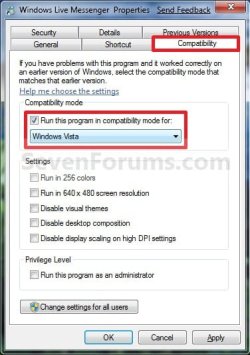
3. For Windows Live Messenger to Minimize to a System Tray Icon
NOTE: Whenever you open Windows Live Messenger it will have a icon on the taskbar until you close it again. Closing WLM doesn't exit you out of WLM, but just minimizes WLM to the system tray and removes the taskbar icon.

A) Under the Compatibilty tab, check the Run this program in compatibility mode for box and select Windows Vista. (See screenshot below)
Properties_Taskbar_Icon.jpg
B) Go to step 5.
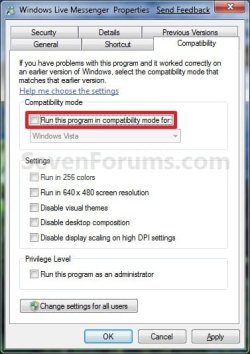
4. For Windows Live Messenger to Use a Taskbar Icon
A) Under the Compatibilty tab, uncheck the Run this program in compatibility mode for box. (See screenshot below)
Properties_Tray_Icon.jpg
5. Click on OK. (See screenshot above or below step 3A)

6. Open Windows Live Messenger to see it's icon location now.
That's it,
Shawn


Attachments

  • Taskbar_Icon.jpg
    Taskbar_Icon.jpg
    8 KB · Views: 117,763
  • Tray_Icon.jpg
    Tray_Icon.jpg
    7.7 KB · Views: 118,148
Last edited:
Thanks for the info but when I went to the link you posted for Live Messenger 8.1 I tried to download the program but all I got was "UNABLE TO FIND PAGE"

Vince

Thinking back, I am almost sure it was closed. But maybe not. If I do it again should I choose Vista, Vista Service Pack 1 or Vista Service Pack 2 under compatability mode?? Or does it matter?? I will make a note of making sure it is "off"
 

My Computer My Computer

Computer Manufacturer/Model Number
Custom Built
OS
Windows 7 Ultimate x64
CPU
Intel E8400
Motherboard
ASUS P5Q SE PLUS
Memory
4GB Kingston HyperX (4x1gb) 1066Mhz Model# KHX8500D2K2/2GN
Graphics Card(s)
Galaxy GTS 450
Sound Card
Stock
Monitor(s) Displays
Dell 1908FP, SONY TV KDS-60A3000 via HDMI Cable
Screen Resolution
1280x1024 (Native), TV (1080p) 1920x1080 (Recommended)
Hard Drives
WD3000HLFS 300GB SATA VelociRaptor,
WD3200AAKS SATA HDD
PSU
Antec TP-650 (650 watts)
Case
Antec 300
Cooling
7-120mm case fans
Keyboard
Logitech Wired Slim Keyboard
Mouse
Gigabyte Wired Advanced Wheel Mouse
Internet Speed
DSL
Other Info
Installed 120mm heatsink over CPU with a 120mm case fan using Artic Silver 5 thermal paste. I downloaded and installed the Win 7 Graphics Driver From The Nvidia web site.
Hello Timewarpone, and welcome to Seven Forums.

The link for Windows Live Messenger is here: Messenger - Windows Live

You would select Windows Vista (step 3) in Compatibility Mode. :)

Hope this helps,
Shawn
 

My Computer My Computer

Computer type
PC/Desktop
Computer Manufacturer/Model Number
Self built custom
OS
64-bit Windows 11 Pro for Workstations
CPU
Intel i7-8700K OC'd to 5 GHz
Motherboard
ASUS ROG Maximus XI Formula Z390
Memory
64 GB (4x16GB) G.SKILL TridentZ RGB DDR4 3600 MHz
Graphics Card(s)
ASUS ROG-STRIX-GTX1080TI-O11G-GAMING
Sound Card
Integrated
Monitor(s) Displays
2 x Samsung Odyssey G7 27"
Screen Resolution
2560x1440
Hard Drives
1TB Samsung 990 PRO M.2,
4TB Samsung 990 PRO PRO M.2,
TerraMaster F8 SSD Plus NAS
PSU
Seasonic Prime Titanium 850W
Case
Thermaltake Core P3
Cooling
Corsair Hydro H115i
Keyboard
Logitech wireless K800
Mouse
Logitech MX Master 4
Internet Speed
2 Gb/s Download and 100 Mb/s Upload
Antivirus
Malwarebyte Anti-Malware Premium
Browser
Google Chrome
Other Info
Logitech Z625 speaker system,
Logitech BRIO 4K Pro webcam,
HP Color LaserJet Pro MFP M477fdn,
APC SMART-UPS RT 1000 XL - SURT1000XLI,
Galaxy S23 Plus phone
I went to the Live Messenger Site and tried downloading it but the version I already have on my computer is the latest version. I will try compatability mode Vista Service pack 3 and I will make sure messenger is off and I set a restore point to be sure.

Thanks,
Vince
 

My Computer My Computer

Computer Manufacturer/Model Number
Custom Built
OS
Windows 7 Ultimate x64
CPU
Intel E8400
Motherboard
ASUS P5Q SE PLUS
Memory
4GB Kingston HyperX (4x1gb) 1066Mhz Model# KHX8500D2K2/2GN
Graphics Card(s)
Galaxy GTS 450
Sound Card
Stock
Monitor(s) Displays
Dell 1908FP, SONY TV KDS-60A3000 via HDMI Cable
Screen Resolution
1280x1024 (Native), TV (1080p) 1920x1080 (Recommended)
Hard Drives
WD3000HLFS 300GB SATA VelociRaptor,
WD3200AAKS SATA HDD
PSU
Antec TP-650 (650 watts)
Case
Antec 300
Cooling
7-120mm case fans
Keyboard
Logitech Wired Slim Keyboard
Mouse
Gigabyte Wired Advanced Wheel Mouse
Internet Speed
DSL
Other Info
Installed 120mm heatsink over CPU with a 120mm case fan using Artic Silver 5 thermal paste. I downloaded and installed the Win 7 Graphics Driver From The Nvidia web site.
First off, I misread the post about downloading messenger 8.1 I didn't realize that 8.1 was an older version of messenger. Second, I closed messenger live before using the compatibility mode (Vista Service Pack 3) and it worked fine this time. I like this a lot better than before.

Thanks,
Vince
 

My Computer My Computer

Computer Manufacturer/Model Number
Custom Built
OS
Windows 7 Ultimate x64
CPU
Intel E8400
Motherboard
ASUS P5Q SE PLUS
Memory
4GB Kingston HyperX (4x1gb) 1066Mhz Model# KHX8500D2K2/2GN
Graphics Card(s)
Galaxy GTS 450
Sound Card
Stock
Monitor(s) Displays
Dell 1908FP, SONY TV KDS-60A3000 via HDMI Cable
Screen Resolution
1280x1024 (Native), TV (1080p) 1920x1080 (Recommended)
Hard Drives
WD3000HLFS 300GB SATA VelociRaptor,
WD3200AAKS SATA HDD
PSU
Antec TP-650 (650 watts)
Case
Antec 300
Cooling
7-120mm case fans
Keyboard
Logitech Wired Slim Keyboard
Mouse
Gigabyte Wired Advanced Wheel Mouse
Internet Speed
DSL
Other Info
Installed 120mm heatsink over CPU with a 120mm case fan using Artic Silver 5 thermal paste. I downloaded and installed the Win 7 Graphics Driver From The Nvidia web site.
You're welcome Vince. I'm happy to hear that you got the new one installed and like it. :)
 

My Computer My Computer

Computer type
PC/Desktop
Computer Manufacturer/Model Number
Self built custom
OS
64-bit Windows 11 Pro for Workstations
CPU
Intel i7-8700K OC'd to 5 GHz
Motherboard
ASUS ROG Maximus XI Formula Z390
Memory
64 GB (4x16GB) G.SKILL TridentZ RGB DDR4 3600 MHz
Graphics Card(s)
ASUS ROG-STRIX-GTX1080TI-O11G-GAMING
Sound Card
Integrated
Monitor(s) Displays
2 x Samsung Odyssey G7 27"
Screen Resolution
2560x1440
Hard Drives
1TB Samsung 990 PRO M.2,
4TB Samsung 990 PRO PRO M.2,
TerraMaster F8 SSD Plus NAS
PSU
Seasonic Prime Titanium 850W
Case
Thermaltake Core P3
Cooling
Corsair Hydro H115i
Keyboard
Logitech wireless K800
Mouse
Logitech MX Master 4
Internet Speed
2 Gb/s Download and 100 Mb/s Upload
Antivirus
Malwarebyte Anti-Malware Premium
Browser
Google Chrome
Other Info
Logitech Z625 speaker system,
Logitech BRIO 4K Pro webcam,
HP Color LaserJet Pro MFP M477fdn,
APC SMART-UPS RT 1000 XL - SURT1000XLI,
Galaxy S23 Plus phone
Thank you very much.
The solution work for me.
 

My Computer My Computer

Computer Manufacturer/Model Number
Intel(R) Core(TM)2 Duo
OS
Windows 7 Ultimate
CPU
E6750 @ 2.66 GHz
Motherboard
Intel(R) DG33TL Media Series
Memory
4.00 GB
Graphics Card(s)
NVIDIA GeForce 8600 GT 1024 MB
Sound Card
SoundBLASTER X-FI Titanium
Monitor(s) Displays
Philips 190WV (19inch LCD WIDE MONITOR 190WV7)
Hard Drives
SAMSUNG HD 753LJ 500 GB
SAMSUNG HD 502LJ 750 GB
SAMSUNG HD 753LJ 750 GB
You're most welcome Pokka. :)
 

My Computer My Computer

Computer type
PC/Desktop
Computer Manufacturer/Model Number
Self built custom
OS
64-bit Windows 11 Pro for Workstations
CPU
Intel i7-8700K OC'd to 5 GHz
Motherboard
ASUS ROG Maximus XI Formula Z390
Memory
64 GB (4x16GB) G.SKILL TridentZ RGB DDR4 3600 MHz
Graphics Card(s)
ASUS ROG-STRIX-GTX1080TI-O11G-GAMING
Sound Card
Integrated
Monitor(s) Displays
2 x Samsung Odyssey G7 27"
Screen Resolution
2560x1440
Hard Drives
1TB Samsung 990 PRO M.2,
4TB Samsung 990 PRO PRO M.2,
TerraMaster F8 SSD Plus NAS
PSU
Seasonic Prime Titanium 850W
Case
Thermaltake Core P3
Cooling
Corsair Hydro H115i
Keyboard
Logitech wireless K800
Mouse
Logitech MX Master 4
Internet Speed
2 Gb/s Download and 100 Mb/s Upload
Antivirus
Malwarebyte Anti-Malware Premium
Browser
Google Chrome
Other Info
Logitech Z625 speaker system,
Logitech BRIO 4K Pro webcam,
HP Color LaserJet Pro MFP M477fdn,
APC SMART-UPS RT 1000 XL - SURT1000XLI,
Galaxy S23 Plus phone
There seems to be something going on with live messenger. After I ran it in Vista Compatability mode it showed up it the taskbar next to the clock after I booted up my computer, like I wanted. This was several weeks ago. About 10 days to 2 weeks ago it stopped showing up in the taskbar. I now have to go to all programs and click on the live messenger icon then it appears. I ran MSCONFIG and clicked on startup and live messenger was checked. Why doesn't live messenger appear in the taskbar after I boot up my computer??
 

My Computer My Computer

Computer Manufacturer/Model Number
Custom Built
OS
Windows 7 Ultimate x64
CPU
Intel E8400
Motherboard
ASUS P5Q SE PLUS
Memory
4GB Kingston HyperX (4x1gb) 1066Mhz Model# KHX8500D2K2/2GN
Graphics Card(s)
Galaxy GTS 450
Sound Card
Stock
Monitor(s) Displays
Dell 1908FP, SONY TV KDS-60A3000 via HDMI Cable
Screen Resolution
1280x1024 (Native), TV (1080p) 1920x1080 (Recommended)
Hard Drives
WD3000HLFS 300GB SATA VelociRaptor,
WD3200AAKS SATA HDD
PSU
Antec TP-650 (650 watts)
Case
Antec 300
Cooling
7-120mm case fans
Keyboard
Logitech Wired Slim Keyboard
Mouse
Gigabyte Wired Advanced Wheel Mouse
Internet Speed
DSL
Other Info
Installed 120mm heatsink over CPU with a 120mm case fan using Artic Silver 5 thermal paste. I downloaded and installed the Win 7 Graphics Driver From The Nvidia web site.
Hello Timewarpone,

I'm not sure why. You might see if uninstalling and reinstalling WLM may help.
 

My Computer My Computer

Computer type
PC/Desktop
Computer Manufacturer/Model Number
Self built custom
OS
64-bit Windows 11 Pro for Workstations
CPU
Intel i7-8700K OC'd to 5 GHz
Motherboard
ASUS ROG Maximus XI Formula Z390
Memory
64 GB (4x16GB) G.SKILL TridentZ RGB DDR4 3600 MHz
Graphics Card(s)
ASUS ROG-STRIX-GTX1080TI-O11G-GAMING
Sound Card
Integrated
Monitor(s) Displays
2 x Samsung Odyssey G7 27"
Screen Resolution
2560x1440
Hard Drives
1TB Samsung 990 PRO M.2,
4TB Samsung 990 PRO PRO M.2,
TerraMaster F8 SSD Plus NAS
PSU
Seasonic Prime Titanium 850W
Case
Thermaltake Core P3
Cooling
Corsair Hydro H115i
Keyboard
Logitech wireless K800
Mouse
Logitech MX Master 4
Internet Speed
2 Gb/s Download and 100 Mb/s Upload
Antivirus
Malwarebyte Anti-Malware Premium
Browser
Google Chrome
Other Info
Logitech Z625 speaker system,
Logitech BRIO 4K Pro webcam,
HP Color LaserJet Pro MFP M477fdn,
APC SMART-UPS RT 1000 XL - SURT1000XLI,
Galaxy S23 Plus phone
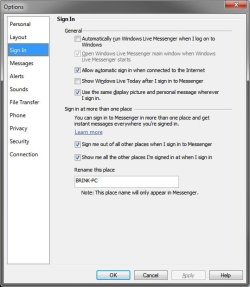
I will try that. How about anything in the options, sign-in section I should consider??
 

My Computer My Computer

Computer Manufacturer/Model Number
Custom Built
OS
Windows 7 Ultimate x64
CPU
Intel E8400
Motherboard
ASUS P5Q SE PLUS
Memory
4GB Kingston HyperX (4x1gb) 1066Mhz Model# KHX8500D2K2/2GN
Graphics Card(s)
Galaxy GTS 450
Sound Card
Stock
Monitor(s) Displays
Dell 1908FP, SONY TV KDS-60A3000 via HDMI Cable
Screen Resolution
1280x1024 (Native), TV (1080p) 1920x1080 (Recommended)
Hard Drives
WD3000HLFS 300GB SATA VelociRaptor,
WD3200AAKS SATA HDD
PSU
Antec TP-650 (650 watts)
Case
Antec 300
Cooling
7-120mm case fans
Keyboard
Logitech Wired Slim Keyboard
Mouse
Gigabyte Wired Advanced Wheel Mouse
Internet Speed
DSL
Other Info
Installed 120mm heatsink over CPU with a 120mm case fan using Artic Silver 5 thermal paste. I downloaded and installed the Win 7 Graphics Driver From The Nvidia web site.
I would't think so, but here's a screenshot of what I use if it can help.

Sign-In.jpg
 

My Computer My Computer

Computer type
PC/Desktop
Computer Manufacturer/Model Number
Self built custom
OS
64-bit Windows 11 Pro for Workstations
CPU
Intel i7-8700K OC'd to 5 GHz
Motherboard
ASUS ROG Maximus XI Formula Z390
Memory
64 GB (4x16GB) G.SKILL TridentZ RGB DDR4 3600 MHz
Graphics Card(s)
ASUS ROG-STRIX-GTX1080TI-O11G-GAMING
Sound Card
Integrated
Monitor(s) Displays
2 x Samsung Odyssey G7 27"
Screen Resolution
2560x1440
Hard Drives
1TB Samsung 990 PRO M.2,
4TB Samsung 990 PRO PRO M.2,
TerraMaster F8 SSD Plus NAS
PSU
Seasonic Prime Titanium 850W
Case
Thermaltake Core P3
Cooling
Corsair Hydro H115i
Keyboard
Logitech wireless K800
Mouse
Logitech MX Master 4
Internet Speed
2 Gb/s Download and 100 Mb/s Upload
Antivirus
Malwarebyte Anti-Malware Premium
Browser
Google Chrome
Other Info
Logitech Z625 speaker system,
Logitech BRIO 4K Pro webcam,
HP Color LaserJet Pro MFP M477fdn,
APC SMART-UPS RT 1000 XL - SURT1000XLI,
Galaxy S23 Plus phone
Thanks for the screen shot. I have checked the 1st, 3rd and 5th box. I tried your configuration but it not work. Thanks anyway.
 

My Computer My Computer

Computer Manufacturer/Model Number
Custom Built
OS
Windows 7 Ultimate x64
CPU
Intel E8400
Motherboard
ASUS P5Q SE PLUS
Memory
4GB Kingston HyperX (4x1gb) 1066Mhz Model# KHX8500D2K2/2GN
Graphics Card(s)
Galaxy GTS 450
Sound Card
Stock
Monitor(s) Displays
Dell 1908FP, SONY TV KDS-60A3000 via HDMI Cable
Screen Resolution
1280x1024 (Native), TV (1080p) 1920x1080 (Recommended)
Hard Drives
WD3000HLFS 300GB SATA VelociRaptor,
WD3200AAKS SATA HDD
PSU
Antec TP-650 (650 watts)
Case
Antec 300
Cooling
7-120mm case fans
Keyboard
Logitech Wired Slim Keyboard
Mouse
Gigabyte Wired Advanced Wheel Mouse
Internet Speed
DSL
Other Info
Installed 120mm heatsink over CPU with a 120mm case fan using Artic Silver 5 thermal paste. I downloaded and installed the Win 7 Graphics Driver From The Nvidia web site.
No problem. You might see if unsetting and resetting compatibility mode after a restart for each may help.
 

My Computer My Computer

Computer type
PC/Desktop
Computer Manufacturer/Model Number
Self built custom
OS
64-bit Windows 11 Pro for Workstations
CPU
Intel i7-8700K OC'd to 5 GHz
Motherboard
ASUS ROG Maximus XI Formula Z390
Memory
64 GB (4x16GB) G.SKILL TridentZ RGB DDR4 3600 MHz
Graphics Card(s)
ASUS ROG-STRIX-GTX1080TI-O11G-GAMING
Sound Card
Integrated
Monitor(s) Displays
2 x Samsung Odyssey G7 27"
Screen Resolution
2560x1440
Hard Drives
1TB Samsung 990 PRO M.2,
4TB Samsung 990 PRO PRO M.2,
TerraMaster F8 SSD Plus NAS
PSU
Seasonic Prime Titanium 850W
Case
Thermaltake Core P3
Cooling
Corsair Hydro H115i
Keyboard
Logitech wireless K800
Mouse
Logitech MX Master 4
Internet Speed
2 Gb/s Download and 100 Mb/s Upload
Antivirus
Malwarebyte Anti-Malware Premium
Browser
Google Chrome
Other Info
Logitech Z625 speaker system,
Logitech BRIO 4K Pro webcam,
HP Color LaserJet Pro MFP M477fdn,
APC SMART-UPS RT 1000 XL - SURT1000XLI,
Galaxy S23 Plus phone
good thanks :cool:
 

My Computer My Computer

Computer Manufacturer/Model Number
biostar
OS
windows 7 Professional build 7600
CPU
intel dual cpu 2.00
Motherboard
bios star
Memory
2gb
Graphics Card(s)
nvidia 9400 gt 1gb
Sound Card
realtek 64
Monitor(s) Displays
generic PNP monitor
Screen Resolution
1600*1400
Hard Drives
150 gb
Internet Speed
512kb
Check mark the box "Run as Administrator" in properties as well. That might help.
 

My Computer My Computer

OS
Win 7
So whats the disadvantage of doing this ??
 

My Computer My Computer

Computer Manufacturer/Model Number
HP DV9000t
OS
Windows 7 Ultimate
CPU
2.0Ghz
Memory
2GB DDR2
Graphics Card(s)
Nvidia Go 7600
Screen Resolution
1680 x 1050
Mouse
Logitech
Internet Speed
8mb
Hello Awjm,

None. It's just a matter of personal preferrance if you wanted a notification tray icon or not for Windows Live Messenger. :)
 

My Computer My Computer

Computer type
PC/Desktop
Computer Manufacturer/Model Number
Self built custom
OS
64-bit Windows 11 Pro for Workstations
CPU
Intel i7-8700K OC'd to 5 GHz
Motherboard
ASUS ROG Maximus XI Formula Z390
Memory
64 GB (4x16GB) G.SKILL TridentZ RGB DDR4 3600 MHz
Graphics Card(s)
ASUS ROG-STRIX-GTX1080TI-O11G-GAMING
Sound Card
Integrated
Monitor(s) Displays
2 x Samsung Odyssey G7 27"
Screen Resolution
2560x1440
Hard Drives
1TB Samsung 990 PRO M.2,
4TB Samsung 990 PRO PRO M.2,
TerraMaster F8 SSD Plus NAS
PSU
Seasonic Prime Titanium 850W
Case
Thermaltake Core P3
Cooling
Corsair Hydro H115i
Keyboard
Logitech wireless K800
Mouse
Logitech MX Master 4
Internet Speed
2 Gb/s Download and 100 Mb/s Upload
Antivirus
Malwarebyte Anti-Malware Premium
Browser
Google Chrome
Other Info
Logitech Z625 speaker system,
Logitech BRIO 4K Pro webcam,
HP Color LaserJet Pro MFP M477fdn,
APC SMART-UPS RT 1000 XL - SURT1000XLI,
Galaxy S23 Plus phone
Hello Awjm,

None. It's just a matter of personal preferrance if you wanted a notification tray icon or not for Windows Live Messenger. :)

Yeah but running in compatibility mode must have some negative effect, it would be much better if the software itself addressed the issue which i am sure they will .... also lets say it's running in vista mode and an update is release, will the update install and revert back to running in true windows 7 ?
 

My Computer My Computer

Computer Manufacturer/Model Number
HP DV9000t
OS
Windows 7 Ultimate
CPU
2.0Ghz
Memory
2GB DDR2
Graphics Card(s)
Nvidia Go 7600
Screen Resolution
1680 x 1050
Mouse
Logitech
Internet Speed
8mb
Awjm,

There have been no bad side effects of using compatibility mode reported by anyone that I know of so far that hasn't turned out to be caused by something else unrelated.

I suppose that it depends on what is updated and if you have to uninstall the old version to install the new one or not. We shall see when the next update arrives.
 

My Computer My Computer

Computer type
PC/Desktop
Computer Manufacturer/Model Number
Self built custom
OS
64-bit Windows 11 Pro for Workstations
CPU
Intel i7-8700K OC'd to 5 GHz
Motherboard
ASUS ROG Maximus XI Formula Z390
Memory
64 GB (4x16GB) G.SKILL TridentZ RGB DDR4 3600 MHz
Graphics Card(s)
ASUS ROG-STRIX-GTX1080TI-O11G-GAMING
Sound Card
Integrated
Monitor(s) Displays
2 x Samsung Odyssey G7 27"
Screen Resolution
2560x1440
Hard Drives
1TB Samsung 990 PRO M.2,
4TB Samsung 990 PRO PRO M.2,
TerraMaster F8 SSD Plus NAS
PSU
Seasonic Prime Titanium 850W
Case
Thermaltake Core P3
Cooling
Corsair Hydro H115i
Keyboard
Logitech wireless K800
Mouse
Logitech MX Master 4
Internet Speed
2 Gb/s Download and 100 Mb/s Upload
Antivirus
Malwarebyte Anti-Malware Premium
Browser
Google Chrome
Other Info
Logitech Z625 speaker system,
Logitech BRIO 4K Pro webcam,
HP Color LaserJet Pro MFP M477fdn,
APC SMART-UPS RT 1000 XL - SURT1000XLI,
Galaxy S23 Plus phone
aiigt kool, thanks for the info , i will wait on MS update .. when is the new messenger set to release ?

All they need to do really is add an option to allow users to separate individual convos on the task bar, so they would still be nice and neat and square, we see the flash and one click to convo .. at times i have 8-9 msn convos and clicking the main window then searching for the actual convo window can be a task, more so when many messages are waiting... when msn fixes this, windows 7 will be flawless :p
 

My Computer My Computer

Computer Manufacturer/Model Number
HP DV9000t
OS
Windows 7 Ultimate
CPU
2.0Ghz
Memory
2GB DDR2
Graphics Card(s)
Nvidia Go 7600
Screen Resolution
1680 x 1050
Mouse
Logitech
Internet Speed
8mb
Back
Top