Display Color Calibration

How to Open and Use Display Color Calibration in Windows 7

   Information
Calibrating your display helps to ensure that colors are represented accurately on your monitor. This will show you how to use Display Color Calibration to calibrate your display in Windows 7.
   Note
Display Color Calibration improves your display color by enabling you to change different color settings. After you adjust the different color settings using Display Color Calibration, you will have a new calibration that contains your new color settings. The new calibration will be associated with your screen display and used by color-managed programs.

The color settings that you can change, as well as how you change those color settings, depend on your monitor's display and its capabilities. Not all monitors have the same color capabilities and settings, so you might not be able to change all the different color settings when using Display Color Calibration.
   Tip
If you have a display calibration device that came with other software, consider using the color measurement device with the accompanying software instead of Display Color Calibration. Using the calibration device with the accompanying calibration software that often comes with it can help you get the best color on your display. In general, using a color measurement instrument to calibrate your display will result in a better calibration compared to the results of doing a visual calibration (which is done in Display Color Calibration).
   Warning
Color corrections made to the Intel integrated graphics by Windows Color Management or other third-party utilities will be reset to the driver’s default settings after hibernation or sleep. Intel integrated graphics settings have priority over Operating System or third party applications for Color Management.

More: Graphics; Color corrections reset after hibernation or sleep


UPDATE:
It has been reported that disabling the igfxpers.exe Intel's persistence module process in Task Manager will allow the color profile to stick after restarting the computer.

On ASUS laptops, turning off and uninstalling the ASUS Splendid utility will stop this.


Here's How:
1. Before starting Display Color Calibration, make sure that your display is set to its native screen resolution.
NOTE: This helps to improve the accuracy of the resulting calibration.

2. Open the Control Panel (Icons View), and click on the Color Management icon.

3. Click on the Advanced tab, and on the Change system defaults button. (see screenshot below)
Advanced-1.jpg
4. If prompted by UAC, then click on Yes.

5. Click on the Advanced tab, and on the Calibrate display button. (see screenshot below)
Advanced-2.jpg
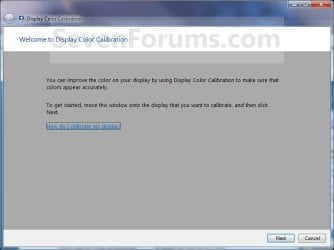
6. Move the window to display on the display monitor that you want to calibrate, then click on Next. (see screenshot below)
Step1.jpg
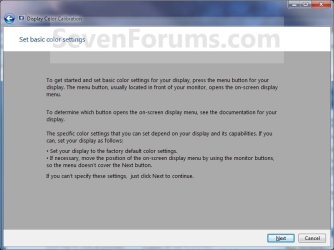
7. Set the display that you want to calibrate to it's default basic color settings, then click on Next. (see screenshot below)
Step2.jpg
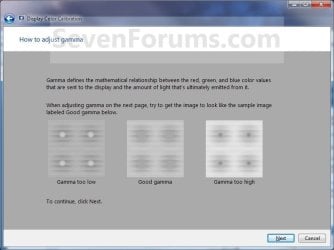
8. Read the how to adjust gamma instructions, then click on Next when ready. (see screenshot below)
Step3.jpg
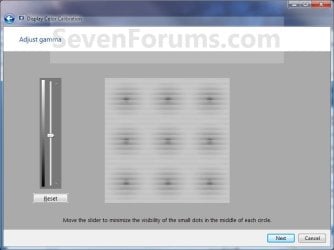
9. Adjust your gamma settings, then click on Next. (see screenshot below)
Step4.jpg
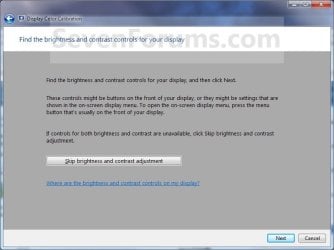
10. If you want to adjust the brightness and contrast settings for the display, then click on Next and continue on to step 11. If not, then click on the Skip brightness and contrast adjustment button, then go to step 15. (see screenshot below)
Step5.jpg
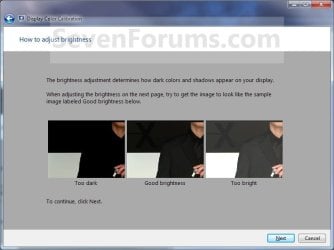
11. Read the how to adjust brightness instructions, then click on Next when ready. (see screenshot below)
Step6.jpg
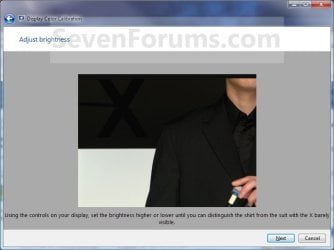
12. Adjust your brightness settings, then click on Next. (see screenshot below)
Step7.jpg
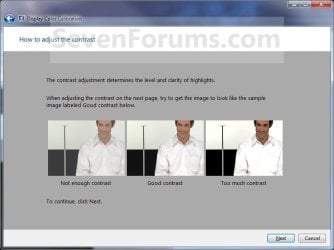
13. Read the how to adjust the contrast instructions, then click on Next when ready. (see screenshot below)
Step8.jpg
14. Adjust your contrast settings, then click on Next. (see screenshot below)

Step9.jpg
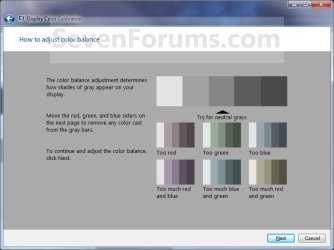
15. Read the how to adjust color balance instructions, then click on Next when ready. (see screenshot below)
Step10.jpg
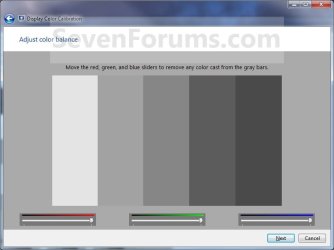
16. Adjust your color balance settings, then click on Next. (see screenshot below)
Step11.jpg
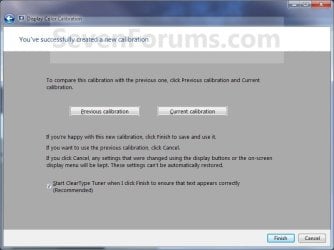
17. The display is now calibrated. You can compare this new Current calibration with the Previous calibration. (see screenshot below step 19)

18. If you wish to start ClearType Tuner to help make the text on your screen sharp and clear after you click on Finish below, then leave the box checked. Uncheck the box if you do not want to have ClearType Tuner open. (see screenshot below step 19)

19. Click on Finish to save and use this new Current calibration, or click on Cancel to cancel these changes and use the Previous calibration. (see screenshot below)
Step12.jpg
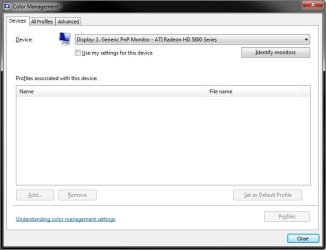
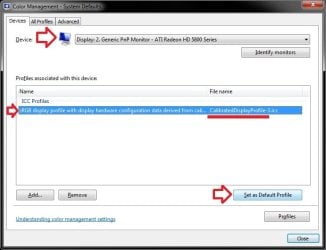
20. From the screenshot under step 3 above, click on the Devices tab, select the monitor that you just calibrated, select the "calibrated" profile you want, click on the Set as Default Profile button, and click on Close. (see screenshot below)
Advanced-3.jpg
21. Click on Close. (see screenshot below step 3)
   Note
It has been reported that the Sony Vaio"VGN-NW240F" has a proprietary Sony service that conflicts with the display driver and does not allow the display driver to save settings permanently. For example, the saved color calibration. They will be reset on log-off or re-boot producing a very pink looking hue. Disabling the Sony Vaio service has been reported to resolve this problem.

The side affect is that you lose the function keys that dim and brighten the display, but a simple desktop gadget could be used to replace the keys.


That's it,
Shawn


Last edited:
Hi Brink,
thanks for your time. Yes, I can adjust the monitor settings but it's not enough. Somehow the Dell computers have this wired greenish shade, visible especially on gray, and the yellow is much lighter than on other computers. I am making a small website and it is important that what I think is yellow, is not a dirty creamy color. I tried 2 other computers before this one, and they all had the same problem.
I read on another forum that it's a problem on earlier Win 7 version, but I updated my Windows and nothing changed.
I would have to upgrade it but it seems to be a very dramatic solution.

Thank you again.

You're welcome. If I can find anything else on this, I'll be sure to post back.
 
Last edited:

My Computer

Computer type
PC/Desktop
Computer Manufacturer/Model Number
Self built custom
OS
64-bit Windows 11 Pro for Workstations
CPU
Intel i7-8700K OC'd to 5 GHz
Motherboard
ASUS ROG Maximus XI Formula Z390
Memory
64 GB (4x16GB) G.SKILL TridentZ RGB DDR4 3600 MHz
Graphics Card(s)
ASUS ROG-STRIX-GTX1080TI-O11G-GAMING
Sound Card
Integrated
Monitor(s) Displays
2 x Samsung Odyssey G7 27"
Screen Resolution
2560x1440
Hard Drives
1TB Samsung 990 PRO M.2,
4TB Samsung 990 PRO PRO M.2,
TerraMaster F8 SSD Plus NAS
PSU
Seasonic Prime Titanium 850W
Case
Thermaltake Core P3
Cooling
Corsair Hydro H115i
Keyboard
Logitech wireless K800
Mouse
Logitech MX Master 4
Internet Speed
2 Gb/s Download and 100 Mb/s Upload
Antivirus
Malwarebyte Anti-Malware Premium
Browser
Google Chrome
Other Info
Logitech Z625 speaker system,
Logitech BRIO 4K Pro webcam,
HP Color LaserJet Pro MFP M477fdn,
APC SMART-UPS RT 1000 XL - SURT1000XLI,
Galaxy S23 Plus phone

My Computer

Computer Manufacturer/Model Number
Dell XPS 8300
OS
Windows 7 premium x64
CPU
3.GHz
Memory
6GB DDR3/ 133 MHz
Graphics Card(s)
video card ATI Radeon HD 5450 1 GB DDR3
Monitor(s) Displays
Full HD ST 2220L
Hard Drives
1 TB 7200 RPM
Seemed to help quite a bit regarding my laptop!
Thanks Brink!

Best Regards,
FredeGail
 

My Computer

Computer Manufacturer/Model Number
Brewed
OS
Microsoft Windows 7 Ultimate: x64 (SP1)
CPU
Intel® Core™ i5-2500K Processor
Motherboard
ASUS P8Z68-V PRO
Memory
Kingston DDR3 HyperX 1600MHz 8GB
Graphics Card(s)
ASUS GTX 560 TI DirectCU II 900MHz
Sound Card
Realtek® ALC892 8-Channel High Definition Audio CODEC
Monitor(s) Displays
ACER LCD P246HBD 1920x1080 (24") - Dell 1280x800
Screen Resolution
ACER LCD P246HBD ~ [1920X1080] - DELL ~ [1280x800]
Hard Drives
500 GB WD Caviar SE116 7200rpm SATA2
PSU
Corsair 750W Power Supply
Case
Coolermaster CM Scout
Cooling
Zalman FS-C77 Fatal1ty CPU Cooler
Keyboard
Logitech G15
Mouse
Coolermaster Sentinel Advanced
Internet Speed
[↓ 10 MB/s DL] [↑ 1 MB/s UL]
Other Info
- ROCCAT™ Kave – Solid 5.1 Surround Sound Gaming Headset
- Not overclocking
Cheers FredeGail. :)
 

My Computer

Computer type
PC/Desktop
Computer Manufacturer/Model Number
Self built custom
OS
64-bit Windows 11 Pro for Workstations
CPU
Intel i7-8700K OC'd to 5 GHz
Motherboard
ASUS ROG Maximus XI Formula Z390
Memory
64 GB (4x16GB) G.SKILL TridentZ RGB DDR4 3600 MHz
Graphics Card(s)
ASUS ROG-STRIX-GTX1080TI-O11G-GAMING
Sound Card
Integrated
Monitor(s) Displays
2 x Samsung Odyssey G7 27"
Screen Resolution
2560x1440
Hard Drives
1TB Samsung 990 PRO M.2,
4TB Samsung 990 PRO PRO M.2,
TerraMaster F8 SSD Plus NAS
PSU
Seasonic Prime Titanium 850W
Case
Thermaltake Core P3
Cooling
Corsair Hydro H115i
Keyboard
Logitech wireless K800
Mouse
Logitech MX Master 4
Internet Speed
2 Gb/s Download and 100 Mb/s Upload
Antivirus
Malwarebyte Anti-Malware Premium
Browser
Google Chrome
Other Info
Logitech Z625 speaker system,
Logitech BRIO 4K Pro webcam,
HP Color LaserJet Pro MFP M477fdn,
APC SMART-UPS RT 1000 XL - SURT1000XLI,
Galaxy S23 Plus phone
I think I've solved the problem of losing color calibration through Intel driver. I read somewhere to disable "igfxpers.exe", which is Intel's persistence module (nice name, isn't it?) and graphic driver stop re-loading after resume. I disabled this module via msconfig. Now LUT sticks!
 

My Computer

Computer Manufacturer/Model Number
HP Probook 4230s
OS
Windows 7 Professional 32-bit SP1
CPU
Core i5 2410
Motherboard
HP
Memory
4GB Hynix
Graphics Card(s)
Intel HD3000
Monitor(s) Displays
Samsung 121AT06-301 (Built-in)
Screen Resolution
1280x800
Hard Drives
Hitachi 500GB
Hello Tempoct,

Thank you for posting back with your results. I have added this in the Warning box at the top of the tutorial to help others with this. :)
 

My Computer

Computer type
PC/Desktop
Computer Manufacturer/Model Number
Self built custom
OS
64-bit Windows 11 Pro for Workstations
CPU
Intel i7-8700K OC'd to 5 GHz
Motherboard
ASUS ROG Maximus XI Formula Z390
Memory
64 GB (4x16GB) G.SKILL TridentZ RGB DDR4 3600 MHz
Graphics Card(s)
ASUS ROG-STRIX-GTX1080TI-O11G-GAMING
Sound Card
Integrated
Monitor(s) Displays
2 x Samsung Odyssey G7 27"
Screen Resolution
2560x1440
Hard Drives
1TB Samsung 990 PRO M.2,
4TB Samsung 990 PRO PRO M.2,
TerraMaster F8 SSD Plus NAS
PSU
Seasonic Prime Titanium 850W
Case
Thermaltake Core P3
Cooling
Corsair Hydro H115i
Keyboard
Logitech wireless K800
Mouse
Logitech MX Master 4
Internet Speed
2 Gb/s Download and 100 Mb/s Upload
Antivirus
Malwarebyte Anti-Malware Premium
Browser
Google Chrome
Other Info
Logitech Z625 speaker system,
Logitech BRIO 4K Pro webcam,
HP Color LaserJet Pro MFP M477fdn,
APC SMART-UPS RT 1000 XL - SURT1000XLI,
Galaxy S23 Plus phone
Hi
thanks for the great tutorial


i have a profile created with a colomunki and one created with spyder , i rent them

now i have uninstalled their software

how can i load a monitor default profile (i mean not calibrated)?

i mean how can i load "not calibrated" or upload "a loaded profile"
, in short have a not calibrated monitor?

thanks
cheers
 

My Computer

Computer type
PC/Desktop
OS
windows 7 ultimate 64bit
Hello Drugo,

You could Remove all profiles and uncheck the Use my settings for this device box for each monitor. :)

color.jpg
 

My Computer

Computer type
PC/Desktop
Computer Manufacturer/Model Number
Self built custom
OS
64-bit Windows 11 Pro for Workstations
CPU
Intel i7-8700K OC'd to 5 GHz
Motherboard
ASUS ROG Maximus XI Formula Z390
Memory
64 GB (4x16GB) G.SKILL TridentZ RGB DDR4 3600 MHz
Graphics Card(s)
ASUS ROG-STRIX-GTX1080TI-O11G-GAMING
Sound Card
Integrated
Monitor(s) Displays
2 x Samsung Odyssey G7 27"
Screen Resolution
2560x1440
Hard Drives
1TB Samsung 990 PRO M.2,
4TB Samsung 990 PRO PRO M.2,
TerraMaster F8 SSD Plus NAS
PSU
Seasonic Prime Titanium 850W
Case
Thermaltake Core P3
Cooling
Corsair Hydro H115i
Keyboard
Logitech wireless K800
Mouse
Logitech MX Master 4
Internet Speed
2 Gb/s Download and 100 Mb/s Upload
Antivirus
Malwarebyte Anti-Malware Premium
Browser
Google Chrome
Other Info
Logitech Z625 speaker system,
Logitech BRIO 4K Pro webcam,
HP Color LaserJet Pro MFP M477fdn,
APC SMART-UPS RT 1000 XL - SURT1000XLI,
Galaxy S23 Plus phone

My Computer

Computer type
PC/Desktop
OS
windows 7 ultimate 64bit
You're most welcome Drugo. No need to reboot to apply. :)
 

My Computer

Computer type
PC/Desktop
Computer Manufacturer/Model Number
Self built custom
OS
64-bit Windows 11 Pro for Workstations
CPU
Intel i7-8700K OC'd to 5 GHz
Motherboard
ASUS ROG Maximus XI Formula Z390
Memory
64 GB (4x16GB) G.SKILL TridentZ RGB DDR4 3600 MHz
Graphics Card(s)
ASUS ROG-STRIX-GTX1080TI-O11G-GAMING
Sound Card
Integrated
Monitor(s) Displays
2 x Samsung Odyssey G7 27"
Screen Resolution
2560x1440
Hard Drives
1TB Samsung 990 PRO M.2,
4TB Samsung 990 PRO PRO M.2,
TerraMaster F8 SSD Plus NAS
PSU
Seasonic Prime Titanium 850W
Case
Thermaltake Core P3
Cooling
Corsair Hydro H115i
Keyboard
Logitech wireless K800
Mouse
Logitech MX Master 4
Internet Speed
2 Gb/s Download and 100 Mb/s Upload
Antivirus
Malwarebyte Anti-Malware Premium
Browser
Google Chrome
Other Info
Logitech Z625 speaker system,
Logitech BRIO 4K Pro webcam,
HP Color LaserJet Pro MFP M477fdn,
APC SMART-UPS RT 1000 XL - SURT1000XLI,
Galaxy S23 Plus phone
You're most welcome Drugo. No need to reboot to apply. :)
to me i have to reboot...
i mean only with a reboot i can have the default colors of my monitor

ps. i know it's a w7 forum , but i have on my laptop xp
can i do it with xp?
how can i do it?


thanks
cheers
 

My Computer

Computer type
PC/Desktop
OS
windows 7 ultimate 64bit
Drugo,

I'm happy to hear that you got it working. Thank you for posting back with your results.

I'm afraid that I have no idea about XP though.
 

My Computer

Computer type
PC/Desktop
Computer Manufacturer/Model Number
Self built custom
OS
64-bit Windows 11 Pro for Workstations
CPU
Intel i7-8700K OC'd to 5 GHz
Motherboard
ASUS ROG Maximus XI Formula Z390
Memory
64 GB (4x16GB) G.SKILL TridentZ RGB DDR4 3600 MHz
Graphics Card(s)
ASUS ROG-STRIX-GTX1080TI-O11G-GAMING
Sound Card
Integrated
Monitor(s) Displays
2 x Samsung Odyssey G7 27"
Screen Resolution
2560x1440
Hard Drives
1TB Samsung 990 PRO M.2,
4TB Samsung 990 PRO PRO M.2,
TerraMaster F8 SSD Plus NAS
PSU
Seasonic Prime Titanium 850W
Case
Thermaltake Core P3
Cooling
Corsair Hydro H115i
Keyboard
Logitech wireless K800
Mouse
Logitech MX Master 4
Internet Speed
2 Gb/s Download and 100 Mb/s Upload
Antivirus
Malwarebyte Anti-Malware Premium
Browser
Google Chrome
Other Info
Logitech Z625 speaker system,
Logitech BRIO 4K Pro webcam,
HP Color LaserJet Pro MFP M477fdn,
APC SMART-UPS RT 1000 XL - SURT1000XLI,
Galaxy S23 Plus phone
Help with calibration settings!!

I just bought a Samsung laptop with Windows 7 Home Premium 64-bit. When I calibrate the monitor, the settings do not stay once the computer sleeps, hibernates, or turns off. Basically, as soon as I close the lid the settings revert back to default.

I have tried everything in this thread and they still do not stay. The one thing I didn't try was disabling the igfxpers.exe using msconfig. I couldn't figure out which tab it was located under or the name it's under? I didn't see anything called igfxpers.exe in msconfig.

This is really frustrating to me. I just sent back and HP computer for the same reason, but at the time I didn't realize it was a Windows 7 issue. I'm this close to sending back this one too and just getting an Apple. This is ridiculous!!

I see no one has replied to this thread for several months, so please if you can help me solve this issue I would greatly appreciate it!!
 

My Computer

Computer Manufacturer/Model Number
Samsung Series 3 NP300E5C-A01US
OS
Win 7 Home Premium 64-bit

My Computer

Computer type
PC/Desktop
Computer Manufacturer/Model Number
Self built custom
OS
64-bit Windows 11 Pro for Workstations
CPU
Intel i7-8700K OC'd to 5 GHz
Motherboard
ASUS ROG Maximus XI Formula Z390
Memory
64 GB (4x16GB) G.SKILL TridentZ RGB DDR4 3600 MHz
Graphics Card(s)
ASUS ROG-STRIX-GTX1080TI-O11G-GAMING
Sound Card
Integrated
Monitor(s) Displays
2 x Samsung Odyssey G7 27"
Screen Resolution
2560x1440
Hard Drives
1TB Samsung 990 PRO M.2,
4TB Samsung 990 PRO PRO M.2,
TerraMaster F8 SSD Plus NAS
PSU
Seasonic Prime Titanium 850W
Case
Thermaltake Core P3
Cooling
Corsair Hydro H115i
Keyboard
Logitech wireless K800
Mouse
Logitech MX Master 4
Internet Speed
2 Gb/s Download and 100 Mb/s Upload
Antivirus
Malwarebyte Anti-Malware Premium
Browser
Google Chrome
Other Info
Logitech Z625 speaker system,
Logitech BRIO 4K Pro webcam,
HP Color LaserJet Pro MFP M477fdn,
APC SMART-UPS RT 1000 XL - SURT1000XLI,
Galaxy S23 Plus phone
Hello xraychick, and welcome to Seven Forums.

Method Three in the tutorial below can help guide you in disabling the igfxpers.exe startup item in the "Startup" tab in msconfig.

http://www.sevenforums.com/tutorials/1401-startup-programs-change.html

I hope this helps, :)
Shawn

Thank you. I am able to get into msconfig, but igfxpers.exe is not listed in the "startup" tab. Could it be listed under a different name? I read in another post that someone disabled "NVIDIA display driver service" and this fixed their issue with the settings not being saved. I'm not at home with my computer right now, but I will check when I get home to see if this is listed under my startup tab.
 
Last edited:

My Computer

Computer Manufacturer/Model Number
Samsung Series 3 NP300E5C-A01US
OS
Win 7 Home Premium 64-bit
I think I've solved the problem of losing color calibration through Intel driver. I read somewhere to disable "igfxpers.exe", which is Intel's persistence module (nice name, isn't it?) and graphic driver stop re-loading after resume. I disabled this module via msconfig. Now LUT sticks!

Tempoct, was this a permanent solution for you?
 

My Computer

Computer Manufacturer/Model Number
Samsung Series 3 NP300E5C-A01US
OS
Win 7 Home Premium 64-bit
Thank you. I am able to get into msconfig, but igfxpers.exe is not listed in the "startup" tab.

In addition, look for it's full name of Intel Common User Interface Module to see if it's listed, or listed in Programs and Features to uninstall the program.
 

My Computer

Computer type
PC/Desktop
Computer Manufacturer/Model Number
Self built custom
OS
64-bit Windows 11 Pro for Workstations
CPU
Intel i7-8700K OC'd to 5 GHz
Motherboard
ASUS ROG Maximus XI Formula Z390
Memory
64 GB (4x16GB) G.SKILL TridentZ RGB DDR4 3600 MHz
Graphics Card(s)
ASUS ROG-STRIX-GTX1080TI-O11G-GAMING
Sound Card
Integrated
Monitor(s) Displays
2 x Samsung Odyssey G7 27"
Screen Resolution
2560x1440
Hard Drives
1TB Samsung 990 PRO M.2,
4TB Samsung 990 PRO PRO M.2,
TerraMaster F8 SSD Plus NAS
PSU
Seasonic Prime Titanium 850W
Case
Thermaltake Core P3
Cooling
Corsair Hydro H115i
Keyboard
Logitech wireless K800
Mouse
Logitech MX Master 4
Internet Speed
2 Gb/s Download and 100 Mb/s Upload
Antivirus
Malwarebyte Anti-Malware Premium
Browser
Google Chrome
Other Info
Logitech Z625 speaker system,
Logitech BRIO 4K Pro webcam,
HP Color LaserJet Pro MFP M477fdn,
APC SMART-UPS RT 1000 XL - SURT1000XLI,
Galaxy S23 Plus phone
Thank you. I am able to get into msconfig, but igfxpers.exe is not listed in the "startup" tab.

In addition, look for it's full name of Intel Common User Interface Module to see if it's listed, or listed in Programs and Features to uninstall the program.

Ok, yes I will check that when I am able. What about the NVIDIA display driver service? Could that be it as well?
 

My Computer

Computer Manufacturer/Model Number
Samsung Series 3 NP300E5C-A01US
OS
Win 7 Home Premium 64-bit
No, that wouldn't be it. :)
 

My Computer

Computer type
PC/Desktop
Computer Manufacturer/Model Number
Self built custom
OS
64-bit Windows 11 Pro for Workstations
CPU
Intel i7-8700K OC'd to 5 GHz
Motherboard
ASUS ROG Maximus XI Formula Z390
Memory
64 GB (4x16GB) G.SKILL TridentZ RGB DDR4 3600 MHz
Graphics Card(s)
ASUS ROG-STRIX-GTX1080TI-O11G-GAMING
Sound Card
Integrated
Monitor(s) Displays
2 x Samsung Odyssey G7 27"
Screen Resolution
2560x1440
Hard Drives
1TB Samsung 990 PRO M.2,
4TB Samsung 990 PRO PRO M.2,
TerraMaster F8 SSD Plus NAS
PSU
Seasonic Prime Titanium 850W
Case
Thermaltake Core P3
Cooling
Corsair Hydro H115i
Keyboard
Logitech wireless K800
Mouse
Logitech MX Master 4
Internet Speed
2 Gb/s Download and 100 Mb/s Upload
Antivirus
Malwarebyte Anti-Malware Premium
Browser
Google Chrome
Other Info
Logitech Z625 speaker system,
Logitech BRIO 4K Pro webcam,
HP Color LaserJet Pro MFP M477fdn,
APC SMART-UPS RT 1000 XL - SURT1000XLI,
Galaxy S23 Plus phone
So, I have an issue. Intel Common User Interface Module nor igfxpers.exe is listed in msconfig "startup" tab or "programs and features".

I searched for it by going to start>search. It listed the program and I right clicked on it and selected open file location. It's listed under computer>local disk (C: )>windows>system32. Would it be safe to delete it from here??
 

My Computer

Computer Manufacturer/Model Number
Samsung Series 3 NP300E5C-A01US
OS
Win 7 Home Premium 64-bit
Back
Top