
Show Window Contents or Outline While Dragging

Show Window Contents or Outline While Dragging in Vista, Windows 7, and Windows 8


   Information
This tutorial will show you how to show window contents while dragging or show only window outline while dragging in Vista, Windows 7, and Windows 8.


EXAMPLE: Show window outline while dragging
Outline.jpg


OPTION ONE

Through Visual Effects Settings


NOTE: In Windows 8.1, you must be signed in as an administrator to be able to do this option.
1. Open the Visual Effects settings in Vista/Windows 7 or Windows 8/8.1.

2. To Show Window Contents While Dragging
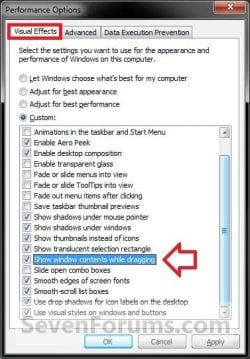
A) Check the Show window contents while dragging box, and click on OK. (see screenshot below)
Visual_Effects.jpg
3. To Show Window Outline While Dragging
A) Uncheck the Show window contents while dragging box, and click on OK. (see screenshot above)


OPTION TWO

Using a REG File Download


1. To Show Window Contents While Dragging
A) Click/tap on the download button below to download the file below.
Show_window_contents_while_dragging.reg

Download


B) Go to step 3.
2. To Show Window Outline While Dragging
A) Click on the download button below to download the file below.
Show_window_outline_while_dragging.reg

Download


3. Save the .reg file to your Desktop.

4. Double click/tap on the downloaded .reg file to merge it.

5. If prompted, click/tap on Run, Yes (UAC), Yes, and OK to approve merging the .reg file.

6. Log off and log on, or restart the computer to apply the changes.

7. When finished, you can delete the downloaded .reg file if you like.


OPTION THREE

Manually in Registry Editor


1. Press the Windows + R keys to open the Run dialog, type regedit, and press Enter.

2. If prompted by UAC, click/tap on Yes to allow.

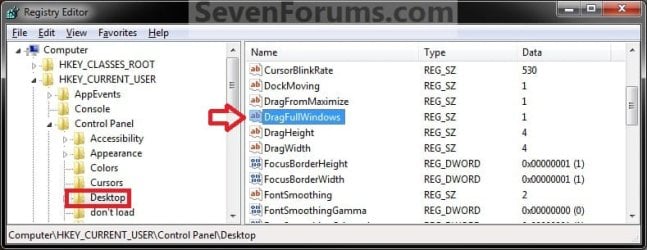
3. In regedit, navigate to the location below. (see screenshot below)
HKEY_CURRENT_USER\Control Panel\Desktop
Reg1.jpg
4. In the right pane, double click/tap on DragFullWindows to modify it. (see screenshot above)

5. To Show Window Contents While Dragging
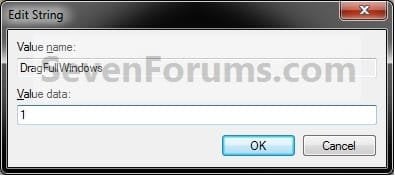
A) Type in 1, and click/tap on OK. (see screenshot below)
Reg2.jpg
B) Go to step 7.
6. To Show Window Outline While Dragging
A) Type in 0 (zero), and click/tap on OK. (see screenshot above)
7. Close regedit.

8. Log off and log on, or restart the computer to apply the changes.
That's it,
Shawn


Attachments

Last edited:
Thanks for that, I wasn't even sure what the problem was tell i saw this post.
 

My Computer

Computer type
PC/Desktop
Computer Manufacturer/Model Number
Custom
OS
Windows 7 Professional 64bit
CPU
Intel i7 920 OC 3.8ghz
Motherboard
Asus P6T
Memory
20gb Kingston DDR3
Graphics Card(s)
Gtx 460 1gb x2 SLI
Sound Card
Realtek HD audio inbuilt 7.1 surround
Monitor(s) Displays
SyncMaster 2333
Screen Resolution
1920*1080
Hard Drives
Seagate es2 barracuda 1TB,
Kingston 128gb SSD,
3 WD 2TB green drives ,
PSU
1200 watt
Cooling
Trition 81
You're welcome thepower. I'm happy to hear that you got it sorted. :)
 

My Computer

Computer type
PC/Desktop
Computer Manufacturer/Model Number
Self built custom
OS
64-bit Windows 11 Pro for Workstations
CPU
Intel i7-8700K OC'd to 5 GHz
Motherboard
ASUS ROG Maximus XI Formula Z390
Memory
64 GB (4x16GB) G.SKILL TridentZ RGB DDR4 3600 MHz
Graphics Card(s)
ASUS ROG-STRIX-GTX1080TI-O11G-GAMING
Sound Card
Integrated
Monitor(s) Displays
2 x Samsung Odyssey G7 27"
Screen Resolution
2560x1440
Hard Drives
1TB Samsung 990 PRO M.2,
4TB Samsung 990 PRO PRO M.2,
TerraMaster F8 SSD Plus NAS
PSU
Seasonic Prime Titanium 850W
Case
Thermaltake Core P3
Cooling
Corsair Hydro H115i
Keyboard
Logitech wireless K800
Mouse
Logitech MX Master 4
Internet Speed
2 Gb/s Download and 100 Mb/s Upload
Antivirus
Malwarebyte Anti-Malware Premium
Browser
Google Chrome
Other Info
Logitech Z625 speaker system,
Logitech BRIO 4K Pro webcam,
HP Color LaserJet Pro MFP M477fdn,
APC SMART-UPS RT 1000 XL - SURT1000XLI,
Galaxy S23 Plus phone
Hello,

please, does this registry value apply for all programs and all windows?

Thanks,
~tEh'Pâr4d0x
 

My Computer

OS
Windows 7 Home Premium 64bit
Hello ~tEh'Pâr4d0x,

Yes, it is applied to all opened windows including program windows. :)
 

My Computer

Computer type
PC/Desktop
Computer Manufacturer/Model Number
Self built custom
OS
64-bit Windows 11 Pro for Workstations
CPU
Intel i7-8700K OC'd to 5 GHz
Motherboard
ASUS ROG Maximus XI Formula Z390
Memory
64 GB (4x16GB) G.SKILL TridentZ RGB DDR4 3600 MHz
Graphics Card(s)
ASUS ROG-STRIX-GTX1080TI-O11G-GAMING
Sound Card
Integrated
Monitor(s) Displays
2 x Samsung Odyssey G7 27"
Screen Resolution
2560x1440
Hard Drives
1TB Samsung 990 PRO M.2,
4TB Samsung 990 PRO PRO M.2,
TerraMaster F8 SSD Plus NAS
PSU
Seasonic Prime Titanium 850W
Case
Thermaltake Core P3
Cooling
Corsair Hydro H115i
Keyboard
Logitech wireless K800
Mouse
Logitech MX Master 4
Internet Speed
2 Gb/s Download and 100 Mb/s Upload
Antivirus
Malwarebyte Anti-Malware Premium
Browser
Google Chrome
Other Info
Logitech Z625 speaker system,
Logitech BRIO 4K Pro webcam,
HP Color LaserJet Pro MFP M477fdn,
APC SMART-UPS RT 1000 XL - SURT1000XLI,
Galaxy S23 Plus phone
Hello ~tEh'Pâr4d0x,

Yes, it is applied to all opened windows including program windows. :)

Hi, thanks for such a quick answer! I don't intend to bother you or in any way hijack this topic, so I will simply link here: http://www.sevenforums.com/customization/206870-xfire-chat-window-outline.html

I mean, I enabled content, it's showing, it's even working for this Xfire messenger window, but when I try to resize the Xfire chat-window, there it appears. It wasn't there a week ago, my PC once suddenly crashed and this started happening.

I tried to reinstall, but nothing helped. Xfire support claims, it is most likely some OS related error.

Weird..

Thanks anyway,
~tEh'Pâr4d0x
 

My Computer

OS
Windows 7 Home Premium 64bit
This seems more like some sort of issue with Xfire instead IMO since it is only happening with this program for you. I would suggest to keep contacting Xfire support to see if they may come out with a patch for it. If they wish to pass the buck and not help, then I would recommend that you pass the buck as well to another software company that cares about their product and customers.
 

My Computer

Computer type
PC/Desktop
Computer Manufacturer/Model Number
Self built custom
OS
64-bit Windows 11 Pro for Workstations
CPU
Intel i7-8700K OC'd to 5 GHz
Motherboard
ASUS ROG Maximus XI Formula Z390
Memory
64 GB (4x16GB) G.SKILL TridentZ RGB DDR4 3600 MHz
Graphics Card(s)
ASUS ROG-STRIX-GTX1080TI-O11G-GAMING
Sound Card
Integrated
Monitor(s) Displays
2 x Samsung Odyssey G7 27"
Screen Resolution
2560x1440
Hard Drives
1TB Samsung 990 PRO M.2,
4TB Samsung 990 PRO PRO M.2,
TerraMaster F8 SSD Plus NAS
PSU
Seasonic Prime Titanium 850W
Case
Thermaltake Core P3
Cooling
Corsair Hydro H115i
Keyboard
Logitech wireless K800
Mouse
Logitech MX Master 4
Internet Speed
2 Gb/s Download and 100 Mb/s Upload
Antivirus
Malwarebyte Anti-Malware Premium
Browser
Google Chrome
Other Info
Logitech Z625 speaker system,
Logitech BRIO 4K Pro webcam,
HP Color LaserJet Pro MFP M477fdn,
APC SMART-UPS RT 1000 XL - SURT1000XLI,
Galaxy S23 Plus phone
hi guys!. i am using windows 8 single for 64bit. I have the same problem. although I could do all solution ways, but problem is keeping on. please help me :((
 

My Computer

Computer type
PC/Desktop
OS
windows 8 64 bit
Hello Brifing, and welcome to Seven Forums.

Please describe the problem you are having, and we'll see if we may be able to help. :)
 

My Computer

Computer type
PC/Desktop
Computer Manufacturer/Model Number
Self built custom
OS
64-bit Windows 11 Pro for Workstations
CPU
Intel i7-8700K OC'd to 5 GHz
Motherboard
ASUS ROG Maximus XI Formula Z390
Memory
64 GB (4x16GB) G.SKILL TridentZ RGB DDR4 3600 MHz
Graphics Card(s)
ASUS ROG-STRIX-GTX1080TI-O11G-GAMING
Sound Card
Integrated
Monitor(s) Displays
2 x Samsung Odyssey G7 27"
Screen Resolution
2560x1440
Hard Drives
1TB Samsung 990 PRO M.2,
4TB Samsung 990 PRO PRO M.2,
TerraMaster F8 SSD Plus NAS
PSU
Seasonic Prime Titanium 850W
Case
Thermaltake Core P3
Cooling
Corsair Hydro H115i
Keyboard
Logitech wireless K800
Mouse
Logitech MX Master 4
Internet Speed
2 Gb/s Download and 100 Mb/s Upload
Antivirus
Malwarebyte Anti-Malware Premium
Browser
Google Chrome
Other Info
Logitech Z625 speaker system,
Logitech BRIO 4K Pro webcam,
HP Color LaserJet Pro MFP M477fdn,
APC SMART-UPS RT 1000 XL - SURT1000XLI,
Galaxy S23 Plus phone
hi brink! I have this problem:) I explain that my computer has windows 8 single 64 bit. Despite show window content ticks, it moves like untick. so I tried these ways in here, but problem is not solving. how can I solve this problem? if i do untick after tick, it apply setting. However, i resart my computer (close-open,log off-on), it occurs again this problem.

meanwhile, I am from Turkey, I apologize from some language mistakes :))
 

My Computer

Computer type
PC/Desktop
OS
windows 8 64 bit
Brifing,

Do you have a custom theme or program installed that could affect or also have settings for this?

For now, use the Find and Find Next feature in Registry Editor to search for the DragFullWindows string value, and make sure that any found is set to 1 for it's data. You may have one in the HKLM key that's overriding your setting in the HKCU key.
 

My Computer

Computer type
PC/Desktop
Computer Manufacturer/Model Number
Self built custom
OS
64-bit Windows 11 Pro for Workstations
CPU
Intel i7-8700K OC'd to 5 GHz
Motherboard
ASUS ROG Maximus XI Formula Z390
Memory
64 GB (4x16GB) G.SKILL TridentZ RGB DDR4 3600 MHz
Graphics Card(s)
ASUS ROG-STRIX-GTX1080TI-O11G-GAMING
Sound Card
Integrated
Monitor(s) Displays
2 x Samsung Odyssey G7 27"
Screen Resolution
2560x1440
Hard Drives
1TB Samsung 990 PRO M.2,
4TB Samsung 990 PRO PRO M.2,
TerraMaster F8 SSD Plus NAS
PSU
Seasonic Prime Titanium 850W
Case
Thermaltake Core P3
Cooling
Corsair Hydro H115i
Keyboard
Logitech wireless K800
Mouse
Logitech MX Master 4
Internet Speed
2 Gb/s Download and 100 Mb/s Upload
Antivirus
Malwarebyte Anti-Malware Premium
Browser
Google Chrome
Other Info
Logitech Z625 speaker system,
Logitech BRIO 4K Pro webcam,
HP Color LaserJet Pro MFP M477fdn,
APC SMART-UPS RT 1000 XL - SURT1000XLI,
Galaxy S23 Plus phone
For the setting in the HKLM key, should it exist, you will need to invoke regedit.exe in Elevated mode.
 

My Computer

Computer type
PC/Desktop
Computer Manufacturer/Model Number
Dwarf Dwf/11/2012 r09/2013
OS
Windows 8.1 Pro RTM x64
CPU
Intel Core-i5-3570K 4-core @ 3.4GHz (Ivy Bridge) (OC 4.4GHz)
Motherboard
ASRock Z77 Extreme4-M
Memory
4 x 4GB DDR3-1600 Corsair Vengeance CMZ8GX3M2A1600C9B (16GB)
Graphics Card(s)
MSI GeForce GTX770 Gaming OC 2GB
Sound Card
Realtek High Definition on board solution (ALC 898)
Monitor(s) Displays
ViewSonic VA1912w Widescreen (VGA)
Screen Resolution
1440x900
Hard Drives
OCZ Agility 3 SSD 120GB SATA III x2 (RAID 0)
Samsung HD501LJ 500GB SATA II x2
Hitachi HDS721010CLA332 1TB SATA II
Iomega 1.5TB Ext USB 2.0
WD 2.0TB Ext USB 3.0
PSU
XFX Pro Series 850W Semi-Modular
Case
Gigabyte IF233
Cooling
1 x 120mm Front Inlet 1 x 120mm Rear Exhaust
Keyboard
Microsoft Comfort Curve Keyboard 3000 (USB)
Mouse
Microsoft Comfort Mouse 3000 for Business (USB)
Internet Speed
NetGear DG834Gv3 ADSL Modem/Router (Ethernet) ~4.0 Mb/s (O2)
Antivirus
Avast! 8.0.1497
Browser
IE 11
Other Info
Optical Drive: HL-DT-ST BD-RE BH10LS30 SATA Bluray
Lexmark S305 Printer/Scanner/Copier (USB)
WEI Score: 8.1/8.1/8.5/8.5/8.25
Asus Eee PC 1011PX Netbook (Windows 7 x86 Starter)
Brink,
I have no a custom theme. the regedit value is same already. here it is? is that true?

p6blx.jpg


but my problem is still existing.
 

My Computer

Computer type
PC/Desktop
OS
windows 8 64 bit
For the setting in the HKLM key, should it exist, you will need to invoke regedit.exe in Elevated mode.

Only if he's logged in as a standard user. He should be prompted by UAC to elevate by default when he opens regedit if logged in as an administrator.
 

My Computer

Computer type
PC/Desktop
Computer Manufacturer/Model Number
Self built custom
OS
64-bit Windows 11 Pro for Workstations
CPU
Intel i7-8700K OC'd to 5 GHz
Motherboard
ASUS ROG Maximus XI Formula Z390
Memory
64 GB (4x16GB) G.SKILL TridentZ RGB DDR4 3600 MHz
Graphics Card(s)
ASUS ROG-STRIX-GTX1080TI-O11G-GAMING
Sound Card
Integrated
Monitor(s) Displays
2 x Samsung Odyssey G7 27"
Screen Resolution
2560x1440
Hard Drives
1TB Samsung 990 PRO M.2,
4TB Samsung 990 PRO PRO M.2,
TerraMaster F8 SSD Plus NAS
PSU
Seasonic Prime Titanium 850W
Case
Thermaltake Core P3
Cooling
Corsair Hydro H115i
Keyboard
Logitech wireless K800
Mouse
Logitech MX Master 4
Internet Speed
2 Gb/s Download and 100 Mb/s Upload
Antivirus
Malwarebyte Anti-Malware Premium
Browser
Google Chrome
Other Info
Logitech Z625 speaker system,
Logitech BRIO 4K Pro webcam,
HP Color LaserJet Pro MFP M477fdn,
APC SMART-UPS RT 1000 XL - SURT1000XLI,
Galaxy S23 Plus phone
Brink,
I have no a custom theme. the regedit value is same already. here it is? is that true?

p6blx.jpg


but my problem is still existing.

That's correct for that location, but be sure to keep hitting "Find Next" until it's finished searching the registry to make sure that there is no other found.
 

My Computer

Computer type
PC/Desktop
Computer Manufacturer/Model Number
Self built custom
OS
64-bit Windows 11 Pro for Workstations
CPU
Intel i7-8700K OC'd to 5 GHz
Motherboard
ASUS ROG Maximus XI Formula Z390
Memory
64 GB (4x16GB) G.SKILL TridentZ RGB DDR4 3600 MHz
Graphics Card(s)
ASUS ROG-STRIX-GTX1080TI-O11G-GAMING
Sound Card
Integrated
Monitor(s) Displays
2 x Samsung Odyssey G7 27"
Screen Resolution
2560x1440
Hard Drives
1TB Samsung 990 PRO M.2,
4TB Samsung 990 PRO PRO M.2,
TerraMaster F8 SSD Plus NAS
PSU
Seasonic Prime Titanium 850W
Case
Thermaltake Core P3
Cooling
Corsair Hydro H115i
Keyboard
Logitech wireless K800
Mouse
Logitech MX Master 4
Internet Speed
2 Gb/s Download and 100 Mb/s Upload
Antivirus
Malwarebyte Anti-Malware Premium
Browser
Google Chrome
Other Info
Logitech Z625 speaker system,
Logitech BRIO 4K Pro webcam,
HP Color LaserJet Pro MFP M477fdn,
APC SMART-UPS RT 1000 XL - SURT1000XLI,
Galaxy S23 Plus phone
p79yb.jpg


brink,

yes, there are lots of regedit values(dragfullwindows) like this pic. But , I cannot understand, you said that make sure that. which one can be 'make sure' :)))
 

My Computer

Computer type
PC/Desktop
OS
windows 8 64 bit
You would want any found set to 1 to have the full window drag and not just an outline.

Normally, you would be setting any found DragFullWindows DWORD values in the right pane.

Any DragFullWindows keys you see in the left pane, you would only set the DefaultApplied DWORD to 1 in it's right pane. Otherwise, skip it and move on to any other it may find.
 

My Computer

Computer type
PC/Desktop
Computer Manufacturer/Model Number
Self built custom
OS
64-bit Windows 11 Pro for Workstations
CPU
Intel i7-8700K OC'd to 5 GHz
Motherboard
ASUS ROG Maximus XI Formula Z390
Memory
64 GB (4x16GB) G.SKILL TridentZ RGB DDR4 3600 MHz
Graphics Card(s)
ASUS ROG-STRIX-GTX1080TI-O11G-GAMING
Sound Card
Integrated
Monitor(s) Displays
2 x Samsung Odyssey G7 27"
Screen Resolution
2560x1440
Hard Drives
1TB Samsung 990 PRO M.2,
4TB Samsung 990 PRO PRO M.2,
TerraMaster F8 SSD Plus NAS
PSU
Seasonic Prime Titanium 850W
Case
Thermaltake Core P3
Cooling
Corsair Hydro H115i
Keyboard
Logitech wireless K800
Mouse
Logitech MX Master 4
Internet Speed
2 Gb/s Download and 100 Mb/s Upload
Antivirus
Malwarebyte Anti-Malware Premium
Browser
Google Chrome
Other Info
Logitech Z625 speaker system,
Logitech BRIO 4K Pro webcam,
HP Color LaserJet Pro MFP M477fdn,
APC SMART-UPS RT 1000 XL - SURT1000XLI,
Galaxy S23 Plus phone
Hello!
I have the same problem: I have to uncheck-apply-recheck-apply again every time I start or login in this laptop (I have windows 8 64bit on ad Asus laptop, I bought it a couple weeks ago).
I've followed every step in this tutorial (performance settings, using the REG file and invoking regedit -using Find Next (there was no 0, every value was 1)) but the problem is still there!
I've tried looking elsewhere on the internet but I cannot find a solution...
Any ideas?
Thank you anyway!
 

My Computer

Computer type
Laptop
Computer Manufacturer/Model Number
Asus
OS
Windows 8 64bit
Hello Fieromuso, and welcome to Seven Forums.

As a test, create a new user account, and see if it works properly while signed in to it to see if this is an issue with only your current account or a global issue in Windows 8. :)
 

My Computer

Computer type
PC/Desktop
Computer Manufacturer/Model Number
Self built custom
OS
64-bit Windows 11 Pro for Workstations
CPU
Intel i7-8700K OC'd to 5 GHz
Motherboard
ASUS ROG Maximus XI Formula Z390
Memory
64 GB (4x16GB) G.SKILL TridentZ RGB DDR4 3600 MHz
Graphics Card(s)
ASUS ROG-STRIX-GTX1080TI-O11G-GAMING
Sound Card
Integrated
Monitor(s) Displays
2 x Samsung Odyssey G7 27"
Screen Resolution
2560x1440
Hard Drives
1TB Samsung 990 PRO M.2,
4TB Samsung 990 PRO PRO M.2,
TerraMaster F8 SSD Plus NAS
PSU
Seasonic Prime Titanium 850W
Case
Thermaltake Core P3
Cooling
Corsair Hydro H115i
Keyboard
Logitech wireless K800
Mouse
Logitech MX Master 4
Internet Speed
2 Gb/s Download and 100 Mb/s Upload
Antivirus
Malwarebyte Anti-Malware Premium
Browser
Google Chrome
Other Info
Logitech Z625 speaker system,
Logitech BRIO 4K Pro webcam,
HP Color LaserJet Pro MFP M477fdn,
APC SMART-UPS RT 1000 XL - SURT1000XLI,
Galaxy S23 Plus phone
Uhm I did that and actually it works properly on the other account! :O
So, is there a software in this account that messes everythinh up? :(
 

My Computer

Computer type
Laptop
Computer Manufacturer/Model Number
Asus
OS
Windows 8 64bit
Back
Top