AUTOCHK Initiation Countdown Time - Change

How to Change AUTOCHK Initiation Countdown Time in Windows 7 and Windows 8

   Information
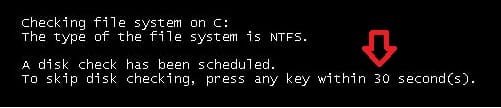
This will show you how to change the AUTOCHK initiation countdown time to how many seconds you would like to have for the To skip disk checking, press and key within 10 second(s) option for a scheduled chkdsk at boot.

The default time is 10 seconds. If you set the time to low (ex: 1 second), then you will not be able to press a key fast enough to cancel a scheduled disk check.

You will need to be logged in as an administrator to be able to change the AUTOCHK initiation countdown time.


EXAMPLE: AUTOCHK initiation countdown time (default and changed) Default.jpg

Changed.jpg


OPTION ONE

Change AUTOCHK Initiation Countdown Time using Command Prompt

1. To See the Current AUTOCHK Initiation Countdown Time A) Open a command prompt or elevated command prompt.

B) In the command prompt, type chkntfs /T and press enter. (see screenshot below) See_Current_CHKDSK_Time.jpg
2. To Change the Current AUTOCHK Initiation Countdown Time A) Open an elevated command prompt (right click and "Run as administrator).

B) In the command prompt, type in chkntfs /T:seconds and press enter. (see screenshot below)
NOTE: Substitue seconds in the command for how many actual seconds (1 to 259200). For example, I would type chkntfs /T:30 for 30 seconds. Change_CHKDSK_Time.jpg
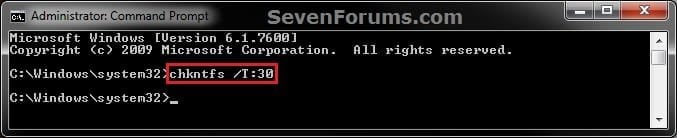
C) You can confirm the change using step 1.
3. When finished, you can close the command prompt.


OPTION TWO

Change AUTOCHK Initiation Countdown Time in Registry Editor

1. Press the Windows + R keys to open the Run dialog, type regedit, and press Enter.

2. If prompted by UAC, then click/tap on Yes.

3. In regedit, navigate to the location below. (see screenshot below)
HKEY_LOCAL_MACHINE\SYSTEM\CurrentControlSet\Control\Session Manager
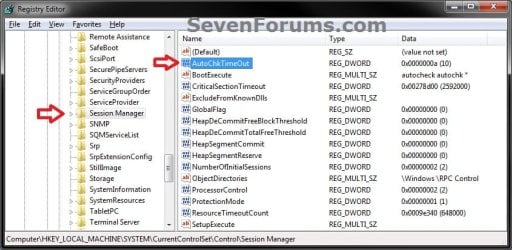
Step1.jpg
4. In the right pane of Session Manager, double click/tap on the AutoChkTimeOut DWORD to modify it. (see screenshot above)
NOTE: If you do not have AutoChkTimeOut in the right pane, then right click on a empty space in the right pane, click on New and DWORD (32-bit) Value, then type AutoChkTimeOut and press enter.

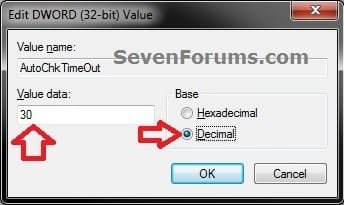
5. Select (dot) Decimal, enter how many seconds (1 to 259200) you want for the timeout value, and click/tap on OK. (see screenshot below) Step2.jpg
6. Close regedit.
That's it,
Shawn


Last edited:
Great one master...:D
 

My Computer

Computer Manufacturer/Model Number
built up
OS
windows 7
CPU
Phenom II AMD Dragon 3.5Ghz
Memory
DDR3 4GB
Graphics Card(s)
ATI Radeon 512Mb
Monitor(s) Displays
HP L1506
Screen Resolution
1152 x 864
Hard Drives
WDC 1 TB SATA-II Green Power
Keyboard
HP wireless keyboard
Mouse
HP Optic
Internet Speed
1GB
LOL, thank you. :)
 

My Computer

Computer type
PC/Desktop
Computer Manufacturer/Model Number
Self built custom
OS
64-bit Windows 11 Pro for Workstations
CPU
Intel i7-8700K OC'd to 5 GHz
Motherboard
ASUS ROG Maximus XI Formula Z390
Memory
64 GB (4x16GB) G.SKILL TridentZ RGB DDR4 3600 MHz
Graphics Card(s)
ASUS ROG-STRIX-GTX1080TI-O11G-GAMING
Sound Card
Integrated
Monitor(s) Displays
2 x Samsung Odyssey G7 27"
Screen Resolution
2560x1440
Hard Drives
1TB Samsung 990 PRO M.2,
4TB Samsung 990 PRO PRO M.2,
TerraMaster F8 SSD Plus NAS
PSU
Seasonic Prime Titanium 850W
Case
Thermaltake Core P3
Cooling
Corsair Hydro H115i
Keyboard
Logitech wireless K800
Mouse
Logitech MX Master 4
Internet Speed
2 Gb/s Download and 100 Mb/s Upload
Antivirus
Malwarebyte Anti-Malware Premium
Browser
Google Chrome
Other Info
Logitech Z625 speaker system,
Logitech BRIO 4K Pro webcam,
HP Color LaserJet Pro MFP M477fdn,
APC SMART-UPS RT 1000 XL - SURT1000XLI,
Galaxy S23 Plus phone
i though it's can be schedule drive to check at boot time with command chkntfs /C drive.
 

My Computer

Computer Manufacturer/Model Number
built up
OS
windows 7
CPU
Phenom II AMD Dragon 3.5Ghz
Memory
DDR3 4GB
Graphics Card(s)
ATI Radeon 512Mb
Monitor(s) Displays
HP L1506
Screen Resolution
1152 x 864
Hard Drives
WDC 1 TB SATA-II Green Power
Keyboard
HP wireless keyboard
Mouse
HP Optic
Internet Speed
1GB
Last edited:

My Computer

Computer type
PC/Desktop
Computer Manufacturer/Model Number
Self built custom
OS
64-bit Windows 11 Pro for Workstations
CPU
Intel i7-8700K OC'd to 5 GHz
Motherboard
ASUS ROG Maximus XI Formula Z390
Memory
64 GB (4x16GB) G.SKILL TridentZ RGB DDR4 3600 MHz
Graphics Card(s)
ASUS ROG-STRIX-GTX1080TI-O11G-GAMING
Sound Card
Integrated
Monitor(s) Displays
2 x Samsung Odyssey G7 27"
Screen Resolution
2560x1440
Hard Drives
1TB Samsung 990 PRO M.2,
4TB Samsung 990 PRO PRO M.2,
TerraMaster F8 SSD Plus NAS
PSU
Seasonic Prime Titanium 850W
Case
Thermaltake Core P3
Cooling
Corsair Hydro H115i
Keyboard
Logitech wireless K800
Mouse
Logitech MX Master 4
Internet Speed
2 Gb/s Download and 100 Mb/s Upload
Antivirus
Malwarebyte Anti-Malware Premium
Browser
Google Chrome
Other Info
Logitech Z625 speaker system,
Logitech BRIO 4K Pro webcam,
HP Color LaserJet Pro MFP M477fdn,
APC SMART-UPS RT 1000 XL - SURT1000XLI,
Galaxy S23 Plus phone
Thanks a lot for this great tutorial.
 

My Computer

OS
Windows 7 Ultimate 32bit
CPU
AMD Phenom II x4 965 3.4GHz
Motherboard
Gigabyte GA-890FXA-UD5 rev2.0
Memory
G.SKILL F3-16000CL8D-4GBPIS (2GBx2)
Graphics Card(s)
Inno3d GTX480 1.5GB GDDR5
Monitor(s) Displays
LG FLATRON W2486L
Screen Resolution
1920x1080@60Hz
Hard Drives
Western Digital Caviar Black WD1002FAEX 1TB 64MB 7200RPM Sata III x3
PSU
Enermax MODU82+ 625W
Case
Thermaltake Element G Middle Tower
Autochk this is chkdsk is it and if it does do a check at boot how come you cant see it as in XP
Thanks for usual high standard
 

My Computer

OS
win 7 ultimate 64bit
Hello ptwd,

Unless you scheduled to run chkdsk at startup for your Windows 7 drive/partition, then you will not see the autochk screen. I hope this answered your question.
 

My Computer

Computer type
PC/Desktop
Computer Manufacturer/Model Number
Self built custom
OS
64-bit Windows 11 Pro for Workstations
CPU
Intel i7-8700K OC'd to 5 GHz
Motherboard
ASUS ROG Maximus XI Formula Z390
Memory
64 GB (4x16GB) G.SKILL TridentZ RGB DDR4 3600 MHz
Graphics Card(s)
ASUS ROG-STRIX-GTX1080TI-O11G-GAMING
Sound Card
Integrated
Monitor(s) Displays
2 x Samsung Odyssey G7 27"
Screen Resolution
2560x1440
Hard Drives
1TB Samsung 990 PRO M.2,
4TB Samsung 990 PRO PRO M.2,
TerraMaster F8 SSD Plus NAS
PSU
Seasonic Prime Titanium 850W
Case
Thermaltake Core P3
Cooling
Corsair Hydro H115i
Keyboard
Logitech wireless K800
Mouse
Logitech MX Master 4
Internet Speed
2 Gb/s Download and 100 Mb/s Upload
Antivirus
Malwarebyte Anti-Malware Premium
Browser
Google Chrome
Other Info
Logitech Z625 speaker system,
Logitech BRIO 4K Pro webcam,
HP Color LaserJet Pro MFP M477fdn,
APC SMART-UPS RT 1000 XL - SURT1000XLI,
Galaxy S23 Plus phone
That's good. You're welcome mate. :)
 

My Computer

Computer type
PC/Desktop
Computer Manufacturer/Model Number
Self built custom
OS
64-bit Windows 11 Pro for Workstations
CPU
Intel i7-8700K OC'd to 5 GHz
Motherboard
ASUS ROG Maximus XI Formula Z390
Memory
64 GB (4x16GB) G.SKILL TridentZ RGB DDR4 3600 MHz
Graphics Card(s)
ASUS ROG-STRIX-GTX1080TI-O11G-GAMING
Sound Card
Integrated
Monitor(s) Displays
2 x Samsung Odyssey G7 27"
Screen Resolution
2560x1440
Hard Drives
1TB Samsung 990 PRO M.2,
4TB Samsung 990 PRO PRO M.2,
TerraMaster F8 SSD Plus NAS
PSU
Seasonic Prime Titanium 850W
Case
Thermaltake Core P3
Cooling
Corsair Hydro H115i
Keyboard
Logitech wireless K800
Mouse
Logitech MX Master 4
Internet Speed
2 Gb/s Download and 100 Mb/s Upload
Antivirus
Malwarebyte Anti-Malware Premium
Browser
Google Chrome
Other Info
Logitech Z625 speaker system,
Logitech BRIO 4K Pro webcam,
HP Color LaserJet Pro MFP M477fdn,
APC SMART-UPS RT 1000 XL - SURT1000XLI,
Galaxy S23 Plus phone
I f*****g love you Brink.. seriously you have not only helped me but amazed me and sent me on a journey with the desire to understand the inner workings of the windows system.. I've been living in the registry and trying to dismantle the OS and the whole windows GUI / UI having a blast customizing at fine tuning and maybe a little exploiting. Anyway on a crash, my alienware has some funky shit where the keyboard takes a while to initialize during booting.. I think the keyboard lights are the culprits. I have a split second to catch the F12 if I'm loading a alternative OS, but the disaster of a problem has been the CHKDSK.. sometimes the keyboard will turn on RIGHT after the 10 seconds has expired and I have 5 drives. I would just turn of my PC a few times (so baddd -__-) and usually after a few tries I can catch CHKDSK at the last second. All your info on killing the DIRTY and ESPECIA ALL the time increase.. THANK YOU... lol I'll come back and bitch (ask for help) if the extended time just forces my keyboard to turn on even later lol.. Hope that's not the case. Do you know, is there boot priority in start up? I unplugged the lights and that seemed to have helped but I'm still messing around with everything.

Farewell Earthling
 

My Computer

Computer type
PC/Desktop
Computer Manufacturer/Model Number
Dell - Alienware Aurora R3
OS
Windows 7 Ultimate x64 SP1
CPU
Intel Core i5-2.5K (4x) CPU @3.3GHz, Sandy Bridge, 1155 LGA
Motherboard
Alienware 046MHW A00
Memory
Corsair XMS3 4GB DDR3 @798.1MHz, 1:6, 9-10-10-25 clocks, 2T
Graphics Card(s)
XFX Radeon HD 6870 Black Edition V2 1GB
Sound Card
AMD HD (6870 GPU) or Sound Blaster X-Fi Xtream Audio (7.1)
Monitor(s) Displays
Bad-Ass Acer AL1717 VGA (3x)
Screen Resolution
3840 x 1024 (1280*3 x 1024)
Hard Drives
Western Digital 1TB/64MB HDD @7200 RPM, SATA-II
Seagate Barracuda LP 2TB/32MB HDD @5900 RPM, SATA-II
PSU
IDK it's a Spaceship bro..
Case
Color-Changing Alienware Spaceship w/ Active Mood Display™
Cooling
Liquid Cooling
Keyboard
No flipping idea.. Has PS/2 mouse input like a boss
Mouse
MS-WMM 4K or Dell PS/2 w/ grime-collecting hamster ball insd
Internet Speed
1.80 MB/s DL & 0.50 MB/s UL
Antivirus
Bitdefender Free
Browser
VM or Sandboxie Opera Chrome Firefox w/EFF HTTPS Everywhere
Other Info
Flashing lights and laser beams... Oh and the color-changing Alienware mood display package
Glad it could help Paul. :)
 

My Computer

Computer type
PC/Desktop
Computer Manufacturer/Model Number
Self built custom
OS
64-bit Windows 11 Pro for Workstations
CPU
Intel i7-8700K OC'd to 5 GHz
Motherboard
ASUS ROG Maximus XI Formula Z390
Memory
64 GB (4x16GB) G.SKILL TridentZ RGB DDR4 3600 MHz
Graphics Card(s)
ASUS ROG-STRIX-GTX1080TI-O11G-GAMING
Sound Card
Integrated
Monitor(s) Displays
2 x Samsung Odyssey G7 27"
Screen Resolution
2560x1440
Hard Drives
1TB Samsung 990 PRO M.2,
4TB Samsung 990 PRO PRO M.2,
TerraMaster F8 SSD Plus NAS
PSU
Seasonic Prime Titanium 850W
Case
Thermaltake Core P3
Cooling
Corsair Hydro H115i
Keyboard
Logitech wireless K800
Mouse
Logitech MX Master 4
Internet Speed
2 Gb/s Download and 100 Mb/s Upload
Antivirus
Malwarebyte Anti-Malware Premium
Browser
Google Chrome
Other Info
Logitech Z625 speaker system,
Logitech BRIO 4K Pro webcam,
HP Color LaserJet Pro MFP M477fdn,
APC SMART-UPS RT 1000 XL - SURT1000XLI,
Galaxy S23 Plus phone
Back
Top