
windows7student
New member
- Local time
- 5:04 PM
- Messages
- 7
Hello
Not sure if this is the right forum for this, but here goes anyway.
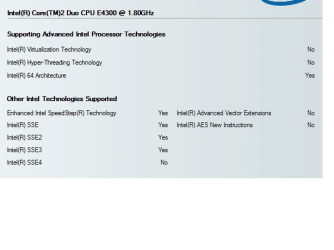
I am running Windows 7 ultimate and have installed Oracle VM VirtualBox ver. 4.1.8 with extension pack. When I run VM-VB I am not given the option to select in the OS type for Windows Server 2008 R2 64-bit. The option given is only for the 32-bit Windows Server 2008. When I try to install Server 2008 R2 the installation process crashes with the error the host machine cannot support 64-bit.
Any advice how I can install Windows 2008 R2 64-bit as a VM on a Windows 7 32-bit host??
Thanks in advance.
Not sure if this is the right forum for this, but here goes anyway.
I am running Windows 7 ultimate and have installed Oracle VM VirtualBox ver. 4.1.8 with extension pack. When I run VM-VB I am not given the option to select in the OS type for Windows Server 2008 R2 64-bit. The option given is only for the 32-bit Windows Server 2008. When I try to install Server 2008 R2 the installation process crashes with the error the host machine cannot support 64-bit.
Any advice how I can install Windows 2008 R2 64-bit as a VM on a Windows 7 32-bit host??
Thanks in advance.
My Computer
- Computer Manufacturer/Model Number
- dell
- OS
- ultimate 32 bit
- CPU
- dual core
- Memory
- 3 Gb
- Monitor(s) Displays
- 15 inch
- Hard Drives
- Drive 1: 40 GB Operating system
Drive 2: RAID 1, 80 GB Data storage


 esters boss for a new laptop:::


