Move shortcut from XP virtual to WIN7 desktop

artzelda

New member
Local time
3:49 PM
Messages
11
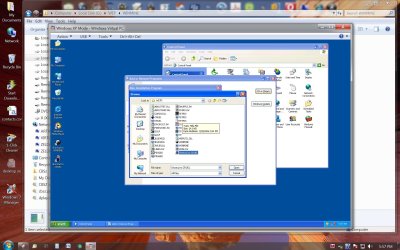
I have some old games that for some reason will not install with the XP virtual machine. I do have these games from the old installation folder and they will run in XP virtual mode. How do I or can I move these shortcuts from the XP virtual desktop to the WIN7 start menu so I can launch them from the Win7 start menu (Windows Virtual PC - Windows XP Mode Applications).
 

Attachments
  • virtual Mode Games.jpg
    virtual Mode Games.jpg
    343.5 KB · Views: 416

My Computer

Computer Manufacturer/Model Number
Dell XPS 730X
OS
Vista Ultimate
Hi artzelda,

In Virtual PC, go to My Computer and open your Windows 7 partition. Anything you copy there will be accessible from Windows 7, so copy your game folders to Program Files and then in Windows 7, navigate to the folder you just copied and right click the game .exe to create a shortcut for your Start menu.

Let me know if you have any questions.

Cheers,

Walker
Windows Outreach Team
 

My Computer

Computer Manufacturer/Model Number
HP Pavilion dm3 (netbook) *** 27" iMac (Dual-Boot)
OS
Windows 7 Home Premium (64-bit) *** Windows XP SP3 (32-bit), OSX 10.6
CPU
AMD Athlon Neo X2 1.6GHz *** Intel Core i7 Quad Core 2.8GHz
Memory
4.00 GB *** 4.00 GB
Graphics Card(s)
ATI Radeon HD 3200, 384MB *** ATI Radeon HD 4850, 1GB
Sound Card
ATI High Definition Audio *** ATI High Definition Audio
Monitor(s) Displays
LG Flatron W2053TX
Screen Resolution
1600 x 900 (monitor), 1266 x 768 (laptop) *** 2560 x 1440
Hard Drives
300 GB SATA (internal), 500 GB HP SimpleSave (external) *** 1 TB SATA (internal), 160 GB LaCie (external)
Mouse
Logitech Cordless Optical Mouse for Notebooks
Internet Speed
Broadband
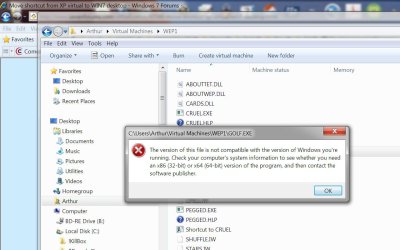
I must be doing something wrong. When in XP virtual mode I went to the file I wanted to copy (WEP1) and copied it to the virtual C partition that contains WIN7 (C:\programs in virtual mode) I then went to the actual WIN7 partition and tried to launch the app and the message states it is incompatible with WIN7. What am I doing incorrectly??
 

My Computer

Computer Manufacturer/Model Number
Dell XPS 730X
OS
Vista Ultimate
What is the exact text of the error message you're getting?
 

My Computer

Computer Manufacturer/Model Number
HP Pavilion dm3 (netbook) *** 27" iMac (Dual-Boot)
OS
Windows 7 Home Premium (64-bit) *** Windows XP SP3 (32-bit), OSX 10.6
CPU
AMD Athlon Neo X2 1.6GHz *** Intel Core i7 Quad Core 2.8GHz
Memory
4.00 GB *** 4.00 GB
Graphics Card(s)
ATI Radeon HD 3200, 384MB *** ATI Radeon HD 4850, 1GB
Sound Card
ATI High Definition Audio *** ATI High Definition Audio
Monitor(s) Displays
LG Flatron W2053TX
Screen Resolution
1600 x 900 (monitor), 1266 x 768 (laptop) *** 2560 x 1440
Hard Drives
300 GB SATA (internal), 500 GB HP SimpleSave (external) *** 1 TB SATA (internal), 160 GB LaCie (external)
Mouse
Logitech Cordless Optical Mouse for Notebooks
Internet Speed
Broadband
See attachment for error message.
 

Attachments

  • Programs X86.jpg
    Programs X86.jpg
    154.7 KB · Views: 361

My Computer

Computer Manufacturer/Model Number
Dell XPS 730X
OS
Vista Ultimate
Hi artzelda,

I apologize, I think I misunderstood what it is you wanted to do. Let me ask you a few questions:

I have some old games that for some reason will not install with the XP virtual machine. I do have these games from the old installation folder and they will run in XP virtual mode.
These two things seem contradictory to me. Could you please clarify what you mean?

How do I or can I move these shortcuts from the XP virtual desktop to the Windows 7 start menu so I can launch them from the Windows 7 start menu (Windows Virtual PC - Windows XP Mode Applications).
I'm not sure but I don't think it's possible to have shortcuts in Windows 7 that point to a program on a separate partition AND open that program in Windows XP Mode. You can always just put a shortcut on the XP Mode Desktop, and open your games from there...

Let me know if I'm completely misunderstanding you!

Cheers,

Walker
Windows Outreach Team
 

My Computer

Computer Manufacturer/Model Number
HP Pavilion dm3 (netbook) *** 27" iMac (Dual-Boot)
OS
Windows 7 Home Premium (64-bit) *** Windows XP SP3 (32-bit), OSX 10.6
CPU
AMD Athlon Neo X2 1.6GHz *** Intel Core i7 Quad Core 2.8GHz
Memory
4.00 GB *** 4.00 GB
Graphics Card(s)
ATI Radeon HD 3200, 384MB *** ATI Radeon HD 4850, 1GB
Sound Card
ATI High Definition Audio *** ATI High Definition Audio
Monitor(s) Displays
LG Flatron W2053TX
Screen Resolution
1600 x 900 (monitor), 1266 x 768 (laptop) *** 2560 x 1440
Hard Drives
300 GB SATA (internal), 500 GB HP SimpleSave (external) *** 1 TB SATA (internal), 160 GB LaCie (external)
Mouse
Logitech Cordless Optical Mouse for Notebooks
Internet Speed
Broadband
The games do not install in xp mode. I have a folder containing the installed games with the exe files. In xp mode I can run these exe files and can create a shortcut in the xp virtual window. I wanted to be able to have these shortcuts run from WIN7 but they won't paste to the WIN7 desktop or start menu. I guess I wii have to use xp only when I want play these games
.
 

My Computer

Computer Manufacturer/Model Number
Dell XPS 730X
OS
Vista Ultimate

My Computer

Computer Manufacturer/Model Number
HP Pavilion dm3 (netbook) *** 27" iMac (Dual-Boot)
OS
Windows 7 Home Premium (64-bit) *** Windows XP SP3 (32-bit), OSX 10.6
CPU
AMD Athlon Neo X2 1.6GHz *** Intel Core i7 Quad Core 2.8GHz
Memory
4.00 GB *** 4.00 GB
Graphics Card(s)
ATI Radeon HD 3200, 384MB *** ATI Radeon HD 4850, 1GB
Sound Card
ATI High Definition Audio *** ATI High Definition Audio
Monitor(s) Displays
LG Flatron W2053TX
Screen Resolution
1600 x 900 (monitor), 1266 x 768 (laptop) *** 2560 x 1440
Hard Drives
300 GB SATA (internal), 500 GB HP SimpleSave (external) *** 1 TB SATA (internal), 160 GB LaCie (external)
Mouse
Logitech Cordless Optical Mouse for Notebooks
Internet Speed
Broadband
Back
Top