Solved Stop Automatic Updates

kmorrow721

New member
Local time
12:31 PM
Messages
1
I have set Windows updates to "download but let me decide to install". Even so I frequently try to shut down my laptop and get a message that updates are being installed and Do Not Turn Off or Unplug" the computer. I often must shut down quickly because I must borad a plane or the order has been given to turn off all elctronics. Why does this keep happening when I have set it the way I did?
 

My Computer

OS
Windows 7 Professional 64 bit
Hello kmorrow, and welcome to Seven Forums.

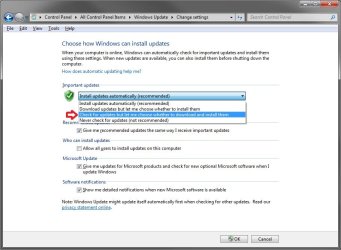
It sounds like you have the wrong option selected. Double check to make sure that you have the one below selected so that it will not be the "download and have them ready to install if you decide to instead" option instead.

Windows_Update.jpg

Hope this helps,
Shawn
 

My Computer

Computer type
PC/Desktop
Computer Manufacturer/Model Number
Self built custom
OS
64-bit Windows 11 Pro for Workstations
CPU
Intel i7-8700K OC'd to 5 GHz
Motherboard
ASUS ROG Maximus XI Formula Z390
Memory
64 GB (4x16GB) G.SKILL TridentZ RGB DDR4 3600 MHz
Graphics Card(s)
ASUS ROG-STRIX-GTX1080TI-O11G-GAMING
Sound Card
Integrated
Monitor(s) Displays
2 x Samsung Odyssey G7 27"
Screen Resolution
2560x1440
Hard Drives
1TB Samsung 990 PRO M.2,
4TB Samsung 990 PRO PRO M.2,
TerraMaster F8 SSD Plus NAS
PSU
Seasonic Prime Titanium 850W
Case
Thermaltake Core P3
Cooling
Corsair Hydro H115i
Keyboard
Logitech wireless K800
Mouse
Logitech MX Master 4
Internet Speed
2 Gb/s Download and 100 Mb/s Upload
Antivirus
Malwarebyte Anti-Malware Premium
Browser
Google Chrome
Other Info
Logitech Z625 speaker system,
Logitech BRIO 4K Pro webcam,
HP Color LaserJet Pro MFP M477fdn,
APC SMART-UPS RT 1000 XL - SURT1000XLI,
Galaxy S23 Plus phone
Required Updates
If you turn on the Update Services, in order for them to properly function some software components on your system that make up or are directly related to the Update Services will need to be updated from time to time. These updates must be performed before the service can check for, download, or install other updates. These required updates fix errors, provide ongoing improvements, and maintain compatibility with the Microsoft servers that support the service. If the Update Services are turned off, you will not receive these updates.

Update Services are "turned on" if you choose one of the following settings: (i) install updates automatically, (ii) download updates automatically and choose whether to install them, or (iii) receive notifications about updates and choose whether to download and install them. Windows Update service is "turned on" and set to "install updates automatically" when you choose the recommended option during Windows Out Of Box Experience (OOBE) setup.

If you turn on the Update Services, regardless of which "turned on" setting you have chosen, required updates to some components of the service will be downloaded and installed automatically without further notice to you. If you would prefer not to receive required updates, turn off the Update Services.

Source: Microsoft Windows Update

Starting in 2007, Microsoft used what many have called "stealth updates". Even if a user selected "Download updates but let me choose whether to install them" or "Check for updates but let me choose whether to download and install them", updates would still be installed without any other user input. If memory serves me correctly, Microsoft did this to facilitate updating Windows Update. Users found out that this practice would interfere with automatic backups, etc because computers would re-boot in the middle of a task without any warnings. If this is still the case, and I believe it is, then the only safe option for Updates is to select "Never check for updates (not recommended)". The user would then have to remember to manually check for updates on a regular basis.
 

My Computer

Computer type
Laptop
Computer Manufacturer/Model Number
Sony Vaio VPCEB47GM Laptop
OS
Win 7 Pro 64-bit
CPU
Intel i5 2.4 Ghz
Memory
8GB DDR3
Graphics Card(s)
Intel HD 3000
Sound Card
IDT High Definition
Monitor(s) Displays
15.6 WGXA Anti-Glare LED
Screen Resolution
1280x800
Hard Drives
640Gb 7200rpm
Antivirus
MSE
Browser
Opera (primary) with IE9 backup
Ah, thank you Lee.
 

My Computer

Computer type
PC/Desktop
Computer Manufacturer/Model Number
Self built custom
OS
64-bit Windows 11 Pro for Workstations
CPU
Intel i7-8700K OC'd to 5 GHz
Motherboard
ASUS ROG Maximus XI Formula Z390
Memory
64 GB (4x16GB) G.SKILL TridentZ RGB DDR4 3600 MHz
Graphics Card(s)
ASUS ROG-STRIX-GTX1080TI-O11G-GAMING
Sound Card
Integrated
Monitor(s) Displays
2 x Samsung Odyssey G7 27"
Screen Resolution
2560x1440
Hard Drives
1TB Samsung 990 PRO M.2,
4TB Samsung 990 PRO PRO M.2,
TerraMaster F8 SSD Plus NAS
PSU
Seasonic Prime Titanium 850W
Case
Thermaltake Core P3
Cooling
Corsair Hydro H115i
Keyboard
Logitech wireless K800
Mouse
Logitech MX Master 4
Internet Speed
2 Gb/s Download and 100 Mb/s Upload
Antivirus
Malwarebyte Anti-Malware Premium
Browser
Google Chrome
Other Info
Logitech Z625 speaker system,
Logitech BRIO 4K Pro webcam,
HP Color LaserJet Pro MFP M477fdn,
APC SMART-UPS RT 1000 XL - SURT1000XLI,
Galaxy S23 Plus phone
... then the only safe option for Updates is to select "Never check for updates (not recommended)". The user would then have to remember to manually check for updates on a regular basis.

Isn't a problem is it? I never update anything, only install service packs when they come along and it never hindered my PC experience...
 

My Computer

Computer type
PC/Desktop
Computer Manufacturer/Model Number
Own build
OS
Windows 7 x64 Professional
CPU
Intel Core i7-870 Lynnfield 2.93 GHz
Motherboard
Intel Whitesburg P55 LGA1156
Memory
Kingston Hyper X 1333MHz DDR3 4x4Gb
Graphics Card(s)
Nvidia GTS 250
Monitor(s) Displays
AOC Q3279VWF 31.5"
Screen Resolution
2560x1440
Hard Drives
Western Digital 1000GB Hard Drive (SATA 3.0Gb/s, 7200rpm, 32MB Cache)
Verbatim 500GB (External)
PSU
650W
Case
Coolermaster HAF 912
Cooling
Stock
Keyboard
Logitech
Mouse
Logitech
Antivirus
Avira
Browser
Firefox
Other Info
LG OptDrive 24x SATA DVDRW Lightscribe
Isn't a problem is it? I never update anything, only install service packs when they come along and it never hindered my PC experience...

I don't find it a problem to turn Windows Updates off, either. But I still do a manual check a few times a month in case Microsoft issues any Critical or Important updates, patches, etc. These updates usually identify security risks that could compromise a computer no matter how careful a user might be. Since it's usually a year or more between service packs, many folks think that's too long to wait before protecting their machines. But I'm also a firm believer in letting people do whatever works for them. ;)
 

My Computer

Computer type
Laptop
Computer Manufacturer/Model Number
Sony Vaio VPCEB47GM Laptop
OS
Win 7 Pro 64-bit
CPU
Intel i5 2.4 Ghz
Memory
8GB DDR3
Graphics Card(s)
Intel HD 3000
Sound Card
IDT High Definition
Monitor(s) Displays
15.6 WGXA Anti-Glare LED
Screen Resolution
1280x800
Hard Drives
640Gb 7200rpm
Antivirus
MSE
Browser
Opera (primary) with IE9 backup
Isn't a problem is it? I never update anything, only install service packs when they come along and it never hindered my PC experience...

I don't find it a problem to turn Windows Updates off, either. But I still do a manual check a few times a month in case Microsoft issues any Critical or Important updates, patches, etc. These updates usually identify security risks that could compromise a computer no matter how careful a user might be. Since it's usually a year or more between service packs, many folks think that's too long to wait before protecting their machines. But I'm also a firm believer in letting people do whatever works for them. ;)
Absolutely agree. I never bothered much with updating regularly but obviously every day that goes by is an experience. Perhaps I should start... ;)
 

My Computer

Computer type
PC/Desktop
Computer Manufacturer/Model Number
Own build
OS
Windows 7 x64 Professional
CPU
Intel Core i7-870 Lynnfield 2.93 GHz
Motherboard
Intel Whitesburg P55 LGA1156
Memory
Kingston Hyper X 1333MHz DDR3 4x4Gb
Graphics Card(s)
Nvidia GTS 250
Monitor(s) Displays
AOC Q3279VWF 31.5"
Screen Resolution
2560x1440
Hard Drives
Western Digital 1000GB Hard Drive (SATA 3.0Gb/s, 7200rpm, 32MB Cache)
Verbatim 500GB (External)
PSU
650W
Case
Coolermaster HAF 912
Cooling
Stock
Keyboard
Logitech
Mouse
Logitech
Antivirus
Avira
Browser
Firefox
Other Info
LG OptDrive 24x SATA DVDRW Lightscribe
I'm surprised...my Windows Update is set to "notify me before downloading or installing updates," and I've never had a "drive-by update" sprung on me yet.

Maybe using Microsoft Update instead of just Windows Update has something to do with it.
 

My Computer

Computer type
PC/Desktop
Computer Manufacturer/Model Number
Custom-built
OS
Windows 7 Professional SP1 32-bit
CPU
Intel Core 2 Duo E6600 2.4GHz
Motherboard
Asus PL5D2
Memory
4GB DDR2-667 (4x1GB in dual-channel config)
Graphics Card(s)
nVidia GeForce 9800 GT
Sound Card
Creative X-Fi XtremeMusic
Monitor(s) Displays
Acer P236H
Screen Resolution
1920x1200 (DVI)
Hard Drives
OCZ SSD Vertex Plus 60GB SATA (Firmware 3.55), 64MB cache
Hitachi HD321KJ SATA, 320GB, 7200rpm, 16MB cache
PSU
Antec TruePower 2.0
Case
Cooler Master Centurion
Cooling
Too many fans
Keyboard
Standard
Mouse
Microsoft wireless optical mouse
Internet Speed
AT&T U-verse (18mbit/sec)
Antivirus
Microsoft Security Essentials
Browser
Firefox
Other Info
Other devices:
Compaq CQ-60 laptop
Google Nexus 7 (2012) tablet
Nvidia SHIELD tablet (US/LTE)
Hardkernel ODROID-XU single-board computer (Samsung Exynos 5420)
Required Updates
If you turn on the Update Services, in order for them to properly function some software components on your system that make up or are directly related to the Update Services will need to be updated from time to time. These updates must be performed before the service can check for, download, or install other updates. These required updates fix errors, provide ongoing improvements, and maintain compatibility with the Microsoft servers that support the service. If the Update Services are turned off, you will not receive these updates.

Update Services are "turned on" if you choose one of the following settings: (i) install updates automatically, (ii) download updates automatically and choose whether to install them, or (iii) receive notifications about updates and choose whether to download and install them. Windows Update service is "turned on" and set to "install updates automatically" when you choose the recommended option during Windows Out Of Box Experience (OOBE) setup.

If you turn on the Update Services, regardless of which "turned on" setting you have chosen, required updates to some components of the service will be downloaded and installed automatically without further notice to you. If you would prefer not to receive required updates, turn off the Update Services.
Source: Microsoft Windows Update

Starting in 2007, Microsoft used what many have called "stealth updates". Even if a user selected "Download updates but let me choose whether to install them" or "Check for updates but let me choose whether to download and install them", updates would still be installed without any other user input. If memory serves me correctly, Microsoft did this to facilitate updating Windows Update. Users found out that this practice would interfere with automatic backups, etc because computers would re-boot in the middle of a task without any warnings. If this is still the case, and I believe it is, then the only safe option for Updates is to select "Never check for updates (not recommended)". The user would then have to remember to manually check for updates on a regular basis.

That's one of those things that's always bugged the hell out of me, and it's nice to finally see a reason for it.
I was all set to make my own thread on this, so i'm glad I looked around first.
 

My Computer

OS
Win 7 Ultimate x64
I'm surprised...my Windows Update is set to "notify me before downloading or installing updates," and I've never had a "drive-by update" sprung on me yet.

Maybe using Microsoft Update instead of just Windows Update has something to do with it.
One of the things I can't stand about the updates, is that even when i've selected the boxes for which updates to apply, it won't give me a popup.
I have to open up the updates after they've downloaded, to make them install right then.
And the times i've forgotten to do that, it installs them when I boot down my machine, which smokes my shorts because i'm always in the middle of leaving then (my computer is only on when i'm home), and the last thing I want to do then is wait for the updates.
You would think a simple popup would be in order, but I guess that would have been too much work for the team that coded the updater.
 

My Computer

OS
Win 7 Ultimate x64
Back
Top