Solved Settings are managed by your administrator - PC was part of a Domain

boweasel

New member
Power User
Local time
5:54 PM
Messages
678
This Dell Optiflex 390 W7 Pro 64 SP1 tower was not used for years, but now the owners want to use it. It was once part of a domain and NOBODY had a clue about any of the passwords. I used a Dell disk to get into the command prompt and reset the Administrator pswd. Then I logged onto that account and reset all the other account pswds. Then I removed the computer from the domain.

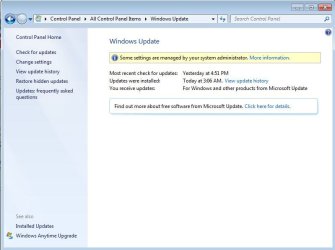
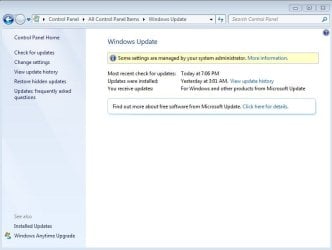
The problem is that the system needs to be updated and I'm getting the following screen no matter what admin account I sign on with.

I have gone through the options in the tutorial Windows Update - Enable or Disable Access - Windows 7 Help Forums but they've made no difference.

I put this in the general section since I'm sure this affects more than just the Windows Updates.
 

Attachments

  • Capture1.JPG
    Capture1.JPG
    46.4 KB · Views: 1

My Computer My Computer

Computer type
Laptop
OS
Windows 7 home premium 64 bit
CPU
AMD K10
Motherboard
Hewlett-Packard 1444 (Socket S1G4)
Memory
3.00GB Dual-Channel DDR3 @ 532MHz
Graphics Card(s)
ATI AMD M880G with ATI Mobility Radeon HD 4250 (HP)
Sound Card
Realtek
Screen Resolution
1366 x 768
Hard Drives
465GB Western Digital
Antivirus
MSE

My Computer My Computer

Computer type
PC/Desktop
Computer Manufacturer/Model Number
Home made Desktop
OS
Windows 10 Pro. 64/ version 1709 Windows 7 Pro/64
CPU
Intel i7-6800K @ 4.3
Motherboard
ASUS X-99 Deluxe II
Memory
Corsair Platinum 16 gig @2400
Graphics Card(s)
EVGA GTX 1070 OC
Monitor(s) Displays
Asus 27" LED LCD/VE278Q
Screen Resolution
1920-1080 or 1280-720 HDMI
Hard Drives
INTEL SSD 730-240 Gb Sata 3.0/
PSU
EVGA Platium 1200W
Case
Phanteks Luxe Tempered Glass 8 fans/ one radiator
Cooling
XSPC/ Water Cooled CPU
Keyboard
Das 4 Professional
Mouse
Logitech M705/MX Anywhere 2-S
Internet Speed
100 mbits
Antivirus
Microsoft Security Essentials/ Malwarebytes Premium 3.0/ SAS
Browser
I.E. 11 default/Firefox/ ISP Time Warner Cable/Spectrum
Other Info
LG BluRay Burner/
Sound system-KLipsch-THX/
Icy Dock ssd Hot Swap bays.

My Computer My Computer

Computer type
Laptop
Computer Manufacturer/Model Number
ASUS
OS
Microsoft Windows 7 Home Premium 64-bit 7601 Multiprocessor Free Service Pack 1
CPU
AMD C-60 APU with Radeon(tm) HD Graphics
Motherboard
ASUSTeK COMPUTER INC. X501U
Memory
4.00 GB
Graphics Card(s)
AMD Radeon HD 6290 Graphics
Sound Card
(1) AMD High Definition Audio Device (2) Realtek High Defi
Screen Resolution
1366 x 768 x 32 bits (4294967296 colors) @ 60 Hz
Hard Drives
Hitachi HTS545050A7E380 SATA Disk Device
Antivirus
Comodo CIS & FW, SecureAplus App Whitelisting, Threatfire
Browser
Cyberfox 64bit, Opera 64bit, Airfox
Other Info
Spy-The-Spy, HitmanPro.Alert, Norton Connect Safe, MJRegWatcher, BitDefender TrafficLight, Voodoo Shield, Zemana AntiMalware
Because this computer was on a domain, let see what kind of license it has from Microsoft.

It might be looking for the domain server for updating.

Please complete this tutorial by Brink.

Windows Genuine and Activation Issue Posting Instructions - Windows 7 Help Forums

Jack


Jack

Here is the report
Code:
Diagnostic Report (1.9.0027.0):
-----------------------------------------
Windows Validation Data-->

Validation Code: 0
Cached Online Validation Code: 0x0
Windows Product Key: *****-*****-M3DJT-4J3WC-733WD
Windows Product Key Hash: xo+ajVSpae7/4VoZjS7m6JL0f3A=
Windows Product ID: 00371-OEM-8992671-00524
Windows Product ID Type: 2
Windows License Type: OEM SLP
Windows OS version: 6.1.7601.2.00010100.1.0.048
ID: {C30448B5-1256-4ECB-8CC6-7691DB453F57}(3)
Is Admin: Yes
TestCab: 0x0
LegitcheckControl ActiveX: N/A, hr = 0x80070002
Signed By: N/A, hr = 0x80070002
Product Name: Windows 7 Professional
Architecture: 0x00000009
Build lab: 7601.win7sp1_ldr.170307-1800
TTS Error: 
Validation Diagnostic: 
Resolution Status: N/A

Vista WgaER Data-->
ThreatID(s): N/A, hr = 0x80070002
Version: N/A, hr = 0x80070002

Windows XP Notifications Data-->
Cached Result: N/A, hr = 0x80070002
File Exists: No
Version: N/A, hr = 0x80070002
WgaTray.exe Signed By: N/A, hr = 0x80070002
WgaLogon.dll Signed By: N/A, hr = 0x80070002

OGA Notifications Data-->
Cached Result: N/A, hr = 0x80070002
Version: N/A, hr = 0x80070002
OGAExec.exe Signed By: N/A, hr = 0x80070002
OGAAddin.dll Signed By: N/A, hr = 0x80070002

OGA Data-->
Office Status: 109 N/A
OGA Version: N/A, 0x80070002
Signed By: N/A, hr = 0x80070002
Office Diagnostics: 025D1FF3-364-80041010_025D1FF3-229-80041010_025D1FF3-230-1_025D1FF3-517-80040154_025D1FF3-237-80040154_025D1FF3-238-2_025D1FF3-244-80070002_025D1FF3-258-3

Browser Data-->
Proxy settings: N/A
User Agent: Mozilla/4.0 (compatible; MSIE 8.0; Win32)
Default Browser: C:\Program Files (x86)\Google\Chrome\Application\chrome.exe
Download signed ActiveX controls: Prompt
Download unsigned ActiveX controls: Disabled
Run ActiveX controls and plug-ins: Allowed
Initialize and script ActiveX controls not marked as safe: Disabled
Allow scripting of Internet Explorer Webbrowser control: Disabled
Active scripting: Allowed
Script ActiveX controls marked as safe for scripting: Allowed

File Scan Data-->

Other data-->
Office Details: <GenuineResults><MachineData><UGUID>{C30448B5-1256-4ECB-8CC6-7691DB453F57}</UGUID><Version>1.9.0027.0</Version><OS>6.1.7601.2.00010100.1.0.048</OS><Architecture>x64</Architecture><PKey>*****-*****-*****-*****-733WD</PKey><PID>00371-OEM-8992671-00524</PID><PIDType>2</PIDType><SID>S-1-5-21-207602415-1083488805-2474201603</SID><SYSTEM><Manufacturer>Dell Inc.</Manufacturer><Model>OptiPlex 390</Model></SYSTEM><BIOS><Manufacturer>Dell Inc.</Manufacturer><Version>A03</Version><SMBIOSVersion major="2" minor="6"/><Date>20111026000000.000000+000</Date></BIOS><HWID>4C013B07018400FE</HWID><UserLCID>0409</UserLCID><SystemLCID>0409</SystemLCID><TimeZone>Eastern Standard Time(GMT-05:00)</TimeZone><iJoin>0</iJoin><SBID><stat>3</stat><msppid></msppid><name></name><model></model></SBID><OEM><OEMID>DELL  </OEMID><OEMTableID>CBX3   </OEMTableID></OEM><GANotification/></MachineData><Software><Office><Result>109</Result><Products/><Applications/></Office></Software></GenuineResults>  

Spsys.log Content: 0x80070002

Licensing Data-->
Software licensing service version: 6.1.7601.17514

Name: Windows(R) 7, Professional edition
Description: Windows Operating System - Windows(R) 7, OEM_SLP channel
Activation ID: 50e329f7-a5fa-46b2-85fd-f224e5da7764
Application ID: 55c92734-d682-4d71-983e-d6ec3f16059f
Extended PID: 00371-00178-926-700524-02-1033-7601.0000-0302012
Installation ID: 008920650440198706723514208682873522352103793011387742
Processor Certificate URL: [url="http://go.microsoft.com/fwlink/?LinkID=88338"]http://go.microsoft.com/fwlink/?LinkID=88338[/url]
Machine Certificate URL: [url="http://go.microsoft.com/fwlink/?LinkID=88339"]http://go.microsoft.com/fwlink/?LinkID=88339[/url]
Use License URL: [url="http://go.microsoft.com/fwlink/?LinkID=88341"]http://go.microsoft.com/fwlink/?LinkID=88341[/url]
Product Key Certificate URL: [url="http://go.microsoft.com/fwlink/?LinkID=88340"]http://go.microsoft.com/fwlink/?LinkID=88340[/url]
Partial Product Key: 733WD
License Status: Licensed
Remaining Windows rearm count: 2
Trusted time: 5/1/2017 9:27:36 PM

Windows Activation Technologies-->
HrOffline: 0x00000000
HrOnline: 0x00000000
HealthStatus: 0x0000000000000000
Event Time Stamp: 4:29:2017 16:56
ActiveX: Registered, Version: 7.1.7600.16395
Admin Service: Registered, Version: 7.1.7600.16395
HealthStatus Bitmask Output:


HWID Data-->
HWID Hash Current: NAAAAAEABAABAAEAAAACAAAAAgABAAEA6GEsexp2fBRK3WI0EDQufHoEmohyI7JawAoucw==

OEM Activation 1.0 Data-->
N/A

OEM Activation 2.0 Data-->
BIOS valid for OA 2.0: yes
Windows marker version: 0x20001
OEMID and OEMTableID Consistent: yes
BIOS Information: 
  ACPI Table Name	OEMID Value	OEMTableID Value
  APIC			DELL  		CBX3   
  FACP			DELL  		CBX3   
  HPET			A M I 		 PCHHPET
  BOOT			DELL  		CBX3    
  MCFG			DELL  		SNDYBRDG
  SSDT			PmRef		Cpu0Ist
  SSDT			PmRef		Cpu0Ist
  DMAR			INTEL 		SNB 
  SLIC			DELL  		CBX3

 
Last edited by a moderator:

My Computer My Computer

Computer type
Laptop
OS
Windows 7 home premium 64 bit
CPU
AMD K10
Motherboard
Hewlett-Packard 1444 (Socket S1G4)
Memory
3.00GB Dual-Channel DDR3 @ 532MHz
Graphics Card(s)
ATI AMD M880G with ATI Mobility Radeon HD 4250 (HP)
Sound Card
Realtek
Screen Resolution
1366 x 768
Hard Drives
465GB Western Digital
Antivirus
MSE

Attachments

  • Capture3.JPG
    Capture3.JPG
    38.7 KB · Views: 59

My Computer My Computer

Computer type
Laptop
OS
Windows 7 home premium 64 bit
CPU
AMD K10
Motherboard
Hewlett-Packard 1444 (Socket S1G4)
Memory
3.00GB Dual-Channel DDR3 @ 532MHz
Graphics Card(s)
ATI AMD M880G with ATI Mobility Radeon HD 4250 (HP)
Sound Card
Realtek
Screen Resolution
1366 x 768
Hard Drives
465GB Western Digital
Antivirus
MSE
windows 7 - Removing a computer from the domain - Server Fault

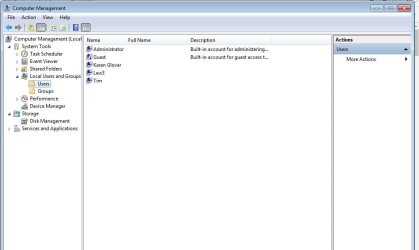
It is important that you have at least one account that is a local administrator and I would stop using the accounts that are domain accounts. You cannot perform these steps if you don't have access to an admin account. You can check the accounts using computer management. administrator is probably local but without a peek at users under computer management I couldn't tell you for sure. Right click on computer and click on manage. Expand local user's and then click on users. Post a screenshot. After completing the steps in the article right click on command prompt and select run as administrator. Type in gpupdate and hit enter.

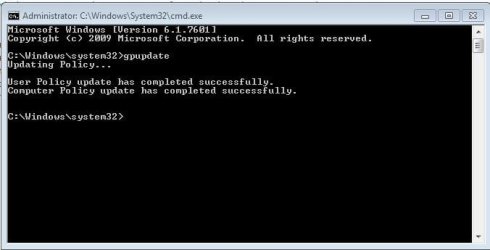
If the group policy update was successful you will see this.

C:\Windows\system32>gpupdate
Updating Policy...

User Policy update has completed successfully.
Computer Policy update has completed successfully.

Finally reboot the computer one more time.
 

My Computers My Computers

System One System Two

windows 7 - Removing a computer from the domain - Server Fault

It is important that you have at least one account that is a local administrator and I would stop using the accounts that are domain accounts. You cannot perform these steps if you don't have access to an admin account. You can check the accounts using computer management. administrator is probably local but without a peek at users under computer management I couldn't tell you for sure. Right click on computer and click on manage. Expand local user's and then click on users. Post a screenshot. After completing the steps in the article right click on command prompt and select run as administrator. Type in gpupdate and hit enter.

If the group policy update was successful you will see this.


Finally reboot the computer one more time.
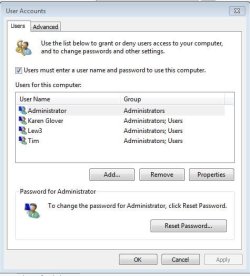
Thanks for the reply. I believe I'd already successfully removed the PC from the domain. Included is a screen shot of the System screen along with the results of the 2 other suggestions. did not read the article since it would seem that the computer is no longer part of any domain, unless I'm missing something.

I did reboot after running gpupdate as an admin just to see if that command itself did anything. It did not - I get the same screen as in post #1.
 

Attachments

  • Capture4.JPG
    Capture4.JPG
    45.9 KB · Views: 1
  • Capture5.JPG
    Capture5.JPG
    28.2 KB · Views: 55
  • Capture6.JPG
    Capture6.JPG
    59.2 KB · Views: 2
Last edited:

My Computer My Computer

Computer type
Laptop
OS
Windows 7 home premium 64 bit
CPU
AMD K10
Motherboard
Hewlett-Packard 1444 (Socket S1G4)
Memory
3.00GB Dual-Channel DDR3 @ 532MHz
Graphics Card(s)
ATI AMD M880G with ATI Mobility Radeon HD 4250 (HP)
Sound Card
Realtek
Screen Resolution
1366 x 768
Hard Drives
465GB Western Digital
Antivirus
MSE
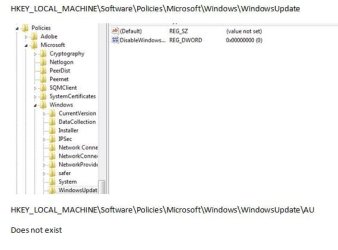
Please post contents of the following registry keys including sub-keys so that we can check them:

HKEY_LOCAL_MACHINE\Software\Policies\Microsoft\Windows\WindowsUpdate

HKEY_LOCAL_MACHINE\Software\Policies\Microsoft\Windows\WindowsUpdate\AU

If the AU subkey exists it's likely to be the problem as mentioned in the link in Post #3

   Note

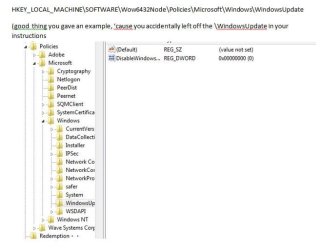
NOTE: For 64-bit editions of Windows you also need to check following Registry key:

HKEY_LOCAL_MACHINE\SOFTWARE\Wow6432Node\Policies\Microsoft\Windows


Here is mine for comparison. There are no AU subkeys.

Code:
Windows Registry Editor Version 5.00

[HKEY_LOCAL_MACHINE\SOFTWARE\Policies\Microsoft\Windows\WindowsUpdate]
"DisableOSUpgrade"=dword:00000001

Code:
Windows Registry Editor Version 5.00

[HKEY_LOCAL_MACHINE\SOFTWARE\Wow6432Node\Policies\Microsoft\Windows\WindowsUpdate]
"DisableOSUpgrade"=dword:00000001

Also read:
Configure Clients in a Non Active Directory Environment
 
Last edited:

My Computer My Computer

Computer type
Laptop
Computer Manufacturer/Model Number
ASUS
OS
Microsoft Windows 7 Home Premium 64-bit 7601 Multiprocessor Free Service Pack 1
CPU
AMD C-60 APU with Radeon(tm) HD Graphics
Motherboard
ASUSTeK COMPUTER INC. X501U
Memory
4.00 GB
Graphics Card(s)
AMD Radeon HD 6290 Graphics
Sound Card
(1) AMD High Definition Audio Device (2) Realtek High Defi
Screen Resolution
1366 x 768 x 32 bits (4294967296 colors) @ 60 Hz
Hard Drives
Hitachi HTS545050A7E380 SATA Disk Device
Antivirus
Comodo CIS & FW, SecureAplus App Whitelisting, Threatfire
Browser
Cyberfox 64bit, Opera 64bit, Airfox
Other Info
Spy-The-Spy, HitmanPro.Alert, Norton Connect Safe, MJRegWatcher, BitDefender TrafficLight, Voodoo Shield, Zemana AntiMalware
Please post contents of the following registry keys including sub-keys so that we can check them:

HKEY_LOCAL_MACHINE\Software\Policies\Microsoft\Windows\WindowsUpdate

HKEY_LOCAL_MACHINE\Software\Policies\Microsoft\Windows\WindowsUpdate\AU

If the AU subkey exists it's likely to be the problem as mentioned in the link in Post #3

   Note

NOTE: For 64-bit editions of Windows you also need to check following Registry key:

HKEY_LOCAL_MACHINE\SOFTWARE\Wow6432Node\Policies\Microsoft\Windows


Here is mine for comparison. There are no AU subkeys.

Code:
Windows Registry Editor Version 5.00

[HKEY_LOCAL_MACHINE\SOFTWARE\Policies\Microsoft\Windows\WindowsUpdate]
"DisableOSUpgrade"=dword:00000001

Code:
Windows Registry Editor Version 5.00

[HKEY_LOCAL_MACHINE\SOFTWARE\Wow6432Node\Policies\Microsoft\Windows\WindowsUpdate]
"DisableOSUpgrade"=dword:00000001

Also read:
Configure Clients in a Non Active Directory Environment

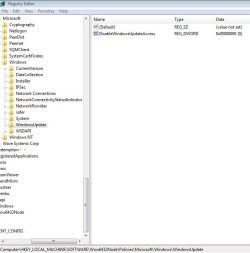
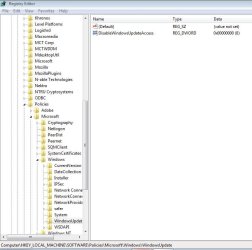
This seems to be the problem....
 

Attachments

  • rega.JPG
    rega.JPG
    28 KB · Views: 48
  • regb.JPG
    regb.JPG
    35.8 KB · Views: 49

My Computer My Computer

Computer type
Laptop
OS
Windows 7 home premium 64 bit
CPU
AMD K10
Motherboard
Hewlett-Packard 1444 (Socket S1G4)
Memory
3.00GB Dual-Channel DDR3 @ 532MHz
Graphics Card(s)
ATI AMD M880G with ATI Mobility Radeon HD 4250 (HP)
Sound Card
Realtek
Screen Resolution
1366 x 768
Hard Drives
465GB Western Digital
Antivirus
MSE
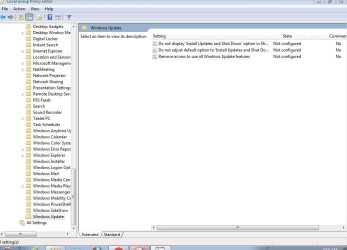
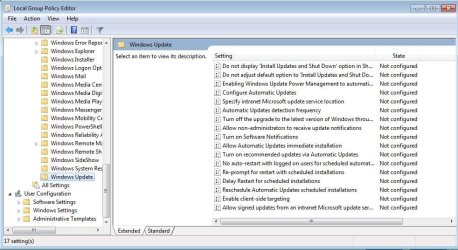
I was hoping that command would force windows to pull from local group policy rather than domain policy. From start menu type in gpedit.msc to open group policy editor. In the window that opens browse to computer configuration > administrative templates > Windows components > Windows update. Try setting all of those settings to not configured. Do the same thing for user configuration > administrative templates > Windows components > Windows update.
 

My Computers My Computers

System One System Two

I was hoping that command would force windows to pull from local group policy rather than domain policy. From start menu type in gpedit.msc to open group policy editor. In the window that opens browse to computer configuration > administrative templates > Windows components > Windows update. Try setting all of those settings to not configured. Do the same thing for user configuration > administrative templates > Windows components > Windows update.
Both of them already set to Not Configured
 

Attachments

  • gpedit2.JPG
    gpedit2.JPG
    69.5 KB · Views: 0
  • gpedit.JPG
    gpedit.JPG
    97.3 KB · Views: 0

My Computer My Computer

Computer type
Laptop
OS
Windows 7 home premium 64 bit
CPU
AMD K10
Motherboard
Hewlett-Packard 1444 (Socket S1G4)
Memory
3.00GB Dual-Channel DDR3 @ 532MHz
Graphics Card(s)
ATI AMD M880G with ATI Mobility Radeon HD 4250 (HP)
Sound Card
Realtek
Screen Resolution
1366 x 768
Hard Drives
465GB Western Digital
Antivirus
MSE
This seems to be the problem....

Hello boweasel,

The "some settings are managed" message you see in Windows Update is just an indicator that you have a policy enabled affecting Windows Update.

The policy you have set in the registry location in your post above is most likely the source of this message.

Deleting that DWORD and restarting the computer should clear the message unless you have some other policy enabled somewhere else in the registry.
 

My Computer My Computer

Computer type
PC/Desktop
Computer Manufacturer/Model Number
Self built custom
OS
64-bit Windows 11 Pro for Workstations
CPU
Intel i7-8700K OC'd to 5 GHz
Motherboard
ASUS ROG Maximus XI Formula Z390
Memory
64 GB (4x16GB) G.SKILL TridentZ RGB DDR4 3600 MHz
Graphics Card(s)
ASUS ROG-STRIX-GTX1080TI-O11G-GAMING
Sound Card
Integrated
Monitor(s) Displays
2 x Samsung Odyssey G7 27"
Screen Resolution
2560x1440
Hard Drives
1TB Samsung 990 PRO M.2,
4TB Samsung 990 PRO PRO M.2,
TerraMaster F8 SSD Plus NAS
PSU
Seasonic Prime Titanium 850W
Case
Thermaltake Core P3
Cooling
Corsair Hydro H115i
Keyboard
Logitech wireless K800
Mouse
Logitech MX Master 4
Internet Speed
2 Gb/s Download and 100 Mb/s Upload
Antivirus
Malwarebyte Anti-Malware Premium
Browser
Google Chrome
Other Info
Logitech Z625 speaker system,
Logitech BRIO 4K Pro webcam,
HP Color LaserJet Pro MFP M477fdn,
APC SMART-UPS RT 1000 XL - SURT1000XLI,
Galaxy S23 Plus phone
Hello boweasel,

The "some settings are managed" message you see in Windows Update is just an indicator that you have a policy enabled affecting Windows Update.

The policy you have set in the registry location in your post above is most likely the source of this message.

Deleting that DWORD and restarting the computer should clear the message unless you have some other policy enabled somewhere else in the registry.
So I should be deleting the follwing two Dwords from the registry?

I was confused by Callender's Post#8. On his note for the 64 bit edition he seemed to have left out another subkey. And then in his example he listed
[HKEY_LOCAL_MACHINE\SOFTWARE\Policies\Microsoft\Windows\WindowsUpdate] "DisableOSUpgrade"=dword:00000001
I don't know if he meant to have the DisableOSUpgrade, but my problem is the DisableWindowsUpdateAccess.

I created a Restore Point then did delete the DisableWindowsUpdateAccess from the[HKEY_LOCAL_MACHINE\SOFTWARE\Wow6432Node\Policies\Microsoft\Windows\WindowsUpdate]which also deleted that same Dword from the other registry point. I rebooted and saw no change. Thinking I might have misunderstood what you wanted me to do I restored the PC. So I don't know if some other policy setting is screwing things up or if I did something wrong.
 

Attachments

  • reg1.JPG
    reg1.JPG
    45.7 KB · Views: 31
  • reg2.JPG
    reg2.JPG
    58.6 KB · Views: 30

My Computer My Computer

Computer type
Laptop
OS
Windows 7 home premium 64 bit
CPU
AMD K10
Motherboard
Hewlett-Packard 1444 (Socket S1G4)
Memory
3.00GB Dual-Channel DDR3 @ 532MHz
Graphics Card(s)
ATI AMD M880G with ATI Mobility Radeon HD 4250 (HP)
Sound Card
Realtek
Screen Resolution
1366 x 768
Hard Drives
465GB Western Digital
Antivirus
MSE
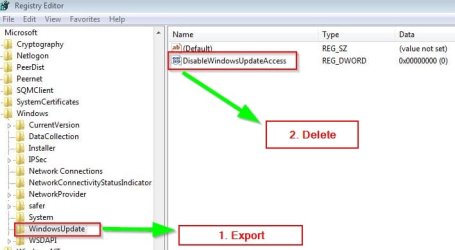
Export and save reg file first. Right click each registry key and export. Then delete DWORD(s) in both locations. Reboot and test.

WU.jpg
 
Last edited:

My Computer My Computer

Computer type
Laptop
Computer Manufacturer/Model Number
ASUS
OS
Microsoft Windows 7 Home Premium 64-bit 7601 Multiprocessor Free Service Pack 1
CPU
AMD C-60 APU with Radeon(tm) HD Graphics
Motherboard
ASUSTeK COMPUTER INC. X501U
Memory
4.00 GB
Graphics Card(s)
AMD Radeon HD 6290 Graphics
Sound Card
(1) AMD High Definition Audio Device (2) Realtek High Defi
Screen Resolution
1366 x 768 x 32 bits (4294967296 colors) @ 60 Hz
Hard Drives
Hitachi HTS545050A7E380 SATA Disk Device
Antivirus
Comodo CIS & FW, SecureAplus App Whitelisting, Threatfire
Browser
Cyberfox 64bit, Opera 64bit, Airfox
Other Info
Spy-The-Spy, HitmanPro.Alert, Norton Connect Safe, MJRegWatcher, BitDefender TrafficLight, Voodoo Shield, Zemana AntiMalware
Export and save reg file first. Right click each registry key and export. Then delete DWORD(s) in both locations. Reboot and test.
Done. No change
 

Attachments

  • Capture1a.JPG
    Capture1a.JPG
    43.1 KB · Views: 0

My Computer My Computer

Computer type
Laptop
OS
Windows 7 home premium 64 bit
CPU
AMD K10
Motherboard
Hewlett-Packard 1444 (Socket S1G4)
Memory
3.00GB Dual-Channel DDR3 @ 532MHz
Graphics Card(s)
ATI AMD M880G with ATI Mobility Radeon HD 4250 (HP)
Sound Card
Realtek
Screen Resolution
1366 x 768
Hard Drives
465GB Western Digital
Antivirus
MSE
EUREKA!!
On a whim, I went into the Windows Update - Enable or Disable Access tutorial and re-downloaded Option 1 - Using a REG File Download
1. To Enable Windows Update Access for Only Current User

Apparently I had to not only delete those Dwords, but also use that batch file to change group policy. I HAD done each of them separately to no avail.
 

My Computer My Computer

Computer type
Laptop
OS
Windows 7 home premium 64 bit
CPU
AMD K10
Motherboard
Hewlett-Packard 1444 (Socket S1G4)
Memory
3.00GB Dual-Channel DDR3 @ 532MHz
Graphics Card(s)
ATI AMD M880G with ATI Mobility Radeon HD 4250 (HP)
Sound Card
Realtek
Screen Resolution
1366 x 768
Hard Drives
465GB Western Digital
Antivirus
MSE
Okay try the attached reg file:


File contents:

Code:
Windows Registry Editor Version 5.00

[HKEY_LOCAL_MACHINE\SOFTWARE\Policies\Microsoft\Windows\WindowsUpdate\AU]
"AUOptions"=dword:00000005

[HKEY_LOCAL_MACHINE\SOFTWARE\Wow6432Node\Policies\Microsoft\Windows\WindowsUpdate\AU]
"AUOptions"=dword:00000005

Download to desktop > Right Click file > Choose "Merge"

Reboot and test.
 

My Computer My Computer

Computer type
Laptop
Computer Manufacturer/Model Number
ASUS
OS
Microsoft Windows 7 Home Premium 64-bit 7601 Multiprocessor Free Service Pack 1
CPU
AMD C-60 APU with Radeon(tm) HD Graphics
Motherboard
ASUSTeK COMPUTER INC. X501U
Memory
4.00 GB
Graphics Card(s)
AMD Radeon HD 6290 Graphics
Sound Card
(1) AMD High Definition Audio Device (2) Realtek High Defi
Screen Resolution
1366 x 768 x 32 bits (4294967296 colors) @ 60 Hz
Hard Drives
Hitachi HTS545050A7E380 SATA Disk Device
Antivirus
Comodo CIS & FW, SecureAplus App Whitelisting, Threatfire
Browser
Cyberfox 64bit, Opera 64bit, Airfox
Other Info
Spy-The-Spy, HitmanPro.Alert, Norton Connect Safe, MJRegWatcher, BitDefender TrafficLight, Voodoo Shield, Zemana AntiMalware
Thanks for letting us know the fix.
 

My Computer My Computer

Computer type
Laptop
Computer Manufacturer/Model Number
ASUS
OS
Microsoft Windows 7 Home Premium 64-bit 7601 Multiprocessor Free Service Pack 1
CPU
AMD C-60 APU with Radeon(tm) HD Graphics
Motherboard
ASUSTeK COMPUTER INC. X501U
Memory
4.00 GB
Graphics Card(s)
AMD Radeon HD 6290 Graphics
Sound Card
(1) AMD High Definition Audio Device (2) Realtek High Defi
Screen Resolution
1366 x 768 x 32 bits (4294967296 colors) @ 60 Hz
Hard Drives
Hitachi HTS545050A7E380 SATA Disk Device
Antivirus
Comodo CIS & FW, SecureAplus App Whitelisting, Threatfire
Browser
Cyberfox 64bit, Opera 64bit, Airfox
Other Info
Spy-The-Spy, HitmanPro.Alert, Norton Connect Safe, MJRegWatcher, BitDefender TrafficLight, Voodoo Shield, Zemana AntiMalware
EUREKA!!
On a whim, I went into the Windows Update - Enable or Disable Access tutorial and re-downloaded Option 1 - Using a REG File Download
1. To Enable Windows Update Access for Only Current User

Apparently I had to not only delete those Dwords, but also use that batch file to change group policy. I HAD done each of them separately to no avail.

Great news. :party:
 

My Computer My Computer

Computer type
PC/Desktop
Computer Manufacturer/Model Number
Self built custom
OS
64-bit Windows 11 Pro for Workstations
CPU
Intel i7-8700K OC'd to 5 GHz
Motherboard
ASUS ROG Maximus XI Formula Z390
Memory
64 GB (4x16GB) G.SKILL TridentZ RGB DDR4 3600 MHz
Graphics Card(s)
ASUS ROG-STRIX-GTX1080TI-O11G-GAMING
Sound Card
Integrated
Monitor(s) Displays
2 x Samsung Odyssey G7 27"
Screen Resolution
2560x1440
Hard Drives
1TB Samsung 990 PRO M.2,
4TB Samsung 990 PRO PRO M.2,
TerraMaster F8 SSD Plus NAS
PSU
Seasonic Prime Titanium 850W
Case
Thermaltake Core P3
Cooling
Corsair Hydro H115i
Keyboard
Logitech wireless K800
Mouse
Logitech MX Master 4
Internet Speed
2 Gb/s Download and 100 Mb/s Upload
Antivirus
Malwarebyte Anti-Malware Premium
Browser
Google Chrome
Other Info
Logitech Z625 speaker system,
Logitech BRIO 4K Pro webcam,
HP Color LaserJet Pro MFP M477fdn,
APC SMART-UPS RT 1000 XL - SURT1000XLI,
Galaxy S23 Plus phone
Okay so here is the issue:

If this machine WAS part of a domain and it is now no longer -- unfortunately, the GPOs (group policy objects) do not automatically revert to the defaults, yes you can restore defaults (I do not recall off the top of my head) -- but there are two ways to remove the old GPO pointers -- one is through GPEDIT.MSC (which i STRONGLY recommend) or regedit (I don't care for that too much because if gpupdate is ran again, it would reapply the old domain policies)

So if you follow where I am going for Group Policy Editor:

1) Click Start
2) in the search bar type "gpedit.msc" (no quotes) and hit enter

A console snap in will open --- this is the local machine GP editor -

3) In the left pane look for the section called "Computer Configuration" and in that group double-click "Administrative Templates" (DO NOT DO THIS UNDER USER CONFIGURATION)

4) In the Right Pane - Double Click the folder that says "Windows Components"
5) In the Right Pane - Double Click the folder that says "Windows Update"
6) In the Right Pane - Note every setting listed that has a setting state as "Enabled" or "Disabled"
7) In each of these settings, double click to open that property, and click the radio button in the upper left corner to "Not Configured" and click on "OK"
8) Repeat until each setting says "not configured"

9) Close the Local Group Policy Editor
10) Click on Start again
11) type "gpupdate /force" (no quotes) -- a command window will appear briefly, when it disappears, I would recommend at that point restarting the computer (that way the Windows Update services restart and any of the legacy pointers to your managed settings are wiped


Then retry looking into the settings, you should be able to configure them freely
 

My Computer My Computer

Computer type
PC/Desktop
OS
Windows 10 Enterprise x64
Back
Top