

How to Browse the "Temporary Internet Files" of Internet Explorer
InformationThis tutorial will show you how to open and view the Temporary Internet Files where Internet Explorer stores copies of webpages, images, and media of sites that you have visited in Internet Explorer for faster viewing later in Internet Explorer by not having to redownload them.
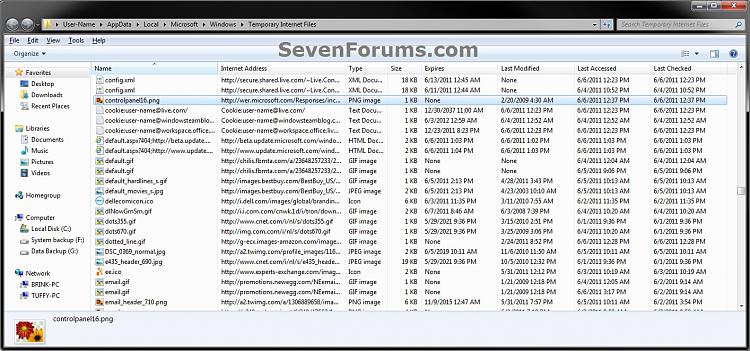
EXAMPLE: Temporary Internet Files
OPTION ONEView "Temporary Internet Files" through Internet Options
1. Open the Control Panel (icons view), and click on the Internet Options icon.
A) Go to step 3.OR
2. In Internet Explorer, click on Tools (Menu bar or gear icon) and Internet Options. (see screenshot below)
3. In the General tab under Browsing History, click on the Settings button. (see screenshot below)
4. Click on the View files button. (see screenshot below)
5. The Temporary Internet Files window will now open.
OPTION TWOView "Temporary Internet Files" through Windows Explorer
1. In Windows Explorer, navigate to and open the hidden (click on link) folder below.That's it,
NOTE: This is the default location of the Temporary Internet Files folder unless it had been changed previously.
C:\Users\(user-name)\AppData\Local\Microsoft\Windows\Temporary Internet Files
Shawn
Related Tutorials
- How to Enable or Disable Access to Internet Explorer Delete Browsing History
- How to Create a Shortcut to Delete Internet Explorer Temporary Files
- How to Delete the Browsing History in IE7 and IE8
- How to Delete the Browsing History of Internet Explorer 9 (IE9)
- How to Set Internet Explorer to "Empty Temporary Internet Files folder when browser is closed"
- How to Create "Delete Browsing History" in Internet Explorer Shortcuts
- How to Set IE8 and IE9 to "Delete browsing history on exit"
- How to Change Disk Space to be Used by Internet Explorer "Temporary Internet Files"
- How to View Internet Explorer History of Visited Websites
Internet Explorer - Temporary Internet Files - Browse

Internet Explorer - Temporary Internet Files - Browse
How to Browse the "Temporary Internet Files" of Internet ExplorerPublished by Brink


Related Discussions