

How to Create a "Restore Files from Selected Backup Location" Shortcut
InformationThis will show you how to download and setup a Restore Files from Selected Backup Location "Restore Files (Advanced)" shortcut that will allow you to select a created backup from any local or network location, and restore selected files from the selected backup Windows 7 or Vista.
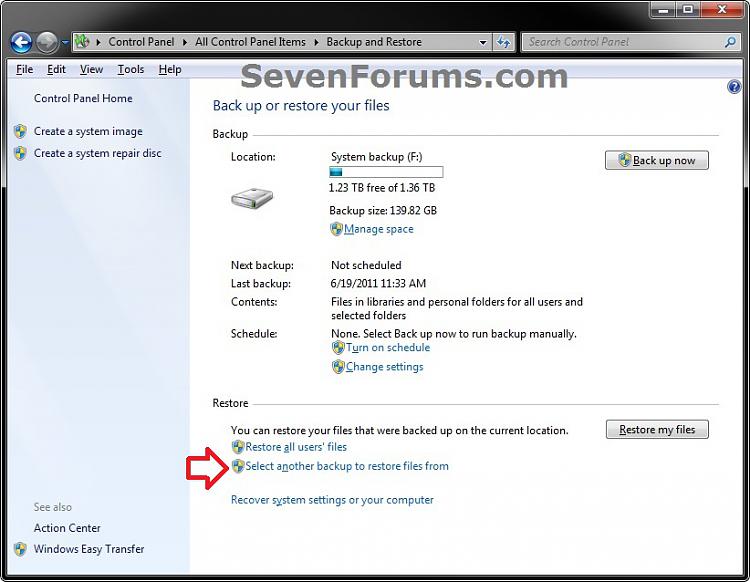
This shortcut is the same as if you clicked on the Select another backup to restore files from button in Backup and Restore.
WarningTo be able to use this shortcut:
- You must be logged in as an administrator.
- You would have needed to previously set up backup and created a Windows backup.
EXAMPLE: Restore Files (Advanced)
OPTION ONEDownload and Setup "Restore Files from Selected Backup Location" Shortcut
1. Click on the Download button below to download the file below.
2. Click on Save and save the .zip file to your desktop.
3. Open the downloaded .zip file, and extract (drag and drop) all of it's contents to your desktop.
4. Right click on the extracted Restore Files from Selected Backup Location.vbs file, click on Properties, General tab, and click on the Unblock button if available.
NOTE: If you do not have a Unblock button under the General tab, then the file is already unblocked and you can continue on.
5. Right click on the now unblocked Restore Files from Selected Backup Location.vbs file, and click on Cut.
6. Navigate to C:\Windows in Windows Explorer, then right click on a empty area of the window and click on Paste to move the .vbs file here.
7. If prompted by UAC, then click on Continue and Yes.
8. Right click on the extracted Restore Files from Selected Backup Location shortcut, click on Properties, General tab, and click on the Unblock button if available.
NOTE: If you do not have a Unblock button under the General tab, then the file is already unblocked and you can continue on.
9. You can now assign a keyboard shortcut, place in Quick Launch, or move this Restore Files from Selected Backup Location shortcut to where you like for easy use.
OPTION TWOTo Remove the "Restore Files from Selected Backup Location" Shortcut
1. Delete the Restore Files from Selected Backup Location shortcut.That's it,
2. In Windows Explorer, navigate to the .vbs file below, right click on it, and click on Delete.
C:\Windows\Restore Files from Selected Backup Location.vbs3. If prompted by UAC, then click on Yes.
Shawn
Related Tutorials
- How to Restore Backup User and System Files in Windows 7
- How to Create a Windows 7 "Restore Backup User and System Files" Shortcut
- How to Enable or Disable Restoring Backup Files in Windows 7
- How to Backup User and System Files in Windows 7
- How to Delete Windows 7 User and System Backup Files
- How to Manually Extract Files from a Backup in Vista and Windows 7
- How to Make a "Create New Backup" Shortcut in Windows 7 and Vista
- How to Make a "Create Incremental Backup" Shortcut in Windows 7 and Vista
- How to Create a "Create a System Image" Shortcut in Windows 7
- How to Create a Windows 7 "Backup and Restore" Shortcut
- How to Create a Windows 7 "Backup User and System Files" Shortcut
- How to Make a "Create System Restore Point" Shortcut in Windows 7
- How to Create a "Manage Windows Backup Disk Space" Shortcut in Windows 7
Restore Files from Selected Backup Location - Create Shortcut
-
-
New #2
Hello Wolfgang,
Nope. It allows you to select a created backup from any local or network location, and restore selected files from the selected backup. :)
-
-

Restore Files from Selected Backup Location - Create Shortcut
How to Create a "Restore Files from Selected Backup Location" ShortcutPublished by Brink


 Quote
Quote
Related Discussions