Backup - Make a "Create New Backup" Shortcut

How to Make a "Create New Backup" Shortcut in Vista, Windows 7, and Windows 8

   Information
This will show how to download a Create New Backup (differential backup) shortcut that will instantly create a new full backup of your previously created Windows Backup setup, and show a progress bar in Vista, Windows 7, and Windows 8.

   Note
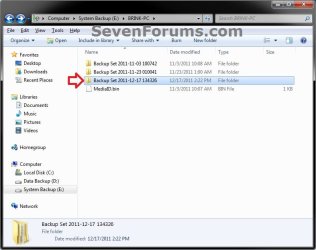
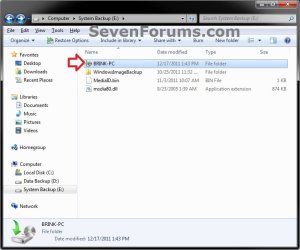
Each new full backup is saved in this format:

drive letter:\computer name\Backup Set YYYY-MM-DD HHMMSS

When this shortcut is used, it will instantly create a new Backup Set folder.
Backup.jpg

Backup_Set.jpg
   Warning
To be able to use this shortcut:

  • You must be logged in as an administrator.

  • You would have needed to previously set up backup and created a Windows backup since this shortcut creates a new backup set for it.

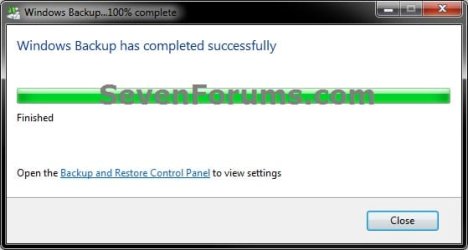
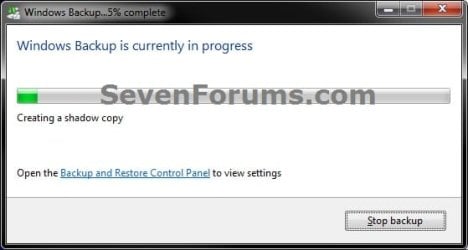
EXAMPLE: Progress bar
NOTE: This is the progress bar that you will see when you run the shortcut indicating that the backup is in progress and at what percentage complete. InProgress.jpg
Complete.jpg


OPTION ONE

To Download and Setup the "Create New Backup" Shortcut


1. Click on the Download button below to download the file below. Create_New_Backup_Set_with_Last_Backup_Settings.zip


Download


2. Click on Save and save the .zip file to your desktop.

3. Open the downloaded .zip file, and extract (drag and drop) all of it's contents to your desktop.

4. Right click on the extracted Create New Backup Set with Last Backup Settings.vbs file, click on Properties, General tab, and click on the Unblock button if available.
NOTE: If you do not have a Unblock button under the General tab, then the file is already unblocked and you can continue on.

5. Right click on the now unblocked Create New Backup Set with Last Backup Settings.vbs file, and click on Cut.

6. Navigate to C:\Windows in Windows Explorer, then right click on a empty area of the window and click on Paste to move the .vbs file here.

7. If prompted by UAC, then click on Continue and Yes.

8. Right click on the extracted Create New Backup shortcut, click on Properties, General tab, and click on the Unblock button if available.
NOTE: If you do not have a Unblock button under the General tab, then the file is already unblocked and you can continue on.

9. You can now assign a keyboard shortcut, place in Quick Launch, or move this Create New Backup shortcut to where you like for easy use.


OPTION TWO

To Remove the "Create New Backup" Shortcut

1. Delete the Create New Backup shortcut.

2. In Windows Explorer, navigate to the .vbs file below, right click on it, and click on Delete. C:\Windows\Create New Backup Set with Last Backup Settings.vbs
3. If prompted by UAC, then click on Yes.
That's it,
Shawn


Attachments

Last edited:
Thanks Shawn was looking for something like this

Danny
 

My Computer

Computer Manufacturer/Model Number
acer aspire 5935g
OS
Windows 7 Home Premium x64 SP1
CPU
intel(R)core(TM)2 duo CPU T6600 @ 2.20GHz
Motherboard
intel gm45/gm47 revision 07
Memory
3 gb ddr3
Graphics Card(s)
ati radeon hd4570/512mb
Monitor(s) Displays
lop156wh2-tle1 15.3 flat
Screen Resolution
1366x768
Hard Drives
OCZ-Agility3 60gig ssd
320gig external hdd
500gig external hdd
Mouse
Optical
Internet Speed
30Mbps Down/30Mbps Up
Thanks Shawn. There have been a number of questions in the forums regarding this. Do you have a list of the sdclt switches and what they do?
 

My Computer

Computer type
Laptop
Computer Manufacturer/Model Number
Hewlett-Packard/G62-107SA Notebook
OS
Microsoft Windows 7 Home Premium 64-bit Service Pack 1
CPU
Intel(R) Core(TM) i3 CPU M 330 @ 2.13GHz
Motherboard
Hewlett-Packard 1425
Memory
8 GB DDR3
Graphics Card(s)
Intel(R) HD Graphics
Sound Card
Realtek High Definition Audio
Monitor(s) Displays
Builtin
Screen Resolution
1366 x 768 x 32 bits (4294967296 colors) @ 60 Hz
Hard Drives
250 GB SATA Hard Disk Drive 7200 rpm
2TB Seagate GoFlex USB 2 Drive
1TB Iomega Prestige USB 2 Drive
1.5TB Iomega Prestige USB 2 Drive (Samsung)
2TB WD MyBook Live NAS.
Mouse
Logitech Anywhere MX
Internet Speed
152 Mbs download 10 Mbs upload
Antivirus
Norton 360
Browser
Chrome
Thanks for this Brink :).
 

My Computer

Computer Manufacturer/Model Number
iRush Pro
OS
Windows 7 Ultimate x64
CPU
Intel Core i5 2500K Processor
Motherboard
Intel H67 Chipset Motherboard (Micro ATX)
Memory
2x4GB DDR3 1333Mhz Memory
Graphics Card(s)
Novatech Radeon 6770 1GB Graphics Card
Hard Drives
1TB
PSU
Novatech 500W
Case
Novatech ATX Gaming Case
Cooling
-
Keyboard
Novatech Wired Keyboard
Mouse
Novatech Wired Mouse
Internet Speed
VirginMedia 10MB/s
You're most welcome guys. Thank you. :)


Thanks Shawn. There have been a number of questions in the forums regarding this. Do you have a list of the sdclt switches and what they do?

Yep. Some may be up and coming tutorials to be. Some already are. Here's a list of some of them. :)


/KICKOFFELEV => Run backup but I don't know what it does yet
/SPACEMGMT => Disk space management
/DELETECATALOGANDKICKOFFNEW => Delete backup catalog
/KICKOFFJOB => Run / increment last backup
/KICKOFFNEW => create new job and run backup
/DISABLEJOB => Turn off backup schedule
/ENABLEJOB => Turn on backup schedule
/BLBBACKUPWIZARD => backup wizard
/FOREIGNRESTORE => backup location management
/RESTOREWIZARDADMIN => Restore Wizard (Admin mode)
/RESTOREWIZARD => Restore Wizard (User mode)
/STOPBACKUP => Stop backup
/TROUBLESHOOT => Troobleshooting backup
/CONFIGURE /TARGET => Target backup windows (Set up backup/Change settings)
/CONFIGELEV /SHOW => Same windows that "/CONFIGURE /TARGET"
/UIMODE /SHOW => Backup progress bar
/CONFIGURE /SHOW => Same windows that "/CONFIGURE /TARGET"
/NOSCHEDULE => Disable backup schedule task
 
Last edited:

My Computer

Computer type
PC/Desktop
Computer Manufacturer/Model Number
Self built custom
OS
64-bit Windows 11 Pro for Workstations
CPU
Intel i7-8700K OC'd to 5 GHz
Motherboard
ASUS ROG Maximus XI Formula Z390
Memory
64 GB (4x16GB) G.SKILL TridentZ RGB DDR4 3600 MHz
Graphics Card(s)
ASUS ROG-STRIX-GTX1080TI-O11G-GAMING
Sound Card
Integrated
Monitor(s) Displays
2 x Samsung Odyssey G7 27"
Screen Resolution
2560x1440
Hard Drives
1TB Samsung 990 PRO M.2,
4TB Samsung 990 PRO PRO M.2,
TerraMaster F8 SSD Plus NAS
PSU
Seasonic Prime Titanium 850W
Case
Thermaltake Core P3
Cooling
Corsair Hydro H115i
Keyboard
Logitech wireless K800
Mouse
Logitech MX Master 4
Internet Speed
2 Gb/s Download and 100 Mb/s Upload
Antivirus
Malwarebyte Anti-Malware Premium
Browser
Google Chrome
Other Info
Logitech Z625 speaker system,
Logitech BRIO 4K Pro webcam,
HP Color LaserJet Pro MFP M477fdn,
APC SMART-UPS RT 1000 XL - SURT1000XLI,
Galaxy S23 Plus phone
Thanks Shawn.
 

My Computer

Computer type
Laptop
Computer Manufacturer/Model Number
Hewlett-Packard/G62-107SA Notebook
OS
Microsoft Windows 7 Home Premium 64-bit Service Pack 1
CPU
Intel(R) Core(TM) i3 CPU M 330 @ 2.13GHz
Motherboard
Hewlett-Packard 1425
Memory
8 GB DDR3
Graphics Card(s)
Intel(R) HD Graphics
Sound Card
Realtek High Definition Audio
Monitor(s) Displays
Builtin
Screen Resolution
1366 x 768 x 32 bits (4294967296 colors) @ 60 Hz
Hard Drives
250 GB SATA Hard Disk Drive 7200 rpm
2TB Seagate GoFlex USB 2 Drive
1TB Iomega Prestige USB 2 Drive
1.5TB Iomega Prestige USB 2 Drive (Samsung)
2TB WD MyBook Live NAS.
Mouse
Logitech Anywhere MX
Internet Speed
152 Mbs download 10 Mbs upload
Antivirus
Norton 360
Browser
Chrome
You're welcome Keith. :)
 

My Computer

Computer type
PC/Desktop
Computer Manufacturer/Model Number
Self built custom
OS
64-bit Windows 11 Pro for Workstations
CPU
Intel i7-8700K OC'd to 5 GHz
Motherboard
ASUS ROG Maximus XI Formula Z390
Memory
64 GB (4x16GB) G.SKILL TridentZ RGB DDR4 3600 MHz
Graphics Card(s)
ASUS ROG-STRIX-GTX1080TI-O11G-GAMING
Sound Card
Integrated
Monitor(s) Displays
2 x Samsung Odyssey G7 27"
Screen Resolution
2560x1440
Hard Drives
1TB Samsung 990 PRO M.2,
4TB Samsung 990 PRO PRO M.2,
TerraMaster F8 SSD Plus NAS
PSU
Seasonic Prime Titanium 850W
Case
Thermaltake Core P3
Cooling
Corsair Hydro H115i
Keyboard
Logitech wireless K800
Mouse
Logitech MX Master 4
Internet Speed
2 Gb/s Download and 100 Mb/s Upload
Antivirus
Malwarebyte Anti-Malware Premium
Browser
Google Chrome
Other Info
Logitech Z625 speaker system,
Logitech BRIO 4K Pro webcam,
HP Color LaserJet Pro MFP M477fdn,
APC SMART-UPS RT 1000 XL - SURT1000XLI,
Galaxy S23 Plus phone
Works well, but it would be nice to have an option to switch off the PC when backup completed.
 

My Computer

Computer type
PC/Desktop
OS
win 10 /32
Back
Top