

How to Turn Recent Programs On or Off in Windows 7
InformationRecent Programs saves and displays file names, programs, and locations you type in the Run dialog box and a list of your recently opened programs on the left white side of the Start Menu below the Pinned Programs line.
This tutorial will show you how to turn Recent Programs on or off in Windows 7.
NoteIf you have a progam pinned to the Start Menu, then it will not show up in the recent program area below the pin to area in the Start Menu.
WarningUnchecking the Store and display recently opened programs in the Start menu box in step 3 below will also cause the Run command dialog box to clear and no longer save it's run program history.
EXAMPLE: Recent Programs in the Start Menu
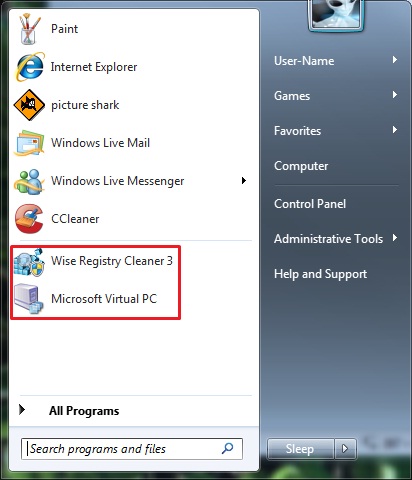
OPTION ONETo Turn Recent Programs On or Off in Start Menu Properties
1. Right click on the Start button, and click on Properties.
2. To Turn Recent Programs On
NOTE: This is the default setting.
A) Check the Store and display recently opened programs in the Start menu box. (See screenshot below step 4)3. To Turn Recent Programs Off
B) Go to step 4.
A) Uncheck the Store and display recently opened programs in the Start menu box. (See screenshot below step 4)4. Click on OK. (See screenshot below)
NOTE: See warning at top of tutorial.
OPTION TWOTo Turn Recent Programs On or Off using a REG File Download
1. To Turn Recent Programs OnThat's it,
NOTE: This is the default setting.
A) Click on the Download button below to download the file below.2. To Turn Recent Programs Off
Turn_On_Recent_Programs_in_Start_Menu.regB) Go to step 3.
A) Click on the Download button below to download the file below.3. Save the .reg file to your desktop.
Turn_Off_Recent_Programs_in_Start_Menu.reg
4. Double click on the downloaded .reg file to merge it.
5. Click on Run, Yes (UAC), Yes, and OK when prompted.
6. When done, you can delete the downloaded .reg file if you like.
Shawn
Related Tutorials
- How to Enable or Disable Recent Programs in Windows 7
- How to Enable or Disable Recent Items in Windows 7 and Vista
- How to Change the Number of Recent Programs to Display in Windows 7 Start Menu
- How to Turn Recent Items On or Off in Windows 7
- How to Customize the Windows 7 Start Menu
- How to Pin or Unpin a Program to the Windows 7 Taskbar
- How to Pin or Unpin a Program to the Windows 7 Start Menu
- How to Open and Use Windows 7 Start Menu and Taskbar Jump Lists
- How to Enable or Disable Windows 7 Explorer Recent Search Box Suggestions
- How to Edit or Reset Windows 7 Explorer Recent Search Box Suggestions
- How to Reset and Clear All Items in Windows 7 Jump Lists
- How to Create a Start Menu Properties Shortcut in Windows 7 and Vista
- How to Delete your Run Dialog Auto Suggest History in Windows
Recent Programs - Turn On or Off
-
New #1
Brink,
I attempted to use Method Two from within my own Batch script. In my script I use the REG utility to import the registry files above. My goal is to clear the Recent Programs list. So the script imports the Off registry file first then kills and restarts explorer.exe. The script then imports the On registry file. The list never clears. During my debugging of my script I manually ran each import from the command line to make sure import was performed correctly. I found that by opening up the Registry Editor after importing the Off registry file that the list cleared. It's as if the registry was reloaded/refreshed when the editor was launched. Do you know of a way to do this via the REG utility such that I can force a rereading of the registry before turning the Recent Programs feature back on?
Thanks,
Paul
-
New #2
Hello Paul, and welcome to Seven Forums. :)
You might see if using the "sleep" command to wait a bit or restart explorer command after the off .reg before doing the on .reg may work better. It sounds like it's getting turned off and back on too fast to apply clearing them.
-
New #3
Brink,
Thanks. My script imports the Off .reg, kills explorer, "sleeps" 5 seconds, starts explorer then imports the On .reg. I'll try putting a "sleep" after the restart of explorer but prior to the import of the On .reg.
Thanks,
Paul
-
New #4
Brink,
That worked. Thanks for the help!
Regards,
Paul
-

Recent Programs - Turn On or Off
How to Turn Recent Programs On or Off in Windows 7Published by Brink


 Quote
Quote
Related Discussions