

How to Add or Remove "Libraries" Folder from the Navigation Pane in Windows 7
InformationLibraries let you access and arrange items from one or more folders quickly without moving them from their original location. Libraries themselves don't store your files or folders. Instead, they point to different locations on a hard disk or external drive attached to your computer. This gives you easy access to a category of files no matter where they are stored. For instance, if you have music files on your hard disk and on an external drive, you can access all of your music files from within the "Music" library.
For more information about Windows 7 Libraries see:
- Windows 7 Libraries: Frequently Asked Questions
- Understanding Windows 7 Libraries - Windows 7 for Developers - The Windows Blog
- Inside Windows 7:Introducing Libraries
This will show you how to add or remove the Libraries folder and all Library folders in the Windows Explorer Navigation Pane in Windows 7.
NoteWhen Libraries is removed from the Navigation Pane, the pinned Windows Explorer icon on the taskbar will still open to the Libaries location by default unless you change the default open to target location for the pinned Windows Explorer taskbar icon.
TipThe default Libaries folders are located at the hidden locations below.
For all users
C:\Users\Public\Libraries
For current user only
C:\Users\(user-name)\AppData\Roaming\Microsoft\Windows\Libraries
Warning
- You can only do this while logged into an administrator account.
- This will affect all user account's on the computer.
EXAMPLE: Libraries in Navigation Pane
NOTE: This is the Libraries group added (default) (left screenshot below) and removed (right screenshot below) from the Navigation Pane.Here's How:
1. Open the Start Menu and type regedit.exe in the search line, then press enter.
2. If prompted by UAC, then click on Yes.
3. In Regedit, go to the location below: (See screenshot below step 4)Code:HKEY_CLASSES_ROOT\CLSID\{031E4825-7B94-4dc3-B131-E946B44C8DD5}\ShellFolder4. In the left pane of regedit, right click on the ShellFolder key and click on Permissions. (See screenshot below)That's it,5. At the top, select the Administrators group. At the bottom, check the Allow box to the right of Full Control and click on OK. (See screenshot below)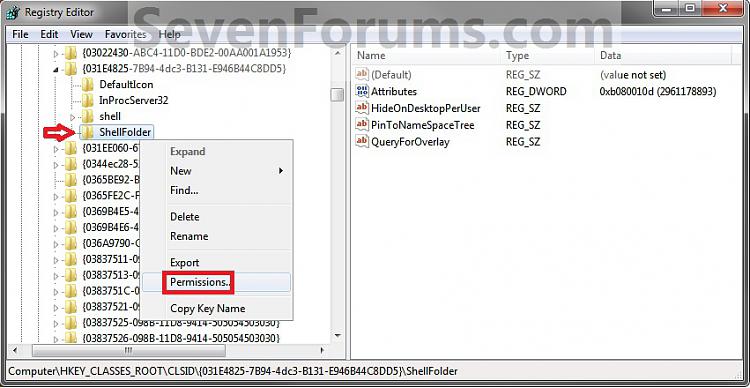 6. In the right pane of regedit, right click on Attributes and click on Modify. (See screenshot below)
 7. To Add All Libraries Back to the Navigation Pane
NOTE: This is the default setting.A) Type in b080010d and click on OK. (see screenshot below)8. To Remove All Libraries from the Navigation PaneB) Go to step 9.A) Type in b090010d and click on OK. (see screenshot below)9. If you have 64-bit Windows 7 Installed
Note
To also add or remove Libraries from the "Open" and "Save as" type windows as well in 64-bit Windows 7, you will also need to do this step.
If you have a 32-bit Windows 7 installed, then skip this step since doing steps 1 to 7/8 will add or remove Libraries from the "Open" and "Save as" type windows as well.A) In Regedit, go to the location below:10. Close regedit.
B) Repeat steps 4 to 7/8 above.Code:HKEY_LOCAL_MACHINE\SOFTWARE\Wow6432Node\Classes\CLSID\{031E4825-7B94-4dc3-B131-E946B44C8DD5}\ShellFolder
11. Log off and log on, or restart the computer to apply.
TipIf you removed Libraries, then you may also would like to use the tutorial below to have the user folders in the Start Menu to open to your C:\Users\(user-name) location instead of it's library folder location.
How to Make Windows 7 Start Menu User Folder Buttons Open to Users Instead of Libraries Location
Shawn
Related Tutorials
- How to Hide or Show a Library in the Navigation Pane in Windows 7 and Windows 8
- How to Show or Not Show All Folders in the Windows 7 Navigation Pane
- How to Turn On or Off Expand to Current Folder in Windows 7 Navigation Pane
- How to Change the Default Libraries Icon in Windows 7
- How to Change a Library Icon in Windows 7
- How to Add or Remove the Libraries Desktop Icon in Windows 7
- How to Change the Default New Library Icon in Windows 7
- How to Restore the Default Libraries in Windows 7 and Windows 8
- How to Fix Libraries when Hidden and Empty in Windows 7 and Windows 8
- How to Add or Remove "Favorites" from the Windows 7 Navigation Pane
- How to Add or Remove "Homegroup" from the Windows 7 Navigation Pane
- How to Add or Remove "Computer" from the Windows 7 Navigation Pane
- How to Add or Remove "Network" from the Windows 7 Navigation Pane
- How to Add or Remove "Control Panel" from the Windows 7 Navigation Pane
- How to Add or Remove your "User Folder" from the Windows 7 Navigation Pane
- How to Add or Remove the "Recycle Bin" from the Windows 7 Navigation Pane
- How to Turn the Navigation Pane On or Off in Windows 7
- How to Turn the Library Pane On or Off in Windows 7
- How to Rename "Libraries" in the Windows 7 Explorer Navigation Pane
- How to Make Windows 7 Start Menu User Folder Buttons Open to Users Instead of Libraries Location
- How to Add or Remove "Include in library" in Windows 7 Context Menu
- How to Arrange Folders Included in a Library in Any Order in Windows 7 and Windows 8
Libraries Folder - Add or Remove from Navigation Pane
-
New #1
remove Homegroup, Computer & Network
Thanks for posting this, it works… I was looking for this information months...
Any idea how I can also remove the Homegroup, Computer & Network from the navigation pane?
-
New #2
Hello Entropy, and welcome to Seven Forums.
I'll work on getting a tutorial for them tonight if possible, but since you want all of them off you could just turn off the Navigation Pane instead. (Organize (toolbar), Layout, uncheck Navigation Pane)
-
New #3
remove Homegroup, Computer & Network
Hello and thank you for answering.
I need the navigation pane because I can add my own shortcuts (29 shortcuts currently) under favorites. However, I do not have a network in my house therefore I do not need homegroup and network in navigation pane. These items, along with computer shortcut, consume a lot of vertical space and by adding my own shortcuts under favorites I get a scroll bar, which I do not want to have. I can add a shortcut for my computer under favorites or for network if I wish so in the future.
Thanks again.
-
New #4
Ok. I'll see if I can't get a tutorial for them late tonight or sometime tommorrow for them. I'll post back when they're ready. :)
-
New #5
i have successful remove the libraries from the explorer but not in a "Open..." or "Save as..." dialog window...how i remove this?!
PS: In italian "Libraries" is "Raccolte"Last edited by Brink; 12 Dec 2016 at 10:13. Reason: removed broken image
-
New #6
Hello Brunosso, and welcome to Seven Forums.
I'm afraid that I cannot find the location for these in the "Open" or "Save as.." type windows to remove them from. If I run accross them, I'll be sure to let you know.
Sorry,
Shawn
-
-
New #8
Computer - Add or Remove from Navigation Pane
Shawn you are my hero… thanks a million… not only you were accurate but your instructions were so clear that even a retarded could easily follow…
However, I have a question. To remove the computer from the navigation pane you need to create a key DWORD (32-bit) Value. I am running x64 bit Windows 7. Do I need to follow different instructions?
Thank you again.
-
New #9
You're most welcome Entropy.
Yeah, you would still need to create the same DWORD (32-bit) value. It's the same in both the 32-bit and 64-bit Windows 7 for that. :)
Libraries Folder - Add or Remove from Navigation Pane
How to Add or Remove "Libraries" Folder from the Navigation Pane in Windows 7Published by Brink


 Quote
Quote
Related Discussions