How to Delete a Folder in Windows from the Command Prompt
Information
This will show you how to permanently delete a Folder in Vista, Windows 7, or Windows 8 using the RD or RMDIR command from within a command prompt.
This can be handy if you cannot delete the folder using the normal methods.
This can be handy if you cannot delete the folder using the normal methods.
Note
While you can run this command in a non-elevated or elevated command prompt, you would get the best results using a elevated command prompt.
Warning
The folder will be deleted immediately and not placed in the Recycle Bin first. Deleting a folder using this command will also delete all of it's contents as well as the folder. Be sure to backup anything you want to keep in the folder first.
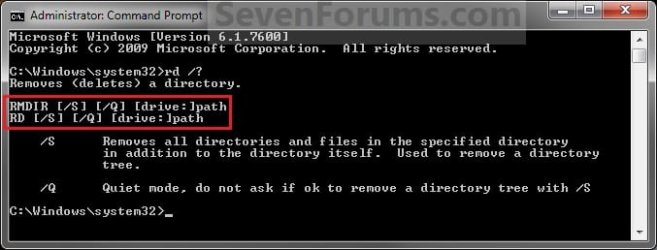
EXAMPLE: RD and RMDIR Command
NOTE: You can use either the RD or RMDIR command in the command prompt. They are the same command.
Here's How:
1. Do step 2 or 3 below for where you would like to use a command prompt at.
2. To Use a Elevated Command Prompt in Windows
A) Open an Elevated command prompt in Vista/Windows 7 or Windows 8, and go to step 4 below.
3. To Use a Command Prompt at Boot
A) Open a command prompt at boot in Vista/Windows 7 or Windows 8, and go to step 4 below.
B) In the command prompt, type diskpart and press Enter. (see screenshot below)
C) In the command prompt, type list volume and press Enter. (see screenshot below)
NOTE: This will let you see what the drive letter is for the drive that you want to delete the folder in since it may not always be the same drive letter that it is in Windows.
D) After making note of the drive letter, type exit and press Enter. (see screenshot below)
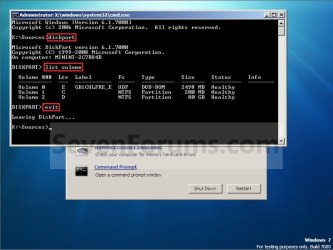
4. In the command prompt, type the command below and press enter.
NOTE: Substitute Full Path of Folder within quotes below with your folder's full path within quotes instead.
Code:
RD /S /Q "[COLOR=red][B]Full Path of Folder[/B][/COLOR]"NOTE: For example, if I wanted to delete a folder named Folder on my desktop, I would type this command below.
Code:
RD /S /Q "C:\Users\UserName\Desktop\Folder"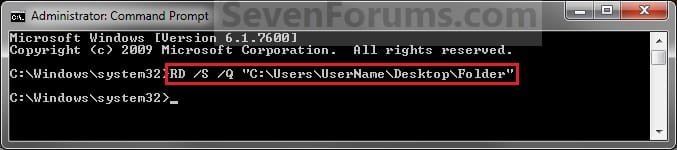
5. The folder should now be deleted.
6. Close the command prompt.
NOTE: If you used a command prompt at boot, then also close the System Recovery Options window and restart the computer.
That's it,
Shawn
Related Tutorials
- How to Delete a File in Windows from the Command Prompt
- Add "Delete Files in Folder" and "Empty Folder" to Context Menu of Folders in Windows
- How to Open a Command Prompt at Startup in Windows 7
- How to Open a Elevated Command Prompt in Windows 7
- How to Open a Command Prompt in Windows 7
- How to Hide or Unhide a File or Folder in Windows 7
- How to Rename a File and Folder from the Command Prompt
Last edited:


 ),
),