Help in marking a partition 'not active' for system backup

rzn6jw

New member
Member
VIP
Local time
9:15 AM
Messages
114
I set my Win 7 64-bit Pro to backup my files and do a system image once a week on a 1TB SATA disk. As of last week, I had only used 450 GB of that disk for the backup process that included a couple of system images of my C: drive (I let Windows decide on how many images to keep).

Today, I get an error message that the backup had failed because the backup disk did not have enough space. I looked at the disk and there was 550GB of space still available, so I was confused.

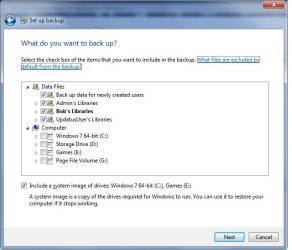
I looked at the parameters of the system backup and found that this time the backup would make a system image of my C: drive and my E: drive (the 2TB drive that keeps all my games). This was not there for the last backup run.

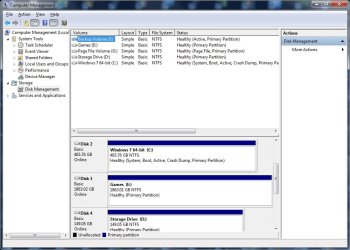
I looked at the parameters for the E: drive and found that its partition was marked 'active' (the only other active partition was my C: drive and I have two other drives installed too but not 'active').

How do I mark the E: drive partition 'not' active so it gets removed from being imaged?
 

My Computer My Computer

Computer type
PC/Desktop
Computer Manufacturer/Model Number
DIY
OS
Windows 7 Pro 64-bit Service Pack 1
CPU
AMD FX 8370 BE 8-core
Motherboard
Gigabyte 990FXA-UD3
Memory
32G Corsair DDR3 1600
Graphics Card(s)
2 GTX660 SC in SLI
Sound Card
Reaktek
Monitor(s) Displays
Samsung 23" LCD
Screen Resolution
1920x1080
Hard Drives
5 SATA HDD
1 eSATA HDD
PSU
Corsair 850w
Case
AZZA Hurricane
Cooling
Case fans
Keyboard
Microsoft
Mouse
Logitech
Internet Speed
T3
Antivirus
Norton Internet Security
Browser
IE, Firefox

My Computer My Computer

Computer type
PC/Desktop
Computer Manufacturer/Model Number
Self built custom
OS
64-bit Windows 11 Pro for Workstations
CPU
Intel i7-8700K OC'd to 5 GHz
Motherboard
ASUS ROG Maximus XI Formula Z390
Memory
64 GB (4x16GB) G.SKILL TridentZ RGB DDR4 3600 MHz
Graphics Card(s)
ASUS ROG-STRIX-GTX1080TI-O11G-GAMING
Sound Card
Integrated
Monitor(s) Displays
2 x Samsung Odyssey G7 27"
Screen Resolution
2560x1440
Hard Drives
1TB Samsung 990 PRO M.2,
4TB Samsung 990 PRO PRO M.2,
TerraMaster F8 SSD Plus NAS
PSU
Seasonic Prime Titanium 850W
Case
Thermaltake Core P3
Cooling
Corsair Hydro H115i
Keyboard
Logitech wireless K800
Mouse
Logitech MX Master 4
Internet Speed
2 Gb/s Download and 100 Mb/s Upload
Antivirus
Malwarebyte Anti-Malware Premium
Browser
Google Chrome
Other Info
Logitech Z625 speaker system,
Logitech BRIO 4K Pro webcam,
HP Color LaserJet Pro MFP M477fdn,
APC SMART-UPS RT 1000 XL - SURT1000XLI,
Galaxy S23 Plus phone
I successfully marked the E: drive partition as inactive per your instructions, check the status of the drive in Disk Management, and re-booted the PC. Thanks.

However, when I enter 'change settings' in system backup and select the 'Let me choose' parameter, the 'include a system image of drives C: and E:' still appears (even after a re-boot). If I select 'Let Windows choose' I don't know if it'll choose both drives now or just the C: drive.

Is there another way to have Backup make a system image of only the C: drive?

Thanks again for your help!
 

My Computer My Computer

Computer type
PC/Desktop
Computer Manufacturer/Model Number
DIY
OS
Windows 7 Pro 64-bit Service Pack 1
CPU
AMD FX 8370 BE 8-core
Motherboard
Gigabyte 990FXA-UD3
Memory
32G Corsair DDR3 1600
Graphics Card(s)
2 GTX660 SC in SLI
Sound Card
Reaktek
Monitor(s) Displays
Samsung 23" LCD
Screen Resolution
1920x1080
Hard Drives
5 SATA HDD
1 eSATA HDD
PSU
Corsair 850w
Case
AZZA Hurricane
Cooling
Case fans
Keyboard
Microsoft
Mouse
Logitech
Internet Speed
T3
Antivirus
Norton Internet Security
Browser
IE, Firefox
Are you able to unselect the E: drive?

If not, then did you move the location of anything like the page file or user folders to the E: drive?
 

My Computer My Computer

Computer type
PC/Desktop
Computer Manufacturer/Model Number
Self built custom
OS
64-bit Windows 11 Pro for Workstations
CPU
Intel i7-8700K OC'd to 5 GHz
Motherboard
ASUS ROG Maximus XI Formula Z390
Memory
64 GB (4x16GB) G.SKILL TridentZ RGB DDR4 3600 MHz
Graphics Card(s)
ASUS ROG-STRIX-GTX1080TI-O11G-GAMING
Sound Card
Integrated
Monitor(s) Displays
2 x Samsung Odyssey G7 27"
Screen Resolution
2560x1440
Hard Drives
1TB Samsung 990 PRO M.2,
4TB Samsung 990 PRO PRO M.2,
TerraMaster F8 SSD Plus NAS
PSU
Seasonic Prime Titanium 850W
Case
Thermaltake Core P3
Cooling
Corsair Hydro H115i
Keyboard
Logitech wireless K800
Mouse
Logitech MX Master 4
Internet Speed
2 Gb/s Download and 100 Mb/s Upload
Antivirus
Malwarebyte Anti-Malware Premium
Browser
Google Chrome
Other Info
Logitech Z625 speaker system,
Logitech BRIO 4K Pro webcam,
HP Color LaserJet Pro MFP M477fdn,
APC SMART-UPS RT 1000 XL - SURT1000XLI,
Galaxy S23 Plus phone
Nothing's been moved except some savegames from my Documents/My Games folder to a folder on the E: drive.

Now it seems the same problem is happening on my wife's Win 7 Home Prem PC. I checked her backup parms and found that a data storage only drive had been added to her backup in the same menu choice as 'Let me decide....'. Backup was doing a system image of that drive along with her C: drive. However, when I unchecked her storage drive and rebooted, backup still thought it would do a system image of that drive.

Is there anywhere I can go in the registry to correct this?
 

My Computer My Computer

Computer type
PC/Desktop
Computer Manufacturer/Model Number
DIY
OS
Windows 7 Pro 64-bit Service Pack 1
CPU
AMD FX 8370 BE 8-core
Motherboard
Gigabyte 990FXA-UD3
Memory
32G Corsair DDR3 1600
Graphics Card(s)
2 GTX660 SC in SLI
Sound Card
Reaktek
Monitor(s) Displays
Samsung 23" LCD
Screen Resolution
1920x1080
Hard Drives
5 SATA HDD
1 eSATA HDD
PSU
Corsair 850w
Case
AZZA Hurricane
Cooling
Case fans
Keyboard
Microsoft
Mouse
Logitech
Internet Speed
T3
Antivirus
Norton Internet Security
Browser
IE, Firefox

My Computer My Computer

Computer type
PC/Desktop
Computer Manufacturer/Model Number
Self built custom
OS
64-bit Windows 11 Pro for Workstations
CPU
Intel i7-8700K OC'd to 5 GHz
Motherboard
ASUS ROG Maximus XI Formula Z390
Memory
64 GB (4x16GB) G.SKILL TridentZ RGB DDR4 3600 MHz
Graphics Card(s)
ASUS ROG-STRIX-GTX1080TI-O11G-GAMING
Sound Card
Integrated
Monitor(s) Displays
2 x Samsung Odyssey G7 27"
Screen Resolution
2560x1440
Hard Drives
1TB Samsung 990 PRO M.2,
4TB Samsung 990 PRO PRO M.2,
TerraMaster F8 SSD Plus NAS
PSU
Seasonic Prime Titanium 850W
Case
Thermaltake Core P3
Cooling
Corsair Hydro H115i
Keyboard
Logitech wireless K800
Mouse
Logitech MX Master 4
Internet Speed
2 Gb/s Download and 100 Mb/s Upload
Antivirus
Malwarebyte Anti-Malware Premium
Browser
Google Chrome
Other Info
Logitech Z625 speaker system,
Logitech BRIO 4K Pro webcam,
HP Color LaserJet Pro MFP M477fdn,
APC SMART-UPS RT 1000 XL - SURT1000XLI,
Galaxy S23 Plus phone
I've attached two screen captures. One shows the backup parameter with C: and E: and the other is the disk management screen.

Let me know what you think.
 

Attachments

  • Backup parms.jpg
    Backup parms.jpg
    38.7 KB · Views: 13
  • diskmgt.jpg
    diskmgt.jpg
    78.6 KB · Views: 8

My Computer My Computer

Computer type
PC/Desktop
Computer Manufacturer/Model Number
DIY
OS
Windows 7 Pro 64-bit Service Pack 1
CPU
AMD FX 8370 BE 8-core
Motherboard
Gigabyte 990FXA-UD3
Memory
32G Corsair DDR3 1600
Graphics Card(s)
2 GTX660 SC in SLI
Sound Card
Reaktek
Monitor(s) Displays
Samsung 23" LCD
Screen Resolution
1920x1080
Hard Drives
5 SATA HDD
1 eSATA HDD
PSU
Corsair 850w
Case
AZZA Hurricane
Cooling
Case fans
Keyboard
Microsoft
Mouse
Logitech
Internet Speed
T3
Antivirus
Norton Internet Security
Browser
IE, Firefox
As a test, see if you are able to create a separate system image with only C: selected (checked) and not E: using the method in the tutorial below instead of through Windows Backup.
If so, then use the tutorial below to reset Window Backup. Afterwards, setup Windows Backup again to see if it will then let you only have C: when including a system image with the scheduled backup.
 

My Computer My Computer

Computer type
PC/Desktop
Computer Manufacturer/Model Number
Self built custom
OS
64-bit Windows 11 Pro for Workstations
CPU
Intel i7-8700K OC'd to 5 GHz
Motherboard
ASUS ROG Maximus XI Formula Z390
Memory
64 GB (4x16GB) G.SKILL TridentZ RGB DDR4 3600 MHz
Graphics Card(s)
ASUS ROG-STRIX-GTX1080TI-O11G-GAMING
Sound Card
Integrated
Monitor(s) Displays
2 x Samsung Odyssey G7 27"
Screen Resolution
2560x1440
Hard Drives
1TB Samsung 990 PRO M.2,
4TB Samsung 990 PRO PRO M.2,
TerraMaster F8 SSD Plus NAS
PSU
Seasonic Prime Titanium 850W
Case
Thermaltake Core P3
Cooling
Corsair Hydro H115i
Keyboard
Logitech wireless K800
Mouse
Logitech MX Master 4
Internet Speed
2 Gb/s Download and 100 Mb/s Upload
Antivirus
Malwarebyte Anti-Malware Premium
Browser
Google Chrome
Other Info
Logitech Z625 speaker system,
Logitech BRIO 4K Pro webcam,
HP Color LaserJet Pro MFP M477fdn,
APC SMART-UPS RT 1000 XL - SURT1000XLI,
Galaxy S23 Plus phone
I have had a backup drive marked active (Seagate I think it was) it shouldn't really matter even though there is no reason for it to be active. Active is only the first stage of telling the BIOS the HDD could be bootable. Just being active shouldn't stop images being stored there. Inadvertently adding system files to the backup drive will cause problems.
You say
"(I let Windows decide on how many images to keep)"
I think this is not good practice. I recommend "Let me choose" and untick the image box in the schedule and make independent images using the "Create system image" box on the left. see
http://www.sevenforums.com/tutorials/663-backup-complete-computer-create-image-backup.html
Multiple images will consume shadow storage were difference images are stored. In other words take manual control and make one image at a time. Rename WindowsImageBackup to store multiple images as long as it is renamed back to WindowsImageBackup for restore see
http://www.sevenforums.com/tutorials/675-system-image-recovery.html

You will need to eventually delete some images and just keep those over the period of time that suits you.

File/folder backup in the backup schedule is fine.
 

My Computer My Computer

Computer type
PC/Desktop
Computer Manufacturer/Model Number
Own build
OS
Windows 7x64 Home Premium SP1
CPU
Intel i7 2600k
Motherboard
ASUS P8Z68 Deluxe
Memory
G.Skill Ripjaws (DDR3-1600) 2x4GB
Graphics Card(s)
Nvidia GeForce GTS 450; Intel HD Graphics 3000(GT2+)
Monitor(s) Displays
Dell Ultrasharp IPS panel U2311H, Samsung SyncMaster P2350
Screen Resolution
1920x1080
Hard Drives
Samsung 850 Pro SSD 256GB, Samsung SSD 840 120GB, Seagates 1TB Barracuda ST31000528AS x2
PSU
Seasonic M12II 520W
Case
Lian Li Lancool PC-K60
Cooling
Case: 1x120mm, 3x140mm CPU: Hyper 212+
Keyboard
Logitech MK520 (wireless)
Mouse
Logitech MK520
Internet Speed
6-7 Mbps
Antivirus
Norton Security Premium, Malwarebytes on 2 (MSE on 3rd PC)
Browser
FireFox
Other Info
Audio: Logitech Z523 2.1
Thanks for all the advice. I'll try these and get back to you this afternoon.
 

My Computer My Computer

Computer type
PC/Desktop
Computer Manufacturer/Model Number
DIY
OS
Windows 7 Pro 64-bit Service Pack 1
CPU
AMD FX 8370 BE 8-core
Motherboard
Gigabyte 990FXA-UD3
Memory
32G Corsair DDR3 1600
Graphics Card(s)
2 GTX660 SC in SLI
Sound Card
Reaktek
Monitor(s) Displays
Samsung 23" LCD
Screen Resolution
1920x1080
Hard Drives
5 SATA HDD
1 eSATA HDD
PSU
Corsair 850w
Case
AZZA Hurricane
Cooling
Case fans
Keyboard
Microsoft
Mouse
Logitech
Internet Speed
T3
Antivirus
Norton Internet Security
Browser
IE, Firefox
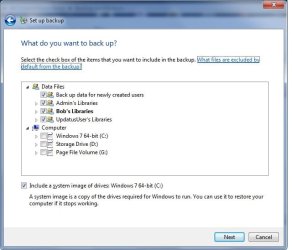
OK, I did an experiment. I removed power from the PC and physically removed the E: drive. Then I applied power and rebooted.

After reboot, I went into the Backup parameters and selected 'Let me choose..'. The following screenshot was presented:
 

Attachments

  • Bkup parm after E removal.jpg
    Bkup parm after E removal.jpg
    38 KB · Views: 8

My Computer My Computer

Computer type
PC/Desktop
Computer Manufacturer/Model Number
DIY
OS
Windows 7 Pro 64-bit Service Pack 1
CPU
AMD FX 8370 BE 8-core
Motherboard
Gigabyte 990FXA-UD3
Memory
32G Corsair DDR3 1600
Graphics Card(s)
2 GTX660 SC in SLI
Sound Card
Reaktek
Monitor(s) Displays
Samsung 23" LCD
Screen Resolution
1920x1080
Hard Drives
5 SATA HDD
1 eSATA HDD
PSU
Corsair 850w
Case
AZZA Hurricane
Cooling
Case fans
Keyboard
Microsoft
Mouse
Logitech
Internet Speed
T3
Antivirus
Norton Internet Security
Browser
IE, Firefox
OK, I tried an experiment. I shutdown the PC and removed power. I then physically removed the E: drive, applied power and rebooted. After reboot I went into Backup and selected 'Let me choose..' and got the first screenshot.

I then did a backup, shutdown the PC, removed power, inserted the E: drive, rebooted, and went into Back again. Upon selecting 'Let me choose...' this time, I got the second screenshot.

At this point it seems that there is something on the E: drive that makes the OS think that it's a system drive (the drive is still inactive by the way). This wasn't apparent in the backup of Sunday 4/21, and there's been windows updates since then, so I'm wondering if something in those updates changed something.

Any thoughts?
 

Attachments

  • Bkup parm after E removal.jpg
    Bkup parm after E removal.jpg
    38 KB · Views: 3
  • After insertion of E drive.jpg
    After insertion of E drive.jpg
    39.2 KB · Views: 4

My Computer My Computer

Computer type
PC/Desktop
Computer Manufacturer/Model Number
DIY
OS
Windows 7 Pro 64-bit Service Pack 1
CPU
AMD FX 8370 BE 8-core
Motherboard
Gigabyte 990FXA-UD3
Memory
32G Corsair DDR3 1600
Graphics Card(s)
2 GTX660 SC in SLI
Sound Card
Reaktek
Monitor(s) Displays
Samsung 23" LCD
Screen Resolution
1920x1080
Hard Drives
5 SATA HDD
1 eSATA HDD
PSU
Corsair 850w
Case
AZZA Hurricane
Cooling
Case fans
Keyboard
Microsoft
Mouse
Logitech
Internet Speed
T3
Antivirus
Norton Internet Security
Browser
IE, Firefox

My Computer My Computer

Computer type
PC/Desktop
Computer Manufacturer/Model Number
Self built custom
OS
64-bit Windows 11 Pro for Workstations
CPU
Intel i7-8700K OC'd to 5 GHz
Motherboard
ASUS ROG Maximus XI Formula Z390
Memory
64 GB (4x16GB) G.SKILL TridentZ RGB DDR4 3600 MHz
Graphics Card(s)
ASUS ROG-STRIX-GTX1080TI-O11G-GAMING
Sound Card
Integrated
Monitor(s) Displays
2 x Samsung Odyssey G7 27"
Screen Resolution
2560x1440
Hard Drives
1TB Samsung 990 PRO M.2,
4TB Samsung 990 PRO PRO M.2,
TerraMaster F8 SSD Plus NAS
PSU
Seasonic Prime Titanium 850W
Case
Thermaltake Core P3
Cooling
Corsair Hydro H115i
Keyboard
Logitech wireless K800
Mouse
Logitech MX Master 4
Internet Speed
2 Gb/s Download and 100 Mb/s Upload
Antivirus
Malwarebyte Anti-Malware Premium
Browser
Google Chrome
Other Info
Logitech Z625 speaker system,
Logitech BRIO 4K Pro webcam,
HP Color LaserJet Pro MFP M477fdn,
APC SMART-UPS RT 1000 XL - SURT1000XLI,
Galaxy S23 Plus phone
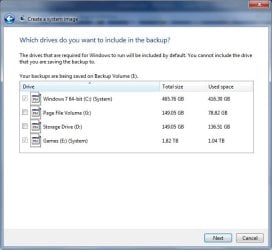
No, both drives are checked and greyed out.
 

Attachments

  • Image.jpg
    Image.jpg
    34.1 KB · Views: 4

My Computer My Computer

Computer type
PC/Desktop
Computer Manufacturer/Model Number
DIY
OS
Windows 7 Pro 64-bit Service Pack 1
CPU
AMD FX 8370 BE 8-core
Motherboard
Gigabyte 990FXA-UD3
Memory
32G Corsair DDR3 1600
Graphics Card(s)
2 GTX660 SC in SLI
Sound Card
Reaktek
Monitor(s) Displays
Samsung 23" LCD
Screen Resolution
1920x1080
Hard Drives
5 SATA HDD
1 eSATA HDD
PSU
Corsair 850w
Case
AZZA Hurricane
Cooling
Case fans
Keyboard
Microsoft
Mouse
Logitech
Internet Speed
T3
Antivirus
Norton Internet Security
Browser
IE, Firefox
It shows E: as a "system" drive. That would be why it's included in a system image.

Odd that it doesn't show E: as a "system" drive in your Disk Management screenshot. :huh:

If you have anything being saved to the E drive like your games, then change it to save into the library on your C: drive again to see if it will let you uncheck E: in System Image.
 

My Computer My Computer

Computer type
PC/Desktop
Computer Manufacturer/Model Number
Self built custom
OS
64-bit Windows 11 Pro for Workstations
CPU
Intel i7-8700K OC'd to 5 GHz
Motherboard
ASUS ROG Maximus XI Formula Z390
Memory
64 GB (4x16GB) G.SKILL TridentZ RGB DDR4 3600 MHz
Graphics Card(s)
ASUS ROG-STRIX-GTX1080TI-O11G-GAMING
Sound Card
Integrated
Monitor(s) Displays
2 x Samsung Odyssey G7 27"
Screen Resolution
2560x1440
Hard Drives
1TB Samsung 990 PRO M.2,
4TB Samsung 990 PRO PRO M.2,
TerraMaster F8 SSD Plus NAS
PSU
Seasonic Prime Titanium 850W
Case
Thermaltake Core P3
Cooling
Corsair Hydro H115i
Keyboard
Logitech wireless K800
Mouse
Logitech MX Master 4
Internet Speed
2 Gb/s Download and 100 Mb/s Upload
Antivirus
Malwarebyte Anti-Malware Premium
Browser
Google Chrome
Other Info
Logitech Z625 speaker system,
Logitech BRIO 4K Pro webcam,
HP Color LaserJet Pro MFP M477fdn,
APC SMART-UPS RT 1000 XL - SURT1000XLI,
Galaxy S23 Plus phone
I save all my games to the E: drive. There are no MS program installs on the drive. I think the only executables are Steam, Origin, and UPlay. Everything else installs in the programs folders on the C: drive.
 

My Computer My Computer

Computer type
PC/Desktop
Computer Manufacturer/Model Number
DIY
OS
Windows 7 Pro 64-bit Service Pack 1
CPU
AMD FX 8370 BE 8-core
Motherboard
Gigabyte 990FXA-UD3
Memory
32G Corsair DDR3 1600
Graphics Card(s)
2 GTX660 SC in SLI
Sound Card
Reaktek
Monitor(s) Displays
Samsung 23" LCD
Screen Resolution
1920x1080
Hard Drives
5 SATA HDD
1 eSATA HDD
PSU
Corsair 850w
Case
AZZA Hurricane
Cooling
Case fans
Keyboard
Microsoft
Mouse
Logitech
Internet Speed
T3
Antivirus
Norton Internet Security
Browser
IE, Firefox
If you run your games from the E: drive, then that is why the E: drive is being included in the system image.

E: has to be included for the game to be able to run properly.

The only way around this would be to uninstall all games from E: , and install them on C: instead.
 

My Computer My Computer

Computer type
PC/Desktop
Computer Manufacturer/Model Number
Self built custom
OS
64-bit Windows 11 Pro for Workstations
CPU
Intel i7-8700K OC'd to 5 GHz
Motherboard
ASUS ROG Maximus XI Formula Z390
Memory
64 GB (4x16GB) G.SKILL TridentZ RGB DDR4 3600 MHz
Graphics Card(s)
ASUS ROG-STRIX-GTX1080TI-O11G-GAMING
Sound Card
Integrated
Monitor(s) Displays
2 x Samsung Odyssey G7 27"
Screen Resolution
2560x1440
Hard Drives
1TB Samsung 990 PRO M.2,
4TB Samsung 990 PRO PRO M.2,
TerraMaster F8 SSD Plus NAS
PSU
Seasonic Prime Titanium 850W
Case
Thermaltake Core P3
Cooling
Corsair Hydro H115i
Keyboard
Logitech wireless K800
Mouse
Logitech MX Master 4
Internet Speed
2 Gb/s Download and 100 Mb/s Upload
Antivirus
Malwarebyte Anti-Malware Premium
Browser
Google Chrome
Other Info
Logitech Z625 speaker system,
Logitech BRIO 4K Pro webcam,
HP Color LaserJet Pro MFP M477fdn,
APC SMART-UPS RT 1000 XL - SURT1000XLI,
Galaxy S23 Plus phone
I've had my games on the E: drive for years and this has not happened. It only began after my successful C: drive backup of 4/21. Went downhill after that.
 

My Computer My Computer

Computer type
PC/Desktop
Computer Manufacturer/Model Number
DIY
OS
Windows 7 Pro 64-bit Service Pack 1
CPU
AMD FX 8370 BE 8-core
Motherboard
Gigabyte 990FXA-UD3
Memory
32G Corsair DDR3 1600
Graphics Card(s)
2 GTX660 SC in SLI
Sound Card
Reaktek
Monitor(s) Displays
Samsung 23" LCD
Screen Resolution
1920x1080
Hard Drives
5 SATA HDD
1 eSATA HDD
PSU
Corsair 850w
Case
AZZA Hurricane
Cooling
Case fans
Keyboard
Microsoft
Mouse
Logitech
Internet Speed
T3
Antivirus
Norton Internet Security
Browser
IE, Firefox
Not sure then other than something is on the E: drive making it appear as a system drive to system image.

If you like, you could try using the Macrium Reflect Free to see how it works for youf or system images and backups instead.
 

My Computer My Computer

Computer type
PC/Desktop
Computer Manufacturer/Model Number
Self built custom
OS
64-bit Windows 11 Pro for Workstations
CPU
Intel i7-8700K OC'd to 5 GHz
Motherboard
ASUS ROG Maximus XI Formula Z390
Memory
64 GB (4x16GB) G.SKILL TridentZ RGB DDR4 3600 MHz
Graphics Card(s)
ASUS ROG-STRIX-GTX1080TI-O11G-GAMING
Sound Card
Integrated
Monitor(s) Displays
2 x Samsung Odyssey G7 27"
Screen Resolution
2560x1440
Hard Drives
1TB Samsung 990 PRO M.2,
4TB Samsung 990 PRO PRO M.2,
TerraMaster F8 SSD Plus NAS
PSU
Seasonic Prime Titanium 850W
Case
Thermaltake Core P3
Cooling
Corsair Hydro H115i
Keyboard
Logitech wireless K800
Mouse
Logitech MX Master 4
Internet Speed
2 Gb/s Download and 100 Mb/s Upload
Antivirus
Malwarebyte Anti-Malware Premium
Browser
Google Chrome
Other Info
Logitech Z625 speaker system,
Logitech BRIO 4K Pro webcam,
HP Color LaserJet Pro MFP M477fdn,
APC SMART-UPS RT 1000 XL - SURT1000XLI,
Galaxy S23 Plus phone
I just downloaded the program. I'll let you know how it works.
 

My Computer My Computer

Computer type
PC/Desktop
Computer Manufacturer/Model Number
DIY
OS
Windows 7 Pro 64-bit Service Pack 1
CPU
AMD FX 8370 BE 8-core
Motherboard
Gigabyte 990FXA-UD3
Memory
32G Corsair DDR3 1600
Graphics Card(s)
2 GTX660 SC in SLI
Sound Card
Reaktek
Monitor(s) Displays
Samsung 23" LCD
Screen Resolution
1920x1080
Hard Drives
5 SATA HDD
1 eSATA HDD
PSU
Corsair 850w
Case
AZZA Hurricane
Cooling
Case fans
Keyboard
Microsoft
Mouse
Logitech
Internet Speed
T3
Antivirus
Norton Internet Security
Browser
IE, Firefox
Back
Top