
SubhasisM5
New member
- Local time
- 3:38 AM
- Messages
- 2
Hello guys,
This is my situation - I have got a computer which previously was used by some other user. While looking through the system, I see the OS is installed in C drive, while I can also see there is a 'Windows' folder in D drive too, which makes me believe that at some point of time there was another Win7 installation in D drive too.
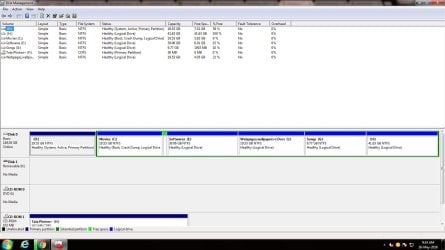
Now I want to free up D drive for Ubuntu installation (I will make a dual-boot system). My plan is to delete the D drive, then install ubuntu there. But I when I click 'Delete Volume' from disk management, it says - "Windows cannot delete the active system partition on this disk". The reason is, OS is installed in C drive (it is tagged as "Boot, Crash Dump") but the active partition is D drive. So I guess it contains the bootable files.
Can anyone please suggest me how to proceed to get a clean system where C drive will have all that is necessary for Windows7 and D drive will be free for Ubuntu installation ? I am attaching the screenshot of my disk management.
Thanks
Subhasis
This is my situation - I have got a computer which previously was used by some other user. While looking through the system, I see the OS is installed in C drive, while I can also see there is a 'Windows' folder in D drive too, which makes me believe that at some point of time there was another Win7 installation in D drive too.
Now I want to free up D drive for Ubuntu installation (I will make a dual-boot system). My plan is to delete the D drive, then install ubuntu there. But I when I click 'Delete Volume' from disk management, it says - "Windows cannot delete the active system partition on this disk". The reason is, OS is installed in C drive (it is tagged as "Boot, Crash Dump") but the active partition is D drive. So I guess it contains the bootable files.
Can anyone please suggest me how to proceed to get a clean system where C drive will have all that is necessary for Windows7 and D drive will be free for Ubuntu installation ? I am attaching the screenshot of my disk management.
Thanks
Subhasis
Attachments
My Computer
At a glance
Win7 32 bit
- Computer type
- PC/Desktop
- OS
- Win7 32 bit


