Unable to Boot After Power Loss

Griffon26

New member
Local time
2:55 PM
Messages
4
Hi,

My Windows 7 laptop recently suffered a power loss during shutdown (I've been running it without the battery since the battery could only provide about 10 minutes of power anyway). Upon turning on the laptop the next day, the computer automatically entered Windows Vista system recovery mode, and restarting the computer again didn't help. The laptop was running Windows 7 Pro, upgraded from an OEM installation of Windows Vista Ultimate.

I proceeded with startup repair, but the repair utility wasn't able to recognize any operating systems on my disk. Proceeding with the repair anyway, startup repair reports that the problem could not be automatically repaired. After that, I've tried the following:
  1. Run chkdsk /f from the command prompt under the System Recovery Options window.
    1. After claiming that a few sectors were unreadable, chkdsk reports that it encountered an unexpected error
  2. Connect the laptop harddrive to another computer as a secondary drive and run chkdsk /f
    1. chkdsk identifies the supposedly unreadable sectors and proceeds to stage 2 and sometimes stage 3, but eventually encounters an unexpected error nonetheless
    2. While attempting to repair the affected sectors, chkdsk reports that there is insufficient space to recover the lost data
    3. The data partition on the harddrive appears to be readable in explorer, but the former system partition appears to be unreadable.
  3. Put the harddrive back into the laptop and perform startup repair from Windows 7 installation disk
    1. Startup repair is still unable to recognize the operating system on the harddrive.
    2. From here, I've also tried using diskpart to set the partition with the Windows installation as "active". After doing so, startup repair is still unable to recognize the OS on the disk, and still complains that the problem could not be repaired automatically.
    3. After completing the above and restarting the computer, I found that I can't even enter the system recovery options window anymore.
  4. Connect the laptop harddrive to another computer and try to read the harddrive from Ubuntu.
    1. All files appear to be accessible and there is no evidence of damage to the drive. Even the free space remaining in the drive appears to be what it was before the crash.
This last step seems to suggest that the drive is physically intact, but for some reason, no implementation of Windows is able to read the data.

At this point, I am out of ideas. I am really hoping to avoid having to reformat the disk and reinstall Windows, unless I can also back up all the 5 years worth of applications also installed on the computer, some of which I no longer have the keys for.

I would really appreciate any suggestions on what to do from here.

Thanks!
 

My Computer My Computer

Computer type
PC/Desktop
OS
Windows 7 Professional 32 bit
Try pulling out the CMOS battery for 2 minutes then reinstall. That might get you going.
 

My Computer My Computer

Computer Manufacturer/Model Number
Custom built
OS
Windows 7 Ultimate 64 bit
CPU
AMD Phenom II X4 965 Black Edition
Motherboard
Gigabyte GA-MA790X-DS4
Memory
GSkill 4 X 2 GB PC 8500
Graphics Card(s)
XFX Radeon HD 6790 D
Sound Card
On board RealTek HD
Monitor(s) Displays
Dual monitors:Samsung SyncMaster S20B300
Screen Resolution
1600 X 900
Hard Drives
Seagate Barracuda 1TB (primary)
Seagate Barracuda 2 X 320 GB
PSU
Ultra X4 750 watt fully modular
Case
Thermaltake Overseer RX 1 full tower
Cooling
Core-Contact 92 mm CPU Cooler
Keyboard
Logitech G510
Mouse
Razor DeathAdder
Internet Speed
50/5 Mbps UL/DL
Other Info
Optical: Super Muliti DVD burner w/lightscribe, Hauppauge WinTV HVR-1800
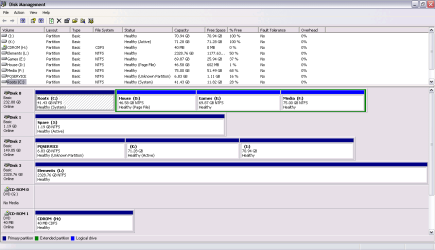
Put disk in working system and post screenshot of "disk management". Explain which disk it is in the output. Or describe EXACTLY which partitions are on disk (PRIMARY/LOGICAL, ACTIVE, filesystem type (for example NTFS) and label)
 

My Computer My Computer

Computer type
Laptop
Computer Manufacturer/Model Number
ACER ASPIRE 5742G
OS
Microsoft Windows 7 Home Premium 64-bits 7601 Multiprocessor Free Service Pack 1
CPU
Intel(R) Core(TM) i3 CPU M 370 @ 2.40GHz
Motherboard
Acer Aspire 5742G
Memory
4,00 GB
Graphics Card(s)
ATI Mobility Radeon HD 5400 Series
Sound Card
(1) AMD High Definition Audio Device (2) Realtek High Defi
Screen Resolution
1366 x 768 x 32 bits (4294967296 colors) @ 60 Hz
Hard Drives
WDC WD5000BEVT-22ZAT0
Hi Kaktussoft, please find the screenshot attached. The disk in question is labeled as Disk2. The two disks K: and I: are usually labeled ACER and DATA, but for some reason can no longer be seen in Windows. chkdsk seems to recognize them though.

Also, with this disk plugged in to the working computer, explorer becomes very slow to use. I had to kill the process to post this screenshot.

Thanks.
 

Attachments

  • DiskManager.PNG
    DiskManager.PNG
    20.5 KB · Views: 9

My Computer My Computer

Computer type
PC/Desktop
OS
Windows 7 Professional 32 bit

My Computer My Computer

Computer type
Laptop
Computer Manufacturer/Model Number
ACER ASPIRE 5742G
OS
Microsoft Windows 7 Home Premium 64-bits 7601 Multiprocessor Free Service Pack 1
CPU
Intel(R) Core(TM) i3 CPU M 370 @ 2.40GHz
Motherboard
Acer Aspire 5742G
Memory
4,00 GB
Graphics Card(s)
ATI Mobility Radeon HD 5400 Series
Sound Card
(1) AMD High Definition Audio Device (2) Realtek High Defi
Screen Resolution
1366 x 768 x 32 bits (4294967296 colors) @ 60 Hz
Hard Drives
WDC WD5000BEVT-22ZAT0
Hi Kaktussoft, sorry for the delay. With the affected harddisk plugged into the working computer, the working computer slows to a crawl, and it seems to be getting worse. This is making it difficult to work with the disk, and I haven't been able to run diskpart yet today. Any way we could address this first?

Also, every time I boot with that harddisk plugged in, the computer always attempts to run chkdsk. Right now, it's taking forever to even reach the chkdsk screen.

Thanks.
 

My Computer My Computer

Computer type
PC/Desktop
OS
Windows 7 Professional 32 bit

My Computer My Computer

Computer type
Laptop
Computer Manufacturer/Model Number
ACER ASPIRE 5742G
OS
Microsoft Windows 7 Home Premium 64-bits 7601 Multiprocessor Free Service Pack 1
CPU
Intel(R) Core(TM) i3 CPU M 370 @ 2.40GHz
Motherboard
Acer Aspire 5742G
Memory
4,00 GB
Graphics Card(s)
ATI Mobility Radeon HD 5400 Series
Sound Card
(1) AMD High Definition Audio Device (2) Realtek High Defi
Screen Resolution
1366 x 768 x 32 bits (4294967296 colors) @ 60 Hz
Hard Drives
WDC WD5000BEVT-22ZAT0
Hi Kaktussoft, I wasn't able to run diskpart even from the Windows 7 installer environment. I ran Partition Wizard on the disk afterward and found that there were a lot of damaged sectors, and Ubuntu was also no longer able to access some of the files on the disk. I think there's good reason to believe that the disk is physically damaged, so I decided to format the disk and try to reinstall Windows.

I'm just confused as to how losing power duing shutdown can cause physical damage to the disk?

Anyway, thanks for your help!
 

My Computer My Computer

Computer type
PC/Desktop
OS
Windows 7 Professional 32 bit
Hi Kaktussoft, I wasn't able to run diskpart even from the Windows 7 installer environment. I ran Partition Wizard on the disk afterward and found that there were a lot of damaged sectors, and Ubuntu was also no longer able to access some of the files on the disk. I think there's good reason to believe that the disk is physically damaged, so I decided to format the disk and try to reinstall Windows.

I'm just confused as to how losing power duing shutdown can cause physical damage to the disk?

Anyway, thanks for your help!
Why couldn't you run diskpart? Give error message or explain what happened.

Did you reformat already... so all is gone? Use seatools for seagate disks, or datalifguard for western digital disks. Test the disk, I think it's dying. A format doesn't fix that!
 

My Computer My Computer

Computer type
Laptop
Computer Manufacturer/Model Number
ACER ASPIRE 5742G
OS
Microsoft Windows 7 Home Premium 64-bits 7601 Multiprocessor Free Service Pack 1
CPU
Intel(R) Core(TM) i3 CPU M 370 @ 2.40GHz
Motherboard
Acer Aspire 5742G
Memory
4,00 GB
Graphics Card(s)
ATI Mobility Radeon HD 5400 Series
Sound Card
(1) AMD High Definition Audio Device (2) Realtek High Defi
Screen Resolution
1366 x 768 x 32 bits (4294967296 colors) @ 60 Hz
Hard Drives
WDC WD5000BEVT-22ZAT0
Back
Top