Laptop Toshiba 500GB crashed NTSF patitions became RAW

GeekEco

New member
Local time
4:42 AM
Messages
23
I know you want the full steps I took to try and recover my backup. I have a laptop Toshiba 500GB HDD. It has over 5 years of critical business & reseearch data, photos, emails. I accidentally knocked the laptop to the floor. It will not reboot again on an installed windows 7 64 bit operating system.

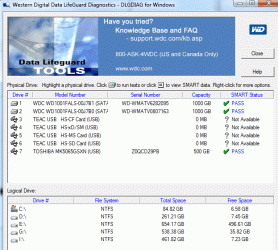
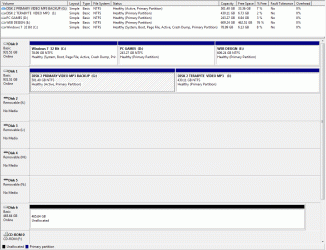
Window 7 recovery rescue disk would not recognize the drive. I attached it to a desktop running windows 7 using usb external drive enclosure. At first it was making clicking sounds and I got a cyclic redundancy error. I ran WD diagnostics and it passed with no errors. Windows 7 device manager showed no errors. MY COMPUTER showed the disk assigning it a Letter. It then asked me do I want to initialize it with mbr or gpt. I stupidly clicked on mbr. After that, I lost the letter designating the drive in MY COMPUTER. It no longer shows up under MY COMPUTER. Under computer management it shows drive as unallocated. If I right click, it ask for new simple partition. I read where you could do a chkdsk /f but the windows system does not see the drive. It is labeled disk 6 under storage management. I also heard that chkdsk can mess up recovering your files as corrupted files will be in lost clusters or chains. It no longer makes clicking sounds or gives CRC error msg.

Prehaps rebuilding the mbr, I believe a backup mbr is on their somewhere. The problem is that I do have a windows 7 backup. I backup all my drives using windows 7 backup program and created a system image. However the drive has three partitions on it so when I backed up I only backed up the system partition C and data partition D. It has manufacturer factory recovery partition. The backup image is located in the folder called imagedrivebackup on another external drive. I also did a backup image on laptop on Drive D partition. However imagedrivebackup is 6 month old and will not backup on any other clean HDD. It is seeking only the HDD on this laptop. But I cannot back using the imagebackup because the drive is no longer recognized by windows.

So, I downloaded Recuva but recuva did not recognize this drive. So I downloaded Easeus data recovery free. It recognize the drive and I ran the quick scan but it didn't show many documents. So I ran the deep scan and checked the folders where my data was stored. However, I realized that the recovery will no way be able to recover all my data files. So I stopped the program and received a warning that stoping the program may result in not finding further files and it started building a file directory.

The question is that the files are now in raw format. Is there a way to rebuild the partitions using backup MBR that was on there? I have over 200gb of data files, email, photos, docs, video etc. If it recovers them, I am reading that file names will all be messed up.

Is there anyway to rebuild the partition or mbr so that that normal files can be readable? A program out there that will rebuild raw back to ntsf. I tried booting up using UBuntu but it did not recognize the drive. I not familiar with Linux so I might have used the wrong verision or did not know how to search probably. I ran testdrive but was at a lost how to use the program and quit. I'm fearful of overwriting anything on the HDD. The Data is there. I was wondering if Spinrite from GRC would repair the HDD. Not familiar with any other programs. The data is there but in raw format. I can't go through 200gb of data to rename each and everyone of those files. Are there steps to take to convert the partition back to NTFS and recover the file table restructure. Sorry, my English not very good.

Thx for any help!
 

My Computer My Computer

At a glance

Windws 7 32bit
Computer type
Laptop
OS
Windws 7 32bit
I'm not a recovery expert by a long shot. I do have one recommendation.

**Don't try anything until one of the forums recovery members see your thread.**

Doing the wrong thing or the right thing a the wrong time could cause data loss.

Do you have your data backup-ed?
 

My Computer My Computer

At a glance

Windows 10 Pro. 64/ version 1709 Windows 7 Pr...Intel i7-6800K @ 4.3Corsair Platinum 16 gig @2400EVGA GTX 1070 OC
Computer type
PC/Desktop
Computer Manufacturer/Model Number
Home made Desktop
OS
Windows 10 Pro. 64/ version 1709 Windows 7 Pro/64
CPU
Intel i7-6800K @ 4.3
Motherboard
ASUS X-99 Deluxe II
Memory
Corsair Platinum 16 gig @2400
Graphics Card(s)
EVGA GTX 1070 OC
Monitor(s) Displays
Asus 27" LED LCD/VE278Q
Screen Resolution
1920-1080 or 1280-720 HDMI
Hard Drives
INTEL SSD 730-240 Gb Sata 3.0/
PSU
EVGA Platium 1200W
Case
Phanteks Luxe Tempered Glass 8 fans/ one radiator
Cooling
XSPC/ Water Cooled CPU
Keyboard
Das 4 Professional
Mouse
Logitech M705/MX Anywhere 2-S
Internet Speed
100 mbits
Antivirus
Microsoft Security Essentials/ Malwarebytes Premium 3.0/ SAS
Browser
I.E. 11 default/Firefox/ ISP Time Warner Cable/Spectrum
Other Info
LG BluRay Burner/
Sound system-KLipsch-THX/
Icy Dock ssd Hot Swap bays.
At this point wait like Jack said for an expert to reply to you, but also you should get another disk that has at least the amount of free space on it as the drive your going to recover because they are more than likely going to have you copy the fixed structure to another drive because editing the now raw drive has a high risk of data loss so you should be prepared to have to utilize that space temporarily on another drive.
 

My Computer My Computer

At a glance

10 Pro x64Ryzen 9 3900X64GB(4x16GB) DDR4EVGA 1080ti FTW3
Computer type
PC/Desktop
Computer Manufacturer/Model Number
Custom
OS
10 Pro x64
CPU
Ryzen 9 3900X
Motherboard
Asrock x370 Tachi
Memory
64GB(4x16GB) DDR4
Graphics Card(s)
EVGA 1080ti FTW3
Sound Card
ASUS Xonar Essence STX (V4 Bursons), ODAC rev B, NFB-11, O2
Monitor(s) Displays
3xASUS PB278Q/R, Optoma HD142X
Screen Resolution
3x1440p, 1080p
Hard Drives
512GB 850 EVO(OS, Programs)
4TB (Movies)
3TB (Downloads)
3TB (Programs)
1TB HDD (Games)
2x6TB R1 (videos)
PSU
AX760
Case
Fractal Define R5
Cooling
NH-D15S
Keyboard
Massdrop Ctrl with Box Navy's
Mouse
G903, Alioth XXL Mat
Internet Speed
280/40
Antivirus
MBAM, ESET
Browser
Canary 64 Bit
Other Info
I also own a Thinkpad P50 Xeon 4K, X220T, X1C5
Thanks for replying. I'll wait for someone as I know I dont want to have any program write to this disk overwriting anything. Someone reply in a post using UBuntu but now I dont see it. I tried Linux but it could not read the drive. I believe I have a backup mbr on this disk. Easus can read it and I can see the raw files. However, I don't know if it is the best program out there. Best would be to rebuild NTSF file table. Windows 7 MY COMMPUTER recognized the drive assigning it a drive letter until I made the mistake of initializing it. It has the manufacturer recovey partition, primary system partition C drive with all my programs, and secondary partition on D drive where are my data is stored. There is also windows backup recovery image on that drive as well. I have data files on C Drive in my documents folder as well as on the desktop under user.

I have the data drive backed up using Windows backup that is 6 months old on another ext HDD. But like I said, I tried to do a restore on another clean 1TB external drive but it would not restore as I would get an error msg recognizing the new External drive. There seems to be association with backup and firmware on the manuacturer laptop. Perhaps, I could buy another 500gb Toshiba drive. I understand that Windows backup programs has problems restoring once a system crashes. It is not the best backup. So I have Recuva and Acronis backup on my other computers. I have clean 1TB external drive available. I know there may be damaged sectors on it. I hear GRC Spinrite can rebuild the hdd but I don't know if the program can do a recovery. I looked at testdrive and minitools recovery but was afraid of using them as I might messed something up.

So I'll await for recovery expert. Thank you.
 

My Computer My Computer

At a glance

Windws 7 32bit
Computer type
Laptop
OS
Windws 7 32bit
I just happened to see this thread now. Your last post was 4 days ago and I have confirmed that you hadn't logged in since then. Are you still looking for a solution? If you confirm yes then I shall go ahead. I have just four more days before I take off to Spain and hope to finish it off by then. Otherwise we shall take it up after my return from Spain around 12th June.
 

My Computer My Computer

At a glance

Windows 7 Home Premium 32 bit
OS
Windows 7 Home Premium 32 bit
jumanji is the expert you need.
 

My Computer My Computer

At a glance

Windows 10 Pro. 64/ version 1709 Windows 7 Pr...Intel i7-6800K @ 4.3Corsair Platinum 16 gig @2400EVGA GTX 1070 OC
Computer type
PC/Desktop
Computer Manufacturer/Model Number
Home made Desktop
OS
Windows 10 Pro. 64/ version 1709 Windows 7 Pro/64
CPU
Intel i7-6800K @ 4.3
Motherboard
ASUS X-99 Deluxe II
Memory
Corsair Platinum 16 gig @2400
Graphics Card(s)
EVGA GTX 1070 OC
Monitor(s) Displays
Asus 27" LED LCD/VE278Q
Screen Resolution
1920-1080 or 1280-720 HDMI
Hard Drives
INTEL SSD 730-240 Gb Sata 3.0/
PSU
EVGA Platium 1200W
Case
Phanteks Luxe Tempered Glass 8 fans/ one radiator
Cooling
XSPC/ Water Cooled CPU
Keyboard
Das 4 Professional
Mouse
Logitech M705/MX Anywhere 2-S
Internet Speed
100 mbits
Antivirus
Microsoft Security Essentials/ Malwarebytes Premium 3.0/ SAS
Browser
I.E. 11 default/Firefox/ ISP Time Warner Cable/Spectrum
Other Info
LG BluRay Burner/
Sound system-KLipsch-THX/
Icy Dock ssd Hot Swap bays.
1. The faulty HDD is now inside an external enclosure and you can plug it into a Desktop running
Windows 7. Please mention the bit version of the Windows.

2. You ran Data Lifeguard Diagnostic for Windows and it showed no errors. Please run it again and post the screenshot of the result running the short test. Also note the time taken to complete the short test and intimate.

3. Post a screenshot of the Windows Disk Management with only your external drive plugged in. Adhere to the guidelines here to post an untruncated screenshot showing all the information http://www.sevenforums.com/tutorials/274797-disk-management-post-screen-capture-image.html

4. Download, install and run MiniTool Partition Wizard Free Edition 9.1 and post the screenshot of how that external drive appears in it - the very first screen when you launch it. https://www.partitionwizard.com/free-partition-manager.html

Using Snipping tool for screenshots:How to Use the Snipping Tool in Vista

Upload to SevenForums: http://www.sevenforums.com/tutorials/9733-screenshots-files-upload-post-seven-forums.html

5. Please post the link from which you downloaded the Easus Data Recovery software for my info..
 

My Computer My Computer

At a glance

Windows 7 Home Premium 32 bit
OS
Windows 7 Home Premium 32 bit
1. Windows 7 Ultimate 64bit
2. Ran Data Lifeguard Diagnostic Pass
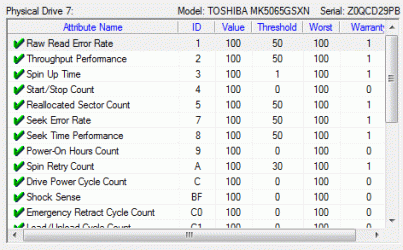
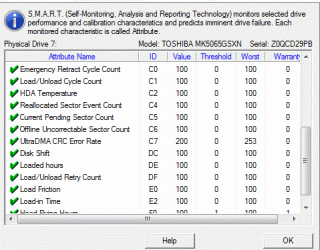
3.Right click and click on smart drive info. PASS showing 2 screenshots of info
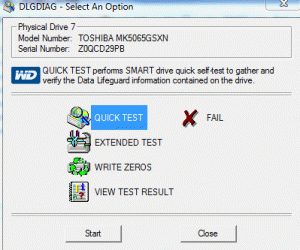
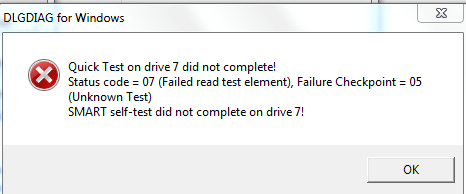
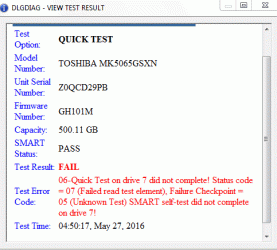
4.Ran Data Lifeguard Diagnostic quick test 2 screen test showing FAIL and screenshot on diag
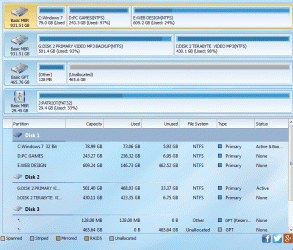
5. Ran Minitools Drive Partitiom showing 2 screen shots
6. ran windows 7 deice manager disk show no error 2 screen screen shot showing run correctly
7. is where I dicovery that I ran the, Eqerusus free recovery file but they inRAW form
. Iy faileg
http://www.sevenforums.com/backup-r...ed-ntsf-patitions-became-raw.html#post3252490
Posted to Laptop Toshiba 500GB failed Help! - EaseUS Software They have free recovery program up to 2GB of infomation/ I say all my recoverirs in Alabama..
 

Attachments

  • ScreenHunter_01 May. 27 04.13.gif
    ScreenHunter_01 May. 27 04.13.gif
    57.1 KB · Views: 52
  • ScreenHunter_09 May. 27 04.47.gif
    ScreenHunter_09 May. 27 04.47.gif
    15.7 KB · Views: 52
  • ScreenHunter_10 May. 27 04.47.gif
    ScreenHunter_10 May. 27 04.47.gif
    20.3 KB · Views: 52
  • ScreenHunter_03 May. 27 04.14.gif
    ScreenHunter_03 May. 27 04.14.gif
    14.6 KB · Views: 52
  • ScreenHunter_02 May. 27 04.14.gif
    ScreenHunter_02 May. 27 04.14.gif
    10.2 KB · Views: 52
  • ScreenHunter_11 May. 27 04.50.gif
    ScreenHunter_11 May. 27 04.50.gif
    16.6 KB · Views: 52
  • ScreenHunter_06 May. 27 04.17.gif
    ScreenHunter_06 May. 27 04.17.gif
    39.5 KB · Views: 3
  • ScreenHunter_07 May. 27 04.28.gif
    ScreenHunter_07 May. 27 04.28.gif
    107.1 KB · Views: 0
  • ScreenHunter_08 May. 27 04.29.gif
    ScreenHunter_08 May. 27 04.29.gif
    166.7 KB · Views: 1
  • ScreenHunter_05 May. 27 04.15.gif
    ScreenHunter_05 May. 27 04.15.gif
    6.3 KB · Views: 52
  • ScreenHunter_04 May. 27 04.15.gif
    ScreenHunter_04 May. 27 04.15.gif
    14.5 KB · Views: 52
Last edited:

My Computer My Computer

At a glance

Windws 7 32bit
Computer type
Laptop
OS
Windws 7 32bit
OK, I don't want to confuse you at this stage. Just answer the following questions.

1. So you used EaseUS Data Recovery Wizard. Right? I wanted you to give me the link from where you downloaded the program so that I can download it, install it and try it just to know what it does, how it does. I have one HDD for the trials. So provide the link from where you downloaded it. I want to download it exactly from where you downloaded it and what you downloaded.

2. Your drive is a Toshiba branded HDD. Any reason why you ran WD Data Life Guard Diagnostics, which is normally run on Western Digital branded HDDs only? ( I thought they might have used a WD HDD inside and that is why you ran the WD program )

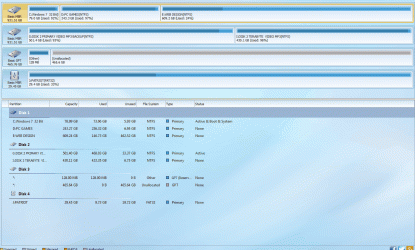
3. Your drive is not an MBR drive but a GPT drive. I can see it so in the Partition Wizard screenshot. Are you aware of it?

4. What does the email from Eaesus say? Can you please reproduce it here? Copy and post the contents of the email only without your email id and their email id. I want to know what exactly they had in their mind for your problem..

There are certain things you can do now. I shall tell you after getting the answers for the above.

.
 

My Computer My Computer

At a glance

Windows 7 Home Premium 32 bit
OS
Windows 7 Home Premium 32 bit
1.
Free Data Recovery Software Download to Recover Deleted Files - EaseUS Data Recovery Wizard Free Edition

2. I was searching for a solution and there several suggestions on other sites to try EASEUS Free data recovery software. So I went to there site to try their free version to determine if it could even read the drive. It could read and recover the raw files but without the file structure. It allow for 2GB recovery. You still would have rename all those files and 500GB of file names was practible. I read in other places you can rebuild the MBR or file table.

I have backup MBR on the drive. I did not go ahead as I read there was perhaps other ways and better data recovery software to rebuild the partition drive.

2. Toshiba didn't have a diagnositc tool to run for their drives. I looked and several sites recommneded running the WD LifeGuard software

3. Yes, I explain up in my other postings on this thread above, at first Windows 7 recognized the drive and assigned it a letter to it. However, when I clicked on it HDD I got a msg do I wish to initialize the drive? I made the mistake in saying YES and they gave me a choice. I chose GPT as I read use GPT for larger drives.

4.
###############################################
Hi EcoGeek,

Thanks for contacting us.

In your case, the lost MBR or parititions are not recoverable. The lost files can be just recovered with RAW mode. Usually, they will be renamed as File0xxx. For details:
Do Not Miss "More lost files (RAW Files)"
My suggestion is upgrading the free version to full version. Then save all the found files.
#################################################

I read on here that someone helped rebuild thier HDD file tables using MiniTools, or TestDrive or another program that costt $70. I can't remember. It was a very complicated process. So I did not want to try what they did in another thread on here using those programs and really messed things up.

GRC Spinrite said they could fix HDD if it was not working probably to get it back up and running but not for recovery drive that went RAW or Unallocated.
THX
 
Last edited:

My Computer My Computer

At a glance

Windws 7 32bit
Computer type
Laptop
OS
Windws 7 32bit
OK, right now I am running an experiment to replicate your HDD condition to ascertain the best possible way to reclaim your drive. That may take sometime.

In the meanwhile, post the exact model Number of your Toshiba Laptop. It looks like a very recent model with UEFI. That is why your 500GB HDD was formatted as a GPT drive more so since it was a 64bit system.

On a GPT drive, there is no backup of the protective MBR at sector 0.

By initialising it as an MBR drive, you have replaced the protective MBR of the GPT drive with the conventional MBR of an MBR drive.

There is no precedent of a case like this. So I have to experiment and work out a solution. I also may have to investigate your drive further . All this is going to take time. So be patient. There may also be a break from 30th inst. to 12 June when I am away in Spain.

Data recovery is a painfully slow and tedious process since we have to proceed carefully without incurring any further data loss. Do not experiment on your own. ( You have been working on half-knowledge and misconceptions :) but that is acceptable since we cannot expect a normal user to be tech-savvy and know/decipher everything. ) Keep your external drive plugged out unless you are asked to plug-in.
Apart from intimating the exact model Number of your Toshiba laptop, let me know whether you have made the Recovery Disks as per Toshiba instructions in the user manual for your system.

Do you have a friend who has the same system - ditto everything? Then it will be easy to restore the Protective MBR.

EDIT: In your first post you said " I stupidly clicked on mbr". In your last post you say "I chose GPT as I read use GPT for larger drives" Please clear the confusion you are creating. I am still assuming that you initialised it as an MBR.
 
Last edited:

My Computer My Computer

At a glance

Windows 7 Home Premium 32 bit
OS
Windows 7 Home Premium 32 bit
Toshiba MK5065GSXN HDD2J12. It has or had a recovery partition on it. I have rescue disks and backupimages but they are useless since it doesn't recognize the drive or if it doesnt don't remember as its been awhile, I didnt want to write to anything or do something that might mess everything up. At first, I got CRC error but that went away. At first when I plugged it into my desktop, Windows recognized the drive assigned a drive letter to it and ask do I want to initialize. I was uncertain on what I choose several months ago whether MBR or GPT cause I couldnt understand why it would ask them do I want to initialize. I thought it had to do something with using it as a plug-in for the first time as you get when you put a new usb thumb drive in, you get a msg. But it is now GPT

Thx for taking the time to look into this. I'll wait Im not going anywhere.
 

My Computer My Computer

At a glance

Windws 7 32bit
Computer type
Laptop
OS
Windws 7 32bit
Please do the following.

1. Create a folder named bootice on the C: drive of your Desktop PC running Windows 7, 64bit.

2. Download x64 version of bootice from here. Bootice Download It will be BOOTICEx64_v1.321.rar file. Extract it to the bootice folder you created. You will have a BOOTICEx64.exe file in it

3. Please remove all other external drives/ pen drives/ Card Readers/USB printers/ USB hubs / docks from the USB ports.. Plug in only your external drive that has the Toshiba HDD inside.

4. Click/doubleclick on the booticex64.exe file to run it.

5. Select your 500 GB external drive and then click on the Sector Edit. Click on the Partitions button on the extreme left to show the Partition information. Post the screenshot showing the Partition information..That screenshot will also enable me to examine the Sector 0 and what it contains.

Please read this post on how to use bootice. http://www.sevenforums.com/hardware-devices/310295-lost-partitions.html#post2584426 ( Read only upto the first four screenshots explaining the Menu icons.That should be sufficient for you to execute the above instructions.)

Your screenshot should be something like the second screenshot in the post.

At this stage we are only examining your drive.

After taking the screenshot, close bootice and then safely remove your external drive.
 

My Computer My Computer

At a glance

Windows 7 Home Premium 32 bit
OS
Windows 7 Home Premium 32 bit
Well I had difficulty on Windows Desktop 64bit. It would not recognize the drive. I have usb keyboard and mice connectors usb connectors on desktop. Control Panel Admin Computer management did not see the drive.

I loaded up on another Windows 7 32bit laptop using BOOTICE 32bit Doesn't look to promising

If you want to wait until you get back that's fine
 

Attachments

  • ScreenHunter_01 May. 29 05.26.jpg
    ScreenHunter_01 May. 29 05.26.jpg
    189.1 KB · Views: 1

My Computer My Computer

At a glance

Windws 7 32bit
Computer type
Laptop
OS
Windws 7 32bit
(On the Windows 64bit Desktop, you need not have to remove your USB keyboard and USB mouse. You need to remove only all storage devices like other external HDDs, Pen drives etc,)

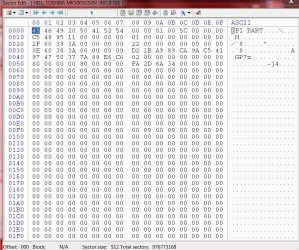
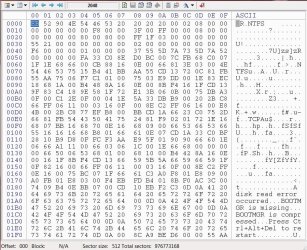
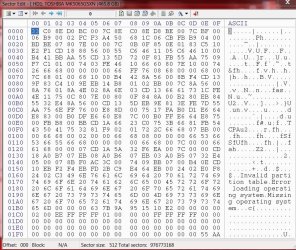
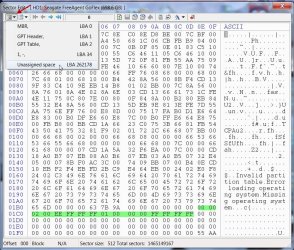
The protective MBR of your GPT drive looks good, nothing wrong. The screenshot below shows the Protective MBR of my 750GB trial drive.

29-05-2016 18-30-49.jpg

(You can see it is ditto the same. It is going to be the same on all GPT drives. That is why there is no backup of this Protective MBR, while the GPT Header and GPT Table are backed up in the last few sector of the HDD. In case the GPT header and GPT Table get corrupted, these will be automatically read from the backup and your HDD will continue to behave normally. You wouldn't even know that the GPT header and GPT table in sector 1 and 2 has been lost/corrupted)

But I wanted you to click on the Partition button on top left to show the partition structure as in the above screenshot ( which you did not do :))

Do that and post a screenshot.

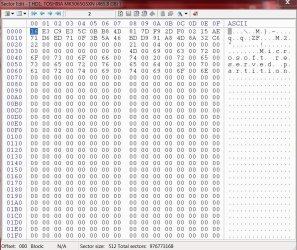
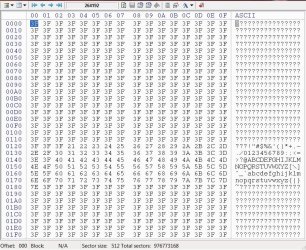
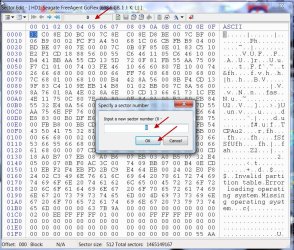
Next select sector 1, then 2, then 2048 and then 264192 and post the screenshots. ( You will click on the Sector field on top, input the sector Number and then OK to go to that sector as explained in my bootice post I had referred)

29-05-2016 19-30-32.jpg

After that close bootice, remove your drive safely and keep it. We shall continue after 12th June. Keep watching this thread after 12th June.
 
Last edited:

My Computer My Computer

At a glance

Windows 7 Home Premium 32 bit
OS
Windows 7 Home Premium 32 bit
I was :sleepy: when I did it reading thru other posts got confused OK I believe I did this right :o

THX for all your help!
 

Attachments

  • ScreenHunter_02 May. 29 10.35.jpg
    ScreenHunter_02 May. 29 10.35.jpg
    6.4 KB · Views: 54
  • 1.jpg
    1.jpg
    159 KB · Views: 0
  • 2.jpg
    2.jpg
    177.5 KB · Views: 0
  • 2048.jpg
    2048.jpg
    175.2 KB · Views: 0
  • 264192.jpg
    264192.jpg
    196.5 KB · Views: 0

My Computer My Computer

At a glance

Windws 7 32bit
Computer type
Laptop
OS
Windws 7 32bit
OK, good. You did a good job.

Your HDD was in reality an MBR drive. I can see the first partition starting at sector 2048, which happens only on MBR drives. You wrongly initialised it as GPT drive. ( This part you confused me by giving contradictory statements and that is why I had to investigate and find it out myself. :))

Not to worry. There is hope we can recover the drive, if not recover all or most of the data.

For now, safely remove the drive and keep it aside. (Do not attempt to do anything yourself. Do not read anything about data recovery on the internet and try to apply it. You misunderstand so many things.. :))

We shall go ahead after 12th June. Till then just relax. :)
 

My Computer My Computer

At a glance

Windows 7 Home Premium 32 bit
OS
Windows 7 Home Premium 32 bit
OK, GeekEco, we are on the job again after two weeks. Hope you are watching.

Before we do anything with your faulty drive, I want you to save the current important sectors that had come up since you initialised the drive wrongly as a GPT drive. You will use bootice to save the sectors in your faulty drive.. Bootice will,by default, save the files to the same folder in which it resides.

1. Save sector 0: ( Of course you already know that you have to select the correct faulty drive and then > Sector Edit. Please remove all other USB HDDs/Pendrives. Only your USB keyboard and USB mouse are allowed in the USB ports apart from your faulty drive.)

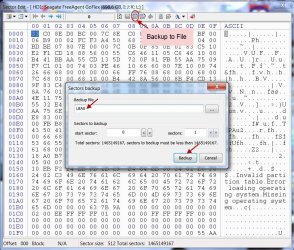
Select sector 0 (which is the Protective MBR), click on the "Backup to file" button on the menubar,give it a name LBA0 and click on the backup button to save. Check the file has really been saved as LBA0.bin in the bootice folder. Illustrative screenshot below.

14-06-2016 21-43-18.jpg

2. Using the Next sector arrow (increment by 1) go to sector 1 and save it as LBA1. ( This is the GPT Header)

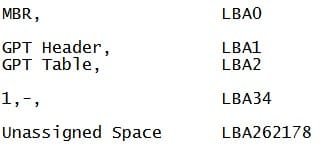
3. Again increment by 1 and save sector 2 as LBA2. ( This is the GPT table. which may contain the partition Tables of the first four partitions and that includes the normally invisible 128 MB MSR partition. So MSR + 3 user partitions.) I am assuming that you did not have more than 3 user partitions and will stop with this. (All the same check sector 3 does not have any partition data and it is all 00s. Report if it has anything other than 00s)

4. Now go to Sector 34 and save it. ( If it is all 00s in all fields then you need not save it.) This is the start point of the MSR partition)

5. Using the Last sector arrow go to the last sector, which in your case will be 976773167. Save it as BupGPTH. (Backup of GPT Header) This is where the backup of the GPT Header at Sector 1 resides)

6. Taking that last sector as n, go to n-32 which in your case is 976773135 and save it as BupGPTT ( Backup of GPT Table) This is where the backup of the GPT Table at sector 2 resides.

Check you have all the saved files, representing the above GPT structure, is all there and confirm.

Close bootice and safely remove your faulty drive.

After your confirmation we shall proceed to the next step of zeroing all these wrongly written sectors that came up due the wrong GPT initialisation. ( We have saved all these sectors so that we can restore those back should a necessity arise to bring the drive back to the condition as is now.)

If my response is delayed, do not worry. That only means that I am busy with other things but will return when free. Mood also matters :))

Edit: In addition save sector 2048 with the name as LBA2048 (I missed it.)( This is the only MBR Partition start sector which is to be retained)
 
Last edited:

My Computer My Computer

At a glance

Windows 7 Home Premium 32 bit
OS
Windows 7 Home Premium 32 bit
OK that's good :)
I made all the backups except for sector 3 & sector 34 had 00s in all fields were not saved

Thanks
 

My Computer My Computer

At a glance

Windws 7 32bit
Computer type
Laptop
OS
Windws 7 32bit
Back
Top