IE9 No Longer able to Open .XML

front360

New member
Member
Local time
6:52 AM
Messages
87
I used to be able to open .xml files in IE9, before I believe I delete some stuff from the registry.(Windows Restore was turned off)
Now when I click on an unknown file extension in ie9, and select “Use the Web Service to find the appropriate program”, it only offers me the option to Save redir.xml. The option to OPEN redir.xml in ie9 is no longer there. If I save redir.xml and try to open it in explorer, it starts to open ie9 then asks me to save redir.xml again.(the option to open is gone!)

Example: When I click this File extension redirect, it doesn't open but only offers me the option to save redir.xml.(No option to Open)

Are these registry values correct?

[HKEY_LOCAL_MACHINE\SOFTWARE\Microsoft\Windows\CurrentVersion\Explorer\Associations]
"XMLLookup"="http://shell.windows.com/fileassoc/fileassoc.asp?LangID=%04x&Ext=%s"
"Application"="http://shell.windows.com/fileassoc/%04x/xml/redir.asp?Ext=%s"
"intl"="http://shell.windows.com/fileassoc/fileassoc.asp?LangID=%04x&Ext=%s"
 

My Computer My Computer

Computer Manufacturer/Model Number
Aus G73JH-RBBX05
OS
Windows 7 SP1 Home Premium x64
CPU
Intel Core i7 720QM
Motherboard
Asus (Intel HM55 Chipset)
Memory
Kingston 8 GB
Graphics Card(s)
ATI Mobility Radeon HD 5870
Sound Card
Realtek
Monitor(s) Displays
LG
Screen Resolution
1600X900
Hard Drives
Crucial M4 256GB
(Seagate Momentus ST9500420AS)Currently Disabled
Mouse
Razer Naga
Internet Speed
Cable
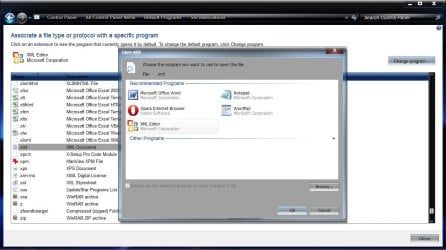
See if you can set the file association to the XML Editor.

Start> In search box type Default Programs> Enter> Choose Associate a file type or protocol with a program> Scroll down to .xml and left click to highlight the listing> Click on Change program in upper right> Choose XML Editor from the list> OK

xml.jpg

See if that works now.

A Guy
 

My Computer My Computer

Computer type
PC/Desktop
OS
Windows 10 Home x64
CPU
INTEL Core i5-750 Quad-Core 3.37GHz
Motherboard
ASUS P7P55D
Memory
HyperX Fury Black Series 8GB (2 x 4GB) 1866Mhz
Graphics Card(s)
EVGA GeForce GTX 750 Superclocked 1GB 128-Bit GDDR5
Monitor(s) Displays
LG 32MA68HY 32" IPS
Screen Resolution
1920 x 1080
Hard Drives
Samsung 840 Evo 120GB, SEAGATE 500GB Barracuda® 7200.12, SATA 3 Gb/s, 7200 RPM, 16MB cache
PSU
ANTEC TruePower New TP-550, 80 PLUS, 550W
Case
ANTEC Three Hundred Illusion
Cooling
COOLER MASTER Hyper 212 Plus, 4 x 120mm 1 x 140mm Noctua's
Internet Speed
85 + Mbps
Antivirus
Avast
Browser
Vivaldi

My Computer My Computer

Computer type
Laptop
Computer Manufacturer/Model Number
Sony Vaio VPCEB47GM Laptop
OS
Win 7 Pro 64-bit
CPU
Intel i5 2.4 Ghz
Memory
8GB DDR3
Graphics Card(s)
Intel HD 3000
Sound Card
IDT High Definition
Monitor(s) Displays
15.6 WGXA Anti-Glare LED
Screen Resolution
1280x800
Hard Drives
640Gb 7200rpm
Antivirus
MSE
Browser
Opera (primary) with IE9 backup
I had Restore turned off and I already tried to Reset IE9.

A Guy- Where is xml editor, it's not listed in 'recommended programs' so I have to 'browse' my HDD for it?
I currently have .xml set in 'Default Programs\Set Associations' to open with Internet Explorer, but the Icon is Notepad. Is this "normal"?

I also already tried to fix .xml file associations from here.

Can someone verify their Win7x64 xml Registry Keys and Values...
 

My Computer My Computer

Computer Manufacturer/Model Number
Aus G73JH-RBBX05
OS
Windows 7 SP1 Home Premium x64
CPU
Intel Core i7 720QM
Motherboard
Asus (Intel HM55 Chipset)
Memory
Kingston 8 GB
Graphics Card(s)
ATI Mobility Radeon HD 5870
Sound Card
Realtek
Monitor(s) Displays
LG
Screen Resolution
1600X900
Hard Drives
Crucial M4 256GB
(Seagate Momentus ST9500420AS)Currently Disabled
Mouse
Razer Naga
Internet Speed
Cable
Yes, browse to the 32 bit IE (iexplorer.exe) in C:\program files (x86)\Internet Explorer, and choose that. If you have done that, and it remains associated with notepad, perhaps try associating it with something on the list...or notepad. Then go back and try to associate it with IE9 again. I'm thinking xml editor may be part of Office. A Guy
 

My Computer My Computer

Computer type
PC/Desktop
OS
Windows 10 Home x64
CPU
INTEL Core i5-750 Quad-Core 3.37GHz
Motherboard
ASUS P7P55D
Memory
HyperX Fury Black Series 8GB (2 x 4GB) 1866Mhz
Graphics Card(s)
EVGA GeForce GTX 750 Superclocked 1GB 128-Bit GDDR5
Monitor(s) Displays
LG 32MA68HY 32" IPS
Screen Resolution
1920 x 1080
Hard Drives
Samsung 840 Evo 120GB, SEAGATE 500GB Barracuda® 7200.12, SATA 3 Gb/s, 7200 RPM, 16MB cache
PSU
ANTEC TruePower New TP-550, 80 PLUS, 550W
Case
ANTEC Three Hundred Illusion
Cooling
COOLER MASTER Hyper 212 Plus, 4 x 120mm 1 x 140mm Noctua's
Internet Speed
85 + Mbps
Antivirus
Avast
Browser
Vivaldi
No luck. I tried swithching to notepad then back to Internet Explorer and I still cannot open .xml via IE...I have Office 2010 Home and Student which doesn't have XML Editor.
I am able to open .xml files in other programs. I just want to be able to open them again via IE.

Anyone get a chance to verify their registry?
 

My Computer My Computer

Computer Manufacturer/Model Number
Aus G73JH-RBBX05
OS
Windows 7 SP1 Home Premium x64
CPU
Intel Core i7 720QM
Motherboard
Asus (Intel HM55 Chipset)
Memory
Kingston 8 GB
Graphics Card(s)
ATI Mobility Radeon HD 5870
Sound Card
Realtek
Monitor(s) Displays
LG
Screen Resolution
1600X900
Hard Drives
Crucial M4 256GB
(Seagate Momentus ST9500420AS)Currently Disabled
Mouse
Razer Naga
Internet Speed
Cable
I have no problem opening xml in IE9. Try to empty the cache in IE9, it might help.
 

My Computer My Computer

Computer type
Laptop
Computer Manufacturer/Model Number
Acer Aspire 5750G
OS
Windows 7 Home Premium x64, Windows 8 Pro
CPU
i5-2430M
Motherboard
Acer JE50_HR
Memory
8 Gb
Graphics Card(s)
nVidia GeForce 610M
Sound Card
Realtek High Definition Audio
Antivirus
Avast
Browser
Chrome
Check in Internet Options > Advanced, scroll down to the Security section, and see if "Enable native XMLHTTP support" is checked. I don't know if this'll do it, but I believe enabled is default anyway.
 

My Computer My Computer

OS
Windows 7 Ultimate x64
Not sure what specific reg entries you want to confirm? Something to try.

Open a command prompt, and type:

ftype xmlfile

Enter

What is the association? I have:

xmlfile="C:\Program Files (x86)\Common Files\Microsoft Shared\OFFICE11\MSOXMLED.EXE" /verb open "%1

I have Office 2003, the OFFICE11 will be different depending on Office version

If you find the MSOXMLED.EXE, you could set the default to C:\Program Files (x86)\Common Files\Microsoft Shared\OFFICE11\MSOXMLED.EXE , which should be the XML Editor I mentioned earlier. That is my default, and it opens .xml files in my default browser (Opera).

A Guy
 

My Computer My Computer

Computer type
PC/Desktop
OS
Windows 10 Home x64
CPU
INTEL Core i5-750 Quad-Core 3.37GHz
Motherboard
ASUS P7P55D
Memory
HyperX Fury Black Series 8GB (2 x 4GB) 1866Mhz
Graphics Card(s)
EVGA GeForce GTX 750 Superclocked 1GB 128-Bit GDDR5
Monitor(s) Displays
LG 32MA68HY 32" IPS
Screen Resolution
1920 x 1080
Hard Drives
Samsung 840 Evo 120GB, SEAGATE 500GB Barracuda® 7200.12, SATA 3 Gb/s, 7200 RPM, 16MB cache
PSU
ANTEC TruePower New TP-550, 80 PLUS, 550W
Case
ANTEC Three Hundred Illusion
Cooling
COOLER MASTER Hyper 212 Plus, 4 x 120mm 1 x 140mm Noctua's
Internet Speed
85 + Mbps
Antivirus
Avast
Browser
Vivaldi
I already have "Enable native XMLHTTP support" checked, and I tried deleting IE9 cache but it still doesn't work.

A Guy- I have Office 2010, so yes when I type "ftype xmlfile" I get the same thing you did but with OFFICE14.

I was curious about the registry entries in my OP and anything having to do with XML, .xml, xmlfile or are there .dll's I could be missing?
 

My Computer My Computer

Computer Manufacturer/Model Number
Aus G73JH-RBBX05
OS
Windows 7 SP1 Home Premium x64
CPU
Intel Core i7 720QM
Motherboard
Asus (Intel HM55 Chipset)
Memory
Kingston 8 GB
Graphics Card(s)
ATI Mobility Radeon HD 5870
Sound Card
Realtek
Monitor(s) Displays
LG
Screen Resolution
1600X900
Hard Drives
Crucial M4 256GB
(Seagate Momentus ST9500420AS)Currently Disabled
Mouse
Razer Naga
Internet Speed
Cable
OK, I'm not giving up. Open regedit and navigate to HKEY_CURRENT_USER\Software\Microsoft\Windows\CurrentVersion\Explorer\FileExts\.xml\OpenWithList . See what the value is. If it is blank, or associated to office, you could try changing the value to iexplorer.exe . At this point I'm going to suggest you back up the registry 1st.

http://www.sevenforums.com/tutorials/4230-registry-backup-restore.html

Edit:

You know, I don't see any mention of you trying to use the Open With context menu? Have you tried right clicking a .xml file, choosing Open With, and choosing IE from the list? Or if it isn't on the list, browse to it, then set it to always open with IE?

http://www.sevenforums.com/tutorials/12196-open-change-default-program.html

A Guy
 

My Computer My Computer

Computer type
PC/Desktop
OS
Windows 10 Home x64
CPU
INTEL Core i5-750 Quad-Core 3.37GHz
Motherboard
ASUS P7P55D
Memory
HyperX Fury Black Series 8GB (2 x 4GB) 1866Mhz
Graphics Card(s)
EVGA GeForce GTX 750 Superclocked 1GB 128-Bit GDDR5
Monitor(s) Displays
LG 32MA68HY 32" IPS
Screen Resolution
1920 x 1080
Hard Drives
Samsung 840 Evo 120GB, SEAGATE 500GB Barracuda® 7200.12, SATA 3 Gb/s, 7200 RPM, 16MB cache
PSU
ANTEC TruePower New TP-550, 80 PLUS, 550W
Case
ANTEC Three Hundred Illusion
Cooling
COOLER MASTER Hyper 212 Plus, 4 x 120mm 1 x 140mm Noctua's
Internet Speed
85 + Mbps
Antivirus
Avast
Browser
Vivaldi
That registry key has a string value Name "a" with Data "IEXPLORE.EXE" and it also has b,c,d which are other programs.

I already tried "Open with" Internet Explorer, which starts IE9 and then opens the IE9 View Downloads Manager that only allows me to save the .xml file. There is no option to Open.
 

My Computer My Computer

Computer Manufacturer/Model Number
Aus G73JH-RBBX05
OS
Windows 7 SP1 Home Premium x64
CPU
Intel Core i7 720QM
Motherboard
Asus (Intel HM55 Chipset)
Memory
Kingston 8 GB
Graphics Card(s)
ATI Mobility Radeon HD 5870
Sound Card
Realtek
Monitor(s) Displays
LG
Screen Resolution
1600X900
Hard Drives
Crucial M4 256GB
(Seagate Momentus ST9500420AS)Currently Disabled
Mouse
Razer Naga
Internet Speed
Cable
OK, that does appear to be correct. It's appearing the issue may be with IE. Two things to try. 1st, let's see if .xml is on the list of files that can be associated to IE (this is different from our attempt to associate .xml with a program above).

Start> In search box type Default Programs> Enter> Click on Set your default programs> Click on Internet Explorer> Click on Choose defaults for this program

See if .xml is on the list and checked. If it is listed, but unchecked, see what is currently listed as the default program, then check it, and click Save in lower right.

If it is checked already, it may be worthwhile to uncheck it and save. Try to open a .xml file, and see what opens it. Then go back and check it and save, see what changes. For me, .xml is listed with Opera (my default browser), but is unchecked and shows currently associated to XML Editor, as I mentioned.

If you have another browser, it may be worthwhile to make it your default, and see if .xml opens with it, and is now showing on that browsers list. You can then make IE default again, and see if the association returns and/or is fixed now.

If none of this changes anything, lets look at the addons in IE.

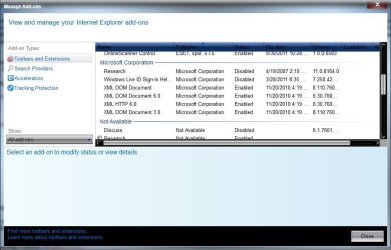
Open IE> Click on the gear icon upper right (tools)> Click Manage Addons> Under Show:, click All add-ons> Scroll down to the Microsoft Corporation section and see if the XML DOM Documents listings are enabled

Manage.jpg

Let's see what results you get from these suggestions. A Guy
 

My Computer My Computer

Computer type
PC/Desktop
OS
Windows 10 Home x64
CPU
INTEL Core i5-750 Quad-Core 3.37GHz
Motherboard
ASUS P7P55D
Memory
HyperX Fury Black Series 8GB (2 x 4GB) 1866Mhz
Graphics Card(s)
EVGA GeForce GTX 750 Superclocked 1GB 128-Bit GDDR5
Monitor(s) Displays
LG 32MA68HY 32" IPS
Screen Resolution
1920 x 1080
Hard Drives
Samsung 840 Evo 120GB, SEAGATE 500GB Barracuda® 7200.12, SATA 3 Gb/s, 7200 RPM, 16MB cache
PSU
ANTEC TruePower New TP-550, 80 PLUS, 550W
Case
ANTEC Three Hundred Illusion
Cooling
COOLER MASTER Hyper 212 Plus, 4 x 120mm 1 x 140mm Noctua's
Internet Speed
85 + Mbps
Antivirus
Avast
Browser
Vivaldi
Okay A Guy, this is strange. When I go here->Set your default programs> Click on Internet Explorer> Click on Choose defaults for this program, ".xml" is not even listed here...The only other browser I have in this list is Firefox, and .xml is not listed there either.

And all 4 XML things are enabled in IE9 Add-Ons.
 

My Computer My Computer

Computer Manufacturer/Model Number
Aus G73JH-RBBX05
OS
Windows 7 SP1 Home Premium x64
CPU
Intel Core i7 720QM
Motherboard
Asus (Intel HM55 Chipset)
Memory
Kingston 8 GB
Graphics Card(s)
ATI Mobility Radeon HD 5870
Sound Card
Realtek
Monitor(s) Displays
LG
Screen Resolution
1600X900
Hard Drives
Crucial M4 256GB
(Seagate Momentus ST9500420AS)Currently Disabled
Mouse
Razer Naga
Internet Speed
Cable
Okay A Guy, this is strange. When I go here->Set your default programs> Click on Internet Explorer> Click on Choose defaults for this program, ".xml" is not even listed here...

And all 4 XML things are enabled in IE9 Add-Ons.

Yes, it isn't listed on my IE either, but is on Opera, my default browser. Suggest you make FF the default, see if .xml is available to associate. If so, make the association. Then make IE the default again, and see if you get the ability to associate it again. I'm wondering what will open .xml if IE isn't the default. I'm not sure if you can add a file type to the programs that can be associated to IE, but thats where I'd go next if you have no luck. A Guy

P.S. My FF does not list .xml either, but Opera does, even though .xml is associated with XML Editor. I'm wondering if your Office install will give you a repair choice, or if reinstalling Office will reassociate the XML Editor?

Opera.jpg
 

My Computer My Computer

Computer type
PC/Desktop
OS
Windows 10 Home x64
CPU
INTEL Core i5-750 Quad-Core 3.37GHz
Motherboard
ASUS P7P55D
Memory
HyperX Fury Black Series 8GB (2 x 4GB) 1866Mhz
Graphics Card(s)
EVGA GeForce GTX 750 Superclocked 1GB 128-Bit GDDR5
Monitor(s) Displays
LG 32MA68HY 32" IPS
Screen Resolution
1920 x 1080
Hard Drives
Samsung 840 Evo 120GB, SEAGATE 500GB Barracuda® 7200.12, SATA 3 Gb/s, 7200 RPM, 16MB cache
PSU
ANTEC TruePower New TP-550, 80 PLUS, 550W
Case
ANTEC Three Hundred Illusion
Cooling
COOLER MASTER Hyper 212 Plus, 4 x 120mm 1 x 140mm Noctua's
Internet Speed
85 + Mbps
Antivirus
Avast
Browser
Vivaldi
I tried everything I asked you to do, but Opera is only browser with ability to associate .xml files. Very odd. Have a look at this program (45 days free evaluation). Worth a download and then try to use the:

File Type Doctor - Right-click any file and select Edit File Type to modify the applications used to open files of that type. Use File Type Doctor to choose default programs, add or remove file types from Explorer's New menu, and customize files' context menus.

Creative Element Power Tools

A Guy
 

My Computer My Computer

Computer type
PC/Desktop
OS
Windows 10 Home x64
CPU
INTEL Core i5-750 Quad-Core 3.37GHz
Motherboard
ASUS P7P55D
Memory
HyperX Fury Black Series 8GB (2 x 4GB) 1866Mhz
Graphics Card(s)
EVGA GeForce GTX 750 Superclocked 1GB 128-Bit GDDR5
Monitor(s) Displays
LG 32MA68HY 32" IPS
Screen Resolution
1920 x 1080
Hard Drives
Samsung 840 Evo 120GB, SEAGATE 500GB Barracuda® 7200.12, SATA 3 Gb/s, 7200 RPM, 16MB cache
PSU
ANTEC TruePower New TP-550, 80 PLUS, 550W
Case
ANTEC Three Hundred Illusion
Cooling
COOLER MASTER Hyper 212 Plus, 4 x 120mm 1 x 140mm Noctua's
Internet Speed
85 + Mbps
Antivirus
Avast
Browser
Vivaldi
Tired of me yet :D I find mention of deleteing the sub key in registry and windows will automatically recreate the correct association. Worth a try (back up registry per instructions provided in an earlier post).

Find the .xml file extension in

HKEY_CURRENT_USER\Software\Microsoft\Windows\CurrentVersion\Explorer\FileExts

key in the registry. Deleting the sub-key with the same name as the extension you want to un-associate will delete the default program association. You'll have to kill and restart explorer.exe for this to take effect. (a reboot will be better)

A Guy
 

My Computer My Computer

Computer type
PC/Desktop
OS
Windows 10 Home x64
CPU
INTEL Core i5-750 Quad-Core 3.37GHz
Motherboard
ASUS P7P55D
Memory
HyperX Fury Black Series 8GB (2 x 4GB) 1866Mhz
Graphics Card(s)
EVGA GeForce GTX 750 Superclocked 1GB 128-Bit GDDR5
Monitor(s) Displays
LG 32MA68HY 32" IPS
Screen Resolution
1920 x 1080
Hard Drives
Samsung 840 Evo 120GB, SEAGATE 500GB Barracuda® 7200.12, SATA 3 Gb/s, 7200 RPM, 16MB cache
PSU
ANTEC TruePower New TP-550, 80 PLUS, 550W
Case
ANTEC Three Hundred Illusion
Cooling
COOLER MASTER Hyper 212 Plus, 4 x 120mm 1 x 140mm Noctua's
Internet Speed
85 + Mbps
Antivirus
Avast
Browser
Vivaldi
When I clicked on .xml in File Type Doctor, it had (user choice override) in "actions in right click menu:". After I deleted this entry I was able to open an .xml file in IE9, except it showed up blank in IE9?
 

My Computer My Computer

Computer Manufacturer/Model Number
Aus G73JH-RBBX05
OS
Windows 7 SP1 Home Premium x64
CPU
Intel Core i7 720QM
Motherboard
Asus (Intel HM55 Chipset)
Memory
Kingston 8 GB
Graphics Card(s)
ATI Mobility Radeon HD 5870
Sound Card
Realtek
Monitor(s) Displays
LG
Screen Resolution
1600X900
Hard Drives
Crucial M4 256GB
(Seagate Momentus ST9500420AS)Currently Disabled
Mouse
Razer Naga
Internet Speed
Cable
1 step forward, 1 step back :( I'm busy during the week, so if you want to wait until the weekend, I'll do some more scratching. At the end of all this, if we don't fix it is a Repair Install, which should almost assuredly fix it.

http://www.sevenforums.com/tutorials/3413-repair-install.html

Since you've tried so much since you last tried the System File Checker, let me suggest you run it again, and see if any help.

http://www.sevenforums.com/tutorials/1538-sfc-scannow-command-system-file-checker.html

A Guy
 

My Computer My Computer

Computer type
PC/Desktop
OS
Windows 10 Home x64
CPU
INTEL Core i5-750 Quad-Core 3.37GHz
Motherboard
ASUS P7P55D
Memory
HyperX Fury Black Series 8GB (2 x 4GB) 1866Mhz
Graphics Card(s)
EVGA GeForce GTX 750 Superclocked 1GB 128-Bit GDDR5
Monitor(s) Displays
LG 32MA68HY 32" IPS
Screen Resolution
1920 x 1080
Hard Drives
Samsung 840 Evo 120GB, SEAGATE 500GB Barracuda® 7200.12, SATA 3 Gb/s, 7200 RPM, 16MB cache
PSU
ANTEC TruePower New TP-550, 80 PLUS, 550W
Case
ANTEC Three Hundred Illusion
Cooling
COOLER MASTER Hyper 212 Plus, 4 x 120mm 1 x 140mm Noctua's
Internet Speed
85 + Mbps
Antivirus
Avast
Browser
Vivaldi
I'm about to try SFC again...and I have used repair install on another pc b4, thanks
 

My Computer My Computer

Computer Manufacturer/Model Number
Aus G73JH-RBBX05
OS
Windows 7 SP1 Home Premium x64
CPU
Intel Core i7 720QM
Motherboard
Asus (Intel HM55 Chipset)
Memory
Kingston 8 GB
Graphics Card(s)
ATI Mobility Radeon HD 5870
Sound Card
Realtek
Monitor(s) Displays
LG
Screen Resolution
1600X900
Hard Drives
Crucial M4 256GB
(Seagate Momentus ST9500420AS)Currently Disabled
Mouse
Razer Naga
Internet Speed
Cable
Back
Top