Are upgrade disks able to repair?

shakenfake

New member
Local time
6:42 AM
Messages
7
I have a HP Compaq CQ60-615DX Notebook Windows 7 home. Unfortunately the computer will no longer boot.
This computer came to me with a busted screen. Paid $25 for a sacrificial Compaq to cannibalize the screen off of it (came with an extra battery too!). After replacing the laptop screen I was able to turn the laptop on while connected to power. I now receive that black screen that says "Windows Error Recovery" with two options: 1. Launch Startup Repair (recommended) 2. Start Windows Normally

If I do the Launch Startup Repair it requires me to insert a disk. I do not have any Windows 7 disks.

If I do the Start Windows Normally I get the Windows logo and "starting windows" but I get no further. The computer just stays like this until eventually it restarts and brings me back to the black screen.

My question now is will the Windows 7 Home Upgrade disk work as a repair disk? I have posted a link to one that I am interested in purchasing off of eBay.
Microsoft Windows 7 Home Premium Upgrade Retail 32 & 64 Bit DVDs w/ License Key | eBay
 

My Computers My Computers

  • At a glance

    Win 7 Home
    Computer type
    Laptop
    Computer Manufacturer/Model Number
    HP Compaq CQ60-615DX
    OS
    Win 7 Home
  • Computer type
    PC/Desktop

My Computers My Computers

  • At a glance

    7 X64i5 84002x8gb 3200mhz
    Computer type
    PC/Desktop
    OS
    7 X64
    CPU
    i5 8400
    Motherboard
    gigabyte b365m ds3h
    Memory
    2x8gb 3200mhz
    Hard Drives
    various
    PSU
    pure power 11 400w cm
    Case
    Coolermaster
    Cooling
    cryorig m9i
  • At a glance

    7x64g54008gb ddr4 2400
    Computer type
    PC/Desktop
    OS
    7x64
    CPU
    g5400
    Motherboard
    ga b365m ds3h
    Memory
    8gb ddr4 2400
    PSU
    xfx pro 450w
Yes that is the laptop. Thank you, now I know what version of Windows is on it!

What does the SHA-1 mean? I will have to find a DVD burner!

Also, when I try to boot into safe mode it will load up some of what it needs to and then stops with "Please Wait". It will then reboot into nothing. I tried that when I got home from work today, not sure if that means this is not salvageable or what exactly is going on.

Windows 7 Home Premium with Service Pack 1 x86 : Microsoft : Free Download, Borrow, and Streaming : Internet Archive
Microsoft Update Catalog

These are two things I have found so far. Not sure which would be better to try...
 

My Computers My Computers

  • At a glance

    Win 7 Home
    Computer type
    Laptop
    Computer Manufacturer/Model Number
    HP Compaq CQ60-615DX
    OS
    Win 7 Home
  • Computer type
    PC/Desktop
What does the SHA-1 mean?
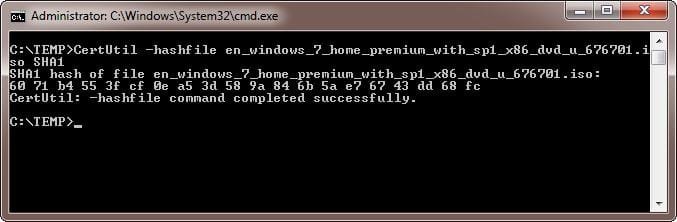
SHA1 is a type of checksum that is generated for a file. After you download a file you can calculate the SHA1 for the file. If this matches the specified SHA1 then file is good and not corrupted. The syntax used is: CertUtil -hashfile PATH\FILENAME SHA1. For example:
  1. Open CMD prompt with Administrator privileges
  2. Move to the folder with the ISO file. In my case it was in C:\TEMP.
  3. Type the command: C:\TEMP> CertUtil -hashfile en_windows_7_home_premium_with_sp1_x86_dvd_u_676701.iso SHA1
2023-09-12 02_07_44-Administrator_ C__Windows_System32_cmd.exe.jpg

By the result you can see that the SHA1 matches that in post #2. That means the file is good.
 

My Computers My Computers

  • At a glance

    Windows 7 Home Premium 64-bitsAMD FX-8350GSKILL Ripjaw-X PC3 12800 8GB (2x4GB)ASUS ROG STRIX GTX 1060 6GB
    Computer type
    PC/Desktop
    Computer Manufacturer/Model Number
    Custom build
    OS
    Windows 7 Home Premium 64-bits
    CPU
    AMD FX-8350
    Motherboard
    Gigabyte GA-990FXA-UD3 (AM3+)
    Memory
    GSKILL Ripjaw-X PC3 12800 8GB (2x4GB)
    Graphics Card(s)
    ASUS ROG STRIX GTX 1060 6GB
    Sound Card
    Integrated
    Monitor(s) Displays
    Asus VE228H (21.5-in)
    Screen Resolution
    1920x1080 60Hz
    Hard Drives
    SAMSUNG 870 EVO 2.5 Inch SATA SSD (1TB)
    SAMSUNG 870 EVO 2.5 Inch SATA SSD (1TB)
    SAMSUNG 870 EVO 2.5 Inch SATA SSD (1TB)
    PSU
    Corsair RM750x (750 watts)
    Case
    Corsair Carbide Series 200R
    Cooling
    Corsair Hydro Series H60 (CWCH60)
    Keyboard
    Logitech Elite
    Mouse
    Logitech M510 Wireless Mouse
    Internet Speed
    Comcast Gigabit Extra (1200Mbps down / 35Mbps up)
    Antivirus
    Malwarebytes
    Browser
    Firefox, Edge, Chrome
    Other Info
    ASUS DRW-24B1ST DVD-RW (24X) optical drive
    Seagate Expansion Desk (5TB) external SATA/USB HDD
    Comcast XB8 Internet Gateway
  • At a glance

    Windows 7 Pro (64-bit)AMD Phenom II 960T X4Corsair XMS2 DDR2-800 8GB (4x2GB)ASUS ENGTX560 DCII OC/2DI/1GD5 1GB
    Computer type
    PC/Desktop
    System Manufacturer/Model Number
    Custom
    OS
    Windows 7 Pro (64-bit)
    CPU
    AMD Phenom II 960T X4
    Motherboard
    ASUS M4N82 Deluxe
    Memory
    Corsair XMS2 DDR2-800 8GB (4x2GB)
    Graphics Card(s)
    ASUS ENGTX560 DCII OC/2DI/1GD5 1GB
    Monitor(s) Displays
    Samsung 930B 19-inch LCD
    Screen Resolution
    1280x1024
    Hard Drives
    Samsung SSD 870 EVO 1000 GB (Windows 10)
    Seagate ST1000DM003 1000 GB (Windows 7)
    PSU
    Antec TruePower (new) TP-650
    Case
    Antec Three Hundred
    Cooling
    AMD stock cooler from FX8350
    Mouse
    Logitech M100
    Internet Speed
    Xfinity Gigabit Extra 1200/35 Mbps
Yes that is the laptop. Thank you, now I know what version of Windows is on it!

What does the SHA-1 mean? I will have to find a DVD burner!

Also, when I try to boot into safe mode it will load up some of what it needs to and then stops with "Please Wait". It will then reboot into nothing. I tried that when I got home from work today, not sure if that means this is not salvageable or what exactly is going on.

Windows 7 Home Premium with Service Pack 1 x86 : Microsoft : Free Download, Borrow, and Streaming : Internet Archive
Microsoft Update Catalog

These are two things I have found so far. Not sure which would be better to try...

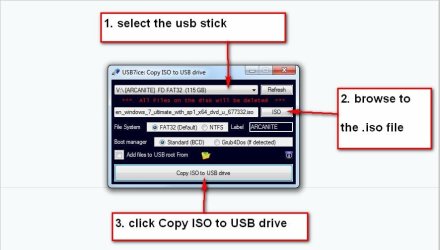
Or you could extract the iso file to a usb stick using this :ar: View attachment Usb7ice.zip


usb7ice.JPG
 

My Computers My Computers

  • At a glance

    7 X64i5 84002x8gb 3200mhz
    Computer type
    PC/Desktop
    OS
    7 X64
    CPU
    i5 8400
    Motherboard
    gigabyte b365m ds3h
    Memory
    2x8gb 3200mhz
    Hard Drives
    various
    PSU
    pure power 11 400w cm
    Case
    Coolermaster
    Cooling
    cryorig m9i
  • At a glance

    7x64g54008gb ddr4 2400
    Computer type
    PC/Desktop
    OS
    7x64
    CPU
    g5400
    Motherboard
    ga b365m ds3h
    Memory
    8gb ddr4 2400
    PSU
    xfx pro 450w
Hi

your testing my memory here......

IF you used an actual Upgrade disk
ALL it did was add specific files to a >>>> Vista <<<<< install
and as your running home which was what that comp was sold with, no upgrade disk is required

I did make a comment MANY years ago listing what they were, i think it was actually about a dozen lines
pretty sure it was where a user upgraded and then had a problem with validation

DO NOT think you can

post an Mgadiag report, from this link and i will be able to confirm
https://www.sevenforums.com/attachm...vation-issue-posting-instructions-mgadiag.exe
 
Last edited:

My Computer My Computer

At a glance

W7 home premium 32bit/W7HP 64bit/w10 tp insid...E5300 dual core3gbNvidia Geforce 7100 Nforce 630i
Computer type
PC/Desktop
Computer Manufacturer/Model Number
medionl/Aspire 6930G/acer x55a
OS
W7 home premium 32bit/W7HP 64bit/w10 tp insider ring
CPU
E5300 dual core
Motherboard
medion MS7366
Memory
3gb
Graphics Card(s)
Nvidia Geforce 7100 Nforce 630i
Monitor(s) Displays
avixc
Internet Speed
n (isp resticted to 72)
Antivirus
mse/pands
Browser
palemoon
Other Info
Belkin Fd7050 n USB using Railink RT2870 drivers, more upto date
Sorry friends I have been busy with work this past week and was out of town since Friday. Thank you for all the replies :D
SIW2 So the two links I posted will work as Windows 7 installs?
 

My Computers My Computers

  • At a glance

    Win 7 Home
    Computer type
    Laptop
    Computer Manufacturer/Model Number
    HP Compaq CQ60-615DX
    OS
    Win 7 Home
  • Computer type
    PC/Desktop
you posted it here post#3
 

My Computers My Computers

  • At a glance

    7 X64i5 84002x8gb 3200mhz
    Computer type
    PC/Desktop
    OS
    7 X64
    CPU
    i5 8400
    Motherboard
    gigabyte b365m ds3h
    Memory
    2x8gb 3200mhz
    Hard Drives
    various
    PSU
    pure power 11 400w cm
    Case
    Coolermaster
    Cooling
    cryorig m9i
  • At a glance

    7x64g54008gb ddr4 2400
    Computer type
    PC/Desktop
    OS
    7x64
    CPU
    g5400
    Motherboard
    ga b365m ds3h
    Memory
    8gb ddr4 2400
    PSU
    xfx pro 450w
Correct, was just double checking to make sure that those are what I am in fact looking for.

I will use your tool to burn them to a USB. I think I have a 4GB one sitting around here somewhere...
 

My Computers My Computers

  • At a glance

    Win 7 Home
    Computer type
    Laptop
    Computer Manufacturer/Model Number
    HP Compaq CQ60-615DX
    OS
    Win 7 Home
  • Computer type
    PC/Desktop
I ended up getting another laptop for free, Lenovo E420, however it has Professional on it. We will see if it works to repair the drive on the other computer. I really like this computer better than the other one but if it can save it I will probably keep both.

Now to get a flashdrive.
 

My Computers My Computers

  • At a glance

    Win 7 Home
    Computer type
    Laptop
    Computer Manufacturer/Model Number
    HP Compaq CQ60-615DX
    OS
    Win 7 Home
  • Computer type
    PC/Desktop
I ended up getting another laptop for free, Lenovo E420, however it has Professional on it. We will see if it works to repair the drive on the other computer. I really like this computer better than the other one but if it can save it I will probably keep both.

Now to get a flashdrive.
That's great. Hope you at least get one laptop working.

BTW, did you ever reinstall Windows 7 on the old HP laptop. Sometimes that is the only choice you have. That is OK as long as you have the Windows 7 product key.

A year or two ago you could buy new Windows 7 keys online for a reasonable price. I don't see any Windows 7 keys available from any of the usual place I buy Windows and Office keys anymore.

BTW, a few years ago someone gave me an old laptop that they bought of all places an auto salvage yard. It wouldn't even power on but I did get some value out of it. The 250GB HDD was still good so I put it in an external enclosure. I plugged that into another computer. I used a program to scan the drive and look for software keys. It found good keys for Windows 7 Home and Office 2007 Standard.

This shows that even when you have a computer that won't boot then at least save the drive and try to get any keys off it.

-----------------------------------------------------------

I have the following laptop which is comparable to the Lenovo E420. It came with Windows 7 but currently is dual-boot with Windows 10 because it works better with current software and the Internet.

Dell Latitude E6410 (2010)
Original O/S: Windows 7 Pro
Current O/S: Windows 7 Pro/Windows 10 Pro (dual-boot)

I have and even older laptop that I got free but had to replace the failed hard drive.

TOSHIBA Tecra M7-S7331 (2006)
Original O/S: Windows XP Tablet
Current O/S: Windows 7 Pro (later upgraded to Windows 10 Pro)

Both laptops work with Windows 10 but would be better off running Windows 7 because Windows 10 is so slow on them. Note both laptops have 4GB RAM so that is not a factor.
 

My Computers My Computers

  • At a glance

    Windows 7 Home Premium 64-bitsAMD FX-8350GSKILL Ripjaw-X PC3 12800 8GB (2x4GB)ASUS ROG STRIX GTX 1060 6GB
    Computer type
    PC/Desktop
    Computer Manufacturer/Model Number
    Custom build
    OS
    Windows 7 Home Premium 64-bits
    CPU
    AMD FX-8350
    Motherboard
    Gigabyte GA-990FXA-UD3 (AM3+)
    Memory
    GSKILL Ripjaw-X PC3 12800 8GB (2x4GB)
    Graphics Card(s)
    ASUS ROG STRIX GTX 1060 6GB
    Sound Card
    Integrated
    Monitor(s) Displays
    Asus VE228H (21.5-in)
    Screen Resolution
    1920x1080 60Hz
    Hard Drives
    SAMSUNG 870 EVO 2.5 Inch SATA SSD (1TB)
    SAMSUNG 870 EVO 2.5 Inch SATA SSD (1TB)
    SAMSUNG 870 EVO 2.5 Inch SATA SSD (1TB)
    PSU
    Corsair RM750x (750 watts)
    Case
    Corsair Carbide Series 200R
    Cooling
    Corsair Hydro Series H60 (CWCH60)
    Keyboard
    Logitech Elite
    Mouse
    Logitech M510 Wireless Mouse
    Internet Speed
    Comcast Gigabit Extra (1200Mbps down / 35Mbps up)
    Antivirus
    Malwarebytes
    Browser
    Firefox, Edge, Chrome
    Other Info
    ASUS DRW-24B1ST DVD-RW (24X) optical drive
    Seagate Expansion Desk (5TB) external SATA/USB HDD
    Comcast XB8 Internet Gateway
  • At a glance

    Windows 7 Pro (64-bit)AMD Phenom II 960T X4Corsair XMS2 DDR2-800 8GB (4x2GB)ASUS ENGTX560 DCII OC/2DI/1GD5 1GB
    Computer type
    PC/Desktop
    System Manufacturer/Model Number
    Custom
    OS
    Windows 7 Pro (64-bit)
    CPU
    AMD Phenom II 960T X4
    Motherboard
    ASUS M4N82 Deluxe
    Memory
    Corsair XMS2 DDR2-800 8GB (4x2GB)
    Graphics Card(s)
    ASUS ENGTX560 DCII OC/2DI/1GD5 1GB
    Monitor(s) Displays
    Samsung 930B 19-inch LCD
    Screen Resolution
    1280x1024
    Hard Drives
    Samsung SSD 870 EVO 1000 GB (Windows 10)
    Seagate ST1000DM003 1000 GB (Windows 7)
    PSU
    Antec TruePower (new) TP-650
    Case
    Antec Three Hundred
    Cooling
    AMD stock cooler from FX8350
    Mouse
    Logitech M100
    Internet Speed
    Xfinity Gigabit Extra 1200/35 Mbps
Hi

your testing my memory here......

IF you used an actual Upgrade disk
ALL it did was add specific files to a >>>> Vista <<<<< install
and as your running home which was what that comp was sold with, no upgrade disk is required

I did make a comment MANY years ago listing what they were, i think it was actually about a dozen lines
pretty sure it was where a user upgraded and then had a problem with validation

DO NOT think you can

post an Mgadiag report, from this link and i will be able to confirm
https://www.sevenforums.com/attachm...vation-issue-posting-instructions-mgadiag.exe

Hi torchwood,
My original MS Win 7 was a upgrade disk. It is the same disk as the retail only having a different ei.cfg. A Upgrade disk will look for a Windows folder on the main drive to proceed as an upgrade, even on a clean install. To install on a blank drive all you needed to do was to install twice.
If you delete the ei.cfg you make it universal (all versions) and it will work like a normal retail disk.

OEM upgrade disks could be completely different.
 

My Computers My Computers

  • At a glance

    Windows 7 HP 64i5 6600K - 800MHz to 4200MHz4+4G GSkill DDR4 3000IG - Intel 530
    Computer type
    PC/Desktop
    Computer Manufacturer/Model Number
    custom build
    OS
    Windows 7 HP 64
    CPU
    i5 6600K - 800MHz to 4200MHz
    Motherboard
    GA-Z170-HD3P
    Memory
    4+4G GSkill DDR4 3000
    Graphics Card(s)
    IG - Intel 530
    Monitor(s) Displays
    Samsung 226BW
    Screen Resolution
    1680x1050
    Hard Drives
    (1) -1 SM951 – 128GB M.2 AHCI PCIe SSD drive for Windows 7 and Lubuntu
    (2) -1 WD SATA 3 - 1T for Data
    (3) -1 WD SATA 3 - 1T for backup
    PSU
    Thermaltake 450W TR2 gold
    Keyboard
    Old and good Chicony mechanical keyboard
    Mouse
    Logitech mX performance - 9 buttons (had to disable some)
    Internet Speed
    500Mb/s
    Browser
    Firefox 64
    Other Info
    TinyWall firewall
  • At a glance

    Windows 7 Proi7-4500U 800MHz to 3.0GHz(4+4)G DDR3 1600IG intel 4400 + NVIDIA GeForce GT 745M
    Computer type
    Laptop
    System Manufacturer/Model Number
    Asus Q550LF
    OS
    Windows 7 Pro
    CPU
    i7-4500U 800MHz to 3.0GHz
    Motherboard
    Asus Q550LF
    Memory
    (4+4)G DDR3 1600
    Graphics Card(s)
    IG intel 4400 + NVIDIA GeForce GT 745M
    Sound Card
    Realtek
    Monitor(s) Displays
    LG Display LP156WF4-SPH1
    Screen Resolution
    1920 x 1080
    Hard Drives
    BX500 120G SSD for Windows and programs +
    1T HDD for data
    Internet Speed
    500 Mb/s
    Browser
    Firefox
    Other Info
    TinyWall firewall
That's great. Hope you at least get one laptop working.

BTW, did you ever reinstall Windows 7 on the old HP laptop. Sometimes that is the only choice you have. That is OK as long as you have the Windows 7 product key.

A year or two ago you could buy new Windows 7 keys online for a reasonable price. I don't see any Windows 7 keys available from any of the usual place I buy Windows and Office keys anymore.

BTW, a few years ago someone gave me an old laptop that they bought of all places an auto salvage yard. It wouldn't even power on but I did get some value out of it. The 250GB HDD was still good so I put it in an external enclosure. I plugged that into another computer. I used a program to scan the drive and look for software keys. It found good keys for Windows 7 Home and Office 2007 Standard.

This shows that even when you have a computer that won't boot then at least save the drive and try to get any keys off it.
If I am unable to save my files and programs from the old laptop then I will be listing it on eBay or taking it to the recycle. I dislike the laptop and much prefer this E420 even though I loathe Lenovo.

- - - Updated - - -

Aaaaaand Windows 7 doesn't like creating a recovery disk with USB. Never knew that... I guess I will purchase a blank CD
 

My Computers My Computers

  • At a glance

    Win 7 Home
    Computer type
    Laptop
    Computer Manufacturer/Model Number
    HP Compaq CQ60-615DX
    OS
    Win 7 Home
  • Computer type
    PC/Desktop
Hi @torchwood,
My original MS Win 7 was a upgrade disk. It is the same disk as the retail only having a different ei.cfg. A Upgrade disk will look for a Windows folder on the main drive to proceed as an upgrade, even on a clean install. To install on a blank drive all you needed to do was to install twice.
If you delete the ei.cfg you make it universal (all versions) and it will work like a normal retail disk.

OEM upgrade disks could be completely different.
Back in the summer of 2009 I build a new computer. I think I remember installing a beta copy of Windows 7. In October 2009 I went down to Best Buy to pick up a copy of Windows 7. All they had were upgrade disks. I bought a copy of Windows 7 Ultimate Upgrade. To my surprise when I did a clean install of Windows 7 it did not ask me to prove I had a previous copy of Windows. Later I read online that Windows 7 Upgrade although technically requiring you to upgrade from a previous version of Windows was not enforcing it.

Years later I wanted to upgrade several of my other computers with Windows XP. I did that by buying a copy of Windows 7 Home Premium Family Pack. It could upgrade up to 3 computers. I started with 3 computers with Windows 7 Home Premiums (32-bit). Since it also included a DVD for Windows 7 Home Premiums (64-bit) I later upgraded all the same computers to 64-bits. Note even though this was meant to upgrade computers with Windows XP I don't remember it ever asking me to prove these other computers had Windows XP previously.
 

My Computers My Computers

  • At a glance

    Windows 7 Home Premium 64-bitsAMD FX-8350GSKILL Ripjaw-X PC3 12800 8GB (2x4GB)ASUS ROG STRIX GTX 1060 6GB
    Computer type
    PC/Desktop
    Computer Manufacturer/Model Number
    Custom build
    OS
    Windows 7 Home Premium 64-bits
    CPU
    AMD FX-8350
    Motherboard
    Gigabyte GA-990FXA-UD3 (AM3+)
    Memory
    GSKILL Ripjaw-X PC3 12800 8GB (2x4GB)
    Graphics Card(s)
    ASUS ROG STRIX GTX 1060 6GB
    Sound Card
    Integrated
    Monitor(s) Displays
    Asus VE228H (21.5-in)
    Screen Resolution
    1920x1080 60Hz
    Hard Drives
    SAMSUNG 870 EVO 2.5 Inch SATA SSD (1TB)
    SAMSUNG 870 EVO 2.5 Inch SATA SSD (1TB)
    SAMSUNG 870 EVO 2.5 Inch SATA SSD (1TB)
    PSU
    Corsair RM750x (750 watts)
    Case
    Corsair Carbide Series 200R
    Cooling
    Corsair Hydro Series H60 (CWCH60)
    Keyboard
    Logitech Elite
    Mouse
    Logitech M510 Wireless Mouse
    Internet Speed
    Comcast Gigabit Extra (1200Mbps down / 35Mbps up)
    Antivirus
    Malwarebytes
    Browser
    Firefox, Edge, Chrome
    Other Info
    ASUS DRW-24B1ST DVD-RW (24X) optical drive
    Seagate Expansion Desk (5TB) external SATA/USB HDD
    Comcast XB8 Internet Gateway
  • At a glance

    Windows 7 Pro (64-bit)AMD Phenom II 960T X4Corsair XMS2 DDR2-800 8GB (4x2GB)ASUS ENGTX560 DCII OC/2DI/1GD5 1GB
    Computer type
    PC/Desktop
    System Manufacturer/Model Number
    Custom
    OS
    Windows 7 Pro (64-bit)
    CPU
    AMD Phenom II 960T X4
    Motherboard
    ASUS M4N82 Deluxe
    Memory
    Corsair XMS2 DDR2-800 8GB (4x2GB)
    Graphics Card(s)
    ASUS ENGTX560 DCII OC/2DI/1GD5 1GB
    Monitor(s) Displays
    Samsung 930B 19-inch LCD
    Screen Resolution
    1280x1024
    Hard Drives
    Samsung SSD 870 EVO 1000 GB (Windows 10)
    Seagate ST1000DM003 1000 GB (Windows 7)
    PSU
    Antec TruePower (new) TP-650
    Case
    Antec Three Hundred
    Cooling
    AMD stock cooler from FX8350
    Mouse
    Logitech M100
    Internet Speed
    Xfinity Gigabit Extra 1200/35 Mbps
Well I got an extra disk, made it into a repair disk, ran the repair on my computer. Got to the end where it said "Restart to repair" or something alone those lines so I hit Okay. Computer restarted and nothing. Same issue, computer won't start up and says I need to repair.

I am going to take it to a repair shop possibly and if they can't fix it then this computer will find its way to the boneyard.

If anyone has a recommendation for an online service or whoever that they think can get this computer working meaning I can use the programs and files that are still on it then let me know. If I can't use the programs then I do not want the computer.

- - - Updated - - -

Just tried it again and it said "You must login to access System Recovery Features"

Well ain't that bout a b...
 

My Computers My Computers

  • At a glance

    Win 7 Home
    Computer type
    Laptop
    Computer Manufacturer/Model Number
    HP Compaq CQ60-615DX
    OS
    Win 7 Home
  • Computer type
    PC/Desktop
Well I got an extra disk, made it into a repair disk, ran the repair on my computer. Got to the end where it said "Restart to repair" or something alone those lines so I hit Okay. Computer restarted and nothing. Same issue, computer won't start up and says I need to repair.

I am going to take it to a repair shop possibly and if they can't fix it then this computer will find its way to the boneyard.

If anyone has a recommendation for an online service or whoever that they think can get this computer working meaning I can use the programs and files that are still on it then let me know. If I can't use the programs then I do not want the computer.

- - - Updated - - -

Just tried it again and it said "You must login to access System Recovery Features"

Well ain't that bout a b...
I have never found the repair function from the Windows boot to disk to ever work successfully. I ended up reinstalling Widows. If your laptop came with Windows 7 then it should have the product key embedded in the BIOS. If so then why don't you reinstall Windows 7?

BTW, I have lost track of how many time I reinstalled Windows because of a problem with Windows. In fact I have done so on my two laptops at least a couple times.
 

My Computers My Computers

  • At a glance

    Windows 7 Home Premium 64-bitsAMD FX-8350GSKILL Ripjaw-X PC3 12800 8GB (2x4GB)ASUS ROG STRIX GTX 1060 6GB
    Computer type
    PC/Desktop
    Computer Manufacturer/Model Number
    Custom build
    OS
    Windows 7 Home Premium 64-bits
    CPU
    AMD FX-8350
    Motherboard
    Gigabyte GA-990FXA-UD3 (AM3+)
    Memory
    GSKILL Ripjaw-X PC3 12800 8GB (2x4GB)
    Graphics Card(s)
    ASUS ROG STRIX GTX 1060 6GB
    Sound Card
    Integrated
    Monitor(s) Displays
    Asus VE228H (21.5-in)
    Screen Resolution
    1920x1080 60Hz
    Hard Drives
    SAMSUNG 870 EVO 2.5 Inch SATA SSD (1TB)
    SAMSUNG 870 EVO 2.5 Inch SATA SSD (1TB)
    SAMSUNG 870 EVO 2.5 Inch SATA SSD (1TB)
    PSU
    Corsair RM750x (750 watts)
    Case
    Corsair Carbide Series 200R
    Cooling
    Corsair Hydro Series H60 (CWCH60)
    Keyboard
    Logitech Elite
    Mouse
    Logitech M510 Wireless Mouse
    Internet Speed
    Comcast Gigabit Extra (1200Mbps down / 35Mbps up)
    Antivirus
    Malwarebytes
    Browser
    Firefox, Edge, Chrome
    Other Info
    ASUS DRW-24B1ST DVD-RW (24X) optical drive
    Seagate Expansion Desk (5TB) external SATA/USB HDD
    Comcast XB8 Internet Gateway
  • At a glance

    Windows 7 Pro (64-bit)AMD Phenom II 960T X4Corsair XMS2 DDR2-800 8GB (4x2GB)ASUS ENGTX560 DCII OC/2DI/1GD5 1GB
    Computer type
    PC/Desktop
    System Manufacturer/Model Number
    Custom
    OS
    Windows 7 Pro (64-bit)
    CPU
    AMD Phenom II 960T X4
    Motherboard
    ASUS M4N82 Deluxe
    Memory
    Corsair XMS2 DDR2-800 8GB (4x2GB)
    Graphics Card(s)
    ASUS ENGTX560 DCII OC/2DI/1GD5 1GB
    Monitor(s) Displays
    Samsung 930B 19-inch LCD
    Screen Resolution
    1280x1024
    Hard Drives
    Samsung SSD 870 EVO 1000 GB (Windows 10)
    Seagate ST1000DM003 1000 GB (Windows 7)
    PSU
    Antec TruePower (new) TP-650
    Case
    Antec Three Hundred
    Cooling
    AMD stock cooler from FX8350
    Mouse
    Logitech M100
    Internet Speed
    Xfinity Gigabit Extra 1200/35 Mbps
It can sometimes take several runs.
 

My Computers My Computers

  • At a glance

    7 X64i5 84002x8gb 3200mhz
    Computer type
    PC/Desktop
    OS
    7 X64
    CPU
    i5 8400
    Motherboard
    gigabyte b365m ds3h
    Memory
    2x8gb 3200mhz
    Hard Drives
    various
    PSU
    pure power 11 400w cm
    Case
    Coolermaster
    Cooling
    cryorig m9i
  • At a glance

    7x64g54008gb ddr4 2400
    Computer type
    PC/Desktop
    OS
    7x64
    CPU
    g5400
    Motherboard
    ga b365m ds3h
    Memory
    8gb ddr4 2400
    PSU
    xfx pro 450w
Hi @torchwood,
My original MS Win 7 was a upgrade disk. It is the same disk as the retail only having a different ei.cfg. A Upgrade disk will look for a Windows folder on the main drive to proceed as an upgrade, even on a clean install.
Windows Upgrade disks before Windows 7 required you to either have a previous qualifying version of Windows installed or insert the CD for that previous version of Windows to prove you were qualified for the upgrade. For example, when I installed Windows XP Pro Upgrade I had to insert my Windows 98 CD.

When I installed from the Windows 7 Ultimate Upgrade DVD I was never asked to prove I was eligible for the upgrade. This was a new build so I was definitely not eligible. Over the months after that I saw in various forum postings that a lot of people were seeing the same thing. I never saw anyone say that they ever read where Microsoft ever commented on this. That shows they were knowingly allowing it. Does that means people were crazy to buy the full version of Windows 7 when they could have saved their money and bought the Upgrade version?
 

My Computers My Computers

  • At a glance

    Windows 7 Home Premium 64-bitsAMD FX-8350GSKILL Ripjaw-X PC3 12800 8GB (2x4GB)ASUS ROG STRIX GTX 1060 6GB
    Computer type
    PC/Desktop
    Computer Manufacturer/Model Number
    Custom build
    OS
    Windows 7 Home Premium 64-bits
    CPU
    AMD FX-8350
    Motherboard
    Gigabyte GA-990FXA-UD3 (AM3+)
    Memory
    GSKILL Ripjaw-X PC3 12800 8GB (2x4GB)
    Graphics Card(s)
    ASUS ROG STRIX GTX 1060 6GB
    Sound Card
    Integrated
    Monitor(s) Displays
    Asus VE228H (21.5-in)
    Screen Resolution
    1920x1080 60Hz
    Hard Drives
    SAMSUNG 870 EVO 2.5 Inch SATA SSD (1TB)
    SAMSUNG 870 EVO 2.5 Inch SATA SSD (1TB)
    SAMSUNG 870 EVO 2.5 Inch SATA SSD (1TB)
    PSU
    Corsair RM750x (750 watts)
    Case
    Corsair Carbide Series 200R
    Cooling
    Corsair Hydro Series H60 (CWCH60)
    Keyboard
    Logitech Elite
    Mouse
    Logitech M510 Wireless Mouse
    Internet Speed
    Comcast Gigabit Extra (1200Mbps down / 35Mbps up)
    Antivirus
    Malwarebytes
    Browser
    Firefox, Edge, Chrome
    Other Info
    ASUS DRW-24B1ST DVD-RW (24X) optical drive
    Seagate Expansion Desk (5TB) external SATA/USB HDD
    Comcast XB8 Internet Gateway
  • At a glance

    Windows 7 Pro (64-bit)AMD Phenom II 960T X4Corsair XMS2 DDR2-800 8GB (4x2GB)ASUS ENGTX560 DCII OC/2DI/1GD5 1GB
    Computer type
    PC/Desktop
    System Manufacturer/Model Number
    Custom
    OS
    Windows 7 Pro (64-bit)
    CPU
    AMD Phenom II 960T X4
    Motherboard
    ASUS M4N82 Deluxe
    Memory
    Corsair XMS2 DDR2-800 8GB (4x2GB)
    Graphics Card(s)
    ASUS ENGTX560 DCII OC/2DI/1GD5 1GB
    Monitor(s) Displays
    Samsung 930B 19-inch LCD
    Screen Resolution
    1280x1024
    Hard Drives
    Samsung SSD 870 EVO 1000 GB (Windows 10)
    Seagate ST1000DM003 1000 GB (Windows 7)
    PSU
    Antec TruePower (new) TP-650
    Case
    Antec Three Hundred
    Cooling
    AMD stock cooler from FX8350
    Mouse
    Logitech M100
    Internet Speed
    Xfinity Gigabit Extra 1200/35 Mbps
Back
Top