Solved Can I make a shortcut open in NON default browser?

iknowjohnny

New member
Power User
VIP
Local time
12:19 PM
Messages
237
I have firefox as default, so if i create a shortcut it always opens in FF. But theres one i want to open in IE. Can this be done? I've even tried saving the page in IE's favorites then dragging that to the desktop from the fav menu but once thats done it opens in the default browser, FF.
 

My Computer My Computer

At a glance

windows 7 professional
OS
windows 7 professional

My Computers My Computers

  • At a glance

    Win7, Win10, Win11
    Computer type
    PC/Desktop
    Computer Manufacturer/Model Number
    HP Pavilion 6751c
    OS
    Win7, Win10, Win11
    Internet Speed
    100 Mbps
    Antivirus
    Norton 360
    Browser
    IE 11
  • At a glance

    Win7, Win10, Win11
    Computer type
    PC/Desktop
    System Manufacturer/Model Number
    HP ENVY 750-514 & Dell XPS 8960
    OS
    Win7, Win10, Win11
    Antivirus
    Norton 360
I have a IE icon, and i can make another, but i need one that opens to this particular web site. I know i can do that by setting IE's homepage to that, but that only gives me one and i need more than one web page shortcut that opens with IE instead of FF.
 

My Computer My Computer

At a glance

windows 7 professional
OS
windows 7 professional
The target of the shortcut would simply be:
<path to IE> <space> <URL>

You can have as many as you want.

Code:
"C:\Program Files\Internet Explorer\iexplore.exe" http://www.sevenforums.com/browsers-mail/321204-can-i-make-shortcut-open-non-default-browser.html
 

My Computer My Computer

At a glance

W7 Pro SP1 64biti78GBIntel HD Graphics
Computer type
Laptop
Computer Manufacturer/Model Number
Employer provided Dell Latitude
OS
W7 Pro SP1 64bit
CPU
i7
Memory
8GB
Graphics Card(s)
Intel HD Graphics
Hard Drives
crappy SSD
Antivirus
Employer mandated Symantec Endpoint Protection
Browser
Pale Moon 64bit, IE11 64bit & Chrome 64bit
The target of the shortcut would simply be:
<path to IE> <space> <URL>

You can have as many as you want.

Code:
"C:\Program Files\Internet Explorer\iexplore.exe" http://www.sevenforums.com/browsers-mail/321204-can-i-make-shortcut-open-non-default-browser.html

Thats it ! Thanks you !
 

My Computer My Computer

At a glance

windows 7 professional
OS
windows 7 professional
Another way to do it would be to have a shortcut on your desktop for IE then you could drag and drop any shortcut to a website that you wished to open in IE to it.
 

My Computer My Computer

At a glance

W10 Pro desktop, W11 laptop, W11 Pro tablet (...3.7Ghz 8700K i7, i7-11800H, i7-1065G716G desktop, 16G laptop, 4G tabletAMD Radeon RX580, RTX 3060, Intel Iris Plus
Computer type
PC/Desktop
Computer Manufacturer/Model Number
Home Built desktop, Dell G15 5511 Gaming laptop,MS Surface Pro 7 tablet
OS
W10 Pro desktop, W11 laptop, W11 Pro tablet (all 64-bit)
CPU
3.7Ghz 8700K i7, i7-11800H, i7-1065G7
Motherboard
ASUS TUF Z370-Pro Gaming in desktop
Memory
16G desktop, 16G laptop, 4G tablet
Graphics Card(s)
AMD Radeon RX580, RTX 3060, Intel Iris Plus
Sound Card
High Definition Audio (Built-in to mobo)
Monitor(s) Displays
Samsung U32J59 32" (2x), 15.6", 12"
Screen Resolution
3840x2160, 3840x2160, 1920x1080, 2160x1440
Hard Drives
500G SSD for OS; 2T, 10T & 15T HDDs for Data on Desktop, 1TB SSD laptop, 128G SSD tablet.
PSU
Corsair CX 750M
Case
Antec 100
Cooling
CM 212+
Keyboard
IBM Model M - used continuously since 1986
Mouse
Microsoft Pro IntelliMouse
Internet Speed
400M down 8M up
Antivirus
Windows Defender
Browser
FireFox
Other Info
Built my first computer (8Mhz 8088cpu, 640K RAM, 20MB HDD, 2 360K floppy drives) in 1985 and have been building them for myself, relatives and friends ever since.
The target of the shortcut would simply be:
<path to IE> <space> <URL>

You can have as many as you want.

Code:
"C:\Program Files\Internet Explorer\iexplore.exe" http://www.sevenforums.com/browsers-mail/321204-can-i-make-shortcut-open-non-default-browser.html

Thats it ! Thanks you !
You are welcome. Oddly enough, if IE were your default browser, you could keep all of your bookmarks (favorites) inside IE and change any favorite that you want to open in any browser that you want... because IE favorites can be OS shortcuts.

There is not a way (that I know of) to do what IE does in any other browser.


Another way to do it would be to have a shortcut on your desktop for IE then you could drag and drop any shortcut to a website that you wished to open in IE to it.
You are correct, but it only works all of the time for IE. In other words, you can drag/drop a normal URL shortcut to any browser EXE shortcut and it should open that browser and visit that website. However, if the URL shortcut was created by dragging the URL from IE's address field, then the URL shortcut is not a normal URL shortcut. That type of URL shortcut can only be used with IE (I think).

Of course, the OP wants these URL shortcuts to open in IE, so the info above is really for others that find this thread because of its excellent topic title. They might want to drag/drop a URL shortcut onto a Chrome EXE shortcut or some other browser EXE shortcut.


edit:
the normal URL shortcut is shown in the lower notepad window:
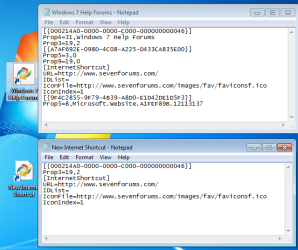
shortcuts.png
normal URL shortcuts are made via...
...right click on the desktop
...select New from the context menu
...select Shortcut from the sub-context menu
...type/paste a URL in the filed named Type the location of the item:
...select Next
...select Finish
normal URL shortcuts can also be made by dragging the URL from a normal browser.
IE is not normal :-)
 

My Computer My Computer

At a glance

W7 Pro SP1 64biti78GBIntel HD Graphics
Computer type
Laptop
Computer Manufacturer/Model Number
Employer provided Dell Latitude
OS
W7 Pro SP1 64bit
CPU
i7
Memory
8GB
Graphics Card(s)
Intel HD Graphics
Hard Drives
crappy SSD
Antivirus
Employer mandated Symantec Endpoint Protection
Browser
Pale Moon 64bit, IE11 64bit & Chrome 64bit
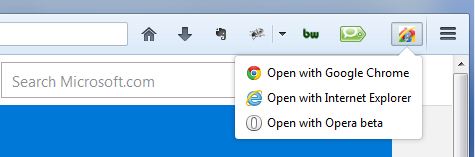
Use 'Open With' Firefox extension

Since you have FF as the default browser, try the Firefox extension called "Open With". Here is the link to the page --> https://addons.mozilla.org/en-US/firefox/addon/open-with/

That way you can open any shortcuts into Firefox. After that, utilize the extension options from Firefox (screen capture attached).

qgH5TAT.jpg
 

My Computer My Computer

At a glance

Windows 7 Professional 64bit
Computer type
Laptop
Computer Manufacturer/Model Number
Dell E7450
OS
Windows 7 Professional 64bit
Back
Top