W wasssu New member Local time 4:30 PM Messages 2 Nov 23, 2015 #1 Hello, If I'm trying to create a new shortcut, the new shortcut is created with Chrome icon and opened with Chrome. But my default browser is IE. How can I solve this problem? Thanks My Computer My Computer Computer typePC/DesktopOSWindows 7 Enterprise
Hello, If I'm trying to create a new shortcut, the new shortcut is created with Chrome icon and opened with Chrome. But my default browser is IE. How can I solve this problem? Thanks
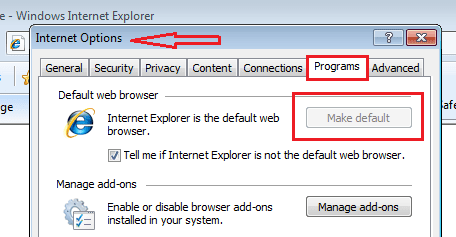
U UsernameIssues a.k.a. UNI Guru Gold Member Local time 7:30 AM Messages 8,138 Nov 23, 2015 #2 wasssu said: ...my default browser is IE. Click to expand... This is what I see when IE is the default browser: What do you see when you look at that tab on your computer? You can use these steps to post a screenshot: http://www.sevenforums.com/tutorials/9733-screenshots-files-upload-post-seven-forums.html My Computer My Computer Computer typeLaptopComputer Manufacturer/Model NumberEmployer provided Dell LatitudeOSW7 Pro SP1 64bitCPUi7Memory8GBGraphics Card(s)Intel HD GraphicsHard Drivescrappy SSDAntivirusEmployer mandated Symantec Endpoint ProtectionBrowserPale Moon 64bit, IE11 64bit & Chrome 64bit
wasssu said: ...my default browser is IE. Click to expand... This is what I see when IE is the default browser: What do you see when you look at that tab on your computer? You can use these steps to post a screenshot: http://www.sevenforums.com/tutorials/9733-screenshots-files-upload-post-seven-forums.html
W wasssu New member Thread Starter Local time 4:30 PM Messages 2 Nov 23, 2015 #3 I see the same thing, IE is my default browser for sure. My Computer My Computer Computer typePC/DesktopOSWindows 7 Enterprise
U UsernameIssues a.k.a. UNI Guru Gold Member Local time 7:30 AM Messages 8,138 Nov 23, 2015 #4 What steps are you using to create a new shortcut? What version of IE do you have? Have you talked with IT support where you work? You could reset IE... http://www.sevenforums.com/tutorials/1222-internet-explorer-reset.html ...including step 5 of that tutorial. As a test: uninstall Chrome and seeing how shortcuts act. My Computer My Computer Computer typeLaptopComputer Manufacturer/Model NumberEmployer provided Dell LatitudeOSW7 Pro SP1 64bitCPUi7Memory8GBGraphics Card(s)Intel HD GraphicsHard Drivescrappy SSDAntivirusEmployer mandated Symantec Endpoint ProtectionBrowserPale Moon 64bit, IE11 64bit & Chrome 64bit
What steps are you using to create a new shortcut? What version of IE do you have? Have you talked with IT support where you work? You could reset IE... http://www.sevenforums.com/tutorials/1222-internet-explorer-reset.html ...including step 5 of that tutorial. As a test: uninstall Chrome and seeing how shortcuts act.