The most SECURE browser?

Callender,
Thanks for taking the time to ferret out bookmarking a Windows shortcut, file or folder! I hope that you did not spend too much time on this because the end result is not what I use each day.

If I had known that you were going to chase that rabbit for me, I would have added details like this:

In IE, I have shortcuts or text script files or compiled script files right on the Favorites bar. When I right click on such a Favorite, I get the full Windows (file) Explorer context menu and sub-menus if it is a file and I get a partial context menu if it is a folder. I use this to edit some scripts before running them; and sometimes I use other context menu operations too. Once edited, I launch the script from the Favorites bar. These scripts interact with IE - hence the desire to have them available via the Favorites bar.

In addition: I have nested folders filled with these shortcuts to scripts or compiled exes. To share them with coworkers, I put a subset of them on a server. Then redirect IE's favorites folder on dozens of common use computers in the office to point to that share. It is great to just copy/move/organize items on that server share and have that new arrangement and content appear on all of those computers' IE Favorites bars ready to use.

Perhaps I could point Aviator to use a server share for the bookmarks, but my limited testing of the steps that you posted did not get me the Windows (file) Explorer context menus when I right clicked on a bookmark that is really a text file.

It might sound picky to want the Windows (file) Explorer context menus available on a browser's bookmark or IE Favorite... but it is an efficient way of doing what I do a lot of each day. Also, it is nice to organize/zip/share/e-mail a tiny portion of the Favorites folder structure. I don't readily know how to do that in Firefox or Chrome. (I've not spent a lot of time looking into to it either.)

exitPr0gram,
Yes, Aviator is a new browser and I will cut them some slack on their installer. My feedback to them was intended to help them make it better. Even if I never use this browser, I don't mind giving them some of my time - hence the video of the install and the two errors. (I've not received an e-mail back from them yet.)

I write/distribute scripts (at work) and I've messed up more than one error message in my time... so I might be looking at the wording of that second error a bit too critically. (And I make lots of typos in forums :-)
 

My Computer

Computer type
Laptop
Computer Manufacturer/Model Number
Employer provided Dell Latitude
OS
W7 Pro SP1 64bit
CPU
i7
Memory
8GB
Graphics Card(s)
Intel HD Graphics
Hard Drives
crappy SSD
Antivirus
Employer mandated Symantec Endpoint Protection
Browser
Pale Moon 64bit, IE11 64bit & Chrome 64bit
File Links

UsernameIssues - I've done some more digging into the settings and took another look at IE to see what you mean. Indeed I can edit and run scripts using IE's bookmarks. As far as Aviator goes all I've managed to do is bookmark files and folders. Clicking on a bookmarked script makes it viewable but not editable and nothing opens in Windows Explorer! I didn't spend a lot of time on this though - it was more a case of looking through Aviator's default settings to see what could be easily changed.

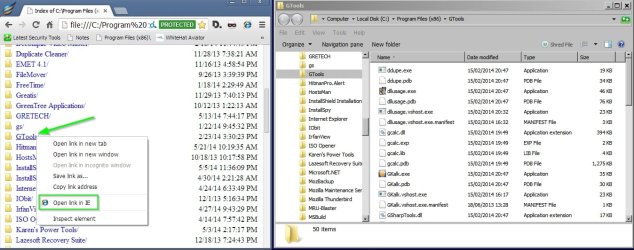
Then after a little more research I found information that suggests the following workaround - but it's not much use:

This add on allows files to be opened in Windows Explorer via IE:

https://chrome.google.com/webstore/detail/open-in-ie/iajffemldkkhodaedkcpnbpfabiglmdi

Screenshot:

Program Filesx86 has been bookmarked

OpenLinks.jpg

However it still doesn't allow bookmarked files/ folders to be opened or scripts to be edited. Attempting to open a script via "Open Link In IE" results in the file appearing in the IE downloads folder with the "Do you want to Run or Save this file" dialog.

Attempting to edit a script just doesn't work but the script can be viewed.

I didn't spend a huge amount of time on this - I like to attempt to understand how things work!
 

My Computer

Computer type
Laptop
Computer Manufacturer/Model Number
ASUS
OS
Microsoft Windows 7 Home Premium 64-bit 7601 Multiprocessor Free Service Pack 1
CPU
AMD C-60 APU with Radeon(tm) HD Graphics
Motherboard
ASUSTeK COMPUTER INC. X501U
Memory
4.00 GB
Graphics Card(s)
AMD Radeon HD 6290 Graphics
Sound Card
(1) AMD High Definition Audio Device (2) Realtek High Defi
Screen Resolution
1366 x 768 x 32 bits (4294967296 colors) @ 60 Hz
Hard Drives
Hitachi HTS545050A7E380 SATA Disk Device
Antivirus
Comodo CIS & FW, SecureAplus App Whitelisting, Threatfire
Browser
Cyberfox 64bit, Opera 64bit, Airfox
Other Info
Spy-The-Spy, HitmanPro.Alert, Norton Connect Safe, MJRegWatcher, BitDefender TrafficLight, Voodoo Shield, Zemana AntiMalware
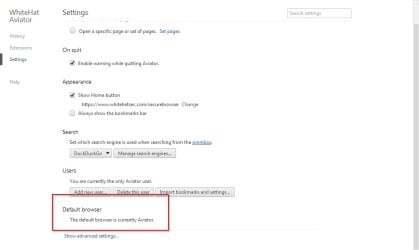
anybody else having issues setting Aviator as their default browser?

I've sent an inquiry to Whitehat Support on the matter so i will be sure to post their response.

So far, how does everyone feel about Aviator on a scale of 1-10? 1 being the worst?? Honestly... i give it a 9.
 

My Computer

Computer type
PC/Desktop
Computer Manufacturer/Model Number
Dell Inspiron 530
OS
Windows 7 Professional Version 6.1 Build 7601 SP1
CPU
Q6600
Motherboard
IDK
Memory
4GB Total
Graphics Card(s)
GeForce 9500GT =(
Sound Card
Onboard
Monitor(s) Displays
Smaller than what i want
Screen Resolution
Not up to par
Hard Drives
Not an SSD
PSU
350 Watt or W/E this model comes with
Case
Dell Inspiron 530
Cooling
Factory
Keyboard
Logitech G510
Mouse
Logitech G500
Internet Speed
Eh, its okay.
Browser
Aviator.
Other Info
I want my old computer back.
Should i enable these within Aviator?

I know what the following options are and what they do but i want to know if they will in any way, whatsoever, decrease the security of the browser as they are disabled by default in Aviator.

"Use a web service to help resolve navigation errors"

and

"Use a prediction service to help complete searches and URLs typed in the address bar"

All they are for, really, are for convenience so not having them is no big deal. Im just curious if any active members participating in this bread have an idea on this...


Thanks to all who have been EXTREMELY helpful in this.

If i have not given you the proper thank you or "Props" message me and I will fix that. :cool:
 

My Computer

Computer type
PC/Desktop
Computer Manufacturer/Model Number
Dell Inspiron 530
OS
Windows 7 Professional Version 6.1 Build 7601 SP1
CPU
Q6600
Motherboard
IDK
Memory
4GB Total
Graphics Card(s)
GeForce 9500GT =(
Sound Card
Onboard
Monitor(s) Displays
Smaller than what i want
Screen Resolution
Not up to par
Hard Drives
Not an SSD
PSU
350 Watt or W/E this model comes with
Case
Dell Inspiron 530
Cooling
Factory
Keyboard
Logitech G510
Mouse
Logitech G500
Internet Speed
Eh, its okay.
Browser
Aviator.
Other Info
I want my old computer back.
I've only spent a few minutes with it - so I can't really rate it.

Yes, I can reproduce the issue of it not staying as the default browser.
 

My Computer

Computer type
Laptop
Computer Manufacturer/Model Number
Employer provided Dell Latitude
OS
W7 Pro SP1 64bit
CPU
i7
Memory
8GB
Graphics Card(s)
Intel HD Graphics
Hard Drives
crappy SSD
Antivirus
Employer mandated Symantec Endpoint Protection
Browser
Pale Moon 64bit, IE11 64bit & Chrome 64bit
Thanks to the person who recommended this!

Be aware, that a browser set up to be most secure will take more steps to view videos, etc. as these elements will be blocked by default. You have to allow most things. Like a firewall, this is great if you don't just click accept for everything to stop the nagging. take a look at Aviator, a Chromium based browser.

WhiteHat Releases Aviator Browser for Windows | Threatpost | The first stop for security news

https://www.whitehatsec.com/aviator/

A Guy

Thanks again for recommending this awesome browser. This response is exactly what i was looking for.

A browser built off of an already somewhat secure browser (Chromium) and then made more secure.

By the way, Aviator blocks certain things (Like flash, and a few more) and when you click on the icon that sais "Allow" .... BAM, the video on youtube (or whatever it is) starts playing instantly. So in regards to your comment about browsers aimed at security usually required more steps to do things.... This is not the case with Aviator, for the most part. But i'm sure you knew that since you're the one that recommended Whitehat Aviator in the first place :D
 
Last edited:

My Computer

Computer type
PC/Desktop
Computer Manufacturer/Model Number
Dell Inspiron 530
OS
Windows 7 Professional Version 6.1 Build 7601 SP1
CPU
Q6600
Motherboard
IDK
Memory
4GB Total
Graphics Card(s)
GeForce 9500GT =(
Sound Card
Onboard
Monitor(s) Displays
Smaller than what i want
Screen Resolution
Not up to par
Hard Drives
Not an SSD
PSU
350 Watt or W/E this model comes with
Case
Dell Inspiron 530
Cooling
Factory
Keyboard
Logitech G510
Mouse
Logitech G500
Internet Speed
Eh, its okay.
Browser
Aviator.
Other Info
I want my old computer back.
Default browser

Actually I don't want to set it as the default browser for the time being but when I tried I had the same problem. The settings would not stick.

Anyway after some messing about here's what I did. (I think)

Navigate to aviator.exe - right click - choose "Run as admin"

Then if "make aviator your default browser" doesn't appear head to:

aviator://settings/ and try it from there.

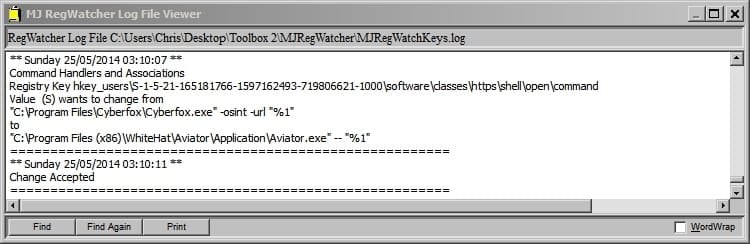
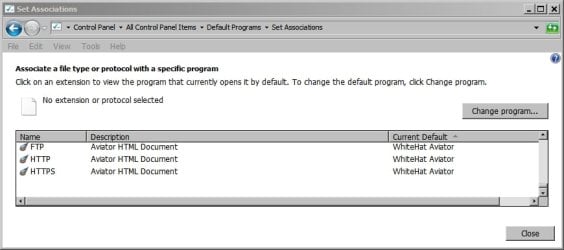
Exit the browser and run it normally. Now it opens links in emails, ftp links and bookmarked shortcuts.

I also had some luck in changing the default program for file types by navigating to say an .htm file then right clicking > properties > change

It wasn't straightforward. Now to revert things back to how they were!


Screenshots:
 

Attachments

  • Settings - Aviator.jpg
    Settings - Aviator.jpg
    117.6 KB · Views: 0
  • Settings - Aviator 2.jpg
    Settings - Aviator 2.jpg
    117.7 KB · Views: 0
  • Settings - Aviator 3.jpg
    Settings - Aviator 3.jpg
    126.7 KB · Views: 0
  • Settings - Aviator 4.jpg
    Settings - Aviator 4.jpg
    117.3 KB · Views: 0
Last edited:

My Computer

Computer type
Laptop
Computer Manufacturer/Model Number
ASUS
OS
Microsoft Windows 7 Home Premium 64-bit 7601 Multiprocessor Free Service Pack 1
CPU
AMD C-60 APU with Radeon(tm) HD Graphics
Motherboard
ASUSTeK COMPUTER INC. X501U
Memory
4.00 GB
Graphics Card(s)
AMD Radeon HD 6290 Graphics
Sound Card
(1) AMD High Definition Audio Device (2) Realtek High Defi
Screen Resolution
1366 x 768 x 32 bits (4294967296 colors) @ 60 Hz
Hard Drives
Hitachi HTS545050A7E380 SATA Disk Device
Antivirus
Comodo CIS & FW, SecureAplus App Whitelisting, Threatfire
Browser
Cyberfox 64bit, Opera 64bit, Airfox
Other Info
Spy-The-Spy, HitmanPro.Alert, Norton Connect Safe, MJRegWatcher, BitDefender TrafficLight, Voodoo Shield, Zemana AntiMalware
Web prediction service

I always disable such things. My understanding of it without doing any research is that it's a privacy issue rather than a security issue!
 

My Computer

Computer type
Laptop
Computer Manufacturer/Model Number
ASUS
OS
Microsoft Windows 7 Home Premium 64-bit 7601 Multiprocessor Free Service Pack 1
CPU
AMD C-60 APU with Radeon(tm) HD Graphics
Motherboard
ASUSTeK COMPUTER INC. X501U
Memory
4.00 GB
Graphics Card(s)
AMD Radeon HD 6290 Graphics
Sound Card
(1) AMD High Definition Audio Device (2) Realtek High Defi
Screen Resolution
1366 x 768 x 32 bits (4294967296 colors) @ 60 Hz
Hard Drives
Hitachi HTS545050A7E380 SATA Disk Device
Antivirus
Comodo CIS & FW, SecureAplus App Whitelisting, Threatfire
Browser
Cyberfox 64bit, Opera 64bit, Airfox
Other Info
Spy-The-Spy, HitmanPro.Alert, Norton Connect Safe, MJRegWatcher, BitDefender TrafficLight, Voodoo Shield, Zemana AntiMalware
I always disable such things. My understanding of it without doing any research is that it's a privacy issue rather than a security issue!

I'll accept that.

We are in what i like to call "The Microwave-Age" where everyone wants everything done fast and with as little work as possible.

I can live without it predicting what i'm looking for anyway, and yea your right. Its technically not a security thing its a privacy thing. Wasn't paying attention. But its all related to security to me, anyway. :D
 

My Computer

Computer type
PC/Desktop
Computer Manufacturer/Model Number
Dell Inspiron 530
OS
Windows 7 Professional Version 6.1 Build 7601 SP1
CPU
Q6600
Motherboard
IDK
Memory
4GB Total
Graphics Card(s)
GeForce 9500GT =(
Sound Card
Onboard
Monitor(s) Displays
Smaller than what i want
Screen Resolution
Not up to par
Hard Drives
Not an SSD
PSU
350 Watt or W/E this model comes with
Case
Dell Inspiron 530
Cooling
Factory
Keyboard
Logitech G510
Mouse
Logitech G500
Internet Speed
Eh, its okay.
Browser
Aviator.
Other Info
I want my old computer back.
Be aware, that a browser set up to be most secure will take more steps to view videos, etc. as these elements will be blocked by default. You have to allow most things. Like a firewall, this is great if you don't just click accept for everything to stop the nagging. take a look at Aviator, a Chromium based browser.

WhiteHat Releases Aviator Browser for Windows | Threatpost | The first stop for security news

https://www.whitehatsec.com/aviator/

A Guy

Thanks again for recommending this awesome browser. This response is exactly what i was looking for.

A browser built off of an already somewhat secure browser (Chromium) and then made more secure.

By the way, Aviator blocks certain things (Like flash, and a few more) and when you click on the icon that sais "Allow" .... BAM, the video on youtube (or whatever it is) starts playing instantly. So in regards to your comment about browsers aimed at security usually required more steps to do things.... This is not the case with Aviator, for the most part. But i'm sure you knew that since you're the one that recommended Whitehat Aviator in the first place :D

You're welcome. I have been following this thread. It's good they let you enable Flash quickly, but it being off by default, and you have to allow it is what I meant. I have never used it personally, but had read about it, and remembered it when you asked. I use Opera 12.17, so the browsers own security isn't a priority for me. I do have other programs that help mitigate issues that might occur when browsing. I'm glad you like it, and kudos to the others for their testing and advice. A Guy
 

My Computer

Computer type
PC/Desktop
OS
Windows 10 Home x64
CPU
INTEL Core i5-750 Quad-Core 3.37GHz
Motherboard
ASUS P7P55D
Memory
HyperX Fury Black Series 8GB (2 x 4GB) 1866Mhz
Graphics Card(s)
EVGA GeForce GTX 750 Superclocked 1GB 128-Bit GDDR5
Monitor(s) Displays
LG 32MA68HY 32" IPS
Screen Resolution
1920 x 1080
Hard Drives
Samsung 840 Evo 120GB, SEAGATE 500GB Barracuda® 7200.12, SATA 3 Gb/s, 7200 RPM, 16MB cache
PSU
ANTEC TruePower New TP-550, 80 PLUS, 550W
Case
ANTEC Three Hundred Illusion
Cooling
COOLER MASTER Hyper 212 Plus, 4 x 120mm 1 x 140mm Noctua's
Internet Speed
85 + Mbps
Antivirus
Avast
Browser
Vivaldi
The option named "Use a web service to help resolve navigation errors" causes Aviator to crash for me.
 

My Computer

Computer type
Laptop
Computer Manufacturer/Model Number
Employer provided Dell Latitude
OS
W7 Pro SP1 64bit
CPU
i7
Memory
8GB
Graphics Card(s)
Intel HD Graphics
Hard Drives
crappy SSD
Antivirus
Employer mandated Symantec Endpoint Protection
Browser
Pale Moon 64bit, IE11 64bit & Chrome 64bit
The option named "Use a web service to help resolve navigation errors" causes Aviator to crash for me.

I enabled it and just typed in google.com and cnn.com without any issues at all... I did install the fix i had posted a few pages back, though.. not sure if you had done that already. By the way... after installing that Microsoft package to fix Aviator's .DLL problem box showing up after installation... It it adds more updates to install in Windows Update :(

But reporting these issues to Whitehat (About Whitehat>Report Issue is fastest way) will help get the ball rolling and get this stuff fixed, i'm sure.
 

My Computer

Computer type
PC/Desktop
Computer Manufacturer/Model Number
Dell Inspiron 530
OS
Windows 7 Professional Version 6.1 Build 7601 SP1
CPU
Q6600
Motherboard
IDK
Memory
4GB Total
Graphics Card(s)
GeForce 9500GT =(
Sound Card
Onboard
Monitor(s) Displays
Smaller than what i want
Screen Resolution
Not up to par
Hard Drives
Not an SSD
PSU
350 Watt or W/E this model comes with
Case
Dell Inspiron 530
Cooling
Factory
Keyboard
Logitech G510
Mouse
Logitech G500
Internet Speed
Eh, its okay.
Browser
Aviator.
Other Info
I want my old computer back.
The option named "Use a web service to help resolve navigation errors" causes Aviator to crash for me.

I enabled it and just typed in google.com and cnn.com without any issues at all... I did install the fix i had posted a few pages back, though.. not sure if you had done that already. By the way... after installing that Microsoft package to fix Aviator's .DLL problem box showing up after installation... More Windows Updates pop up.

But reporting these issues to Whitehat (About Whitehat>Report Issue is fastest way) will help get the ball rolling and get this stuff fixed, i'm sure.
Whitehat support has not replied to the first report/video that I sent them :-(

The feature that you enabled/tested is supposed to help you out when you typo a URL.

Don't test it with known good URLs :-)

Try typing in aabbcc.com
 

My Computer

Computer type
Laptop
Computer Manufacturer/Model Number
Employer provided Dell Latitude
OS
W7 Pro SP1 64bit
CPU
i7
Memory
8GB
Graphics Card(s)
Intel HD Graphics
Hard Drives
crappy SSD
Antivirus
Employer mandated Symantec Endpoint Protection
Browser
Pale Moon 64bit, IE11 64bit & Chrome 64bit
The option named "Use a web service to help resolve navigation errors" causes Aviator to crash for me.

I enabled it and just typed in google.com and cnn.com without any issues at all... I did install the fix i had posted a few pages back, though.. not sure if you had done that already. By the way... after installing that Microsoft package to fix Aviator's .DLL problem box showing up after installation... More Windows Updates pop up.

But reporting these issues to Whitehat (About Whitehat>Report Issue is fastest way) will help get the ball rolling and get this stuff fixed, i'm sure.
Whitehat support has not replied to the first report/video that I sent them :-(

The feature that you enabled/tested is supposed to help you out when you typo a URL.

Don't test it with known good URLs :-)

Try typing in aabbcc.com

Aaaww dude. Your right. Mine crashed, too. Sucks even more cause i was downloading something.

Since they've replied to mine so far, i have already reported this to them. I also asked if the Adblock extension will conflict with whatever they have integrated in to Aviator hah... Hopefully they don't label my email address as spam LOL.

BTW do you put in an email address while reporting the issue and checking your spam folder, etc? I'm sure you did but always good to double check. The small stuff is what gets us sometimes.

You know that they at least get them and see them. At my job every now and then we get behind on emails with all of our other responsibilities so i'm sure sending them will still be better than not.
 

My Computer

Computer type
PC/Desktop
Computer Manufacturer/Model Number
Dell Inspiron 530
OS
Windows 7 Professional Version 6.1 Build 7601 SP1
CPU
Q6600
Motherboard
IDK
Memory
4GB Total
Graphics Card(s)
GeForce 9500GT =(
Sound Card
Onboard
Monitor(s) Displays
Smaller than what i want
Screen Resolution
Not up to par
Hard Drives
Not an SSD
PSU
350 Watt or W/E this model comes with
Case
Dell Inspiron 530
Cooling
Factory
Keyboard
Logitech G510
Mouse
Logitech G500
Internet Speed
Eh, its okay.
Browser
Aviator.
Other Info
I want my old computer back.
I put an e-mail address in to the problem reporting "website" and a link to the video showing the stuff that I wrote to them about. In fact, I used the OS clipboard via KeePass to copy/paste (so no typo) an e-mail address that has never been used to send out e-mails - so the e-mail address should not be blacklisted. Unless they block every e-mail from the domain that I used.

I've been checking the spam folder. Everything is empty.

If I don't hear from them soon, I'll e-mail them directly - instead of using this problem reporting "website":

problem.png
 

My Computer

Computer type
Laptop
Computer Manufacturer/Model Number
Employer provided Dell Latitude
OS
W7 Pro SP1 64bit
CPU
i7
Memory
8GB
Graphics Card(s)
Intel HD Graphics
Hard Drives
crappy SSD
Antivirus
Employer mandated Symantec Endpoint Protection
Browser
Pale Moon 64bit, IE11 64bit & Chrome 64bit
I put an e-mail address in to the problem reporting "website" and a link to the video showing the stuff that I wrote to them about. In fact, I used the OS clipboard via KeePass to copy/paste (so no typo) an e-mail address that has never been used to send out e-mails - so the e-mail address should not be blacklisted. Unless they block every e-mail from the domain that I used.

I've been checking the spam folder. Everything is empty.

If I don't hear from them soon, I'll e-mail them directly - instead of using this problem reporting "website":

View attachment 319193

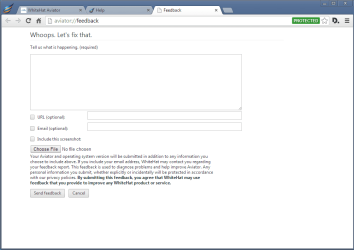
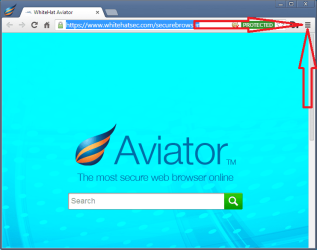
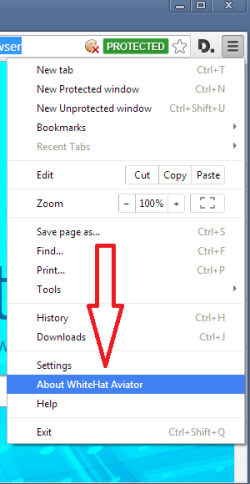
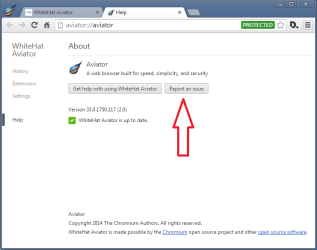
I do not use the website to report the problem. I click on the three lines at the top right hand corner "Customize and Control WhiteHat Aviator" then go to About Whitehat Aviator, then "Report a problem." and add an email address and nothing else.
 

My Computer

Computer type
PC/Desktop
Computer Manufacturer/Model Number
Dell Inspiron 530
OS
Windows 7 Professional Version 6.1 Build 7601 SP1
CPU
Q6600
Motherboard
IDK
Memory
4GB Total
Graphics Card(s)
GeForce 9500GT =(
Sound Card
Onboard
Monitor(s) Displays
Smaller than what i want
Screen Resolution
Not up to par
Hard Drives
Not an SSD
PSU
350 Watt or W/E this model comes with
Case
Dell Inspiron 530
Cooling
Factory
Keyboard
Logitech G510
Mouse
Logitech G500
Internet Speed
Eh, its okay.
Browser
Aviator.
Other Info
I want my old computer back.
I put an e-mail address in to the problem reporting "website" and a link to the video showing the stuff that I wrote to them about. In fact, I used the OS clipboard via KeePass to copy/paste (so no typo) an e-mail address that has never been used to send out e-mails - so the e-mail address should not be blacklisted. Unless they block every e-mail from the domain that I used.

I've been checking the spam folder. Everything is empty.

If I don't hear from them soon, I'll e-mail them directly - instead of using this problem reporting "website":

View attachment 319193

I do not use the website to report the problem. I click on the three lines at the top right hand corner "Customize and Control WhiteHat Aviator" then go to About Whitehat Aviator, then "Report a problem." and add an email address and nothing else.
Those are the steps that I used.
That is why I put quotation marks around "website" :-)

aviator1.png

aviator2.png

aviator3.png

aviator4.png
 

My Computer

Computer type
Laptop
Computer Manufacturer/Model Number
Employer provided Dell Latitude
OS
W7 Pro SP1 64bit
CPU
i7
Memory
8GB
Graphics Card(s)
Intel HD Graphics
Hard Drives
crappy SSD
Antivirus
Employer mandated Symantec Endpoint Protection
Browser
Pale Moon 64bit, IE11 64bit & Chrome 64bit
I put an e-mail address in to the problem reporting "website" and a link to the video showing the stuff that I wrote to them about. In fact, I used the OS clipboard via KeePass to copy/paste (so no typo) an e-mail address that has never been used to send out e-mails - so the e-mail address should not be blacklisted. Unless they block every e-mail from the domain that I used.

I've been checking the spam folder. Everything is empty.

If I don't hear from them soon, I'll e-mail them directly - instead of using this problem reporting "website":

View attachment 319193

I do not use the website to report the problem. I click on the three lines at the top right hand corner "Customize and Control WhiteHat Aviator" then go to About Whitehat Aviator, then "Report a problem." and add an email address and nothing else.
Those are the steps that I used.
That is why I put quotation marks around "website" :-)

View attachment 319196

View attachment 319197

View attachment 319198

View attachment 319199

Not sure why they dont respond to you. Maybe they just dont like you, lol JK..

Hopefully they do not stop responding to me too
 

My Computer

Computer type
PC/Desktop
Computer Manufacturer/Model Number
Dell Inspiron 530
OS
Windows 7 Professional Version 6.1 Build 7601 SP1
CPU
Q6600
Motherboard
IDK
Memory
4GB Total
Graphics Card(s)
GeForce 9500GT =(
Sound Card
Onboard
Monitor(s) Displays
Smaller than what i want
Screen Resolution
Not up to par
Hard Drives
Not an SSD
PSU
350 Watt or W/E this model comes with
Case
Dell Inspiron 530
Cooling
Factory
Keyboard
Logitech G510
Mouse
Logitech G500
Internet Speed
Eh, its okay.
Browser
Aviator.
Other Info
I want my old computer back.
Point them to this thread. If they see their browser being discussed on a forum with 281,000 members, as renowned as Seven Forums, maybe one of the developers would like to join in the discussion here ;)

A Guy
 

My Computer

Computer type
PC/Desktop
OS
Windows 10 Home x64
CPU
INTEL Core i5-750 Quad-Core 3.37GHz
Motherboard
ASUS P7P55D
Memory
HyperX Fury Black Series 8GB (2 x 4GB) 1866Mhz
Graphics Card(s)
EVGA GeForce GTX 750 Superclocked 1GB 128-Bit GDDR5
Monitor(s) Displays
LG 32MA68HY 32" IPS
Screen Resolution
1920 x 1080
Hard Drives
Samsung 840 Evo 120GB, SEAGATE 500GB Barracuda® 7200.12, SATA 3 Gb/s, 7200 RPM, 16MB cache
PSU
ANTEC TruePower New TP-550, 80 PLUS, 550W
Case
ANTEC Three Hundred Illusion
Cooling
COOLER MASTER Hyper 212 Plus, 4 x 120mm 1 x 140mm Noctua's
Internet Speed
85 + Mbps
Antivirus
Avast
Browser
Vivaldi
Point them to this thread. If they see their browser being discussed on a forum with 281,000 members, as renowned as Seven Forums, maybe one of the developers would like to join in the discussion here ;)

A Guy

Actually, when i reported an issue i mentioned this thread and mentioned it would be nice if they were to participate ;)
 

My Computer

Computer type
PC/Desktop
Computer Manufacturer/Model Number
Dell Inspiron 530
OS
Windows 7 Professional Version 6.1 Build 7601 SP1
CPU
Q6600
Motherboard
IDK
Memory
4GB Total
Graphics Card(s)
GeForce 9500GT =(
Sound Card
Onboard
Monitor(s) Displays
Smaller than what i want
Screen Resolution
Not up to par
Hard Drives
Not an SSD
PSU
350 Watt or W/E this model comes with
Case
Dell Inspiron 530
Cooling
Factory
Keyboard
Logitech G510
Mouse
Logitech G500
Internet Speed
Eh, its okay.
Browser
Aviator.
Other Info
I want my old computer back.
Back
Top