The most SECURE browser?

Perhaps they don't want to talk to the forum member that stated that "Their style/hype of communicating things is worse than Chicken Little's and Steve Gibson's."

:-)
 

My Computer

Computer type
Laptop
Computer Manufacturer/Model Number
Employer provided Dell Latitude
OS
W7 Pro SP1 64bit
CPU
i7
Memory
8GB
Graphics Card(s)
Intel HD Graphics
Hard Drives
crappy SSD
Antivirus
Employer mandated Symantec Endpoint Protection
Browser
Pale Moon 64bit, IE11 64bit & Chrome 64bit
Perhaps they don't want to talk to the forum member that stated that "Their style/hype of communicating things is worse than Chicken Little's and Steve Gibson's."

:-)

LOL.

There is always a number to call them and explain to them what the issue is.
 

My Computer

Computer type
PC/Desktop
Computer Manufacturer/Model Number
Dell Inspiron 530
OS
Windows 7 Professional Version 6.1 Build 7601 SP1
CPU
Q6600
Motherboard
IDK
Memory
4GB Total
Graphics Card(s)
GeForce 9500GT =(
Sound Card
Onboard
Monitor(s) Displays
Smaller than what i want
Screen Resolution
Not up to par
Hard Drives
Not an SSD
PSU
350 Watt or W/E this model comes with
Case
Dell Inspiron 530
Cooling
Factory
Keyboard
Logitech G510
Mouse
Logitech G500
Internet Speed
Eh, its okay.
Browser
Aviator.
Other Info
I want my old computer back.
Web Prediction Service crash

Same problem for me. After running a ProcMon capture I couldn't figure out what caused the crash.

Then I figured that "DuckDuckGo" doesn't use a web prediction service or auto suggest as it's a search engine focused on privacy.

After some messing about trying to change the default search engine to Google which I managed to do - searches from the Whitehat home page for aabbcc.com still resulted in a DuckDuckGo search followed by a crash.

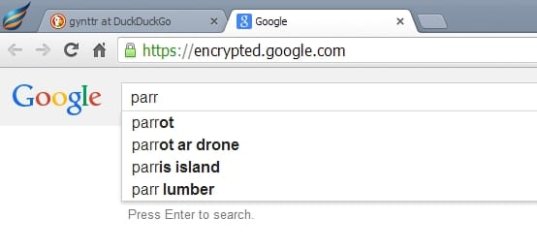
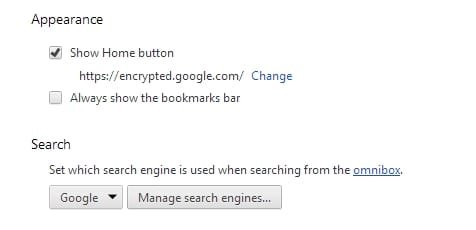
The solution was to change the home page to:

https://encrypted.google.com/

and search engine to google.

Then everything seems to work.

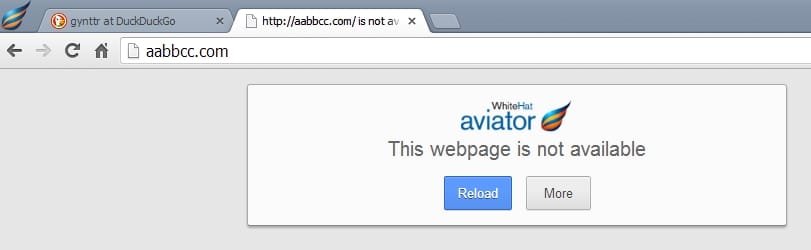
EDIT: Meant to add that searching for aabbcc.com results in the page in the screenshot below being shown but typing something like yhoo.com into the address bar now redirects to yahoo.
 

Attachments

  • aabbcc.jpg
    aabbcc.jpg
    14 KB · Views: 1
  • Google - Aviator.jpg
    Google - Aviator.jpg
    13.6 KB · Views: 32
  • Settings - Aviator.jpg
    Settings - Aviator.jpg
    7.9 KB · Views: 32
Last edited:

My Computer

Computer type
Laptop
Computer Manufacturer/Model Number
ASUS
OS
Microsoft Windows 7 Home Premium 64-bit 7601 Multiprocessor Free Service Pack 1
CPU
AMD C-60 APU with Radeon(tm) HD Graphics
Motherboard
ASUSTeK COMPUTER INC. X501U
Memory
4.00 GB
Graphics Card(s)
AMD Radeon HD 6290 Graphics
Sound Card
(1) AMD High Definition Audio Device (2) Realtek High Defi
Screen Resolution
1366 x 768 x 32 bits (4294967296 colors) @ 60 Hz
Hard Drives
Hitachi HTS545050A7E380 SATA Disk Device
Antivirus
Comodo CIS & FW, SecureAplus App Whitelisting, Threatfire
Browser
Cyberfox 64bit, Opera 64bit, Airfox
Other Info
Spy-The-Spy, HitmanPro.Alert, Norton Connect Safe, MJRegWatcher, BitDefender TrafficLight, Voodoo Shield, Zemana AntiMalware
Same problem for me. After running a ProcMon capture I couldn't figure out what caused the crash.

Then I figured that "DuckDuckGo" doesn't use a web prediction service or auto suggest as it's a search engine focused on privacy.

After some messing about trying to change the default search engine to Google which I managed to do - searches from the Whitehat home page for aabbcc.com still resulted in a DuckDuckGo search followed by a crash.

The solution was to change the home page to:

https://encrypted.google.com/

Then everything seems to work.

What in the world made you think of that solution??
 

My Computer

Computer type
PC/Desktop
Computer Manufacturer/Model Number
Dell Inspiron 530
OS
Windows 7 Professional Version 6.1 Build 7601 SP1
CPU
Q6600
Motherboard
IDK
Memory
4GB Total
Graphics Card(s)
GeForce 9500GT =(
Sound Card
Onboard
Monitor(s) Displays
Smaller than what i want
Screen Resolution
Not up to par
Hard Drives
Not an SSD
PSU
350 Watt or W/E this model comes with
Case
Dell Inspiron 530
Cooling
Factory
Keyboard
Logitech G510
Mouse
Logitech G500
Internet Speed
Eh, its okay.
Browser
Aviator.
Other Info
I want my old computer back.
Inspiration?

It just seemed likely when I thought about reasons why it might not be working.

I reckon that probably it would be better to drop the "encrypted" part from the home page URL for smooth operation!

Like I said before it's a privacy issue for me and I tend to keep such things disabled anyway. Depending on what I'm searching for I use Google most of the time but for other stuff I'll switch to Opera browser with DuckDuckGo or possibly I'll be using Aviator as it's growing on me.

The only thing is that I'm still learning about it and not spending a lot of time using it yet. I'd like to know what it does with Etags and the like. I expect that given a few months some bright sparks will have it all figured out!
 

My Computer

Computer type
Laptop
Computer Manufacturer/Model Number
ASUS
OS
Microsoft Windows 7 Home Premium 64-bit 7601 Multiprocessor Free Service Pack 1
CPU
AMD C-60 APU with Radeon(tm) HD Graphics
Motherboard
ASUSTeK COMPUTER INC. X501U
Memory
4.00 GB
Graphics Card(s)
AMD Radeon HD 6290 Graphics
Sound Card
(1) AMD High Definition Audio Device (2) Realtek High Defi
Screen Resolution
1366 x 768 x 32 bits (4294967296 colors) @ 60 Hz
Hard Drives
Hitachi HTS545050A7E380 SATA Disk Device
Antivirus
Comodo CIS & FW, SecureAplus App Whitelisting, Threatfire
Browser
Cyberfox 64bit, Opera 64bit, Airfox
Other Info
Spy-The-Spy, HitmanPro.Alert, Norton Connect Safe, MJRegWatcher, BitDefender TrafficLight, Voodoo Shield, Zemana AntiMalware
It just seemed likely when I thought about reasons why it might not be working.

I reckon that probably it would be better to drop the "encrypted" part from the home page URL for smooth operation!

Like I said before it's a privacy issue for me and I tend to keep such things disabled anyway. Depending on what I'm searching for I use Google most of the time but for other stuff I'll switch to Opera browser with DuckDuckGo or possibly I'll be using Aviator as it's growing on me.

The only thing is that I'm still learning about it and not spending a lot of time using it yet. I'd like to know what it does with Etags and the like. I expect that given a few months some bright sparks will have it all figured out!

Is DuckDuckGo a good search engine? If so, why? More privacy, etc. vs Google?

I'm glad its growing on you. I've learned a lot from this thread.
 

My Computer

Computer type
PC/Desktop
Computer Manufacturer/Model Number
Dell Inspiron 530
OS
Windows 7 Professional Version 6.1 Build 7601 SP1
CPU
Q6600
Motherboard
IDK
Memory
4GB Total
Graphics Card(s)
GeForce 9500GT =(
Sound Card
Onboard
Monitor(s) Displays
Smaller than what i want
Screen Resolution
Not up to par
Hard Drives
Not an SSD
PSU
350 Watt or W/E this model comes with
Case
Dell Inspiron 530
Cooling
Factory
Keyboard
Logitech G510
Mouse
Logitech G500
Internet Speed
Eh, its okay.
Browser
Aviator.
Other Info
I want my old computer back.
Tracking issues

Check out the following:

Fix Tracking!

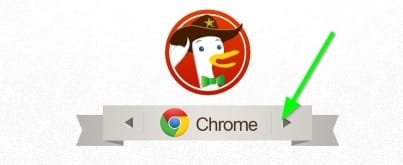
Under the logo click the banner and select Chrome. Scroll down.

It's a matter of personal preference. I don't much like being tracked even if a lot of that tracking doesn't personally identify me.

If you happen to use FF or a FF variant check out:

Lightbeam

You need the add on bar enabled in order to use it. For me - with all anti-tracking methods enabled the chart remains blank and that's how I like it!

For Chrome:

https://chrome.google.com/webstore/...chrome/ganlifbpkcplnldliibcbegplfmcfigp?hl=en

Note: Discussing some of those methods breaches the Forum Rules so it's not a discussion that I will engage in.

That's just the way it is!
 
Last edited:

My Computer

Computer type
Laptop
Computer Manufacturer/Model Number
ASUS
OS
Microsoft Windows 7 Home Premium 64-bit 7601 Multiprocessor Free Service Pack 1
CPU
AMD C-60 APU with Radeon(tm) HD Graphics
Motherboard
ASUSTeK COMPUTER INC. X501U
Memory
4.00 GB
Graphics Card(s)
AMD Radeon HD 6290 Graphics
Sound Card
(1) AMD High Definition Audio Device (2) Realtek High Defi
Screen Resolution
1366 x 768 x 32 bits (4294967296 colors) @ 60 Hz
Hard Drives
Hitachi HTS545050A7E380 SATA Disk Device
Antivirus
Comodo CIS & FW, SecureAplus App Whitelisting, Threatfire
Browser
Cyberfox 64bit, Opera 64bit, Airfox
Other Info
Spy-The-Spy, HitmanPro.Alert, Norton Connect Safe, MJRegWatcher, BitDefender TrafficLight, Voodoo Shield, Zemana AntiMalware
...but typing something like yhoo.com into the address bar now redirects to yahoo.
yhoo.com is not a valid typo test. It is a domain owned by Yahoo. The yhoo web server returns pings and it is doing the redirection to yahoo.com --- not the Aviator browser or the "web service" in option being tested.

aabbcc.com is a domain owned by MIS... but there does not appear to be a web server using it. Hence the navigation error. (You might get ping results for aabbcc.com or any website depending on your DNS service/setup.)

I get the same navigation error if I use wwwwwwwhat.com
which does not appear to be owned by anyone.

I'll stick with the simpler aabbcc.com for testing.

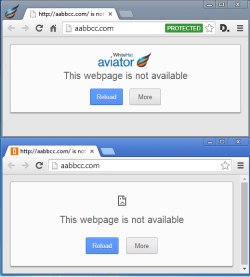
With the option named "Use a web service to help resolve navigation errors" turned OFF...
...this is what I see in Aviator vs. Chrome:
Avaitor-vs-Chrome-OFF.png
Callender said, "The solution was to change...."
I'm not sure that your solution to Aviator's crashing works if the end result is the same as turning off the option. Or maybe I'm missing something.


With the option named "Use a web service to help resolve navigation errors" turned ON...
...this is what I see in Aviator vs. Chrome:
Avaitor-vs-Chrome-ON.png


Avaiator is not remembering the size of the last window closed. See the video below.

Setting aabbcc.com as the homepage, Avaiator ignored that setting after a crash. The setting was still there, but Aviator took me to the default customized search page. I have to start Avaitor a second time to get it to honor my settings. I show this twice at te end of the video. Once where I go into the settings window and once without that step.

Having to restart twice to get back to your settings is not a big deal, but it night have explain some of Callender's findings.


Notice that both browser windows start off as the same size.

I have Process Explorer's Difference Highlighting Duration* set to 9 seconds. The apps turn red once they exit, but I want to see that red line for a while. It is not taking 9 seconds for these apps to exit RAM.

*the option is called Difference Highlight Duration elsewhere.

In the video, the W7 pro 64bit VM's DNS is set to 8.8.8.8 to avoid my OpenDNS service that provides its own navigation errors help. Also, a number of MS services** are disabled just to get the list in Process Explorer smaller and to stop the list from changing (thus moving up/down) more than is already does in the video.

**services like Windows Media Player Network Sharing Service and Windows Search. I get the same results with all MS services set to their default start up values.
 

My Computer

Computer type
Laptop
Computer Manufacturer/Model Number
Employer provided Dell Latitude
OS
W7 Pro SP1 64bit
CPU
i7
Memory
8GB
Graphics Card(s)
Intel HD Graphics
Hard Drives
crappy SSD
Antivirus
Employer mandated Symantec Endpoint Protection
Browser
Pale Moon 64bit, IE11 64bit & Chrome 64bit
Check out the following:

Fix Tracking!

Under the logo click the banner and select Chrome. Scroll down.

It's a matter of personal preference. I don't much like being tracked even if a lot of that tracking doesn't personally identify me.

If you happen to use FF or a FF variant check out:

Lightbeam

You need the add on bar enabled in order to use it. For me - with all anti-tracking methods enabled the chart remains blank and that's how I like it!

For Chrome:

https://chrome.google.com/webstore/...chrome/ganlifbpkcplnldliibcbegplfmcfigp?hl=en

Note: Discussing some of those methods breaches the Forum Rules so it's not a discussion that I will engage in.

That's just the way it is!

For your first entry in "Fix Tracking" Aviator already has "Send do not track request feature" if that is what you were getting at... I was not to find the thing to click on when you told me to find Chrome and "Click on it" ...

But i'm wondering if Collusion is an overkill, or maybe even redundant, to add to Aviator as this is currently my browser of choice with Chrome as my backup.

*UPDATE*

I looked at that site again and didn't find nothing to click on but it stated which options to disable in Chrome for increased security within the "Advanced Options" ... Which is basically to uncheck all within that section except for "Send do not track".
 
Last edited:

My Computer

Computer type
PC/Desktop
Computer Manufacturer/Model Number
Dell Inspiron 530
OS
Windows 7 Professional Version 6.1 Build 7601 SP1
CPU
Q6600
Motherboard
IDK
Memory
4GB Total
Graphics Card(s)
GeForce 9500GT =(
Sound Card
Onboard
Monitor(s) Displays
Smaller than what i want
Screen Resolution
Not up to par
Hard Drives
Not an SSD
PSU
350 Watt or W/E this model comes with
Case
Dell Inspiron 530
Cooling
Factory
Keyboard
Logitech G510
Mouse
Logitech G500
Internet Speed
Eh, its okay.
Browser
Aviator.
Other Info
I want my old computer back.
Check out the following:

Fix Tracking!

Under the logo click the banner and select Chrome. Scroll down.

It's a matter of personal preference. I don't much like being tracked even if a lot of that tracking doesn't personally identify me.

If you happen to use FF or a FF variant check out:

Lightbeam

You need the add on bar enabled in order to use it. For me - with all anti-tracking methods enabled the chart remains blank and that's how I like it!

For Chrome:

https://chrome.google.com/webstore/...chrome/ganlifbpkcplnldliibcbegplfmcfigp?hl=en

Note: Discussing some of those methods breaches the Forum Rules so it's not a discussion that I will engage in.

That's just the way it is!

For your first entry in "Fix Tracking" Aviator already has "Send do not track request feature" if that is what you were getting at... I was not to find the thing to click on when you told me to find Chrome and "Click on it" ...

But i'm wondering if Collusion is an overkill, or maybe even redundant, to add to Aviator as this is currently my browser of choice with Chrome as my backup.

*UPDATE*

I looked at that site again and didn't find nothing to click on but it stated which options to disable in Chrome for increased security within the "Advanced Options" ... Which is basically to uncheck all within that section except for "Send do not track".

By the way... the option that we were discussing within Aviator, the one to "
Use a web service to help resolve navigation errors" .... if it poses a risk, as stated in your post, in Chrome... Shouldn't we just leave it disabled?

I've added HTTPS Everywhere to Chrome. Niiiiice ;)

That whole FixTracking for Chrome link was awesome. I feel like my Chrome is so much more secure now :D
 
Last edited:

My Computer

Computer type
PC/Desktop
Computer Manufacturer/Model Number
Dell Inspiron 530
OS
Windows 7 Professional Version 6.1 Build 7601 SP1
CPU
Q6600
Motherboard
IDK
Memory
4GB Total
Graphics Card(s)
GeForce 9500GT =(
Sound Card
Onboard
Monitor(s) Displays
Smaller than what i want
Screen Resolution
Not up to par
Hard Drives
Not an SSD
PSU
350 Watt or W/E this model comes with
Case
Dell Inspiron 530
Cooling
Factory
Keyboard
Logitech G510
Mouse
Logitech G500
Internet Speed
Eh, its okay.
Browser
Aviator.
Other Info
I want my old computer back.
Correction

Thanks to UsernameIssues for pointing out a few things. It seems that I was wrong when in my earlier post I stated:

"DuckDuckGo doesn't use a web prediction service or auto suggest as it's a search engine focused on privacy."

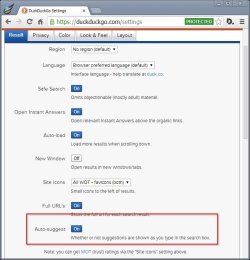
So having done a clean reinstall of Aviator I see the following:

DuckDuckGo Settings - Aviator.jpg

Search Predict.jpg

I've reset search provider and home page to DuckDuckGo.

As for turning on "Use a web service to help resolve navigation errors" - it doesn't want to work. I still get the crash when typing aabbcc.com into the address bar.

Switched to standard Hosts File and reverted to default DNS.

After the crash I was previously getting the message "Aviator has crashed - do you want to relaunch?" but currently I no longer see that message.

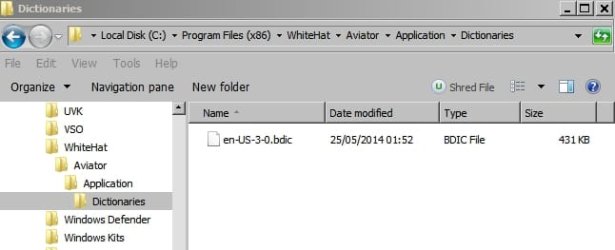
As for the uninstall - it didn't fully remove Aviator. Here are the leftovers:

Aviator-Dictionaries.jpg
Aviator-User Data.jpg

View attachment aviator-26-05-2014.txt The attached file is a list of leftover registry entries not including shell bags.

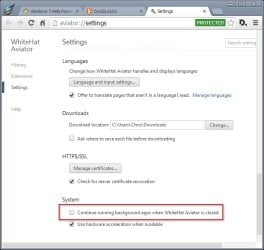
Also I'm not sure what these "background apps" are but unchecking seems to enable a smoother exit.

Settings - Aviator 2.jpg
 

My Computer

Computer type
Laptop
Computer Manufacturer/Model Number
ASUS
OS
Microsoft Windows 7 Home Premium 64-bit 7601 Multiprocessor Free Service Pack 1
CPU
AMD C-60 APU with Radeon(tm) HD Graphics
Motherboard
ASUSTeK COMPUTER INC. X501U
Memory
4.00 GB
Graphics Card(s)
AMD Radeon HD 6290 Graphics
Sound Card
(1) AMD High Definition Audio Device (2) Realtek High Defi
Screen Resolution
1366 x 768 x 32 bits (4294967296 colors) @ 60 Hz
Hard Drives
Hitachi HTS545050A7E380 SATA Disk Device
Antivirus
Comodo CIS & FW, SecureAplus App Whitelisting, Threatfire
Browser
Cyberfox 64bit, Opera 64bit, Airfox
Other Info
Spy-The-Spy, HitmanPro.Alert, Norton Connect Safe, MJRegWatcher, BitDefender TrafficLight, Voodoo Shield, Zemana AntiMalware
Thanks to UsernameIssues for pointing out a few things. It seems that I was wrong when in my earlier post I stated:

"DuckDuckGo doesn't use a web prediction service or auto suggest as it's a search engine focused on privacy."

So having done a clean reinstall of Aviator I see the following:

View attachment 319378

View attachment 319379

I've reset search provider and home page to DuckDuckGo.

As for turning on "Use a web service to help resolve navigation errors" - it doesn't want to work. I still get the crash when typing aabbcc.com into the address bar.

Switched to standard Hosts File and reverted to default DNS.

After the crash I was previously getting the message "Aviator has crashed - do you want to relaunch?" but currently I no longer see that message.

As for the uninstall - it didn't fully remove Aviator. Here are the leftovers:

View attachment 319380
View attachment 319381

View attachment 319384 The attached file is a list of leftover registry entries not including shell bags.

Also I'm not sure what these "background apps" are but unchecking seems to enable a smoother exit.

View attachment 319385

I will play follow the leader and change my homepage and search engine to duck duck go as well. Should I, though even if i have HTTPS?

One last thing, could the legacy Microsoft uninstall assistant software (not sure if that's the exact name) be used to get rid of the files left behind by a normal install? Such as the ones you mentioned? Or is it better to just delete manually?
 

My Computer

Computer type
PC/Desktop
Computer Manufacturer/Model Number
Dell Inspiron 530
OS
Windows 7 Professional Version 6.1 Build 7601 SP1
CPU
Q6600
Motherboard
IDK
Memory
4GB Total
Graphics Card(s)
GeForce 9500GT =(
Sound Card
Onboard
Monitor(s) Displays
Smaller than what i want
Screen Resolution
Not up to par
Hard Drives
Not an SSD
PSU
350 Watt or W/E this model comes with
Case
Dell Inspiron 530
Cooling
Factory
Keyboard
Logitech G510
Mouse
Logitech G500
Internet Speed
Eh, its okay.
Browser
Aviator.
Other Info
I want my old computer back.

My Computer

Computer type
PC/Desktop
OS
Windows 10 Home x64
CPU
INTEL Core i5-750 Quad-Core 3.37GHz
Motherboard
ASUS P7P55D
Memory
HyperX Fury Black Series 8GB (2 x 4GB) 1866Mhz
Graphics Card(s)
EVGA GeForce GTX 750 Superclocked 1GB 128-Bit GDDR5
Monitor(s) Displays
LG 32MA68HY 32" IPS
Screen Resolution
1920 x 1080
Hard Drives
Samsung 840 Evo 120GB, SEAGATE 500GB Barracuda® 7200.12, SATA 3 Gb/s, 7200 RPM, 16MB cache
PSU
ANTEC TruePower New TP-550, 80 PLUS, 550W
Case
ANTEC Three Hundred Illusion
Cooling
COOLER MASTER Hyper 212 Plus, 4 x 120mm 1 x 140mm Noctua's
Internet Speed
85 + Mbps
Antivirus
Avast
Browser
Vivaldi
What to click?

I just meant click the arrow on the banner until it displays "Chrome"

Fix Tracking.jpg

Attempting to answer some of your other questions:

If you set default search engine to DuckDuckGo it seems to use https where possible anyway. If you use any other search engine get the https everywhere add on.

As for your question:
"Use a web service to help resolve navigation errors" .... if it poses a risk, as stated in your post, in Chrome... Shouldn't we just leave it disabled?

It's down to personal choice.

Suggested reading: Web Browser Security Revisited (Part 4) :: Web Application Security :: Articles & Tutorials :: WindowSecurity.com

The only reason that I enabled it on a temporary basis was because you asked about it!

As UNI has found - there does seem to be a bug and the browser crashes under certain circumstances with this feature enabled. I suppose that this bug will be ironed out in a forthcoming release.

I'll check out collusion in Aviator and see what happens. In my case - probably not much but I'll try disabling as many anti tracking methods as I can. It's not supposed to be a permanent add on - just something to help you understand who's sending information about your surfing habits to other sites.

EDIT: DuckDuckGo seems to use https where possible.

Adding https everywhere doesn't hurt!
 
Last edited:

My Computer

Computer type
Laptop
Computer Manufacturer/Model Number
ASUS
OS
Microsoft Windows 7 Home Premium 64-bit 7601 Multiprocessor Free Service Pack 1
CPU
AMD C-60 APU with Radeon(tm) HD Graphics
Motherboard
ASUSTeK COMPUTER INC. X501U
Memory
4.00 GB
Graphics Card(s)
AMD Radeon HD 6290 Graphics
Sound Card
(1) AMD High Definition Audio Device (2) Realtek High Defi
Screen Resolution
1366 x 768 x 32 bits (4294967296 colors) @ 60 Hz
Hard Drives
Hitachi HTS545050A7E380 SATA Disk Device
Antivirus
Comodo CIS & FW, SecureAplus App Whitelisting, Threatfire
Browser
Cyberfox 64bit, Opera 64bit, Airfox
Other Info
Spy-The-Spy, HitmanPro.Alert, Norton Connect Safe, MJRegWatcher, BitDefender TrafficLight, Voodoo Shield, Zemana AntiMalware

My Computer

Computer type
Laptop
Computer Manufacturer/Model Number
ASUS
OS
Microsoft Windows 7 Home Premium 64-bit 7601 Multiprocessor Free Service Pack 1
CPU
AMD C-60 APU with Radeon(tm) HD Graphics
Motherboard
ASUSTeK COMPUTER INC. X501U
Memory
4.00 GB
Graphics Card(s)
AMD Radeon HD 6290 Graphics
Sound Card
(1) AMD High Definition Audio Device (2) Realtek High Defi
Screen Resolution
1366 x 768 x 32 bits (4294967296 colors) @ 60 Hz
Hard Drives
Hitachi HTS545050A7E380 SATA Disk Device
Antivirus
Comodo CIS & FW, SecureAplus App Whitelisting, Threatfire
Browser
Cyberfox 64bit, Opera 64bit, Airfox
Other Info
Spy-The-Spy, HitmanPro.Alert, Norton Connect Safe, MJRegWatcher, BitDefender TrafficLight, Voodoo Shield, Zemana AntiMalware
Aviator vs Collusion

Unfortunately the Collusion extension won't add to Aviator so if you want to see it in action you'll have to add it to Chrome!
 

My Computer

Computer type
Laptop
Computer Manufacturer/Model Number
ASUS
OS
Microsoft Windows 7 Home Premium 64-bit 7601 Multiprocessor Free Service Pack 1
CPU
AMD C-60 APU with Radeon(tm) HD Graphics
Motherboard
ASUSTeK COMPUTER INC. X501U
Memory
4.00 GB
Graphics Card(s)
AMD Radeon HD 6290 Graphics
Sound Card
(1) AMD High Definition Audio Device (2) Realtek High Defi
Screen Resolution
1366 x 768 x 32 bits (4294967296 colors) @ 60 Hz
Hard Drives
Hitachi HTS545050A7E380 SATA Disk Device
Antivirus
Comodo CIS & FW, SecureAplus App Whitelisting, Threatfire
Browser
Cyberfox 64bit, Opera 64bit, Airfox
Other Info
Spy-The-Spy, HitmanPro.Alert, Norton Connect Safe, MJRegWatcher, BitDefender TrafficLight, Voodoo Shield, Zemana AntiMalware
"Use a web service to help resolve navigation errors" .... if it poses a risk, as stated in your post, in Chrome... Shouldn't we just leave it disabled?

Yes, leave it off - but we are also attempting to help Aviator fix their problems; hence the video :-)

Yes, Aviator sends the do not track info...
...but most websites seem to ignore that
...so you need more anti-tracking measures.

I'm not too worried about tracking...
...hence my use of OpenDNS
...which sells my DNS query data.

 

My Computer

Computer type
Laptop
Computer Manufacturer/Model Number
Employer provided Dell Latitude
OS
W7 Pro SP1 64bit
CPU
i7
Memory
8GB
Graphics Card(s)
Intel HD Graphics
Hard Drives
crappy SSD
Antivirus
Employer mandated Symantec Endpoint Protection
Browser
Pale Moon 64bit, IE11 64bit & Chrome 64bit
Removal?

One last thing, could the legacy Microsoft uninstall assistant software (not sure if that's the exact name) be used to get rid of the files left behind by a normal install? Such as the ones you mentioned? Or is it better to just delete manually?

Personally whenever I uninstall anything I do a manual search for leftovers (Folders, files and registry) and delete when found. I make sure that I've got a backup though!
 

My Computer

Computer type
Laptop
Computer Manufacturer/Model Number
ASUS
OS
Microsoft Windows 7 Home Premium 64-bit 7601 Multiprocessor Free Service Pack 1
CPU
AMD C-60 APU with Radeon(tm) HD Graphics
Motherboard
ASUSTeK COMPUTER INC. X501U
Memory
4.00 GB
Graphics Card(s)
AMD Radeon HD 6290 Graphics
Sound Card
(1) AMD High Definition Audio Device (2) Realtek High Defi
Screen Resolution
1366 x 768 x 32 bits (4294967296 colors) @ 60 Hz
Hard Drives
Hitachi HTS545050A7E380 SATA Disk Device
Antivirus
Comodo CIS & FW, SecureAplus App Whitelisting, Threatfire
Browser
Cyberfox 64bit, Opera 64bit, Airfox
Other Info
Spy-The-Spy, HitmanPro.Alert, Norton Connect Safe, MJRegWatcher, BitDefender TrafficLight, Voodoo Shield, Zemana AntiMalware
One last thing, could the legacy Microsoft uninstall assistant software (not sure if that's the exact name) be used to get rid of the files left behind by a normal install? Such as the ones you mentioned? Or is it better to just delete manually?

Personally whenever I uninstall anything I do a manual search for leftovers (Folders, files and registry) and delete when found. I make sure that I've got a backup though!

I got you. "If you want it done right, do it yourself."

"Use a web service to help resolve navigation errors" .... if it poses a risk, as stated in your post, in Chrome... Shouldn't we just leave it disabled?

Yes, leave it off - but we are also attempting to help Aviator fix their problems; hence the video :-)

Yes, Aviator sends the do not track info...
...but most websites seem to ignore that
...so you need more anti-tracking measures.

I'm not too worried about tracking...
...hence my use of OpenDNS
...which sells my DNS query data.

That's awesome cause i'm trying to help them improve as well. It's a good feeling knowing you can browse safely on your home machine ;)

Unfortunately the Collusion extension won't add to Aviator so if you want to see it in action you'll have to add it to Chrome!

That sucks. Added it to Chrome, though. Made by the same guys as Disconnect, too.

The only reason that I enabled it on a temporary basis was because you asked about it!

I appreciate that.
 

My Computer

Computer type
PC/Desktop
Computer Manufacturer/Model Number
Dell Inspiron 530
OS
Windows 7 Professional Version 6.1 Build 7601 SP1
CPU
Q6600
Motherboard
IDK
Memory
4GB Total
Graphics Card(s)
GeForce 9500GT =(
Sound Card
Onboard
Monitor(s) Displays
Smaller than what i want
Screen Resolution
Not up to par
Hard Drives
Not an SSD
PSU
350 Watt or W/E this model comes with
Case
Dell Inspiron 530
Cooling
Factory
Keyboard
Logitech G510
Mouse
Logitech G500
Internet Speed
Eh, its okay.
Browser
Aviator.
Other Info
I want my old computer back.
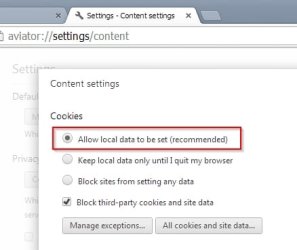
Another settings issue

When attempting to change cookie settings to:

Allow local data to be set (recommended)

there's no way that the setting will stick. I wonder if that could be related to the last window size and position issue?

Local Data Settings.jpg
 

My Computer

Computer type
Laptop
Computer Manufacturer/Model Number
ASUS
OS
Microsoft Windows 7 Home Premium 64-bit 7601 Multiprocessor Free Service Pack 1
CPU
AMD C-60 APU with Radeon(tm) HD Graphics
Motherboard
ASUSTeK COMPUTER INC. X501U
Memory
4.00 GB
Graphics Card(s)
AMD Radeon HD 6290 Graphics
Sound Card
(1) AMD High Definition Audio Device (2) Realtek High Defi
Screen Resolution
1366 x 768 x 32 bits (4294967296 colors) @ 60 Hz
Hard Drives
Hitachi HTS545050A7E380 SATA Disk Device
Antivirus
Comodo CIS & FW, SecureAplus App Whitelisting, Threatfire
Browser
Cyberfox 64bit, Opera 64bit, Airfox
Other Info
Spy-The-Spy, HitmanPro.Alert, Norton Connect Safe, MJRegWatcher, BitDefender TrafficLight, Voodoo Shield, Zemana AntiMalware
Back
Top