The most SECURE browser?

When attempting to change cookie settings to:

Allow local data to be set (recommended)

there's no way that the setting will stick. I wonder if that could be related to the last window size and position issue?

View attachment 319426

I wish someone from WhiteHat would join this conversation.
 

My Computer

Computer type
PC/Desktop
Computer Manufacturer/Model Number
Dell Inspiron 530
OS
Windows 7 Professional Version 6.1 Build 7601 SP1
CPU
Q6600
Motherboard
IDK
Memory
4GB Total
Graphics Card(s)
GeForce 9500GT =(
Sound Card
Onboard
Monitor(s) Displays
Smaller than what i want
Screen Resolution
Not up to par
Hard Drives
Not an SSD
PSU
350 Watt or W/E this model comes with
Case
Dell Inspiron 530
Cooling
Factory
Keyboard
Logitech G510
Mouse
Logitech G500
Internet Speed
Eh, its okay.
Browser
Aviator.
Other Info
I want my old computer back.
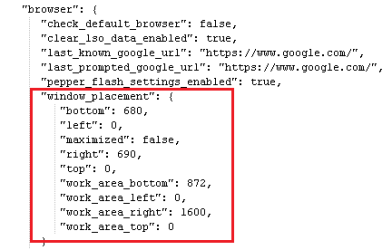
In Chrome, there is a section of the Preferences file that records the window placement/size:
Chrome-window.png
Aviator's Preferences file seems to be missing that info (by design?).

Aviator seems to break some things (by design?) for the sake of privacy.

I'm not sure that it is possible to allow local data to be set...
...when Aviator launches a child that disables databases.
disable.png

Code:
"C:\Program Files (x86)\WhiteHat\Aviator\Application\Aviator.exe" --type=renderer [B][COLOR=Red]--disable-databases[/COLOR][/B] --lang=en-US --force-fieldtrials=BrowserPreReadExperiment/100-pct-default/Prerender/Prerender15minTTL/UMA-New-Install-Uniformity-Trial/Experiment/UMA-Session-Randomized-Uniformity-Trial-5-Percent/group_17/UMA-Uniformity-Trial-1-Percent/group_60/UMA-Uniformity-Trial-10-Percent/group_04/UMA-Uniformity-Trial-100-Percent/group_01/UMA-Uniformity-Trial-20-Percent/group_04/UMA-Uniformity-Trial-5-Percent/group_18/UMA-Uniformity-Trial-50-Percent/group_01/ --enable-threaded-compositing --enable-delegated-renderer --enable-deadline-scheduling --disable-pepper-3d --disable-accelerated-compositing --disable-accelerated-video-decode --disable-webrtc-hw-encoding --enable-software-compositing --disable-gpu-compositing --disable-pepper-3d --channel="3504.1.1821746514\1381905567" /prefetch:673131151
 

My Computer

Computer type
Laptop
Computer Manufacturer/Model Number
Employer provided Dell Latitude
OS
W7 Pro SP1 64bit
CPU
i7
Memory
8GB
Graphics Card(s)
Intel HD Graphics
Hard Drives
crappy SSD
Antivirus
Employer mandated Symantec Endpoint Protection
Browser
Pale Moon 64bit, IE11 64bit & Chrome 64bit

My Computer

Computer type
PC/Desktop
OS
Windows 10 Home x64
CPU
INTEL Core i5-750 Quad-Core 3.37GHz
Motherboard
ASUS P7P55D
Memory
HyperX Fury Black Series 8GB (2 x 4GB) 1866Mhz
Graphics Card(s)
EVGA GeForce GTX 750 Superclocked 1GB 128-Bit GDDR5
Monitor(s) Displays
LG 32MA68HY 32" IPS
Screen Resolution
1920 x 1080
Hard Drives
Samsung 840 Evo 120GB, SEAGATE 500GB Barracuda® 7200.12, SATA 3 Gb/s, 7200 RPM, 16MB cache
PSU
ANTEC TruePower New TP-550, 80 PLUS, 550W
Case
ANTEC Three Hundred Illusion
Cooling
COOLER MASTER Hyper 212 Plus, 4 x 120mm 1 x 140mm Noctua's
Internet Speed
85 + Mbps
Antivirus
Avast
Browser
Vivaldi
Perhaps they are trying to make the fingerprint less unique?

https://panopticlick.eff.org/

A Guy
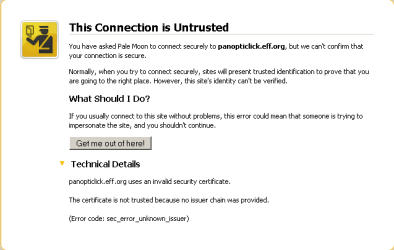
Pale Moon warns me thusly...
palemoon.png
...while Aviator happily takes me there without warning.
(I know/trust EEF - having followed their work for more than a decade via RISK digest.)

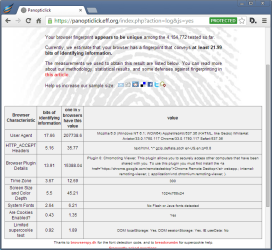
Unfortunately, Aviator fails EFF's test:
fingerprint.png
 

My Computer

Computer type
Laptop
Computer Manufacturer/Model Number
Employer provided Dell Latitude
OS
W7 Pro SP1 64bit
CPU
i7
Memory
8GB
Graphics Card(s)
Intel HD Graphics
Hard Drives
crappy SSD
Antivirus
Employer mandated Symantec Endpoint Protection
Browser
Pale Moon 64bit, IE11 64bit & Chrome 64bit
Perhaps they are trying to make the fingerprint less unique?

https://panopticlick.eff.org/

A Guy

Perhaps they are trying to make the fingerprint less unique?

https://panopticlick.eff.org/

A Guy
Pale Moon warns me thusly...
View attachment 319437
...while Aviator happily takes me there without warning.
(I know/trust EEF - having followed their work for more than a decade via RISK digest.)

Unfortunately, Aviator fails EFF's test:
View attachment 319436


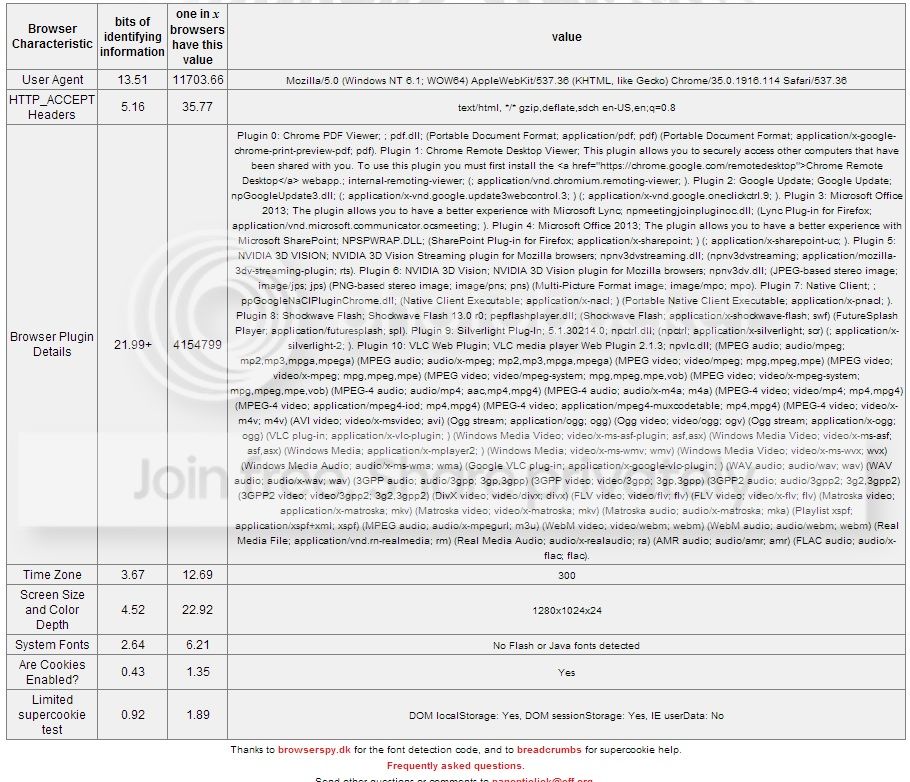
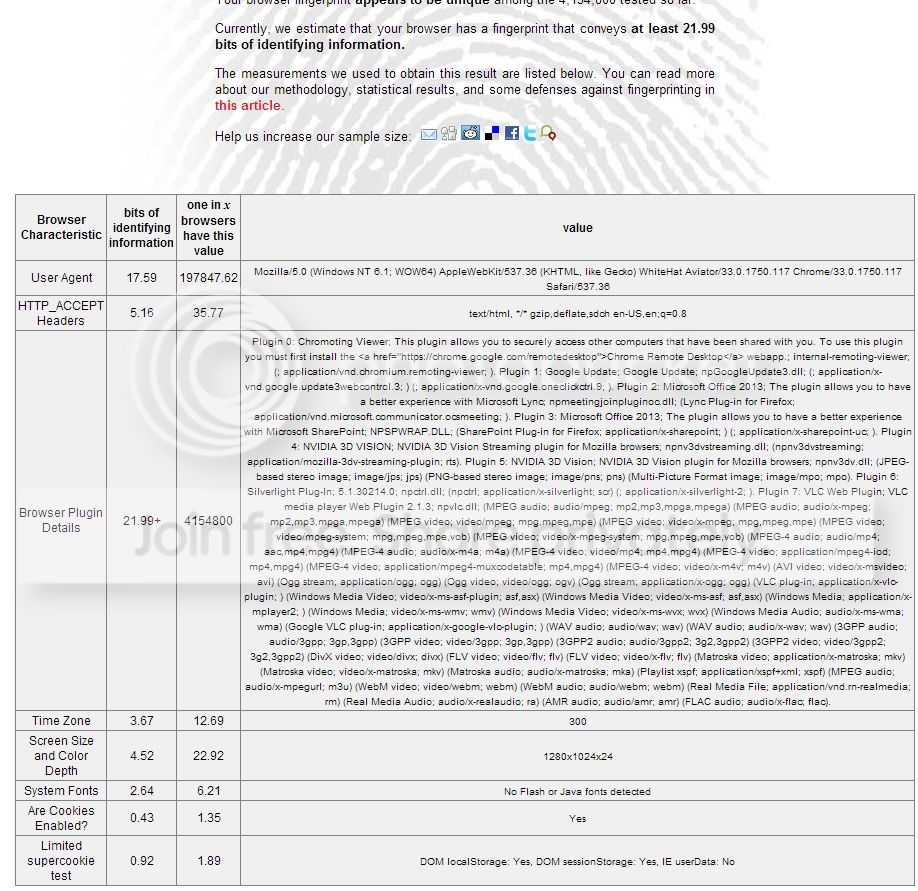
I performed the https://panopticlick.eff.org/ test on both my Chrome Browser and Aviator browser. I'm not sure how to determine which ones more secure:

ChromeEFF.jpg


That one is Chrome.


And this one is Aviator...

How am i to tell the difference? What's good what's bad, etc? Did Chrome do better than Aviator?

AviatorEFF.jpg
 
Last edited:

My Computer

Computer type
PC/Desktop
Computer Manufacturer/Model Number
Dell Inspiron 530
OS
Windows 7 Professional Version 6.1 Build 7601 SP1
CPU
Q6600
Motherboard
IDK
Memory
4GB Total
Graphics Card(s)
GeForce 9500GT =(
Sound Card
Onboard
Monitor(s) Displays
Smaller than what i want
Screen Resolution
Not up to par
Hard Drives
Not an SSD
PSU
350 Watt or W/E this model comes with
Case
Dell Inspiron 530
Cooling
Factory
Keyboard
Logitech G510
Mouse
Logitech G500
Internet Speed
Eh, its okay.
Browser
Aviator.
Other Info
I want my old computer back.
Privacy designed in

Yes I think that must be the case and it does really seems that some of those settings are not meant to be enabled or cannot be enabled for either security or privacy reasons. What it really needs from a user perspective is the removal of those options from the settings menus.
 

My Computer

Computer type
Laptop
Computer Manufacturer/Model Number
ASUS
OS
Microsoft Windows 7 Home Premium 64-bit 7601 Multiprocessor Free Service Pack 1
CPU
AMD C-60 APU with Radeon(tm) HD Graphics
Motherboard
ASUSTeK COMPUTER INC. X501U
Memory
4.00 GB
Graphics Card(s)
AMD Radeon HD 6290 Graphics
Sound Card
(1) AMD High Definition Audio Device (2) Realtek High Defi
Screen Resolution
1366 x 768 x 32 bits (4294967296 colors) @ 60 Hz
Hard Drives
Hitachi HTS545050A7E380 SATA Disk Device
Antivirus
Comodo CIS & FW, SecureAplus App Whitelisting, Threatfire
Browser
Cyberfox 64bit, Opera 64bit, Airfox
Other Info
Spy-The-Spy, HitmanPro.Alert, Norton Connect Safe, MJRegWatcher, BitDefender TrafficLight, Voodoo Shield, Zemana AntiMalware
Yes I think that must be the case and it does really seems that some of those settings are not meant to be enabled or cannot be enabled for either security or privacy reasons. What it really needs from a user perspective is the removal of those options from the settings menus.

to which post are you referring to ?

Call me a newbie but i don't know exactly what that sites used for and it seems UserNameIssues trusted it for some time now and i'd like to know more about it... Does the sites main page explain everything? Either way, i'd like how to read the results so i can compare my Chrome to my Aviator :D

It seems like a test to see how "Unique" a browser is from the details on the front page of that site.

What could be safely modified to make a browser's "Fingerprint" more unique? It seems as if Aviator is more unique than most but UserNameIssues comment in post#124 states that the browser failed EFF's test =(
 

My Computer

Computer type
PC/Desktop
Computer Manufacturer/Model Number
Dell Inspiron 530
OS
Windows 7 Professional Version 6.1 Build 7601 SP1
CPU
Q6600
Motherboard
IDK
Memory
4GB Total
Graphics Card(s)
GeForce 9500GT =(
Sound Card
Onboard
Monitor(s) Displays
Smaller than what i want
Screen Resolution
Not up to par
Hard Drives
Not an SSD
PSU
350 Watt or W/E this model comes with
Case
Dell Inspiron 530
Cooling
Factory
Keyboard
Logitech G510
Mouse
Logitech G500
Internet Speed
Eh, its okay.
Browser
Aviator.
Other Info
I want my old computer back.
Post 126 was referring to UNI's comments in Post 122

I should have made that clear!
 

My Computer

Computer type
Laptop
Computer Manufacturer/Model Number
ASUS
OS
Microsoft Windows 7 Home Premium 64-bit 7601 Multiprocessor Free Service Pack 1
CPU
AMD C-60 APU with Radeon(tm) HD Graphics
Motherboard
ASUSTeK COMPUTER INC. X501U
Memory
4.00 GB
Graphics Card(s)
AMD Radeon HD 6290 Graphics
Sound Card
(1) AMD High Definition Audio Device (2) Realtek High Defi
Screen Resolution
1366 x 768 x 32 bits (4294967296 colors) @ 60 Hz
Hard Drives
Hitachi HTS545050A7E380 SATA Disk Device
Antivirus
Comodo CIS & FW, SecureAplus App Whitelisting, Threatfire
Browser
Cyberfox 64bit, Opera 64bit, Airfox
Other Info
Spy-The-Spy, HitmanPro.Alert, Norton Connect Safe, MJRegWatcher, BitDefender TrafficLight, Voodoo Shield, Zemana AntiMalware

My Computer

Computer type
Laptop
Computer Manufacturer/Model Number
Employer provided Dell Latitude
OS
W7 Pro SP1 64bit
CPU
i7
Memory
8GB
Graphics Card(s)
Intel HD Graphics
Hard Drives
crappy SSD
Antivirus
Employer mandated Symantec Endpoint Protection
Browser
Pale Moon 64bit, IE11 64bit & Chrome 64bit
Adblock Conflict and Settings as Default Browser

Post 126 was referring to UNI's comments in Post 122

I should have made that clear!

You can try to follow the info presented here https://panopticlick.eff.org/self-defense.php to try and pass the test.

I don't attempt to be that hidden on the web.

Oh well anyway... The response I received for Setting Aviator as the Default browser is as follows:

Hi,

Thanks again for the interest in Aviator. We’re aware of the default problem and working on a fix right now. In the meantime, I’ve pasted below a suggested workaround from our development team that’ll fix the problem. It’s obviously more complicated this way than it needs to be, and hopefully by next update the default option will work as it’s supposed to.

Users who already installed Aviator, can run Aviator as Admin once to make it default browser using the steps below:
1. Close Aviator instance if it is running
2. Desktop -> Right Click on Aviator Icon -> Run as Admin
3. After the UAC, the user has to set Aviator as the default browser.

Let me know if you have any more questions, and yeah, I’ll check out that forum and see if I can help out on anything in my limited non-technical capacity.

Regards,

Mason Kolbeck
Aviator Customer Support
WhiteHat Security, Inc.
Web: http://whitehatsec.com/aviator
Email: [email protected]


As far as Adblock conflicting with Disconnect in Aviator the replay was:

While in the past Adblock would conflict with Disconnect, it seems that’s no longer the case right now and I haven’t heard of a single user who’s had a problem or change in performance after installation of adblock. This doesn’t mean that there absolutely won’t be any problems, but it doesn’t look like there’s blatant incompatibility between the two and the average user should be fine.
 

My Computer

Computer type
PC/Desktop
Computer Manufacturer/Model Number
Dell Inspiron 530
OS
Windows 7 Professional Version 6.1 Build 7601 SP1
CPU
Q6600
Motherboard
IDK
Memory
4GB Total
Graphics Card(s)
GeForce 9500GT =(
Sound Card
Onboard
Monitor(s) Displays
Smaller than what i want
Screen Resolution
Not up to par
Hard Drives
Not an SSD
PSU
350 Watt or W/E this model comes with
Case
Dell Inspiron 530
Cooling
Factory
Keyboard
Logitech G510
Mouse
Logitech G500
Internet Speed
Eh, its okay.
Browser
Aviator.
Other Info
I want my old computer back.
Hi I finally got around to joining this. I'm the guy with WhiteHat who answered the emails mentioned above. I'm not a developer or in a really technical capacity here, so I won't be able to answer more in-depth questions, but I can and will forward them to our development team in an attempt to make what Aviator does/is more apparent to everyone. Hopefully this all falls within the forum rules regarding advertising or product boosting...

To Username Issues: I finally responded to your email. I apologize for taking such an obscenely long time to do it, I saw it, sent the suggestion to development, and then just blatantly forgot to send an acknowledgement to you. Rookie mistake on my part, and once again I am really sorry for the inconvenience.

Regarding the person who's cookie settings won't stick (Callender in Post 120), this seems to be an issue that just came out the last update or two. I know development's working on this, but I don't know exactly what they've got done. This seems to be a result of us moving Settings to be opened in a Protected window, when before it was Not Protected. This is a shot in the dark, but if you open Settings in a Not Protected window (ctrl+shift+u, then settings as normal) you might be able to get the settings to "stick". I can't stress the shot-in-the-darkiness (shot-in-the-darkiosity? Well, whatever the word for being characteristic of being a shot in the dark is) improbability of this suggestion enough, but it is possible it works.

To other posts, we're kind of stretched thin for a lot of things, what with being a new browser and all, so things like consistent browser window size are known but aren't prioritized for repair when we have more pressing functionality issues to focus on. Eventually we'll get that fixed as the long term success of Aviator depends on it being a browser that doesn't frustrate you every time you open it. Regarding Panopticlick, we're pretty identifiable, that's a side effect of being a new browser, though we're looking into ways to improve this in the future. Browser fingerprinting may not be too big a deal now when compared to cookies for tracking, but in the future we do want to be ready for it.

This is a pretty big thread already, so I can't hope to say everything here to answer all the still open questions, so I'll limit my response to the above. If you have any questions post them here or email me at the support website and I'll either answer or get someone more qualified to answer.

Finally, on a more selfish note, it's been pointed out rightfully that Aviator's a newer browser, thus partially explaining the large amount of bugs or lack of polish. The solution to this to hear what people who use it dislike/notice/want. So don't be shy to let me know what is wrong with Aviator, what could be better and what you think should be done. We're a small team and it's hard to get that info on our own.

PS regarding the "Their style/hype of communicating things is worse than Chicken Little's and Steve Gibson's" comment... Yeah that seems about right. Hype must sell, I guess...

 

My Computer

Computer type
PC/Desktop
OS
Windows Home Premium 7 64 bit
Chrome vs Aviator

Perhaps they are trying to make the fingerprint less unique?

https://panopticlick.eff.org/

A Guy

Perhaps they are trying to make the fingerprint less unique?

https://panopticlick.eff.org/

A Guy
Pale Moon warns me thusly...
View attachment 319437
...while Aviator happily takes me there without warning.
(I know/trust EEF - having followed their work for more than a decade via RISK digest.)

Unfortunately, Aviator fails EFF's test:
View attachment 319436


I performed the https://panopticlick.eff.org/ test on both my Chrome Browser and Aviator browser. I'm not sure how to determine which ones more secure:

ChromeEFF.jpg


That one is Chrome.


And this one is Aviator...

How am i to tell the difference? What's good what's bad, etc? Did Chrome do better than Aviator?

AviatorEFF.jpg


Well if you look at the "One in x browsers have this value" heading:

Aviator on your machine shows 1 in 197847 in your attachment

Chrome shows 1 in 11703

Basically - a low number is better.

So if you're visiting a website using Aviator only 1 in 197847 visitors to that site will have the same browser configuration as you - and if using Chrome 1 in 11703 visitors.

So it's all down to how many regular visitors a website has. On the figures shown Aviator makes you more identifiable as a repeat visitor to any particular site as it's a little used browser.

Amongst visitors using Chrome - you'd really need to know how many other visitors have the same browser configuration to get an idea of how identifiable you are using the browser fingerprinting method.

The aim is to identify repeat visits versus unique visits even if a user has changed their ip address and disabled cookies and any trackers.

It's not really much cause for concern but it's certainly possible to use a random user agent string for each site visit if you're paranoid!
 
Last edited:

My Computer

Computer type
Laptop
Computer Manufacturer/Model Number
ASUS
OS
Microsoft Windows 7 Home Premium 64-bit 7601 Multiprocessor Free Service Pack 1
CPU
AMD C-60 APU with Radeon(tm) HD Graphics
Motherboard
ASUSTeK COMPUTER INC. X501U
Memory
4.00 GB
Graphics Card(s)
AMD Radeon HD 6290 Graphics
Sound Card
(1) AMD High Definition Audio Device (2) Realtek High Defi
Screen Resolution
1366 x 768 x 32 bits (4294967296 colors) @ 60 Hz
Hard Drives
Hitachi HTS545050A7E380 SATA Disk Device
Antivirus
Comodo CIS & FW, SecureAplus App Whitelisting, Threatfire
Browser
Cyberfox 64bit, Opera 64bit, Airfox
Other Info
Spy-The-Spy, HitmanPro.Alert, Norton Connect Safe, MJRegWatcher, BitDefender TrafficLight, Voodoo Shield, Zemana AntiMalware
Cookie settings

Aviatorguy;2787389 Regarding the person who's cookie settings won't stick (Callender in [URL="http://www.sevenforums.com/browsers-mail/329876-most-secure-browser-12.html#post2786650" said:
Post 120[/URL]), this seems to be an issue that just came out the last update or two. I know development's working on this, but I don't know exactly what they've got done. This seems to be a result of us moving Settings to be opened in a Protected window, when before it was Not Protected. This is a shot in the dark, but if you open Settings in a Not Protected window (ctrl+shift+u, then settings as normal) you might be able to get the settings to "stick". ...

Thanks for your response. Actually cookie settings are not a huge concern to me. I actually use a browser add on to remove cookies:

https://addons.mozilla.org/en-US/firefox/addon/self-destructing-cookies/

My observation was just based on how it might be a little confusing for the average user who would struggle to understand why the "recommended settings" could not be set.

Any suggestions? Well an easy to spot method of resetting all Aviator settings to default would be nice!
 

My Computer

Computer type
Laptop
Computer Manufacturer/Model Number
ASUS
OS
Microsoft Windows 7 Home Premium 64-bit 7601 Multiprocessor Free Service Pack 1
CPU
AMD C-60 APU with Radeon(tm) HD Graphics
Motherboard
ASUSTeK COMPUTER INC. X501U
Memory
4.00 GB
Graphics Card(s)
AMD Radeon HD 6290 Graphics
Sound Card
(1) AMD High Definition Audio Device (2) Realtek High Defi
Screen Resolution
1366 x 768 x 32 bits (4294967296 colors) @ 60 Hz
Hard Drives
Hitachi HTS545050A7E380 SATA Disk Device
Antivirus
Comodo CIS & FW, SecureAplus App Whitelisting, Threatfire
Browser
Cyberfox 64bit, Opera 64bit, Airfox
Other Info
Spy-The-Spy, HitmanPro.Alert, Norton Connect Safe, MJRegWatcher, BitDefender TrafficLight, Voodoo Shield, Zemana AntiMalware
A browser is as secure as the person sitting at the keyboard is.
 

My Computer

Computer type
PC/Desktop
Computer Manufacturer/Model Number
Custom Build
OS
Win 10 Pro 64
CPU
Intel Core i7 960 @3.20 GHz
Motherboard
MSI MS7522
Memory
24.0 GB DDR3
Graphics Card(s)
EVGA GTX 750Ti
Monitor(s) Displays
LG E2341 23 Inch
Screen Resolution
1920x1080
Hard Drives
1TB Western Dgital 1002FAEX-00Y9A0
1TB Hitachi HDS721010CLA322
PSU
700 Watt
Case
Haf 912
Cooling
Fans
Keyboard
Logitech MK710
Mouse
Logitech M705
Internet Speed
Cable
Antivirus
AIS 2015 .10.0.2225
Browser
Firefox 49
Other Info
MalwareBytes Anti-Rootkit utility
Aviatorguy,
Welcome to the Seven Forums and thanks for joining.

Thanks for the e-mail reply. Rather than reply to that e-mail, I'll put a tiny bit of info below.

Here is a small snippet from your e-mail to me:
The integrity level is being discussed right now, as it does lead to complications in terms of which account can use Aviator

Sorry, either I was not clear or I'm not understanding the line that I've quoted above. I don't see how it has any impact on which account can use Aviator.

The installer runs as admin (high integrity level).
The installer launches the browser.
(which is also now running as admin*).
Does it have to be running as admin so that it can write some stuff somewhere just one time?

*That "parent" browser launches "children" that run at the untrusted level - so, perhaps that is secure enough. If there is no danger from running the "parent" process, then no changes need to be made. If there is a danger, then simply don't start the browser after the install. Let the user start it manually. If you really want to have the browser start after the install, then there are ways to have the installer launch the "parent" process at the medium integrity level.

Once the browser is closed, subsequent sessions are launched with the "parent" process at the medium integrity level (The "children" are still untrusted.)

My fear (perhaps unfounded) is that a user thinks that this is the most secure browser (per your hype) and immediately surfs to a black hat website**. Also, users can leave windows open for weeks.

**...because wanting to feel safe while surfing to a questionable website was the reason why some people install Aviator.
 

My Computer

Computer type
Laptop
Computer Manufacturer/Model Number
Employer provided Dell Latitude
OS
W7 Pro SP1 64bit
CPU
i7
Memory
8GB
Graphics Card(s)
Intel HD Graphics
Hard Drives
crappy SSD
Antivirus
Employer mandated Symantec Endpoint Protection
Browser
Pale Moon 64bit, IE11 64bit & Chrome 64bit
Feedback

Regarding the person who's cookie settings won't stick (Callender in Post 120), this seems to be an issue that just came out the last update or two. I know development's working on this, but I don't know exactly what they've got done. This seems to be a result of us moving Settings to be opened in a Protected window, when before it was Not Protected. This is a shot in the dark, but if you open Settings in a Not Protected window (ctrl+shift+u, then settings as normal) you might be able to get the settings to "stick". I can't stress the shot-in-the-darkiness (shot-in-the-darkiosity? Well, whatever the word for being characteristic of being a shot in the dark is) improbability of this suggestion enough, but it is possible it works.

The suggested method works! Thanks.
 

My Computer

Computer type
Laptop
Computer Manufacturer/Model Number
ASUS
OS
Microsoft Windows 7 Home Premium 64-bit 7601 Multiprocessor Free Service Pack 1
CPU
AMD C-60 APU with Radeon(tm) HD Graphics
Motherboard
ASUSTeK COMPUTER INC. X501U
Memory
4.00 GB
Graphics Card(s)
AMD Radeon HD 6290 Graphics
Sound Card
(1) AMD High Definition Audio Device (2) Realtek High Defi
Screen Resolution
1366 x 768 x 32 bits (4294967296 colors) @ 60 Hz
Hard Drives
Hitachi HTS545050A7E380 SATA Disk Device
Antivirus
Comodo CIS & FW, SecureAplus App Whitelisting, Threatfire
Browser
Cyberfox 64bit, Opera 64bit, Airfox
Other Info
Spy-The-Spy, HitmanPro.Alert, Norton Connect Safe, MJRegWatcher, BitDefender TrafficLight, Voodoo Shield, Zemana AntiMalware
That's great to hear Callender! Regarding your suggestion that is a feature we're putting in, either next update or the one after. It just doesn't exist on Aviator right now, and I really have no idea why it's taken this long as it's a simple button already in Chromium, but the moral of the story is we're on it!

And UsernameIssues, what you said:
The installer runs as admin (high integrity level).
The installer launches the browser.
(which is also now running as admin*).
Does it have to be running as admin so that it can write some stuff somewhere just one time?

Is what I was trying to address but worded wrong. We've run into problems in the past with users who weren't admin, and thus couldn't install Aviator or had other problems. What I meant to say is that we're reevaluating the need of Aviator to use admin, or some variation of this to fix the problem. I don't know the exact reasoning for the way it is right now, but I do know that development's actively looking into a way to change it.

Also, your fear about a user blindly trusting Aviator due to the hype machine going on over here is very founded. I'm not in marketing, but I do know that they have to walk a line between "no hype so no-one cares" and "overhyped that people think it's something it's not". They also try to convince everyone that this product's needed. The website's wording is pretty strong in terms of what Aviator can do but I don't think it's so ridiculous as to imply it's bulletproof, just rather as the most practical and safe option available today ready-to-go, which is a) hopefully not misleading anyone into thinking they can surf with impunity and b) let's be honest, the bare minimum you can say about your product on your own website.

That all being said, I'm kinda extremely biased in favor of Aviator, so if you (or anyone else here) feel that Aviator's overhyped to the point of putting our users at risk let me know where I can get an example of this so I can bring this to the attention of people who can change this sort of thing. The last thing we need is to have people think our product does way more than in actuality, so I actually want to hear what you think about that!
 

My Computer

Computer type
PC/Desktop
OS
Windows Home Premium 7 64 bit
Welcome to Seven Forums Aviatorguy ;)

A Guy
 

My Computer

Computer type
PC/Desktop
OS
Windows 10 Home x64
CPU
INTEL Core i5-750 Quad-Core 3.37GHz
Motherboard
ASUS P7P55D
Memory
HyperX Fury Black Series 8GB (2 x 4GB) 1866Mhz
Graphics Card(s)
EVGA GeForce GTX 750 Superclocked 1GB 128-Bit GDDR5
Monitor(s) Displays
LG 32MA68HY 32" IPS
Screen Resolution
1920 x 1080
Hard Drives
Samsung 840 Evo 120GB, SEAGATE 500GB Barracuda® 7200.12, SATA 3 Gb/s, 7200 RPM, 16MB cache
PSU
ANTEC TruePower New TP-550, 80 PLUS, 550W
Case
ANTEC Three Hundred Illusion
Cooling
COOLER MASTER Hyper 212 Plus, 4 x 120mm 1 x 140mm Noctua's
Internet Speed
85 + Mbps
Antivirus
Avast
Browser
Vivaldi
Hi I finally got around to joining this. I'm the guy with WhiteHat who answered the emails mentioned above. I'm not a developer or in a really technical capacity here, so I won't be able to answer more in-depth questions, but I can and will forward them to our development team in an attempt to make what Aviator does/is more apparent to everyone. Hopefully this all falls within the forum rules regarding advertising or product boosting...

Thank you for joining the forum as requested and WELCOME!

All contribution are welcome.:D

Not sure if you would ever need advice but the members on sevenforums.com are very knowledgeable and helpful.

P. S.

I'm no MS expert but I help where I can. Hence all the emails you've received from me lol.
 

My Computer

Computer type
PC/Desktop
Computer Manufacturer/Model Number
Dell Inspiron 530
OS
Windows 7 Professional Version 6.1 Build 7601 SP1
CPU
Q6600
Motherboard
IDK
Memory
4GB Total
Graphics Card(s)
GeForce 9500GT =(
Sound Card
Onboard
Monitor(s) Displays
Smaller than what i want
Screen Resolution
Not up to par
Hard Drives
Not an SSD
PSU
350 Watt or W/E this model comes with
Case
Dell Inspiron 530
Cooling
Factory
Keyboard
Logitech G510
Mouse
Logitech G500
Internet Speed
Eh, its okay.
Browser
Aviator.
Other Info
I want my old computer back.

My Computer

Computer type
PC/Desktop
OS
Windows 10 Home x64
CPU
INTEL Core i5-750 Quad-Core 3.37GHz
Motherboard
ASUS P7P55D
Memory
HyperX Fury Black Series 8GB (2 x 4GB) 1866Mhz
Graphics Card(s)
EVGA GeForce GTX 750 Superclocked 1GB 128-Bit GDDR5
Monitor(s) Displays
LG 32MA68HY 32" IPS
Screen Resolution
1920 x 1080
Hard Drives
Samsung 840 Evo 120GB, SEAGATE 500GB Barracuda® 7200.12, SATA 3 Gb/s, 7200 RPM, 16MB cache
PSU
ANTEC TruePower New TP-550, 80 PLUS, 550W
Case
ANTEC Three Hundred Illusion
Cooling
COOLER MASTER Hyper 212 Plus, 4 x 120mm 1 x 140mm Noctua's
Internet Speed
85 + Mbps
Antivirus
Avast
Browser
Vivaldi
Back
Top