Transfer mail from drive to Windows Live Mail

WWCody

New member
Local time
6:50 PM
Messages
3
How do I transfer stored email messages from an external drive with messages originally stored using Windows Mail (WM) under Vista to a machine using Windows Live Mail (WLM) under Windows 7?

My notebook crashed (literally, having crashed to the floor after being bumped off a desk). It could no be rebooted, as far as I can tell. The monitor was dead, an external monitor did not work, and the drives did not respond. Fortunately, the drives work in an external case, so I can see all the files, including the mail files.

Apparently WM stores email messages differently from WLM. While WM has a single folder with all messages for the inbox in the subfolder "Local folders", WLM has a separate folder for each mail account under the "Windows Live Mail" folder. There is also a storage folder but that appears to be used for deleted or outgoing messages.

So how do I get the messages from the WM inbox sorted into the right account folders in WLM? What do I need to know to get the whole thing, including other folders I set up, transferred properly?

I have more than 10 email accounts, all with POP3 servers. I have made accounts for three of these on the WLM on the new machine and they downloaded the several months messages that were stored on the server. However, I have many older messages stored on the WM on the now external drive.

Any help would be appreciated, but keep it simple.

Thanks,

WWCody
 
Last edited:

My Computer My Computer

Computer Manufacturer/Model Number
Del Studio 17
OS
Windows 7
CPU
Intel Core i& 720QM
Memory
8 gb
Graphics Card(s)
ATI Mibility Radeeon HD 4650 1GB
Monitor(s) Displays
17" 1600 x 900
Hard Drives
2x500 GB
...Any help would be appreciated, but keep it simple...
Since you know where your emails are it should be simple. WLM has an "Import" feature for emails and for contacts. First make the menu bar visible in WLM. Then use File/Import Messages to start the import messages wizard. You will have to browse to the location of your Windows Mail folder on the other drive. Make sure you browse to the other drive since there is a similar folder of the same name on Windows 7 which is not relevant.
 

My Computer My Computer

Computer type
PC/Desktop
Computer Manufacturer/Model Number
OQO 2+
OS
Windows 8 Pro w/MC 32-bit
CPU
Intel Atom 1.86 GHz
Motherboard
OQO 2+
Memory
2 GB
Graphics Card(s)
Intel GMA 500
Sound Card
IDT
Monitor(s) Displays
LCD
Screen Resolution
800 x 480 (portable) 1280 x 1024 (docked)
Hard Drives
64 GB SSD
PSU
9 Ah Battery (portable) or OQO Brick (docked)
Case
Shirt Pocket Sized
Cooling
Tiny Fan
Keyboard
Slide out (portable) DiNovo Edge (docked)
Mouse
Eraser head (portable) Logitech Bluetooth (docked)
Internet Speed
WWAN or 802.11G (portable) T1 (docked)
Browser
IE 10
Other Info
DVD-RW OQO Docking Station
Roncerr,
thank you very much for the idea that the files can just be imported.

You suggested "...browse to the location of your Windows Mail folder on the other drive...."

The WLM import feature doesn't allow me to browse through [drive]:\users\[username]\AppData]\ and doesn't allow me to type in that line and the rest of the path.

I can get to the folder using the windows explorer and just type in the full path. Can I then just copy all the files in the import folder and paste them to a folder on the desktop? Is that all the export function would have done, were my old vista-based computer still working?

If so, then that should be simple.

thanks,

WWCody
 

My Computer My Computer

Computer Manufacturer/Model Number
Del Studio 17
OS
Windows 7
CPU
Intel Core i& 720QM
Memory
8 gb
Graphics Card(s)
ATI Mibility Radeeon HD 4650 1GB
Monitor(s) Displays
17" 1600 x 900
Hard Drives
2x500 GB
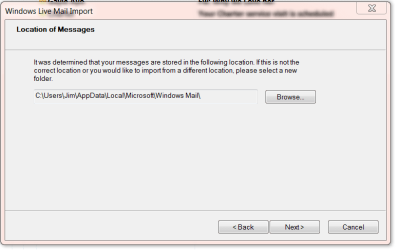
When you select import and select Windows Mail does it give you this window??

Mail.PNG

Jim :geek:
 

My Computer My Computer

Computer type
PC/Desktop
Computer Manufacturer/Model Number
Home Built
OS
Windows 8.1 Pro w/Media Center 64bit, Windows 7 HP 64bit
CPU
Phenom II X6 1100T
Motherboard
ASUS M5A99X EVO
Memory
Crucial Balistic 8gb DDR3-1866 CL9
Graphics Card(s)
MSI R6850 Cyclone IGD5 PE
Sound Card
On Board
Monitor(s) Displays
ASUS VE258Q 25" LED with DVI-HDMI-DisplayPort
Screen Resolution
1920 x 1080
Hard Drives
Two WD Cavier Black 2TB Sata III, WD My Book Essential 2TB USB 3.0
PSU
Seasonic X650 80 Plus GOLD Modular
Case
Corsair 400R
Cooling
Antec Kuhler H2O 620, Two 120mm and four 140mm
Keyboard
Logitech K120
Mouse
Logitech Marble Mouse USB, Logitech Precision Game Pad
Internet Speed
15MB
Antivirus
Norton IS 2013, Malwarebytes Pro Beta 2
Browser
IE-11, FF-27
Other Info
APC UPS ES 750, Netgear WNR3500L Gigabit & Wireless N Router with SamKnows Test Program, Motorola SB6120 Gigabit Cable Modem. Brother HL-2170W Laser Printer, Epson V300 Scanner
When you select import and select Windows Mail does it give you this window??
Jim,

Yes, that is it. It allows no changes. If I press the "Browse" button, it shows a folder tree that allows me to browse down to the [username] on the external drive but no further
.
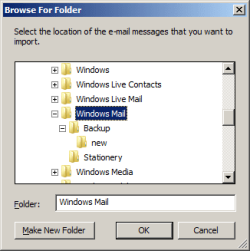
However, I just noticed that it will allow me to browse in the :\c drive and gets me to a folder labeled "Windows Mail" which has subfolders labeled "backup"\"new" and "stationery".

see the attached picture.

Do I just copy the files from the external drive and paste them here to then import them?

WWCody

Jonathan
 

Attachments

  • Picture2.png
    Picture2.png
    5.7 KB · Views: 13

My Computer My Computer

Computer Manufacturer/Model Number
Del Studio 17
OS
Windows 7
CPU
Intel Core i& 720QM
Memory
8 gb
Graphics Card(s)
ATI Mibility Radeeon HD 4650 1GB
Monitor(s) Displays
17" 1600 x 900
Hard Drives
2x500 GB
I have the same thing on mine and I have never had Windows Mail on this system, so I ASSUME it is a default location and you can try coping your e-mail over to it.

Jim :geek:
 

My Computer My Computer

Computer type
PC/Desktop
Computer Manufacturer/Model Number
Home Built
OS
Windows 8.1 Pro w/Media Center 64bit, Windows 7 HP 64bit
CPU
Phenom II X6 1100T
Motherboard
ASUS M5A99X EVO
Memory
Crucial Balistic 8gb DDR3-1866 CL9
Graphics Card(s)
MSI R6850 Cyclone IGD5 PE
Sound Card
On Board
Monitor(s) Displays
ASUS VE258Q 25" LED with DVI-HDMI-DisplayPort
Screen Resolution
1920 x 1080
Hard Drives
Two WD Cavier Black 2TB Sata III, WD My Book Essential 2TB USB 3.0
PSU
Seasonic X650 80 Plus GOLD Modular
Case
Corsair 400R
Cooling
Antec Kuhler H2O 620, Two 120mm and four 140mm
Keyboard
Logitech K120
Mouse
Logitech Marble Mouse USB, Logitech Precision Game Pad
Internet Speed
15MB
Antivirus
Norton IS 2013, Malwarebytes Pro Beta 2
Browser
IE-11, FF-27
Other Info
APC UPS ES 750, Netgear WNR3500L Gigabit & Wireless N Router with SamKnows Test Program, Motorola SB6120 Gigabit Cable Modem. Brother HL-2170W Laser Printer, Epson V300 Scanner
...If I press the "Browse" button, it shows a folder tree that allows me to browse down to the [username] on the external drive but no further...
I can't imagine why it doesn't let you browse all the way. I admit I haven't tried that myself. But IF your emails are indeed in that folder (actually in a subfolder of that folder called "Local Folders") you should be able to find them in Windows Explorer separately from the WLM browse window. You could try dragging the "Windows Mail" folder THAT HAS YOUR MAIL in one of its subfolders and drag it from the external drive to your current active c: drive like this "c:/Windows Mail/". It should be copied over with all its subfolders including the one with your messages. Now go back to WLM's browse window and browse to the new location.
 

My Computer My Computer

Computer type
PC/Desktop
Computer Manufacturer/Model Number
OQO 2+
OS
Windows 8 Pro w/MC 32-bit
CPU
Intel Atom 1.86 GHz
Motherboard
OQO 2+
Memory
2 GB
Graphics Card(s)
Intel GMA 500
Sound Card
IDT
Monitor(s) Displays
LCD
Screen Resolution
800 x 480 (portable) 1280 x 1024 (docked)
Hard Drives
64 GB SSD
PSU
9 Ah Battery (portable) or OQO Brick (docked)
Case
Shirt Pocket Sized
Cooling
Tiny Fan
Keyboard
Slide out (portable) DiNovo Edge (docked)
Mouse
Eraser head (portable) Logitech Bluetooth (docked)
Internet Speed
WWAN or 802.11G (portable) T1 (docked)
Browser
IE 10
Other Info
DVD-RW OQO Docking Station
Back
Top