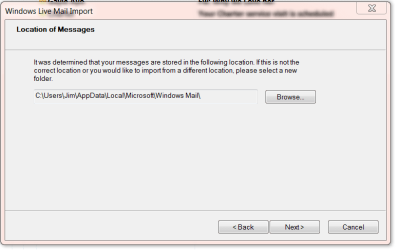
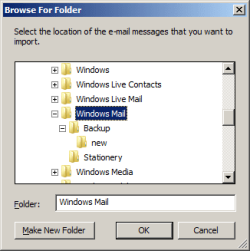
How do I transfer stored email messages from an external drive with messages originally stored using Windows Mail (WM) under Vista to a machine using Windows Live Mail (WLM) under Windows 7?
My notebook crashed (literally, having crashed to the floor after being bumped off a desk). It could no be rebooted, as far as I can tell. The monitor was dead, an external monitor did not work, and the drives did not respond. Fortunately, the drives work in an external case, so I can see all the files, including the mail files.
Apparently WM stores email messages differently from WLM. While WM has a single folder with all messages for the inbox in the subfolder "Local folders", WLM has a separate folder for each mail account under the "Windows Live Mail" folder. There is also a storage folder but that appears to be used for deleted or outgoing messages.
So how do I get the messages from the WM inbox sorted into the right account folders in WLM? What do I need to know to get the whole thing, including other folders I set up, transferred properly?
I have more than 10 email accounts, all with POP3 servers. I have made accounts for three of these on the WLM on the new machine and they downloaded the several months messages that were stored on the server. However, I have many older messages stored on the WM on the now external drive.
Any help would be appreciated, but keep it simple.
Thanks,
WWCody
My notebook crashed (literally, having crashed to the floor after being bumped off a desk). It could no be rebooted, as far as I can tell. The monitor was dead, an external monitor did not work, and the drives did not respond. Fortunately, the drives work in an external case, so I can see all the files, including the mail files.
Apparently WM stores email messages differently from WLM. While WM has a single folder with all messages for the inbox in the subfolder "Local folders", WLM has a separate folder for each mail account under the "Windows Live Mail" folder. There is also a storage folder but that appears to be used for deleted or outgoing messages.
So how do I get the messages from the WM inbox sorted into the right account folders in WLM? What do I need to know to get the whole thing, including other folders I set up, transferred properly?
I have more than 10 email accounts, all with POP3 servers. I have made accounts for three of these on the WLM on the new machine and they downloaded the several months messages that were stored on the server. However, I have many older messages stored on the WM on the now external drive.
Any help would be appreciated, but keep it simple.
Thanks,
WWCody
Last edited:
My Computer
- Computer Manufacturer/Model Number
- Del Studio 17
- OS
- Windows 7
- CPU
- Intel Core i& 720QM
- Memory
- 8 gb
- Graphics Card(s)
- ATI Mibility Radeeon HD 4650 1GB
- Monitor(s) Displays
- 17" 1600 x 900
- Hard Drives
- 2x500 GB