
BSOD 0x0000001e and 0x0000000a

Useless User

New member
Local time
11:50 AM
Messages
147
BSOD 0x0000001e + 0x0000000a + 0x00000124

Hi,

I am getting frequent BSODs when the PC is idle or under load (it runs a light simulation software, no games, internet browser, etc.). Although enabled, no minidump is written, hence I can't zip one up and post it here. What I did so far (multiple times, spending too many days):

I updated Windows 7, updated drivers (at least the PC tells me they are up to date), updated BIOS. I am using Windows 7 Professional, an ASUS P9X79 PRO motherboard, an Intel i7-3930 processor, 2x8GB Kingston memory in the right slots, BIOS set to defaults (CMOS button, battery removal), temperatures at full load around 60°C.

mdsched - passed multiple times
IPTC - passed multiple times, also failed multiple times
Intel Burn Test - passes very high setting, fails standard setting
verifier - manages to produce only one BSOD displaying "atikmpag.sys" on the blue screen part that is visible
Prime95 - sometimes works for a full day, sometimes fails after an hour

What can I do to pinpoint the problem?

Thanks in advance!
 
Last edited:

My Computer My Computer

At a glance

Microsoft Windows 7 Professional 64-Bit 7601 ...Intel(R) Core(TM) i7-3930K CPU @ 3.20 Steppin...Kingston KHX1600C9D3K4/16GX 16 GB DDR3 9-9-9-27AMD FirePro V4900 (FireGL V)
Computer type
PC/Desktop
Computer Manufacturer/Model Number
Custom build 01/06/2012, rebuilt 10/24/2014
OS
Microsoft Windows 7 Professional 64-Bit 7601 Multiprocessor Free Service Pack 1
CPU
Intel(R) Core(TM) i7-3930K CPU @ 3.20 Stepping 6 Revision C1
Motherboard
ASUSTeK COMPUTER INC. P9X79 BIOS 4608
Memory
Kingston KHX1600C9D3K4/16GX 16 GB DDR3 9-9-9-27
Graphics Card(s)
AMD FirePro V4900 (FireGL V)
Sound Card
(1) AMD High Definition Audio Device (2) Realtek High Defini
Monitor(s) Displays
HP LP2475w
Screen Resolution
1920 x 1200
Hard Drives
(1) ATA SAMSUNG HD204UI SCSI Disk Device
(2) ATA SAMSUNG SSD 830 SCSI Disk Device
PSU
CORSAIR HX650W
Case
fractal design DEFINE R4
Cooling
Noctua NH-D14 SE2011 and 2 x NF-A14 PWM
Keyboard
FILCO Majestouch 2 Ninja
Antivirus
Microsoft Security Essentials
Browser
IE11
Other Info
TP-LINK 150Mbps-Wireless-N-PCI-Adapter TL-WN751ND
   Information
:info: Before posting a BSOD thread, please read the instructions here: Blue Screen of Death (BSOD) Posting Instructions

If you need to add new information like the dump files, please make a new post in your initial BSOD thread. Please do not make an extra new thread.
 

My Computer My Computer

At a glance

Windows 7 Ultimate 64-bitIntel G3420 3.2GHZ Dual CoreKingson 8GB 1600mhzMSI R7970 TF 3GD5/OC BE
Computer type
PC/Desktop
Computer Manufacturer/Model Number
Custom Build
OS
Windows 7 Ultimate 64-bit
CPU
Intel G3420 3.2GHZ Dual Core
Motherboard
Gigabyte H87-HD3
Memory
Kingson 8GB 1600mhz
Graphics Card(s)
MSI R7970 TF 3GD5/OC BE
Monitor(s) Displays
21" LG & "19 Vertical Samsung
Hard Drives
120GB SSD - Boot
1TB WD
350GB External
2TB External (Wireless)
PSU
Corsair CX 500 modular
Case
Zalman Z11 Plus (modified)
Cooling
Corsair H55, 2x 120mm SP Corsair, 1x 140 Coolermaster
Keyboard
Corsair K50
Mouse
CSL Gaming
Internet Speed
164Mbps
Antivirus
Avast, Malwarebytes
Browser
Google Chrome, IE, Firefox
Thanks, I attached the zipped SF information folder to my original post above. You can see that, for whatever reason, I am not getting minidump files written on my BSODs, although that function is enabled and did work for a while.
 

My Computer My Computer

At a glance

Microsoft Windows 7 Professional 64-Bit 7601 ...Intel(R) Core(TM) i7-3930K CPU @ 3.20 Steppin...Kingston KHX1600C9D3K4/16GX 16 GB DDR3 9-9-9-27AMD FirePro V4900 (FireGL V)
Computer type
PC/Desktop
Computer Manufacturer/Model Number
Custom build 01/06/2012, rebuilt 10/24/2014
OS
Microsoft Windows 7 Professional 64-Bit 7601 Multiprocessor Free Service Pack 1
CPU
Intel(R) Core(TM) i7-3930K CPU @ 3.20 Stepping 6 Revision C1
Motherboard
ASUSTeK COMPUTER INC. P9X79 BIOS 4608
Memory
Kingston KHX1600C9D3K4/16GX 16 GB DDR3 9-9-9-27
Graphics Card(s)
AMD FirePro V4900 (FireGL V)
Sound Card
(1) AMD High Definition Audio Device (2) Realtek High Defini
Monitor(s) Displays
HP LP2475w
Screen Resolution
1920 x 1200
Hard Drives
(1) ATA SAMSUNG HD204UI SCSI Disk Device
(2) ATA SAMSUNG SSD 830 SCSI Disk Device
PSU
CORSAIR HX650W
Case
fractal design DEFINE R4
Cooling
Noctua NH-D14 SE2011 and 2 x NF-A14 PWM
Keyboard
FILCO Majestouch 2 Ninja
Antivirus
Microsoft Security Essentials
Browser
IE11
Other Info
TP-LINK 150Mbps-Wireless-N-PCI-Adapter TL-WN751ND
Since starting this thread, the PC has not crashed; it's idle apart from some occasional IE use.

However, as soon as I run a taxing software (mathematics, simulations) on it, a BSOD ensues after either a few minutes or a few hours. Still, no dump files are written to disk, although I checked the settings for that as per this forum : (

Bump : )
 
Last edited:

My Computer My Computer

At a glance

Microsoft Windows 7 Professional 64-Bit 7601 ...Intel(R) Core(TM) i7-3930K CPU @ 3.20 Steppin...Kingston KHX1600C9D3K4/16GX 16 GB DDR3 9-9-9-27AMD FirePro V4900 (FireGL V)
Computer type
PC/Desktop
Computer Manufacturer/Model Number
Custom build 01/06/2012, rebuilt 10/24/2014
OS
Microsoft Windows 7 Professional 64-Bit 7601 Multiprocessor Free Service Pack 1
CPU
Intel(R) Core(TM) i7-3930K CPU @ 3.20 Stepping 6 Revision C1
Motherboard
ASUSTeK COMPUTER INC. P9X79 BIOS 4608
Memory
Kingston KHX1600C9D3K4/16GX 16 GB DDR3 9-9-9-27
Graphics Card(s)
AMD FirePro V4900 (FireGL V)
Sound Card
(1) AMD High Definition Audio Device (2) Realtek High Defini
Monitor(s) Displays
HP LP2475w
Screen Resolution
1920 x 1200
Hard Drives
(1) ATA SAMSUNG HD204UI SCSI Disk Device
(2) ATA SAMSUNG SSD 830 SCSI Disk Device
PSU
CORSAIR HX650W
Case
fractal design DEFINE R4
Cooling
Noctua NH-D14 SE2011 and 2 x NF-A14 PWM
Keyboard
FILCO Majestouch 2 Ninja
Antivirus
Microsoft Security Essentials
Browser
IE11
Other Info
TP-LINK 150Mbps-Wireless-N-PCI-Adapter TL-WN751ND
Dang ; )
 

My Computer My Computer

At a glance

Microsoft Windows 7 Professional 64-Bit 7601 ...Intel(R) Core(TM) i7-3930K CPU @ 3.20 Steppin...Kingston KHX1600C9D3K4/16GX 16 GB DDR3 9-9-9-27AMD FirePro V4900 (FireGL V)
Computer type
PC/Desktop
Computer Manufacturer/Model Number
Custom build 01/06/2012, rebuilt 10/24/2014
OS
Microsoft Windows 7 Professional 64-Bit 7601 Multiprocessor Free Service Pack 1
CPU
Intel(R) Core(TM) i7-3930K CPU @ 3.20 Stepping 6 Revision C1
Motherboard
ASUSTeK COMPUTER INC. P9X79 BIOS 4608
Memory
Kingston KHX1600C9D3K4/16GX 16 GB DDR3 9-9-9-27
Graphics Card(s)
AMD FirePro V4900 (FireGL V)
Sound Card
(1) AMD High Definition Audio Device (2) Realtek High Defini
Monitor(s) Displays
HP LP2475w
Screen Resolution
1920 x 1200
Hard Drives
(1) ATA SAMSUNG HD204UI SCSI Disk Device
(2) ATA SAMSUNG SSD 830 SCSI Disk Device
PSU
CORSAIR HX650W
Case
fractal design DEFINE R4
Cooling
Noctua NH-D14 SE2011 and 2 x NF-A14 PWM
Keyboard
FILCO Majestouch 2 Ninja
Antivirus
Microsoft Security Essentials
Browser
IE11
Other Info
TP-LINK 150Mbps-Wireless-N-PCI-Adapter TL-WN751ND

My Computer My Computer

At a glance

Windows 7 Ultimate 64-bitIntel G3420 3.2GHZ Dual CoreKingson 8GB 1600mhzMSI R7970 TF 3GD5/OC BE
Computer type
PC/Desktop
Computer Manufacturer/Model Number
Custom Build
OS
Windows 7 Ultimate 64-bit
CPU
Intel G3420 3.2GHZ Dual Core
Motherboard
Gigabyte H87-HD3
Memory
Kingson 8GB 1600mhz
Graphics Card(s)
MSI R7970 TF 3GD5/OC BE
Monitor(s) Displays
21" LG & "19 Vertical Samsung
Hard Drives
120GB SSD - Boot
1TB WD
350GB External
2TB External (Wireless)
PSU
Corsair CX 500 modular
Case
Zalman Z11 Plus (modified)
Cooling
Corsair H55, 2x 120mm SP Corsair, 1x 140 Coolermaster
Keyboard
Corsair K50
Mouse
CSL Gaming
Internet Speed
164Mbps
Antivirus
Avast, Malwarebytes
Browser
Google Chrome, IE, Firefox
Hi, thanks for looking!

I just can't get the PC to write a minidump. I actually followed the minidump instructions given before writing the initial post.

Each blue screen messages, right at the bottom of the screen, that it supposedly collects data and then writes a minidump and then completes doing so - only that it doesn't. I can see that the Minidump folder shows a lock icon in explorer, which I, right-clicking as administrator, can't remove. Could that have something to do with it? If so, how did this folder lock itself without my doing?

Could I change/set something else? Initiate the PC to write another kind of dump file to disk that provides meaningful information?

Cheers!
 

My Computer My Computer

At a glance

Microsoft Windows 7 Professional 64-Bit 7601 ...Intel(R) Core(TM) i7-3930K CPU @ 3.20 Steppin...Kingston KHX1600C9D3K4/16GX 16 GB DDR3 9-9-9-27AMD FirePro V4900 (FireGL V)
Computer type
PC/Desktop
Computer Manufacturer/Model Number
Custom build 01/06/2012, rebuilt 10/24/2014
OS
Microsoft Windows 7 Professional 64-Bit 7601 Multiprocessor Free Service Pack 1
CPU
Intel(R) Core(TM) i7-3930K CPU @ 3.20 Stepping 6 Revision C1
Motherboard
ASUSTeK COMPUTER INC. P9X79 BIOS 4608
Memory
Kingston KHX1600C9D3K4/16GX 16 GB DDR3 9-9-9-27
Graphics Card(s)
AMD FirePro V4900 (FireGL V)
Sound Card
(1) AMD High Definition Audio Device (2) Realtek High Defini
Monitor(s) Displays
HP LP2475w
Screen Resolution
1920 x 1200
Hard Drives
(1) ATA SAMSUNG HD204UI SCSI Disk Device
(2) ATA SAMSUNG SSD 830 SCSI Disk Device
PSU
CORSAIR HX650W
Case
fractal design DEFINE R4
Cooling
Noctua NH-D14 SE2011 and 2 x NF-A14 PWM
Keyboard
FILCO Majestouch 2 Ninja
Antivirus
Microsoft Security Essentials
Browser
IE11
Other Info
TP-LINK 150Mbps-Wireless-N-PCI-Adapter TL-WN751ND
Are you setting this size correct?

The complete memory dump will require that there is a page file set to at least the size of physical memory installed plus 1MB (for the header).
 

My Computer My Computer

At a glance

Windows 7 Ultimate 64-bitIntel G3420 3.2GHZ Dual CoreKingson 8GB 1600mhzMSI R7970 TF 3GD5/OC BE
Computer type
PC/Desktop
Computer Manufacturer/Model Number
Custom Build
OS
Windows 7 Ultimate 64-bit
CPU
Intel G3420 3.2GHZ Dual Core
Motherboard
Gigabyte H87-HD3
Memory
Kingson 8GB 1600mhz
Graphics Card(s)
MSI R7970 TF 3GD5/OC BE
Monitor(s) Displays
21" LG & "19 Vertical Samsung
Hard Drives
120GB SSD - Boot
1TB WD
350GB External
2TB External (Wireless)
PSU
Corsair CX 500 modular
Case
Zalman Z11 Plus (modified)
Cooling
Corsair H55, 2x 120mm SP Corsair, 1x 140 Coolermaster
Keyboard
Corsair K50
Mouse
CSL Gaming
Internet Speed
164Mbps
Antivirus
Avast, Malwarebytes
Browser
Google Chrome, IE, Firefox
I did. I will go through all of it again and then await the next BSOD to see what happens and then attach the latest dump(s).

Maybe, the SF-report contains some additional clues, apart from those vintage dump files.
 

My Computer My Computer

At a glance

Microsoft Windows 7 Professional 64-Bit 7601 ...Intel(R) Core(TM) i7-3930K CPU @ 3.20 Steppin...Kingston KHX1600C9D3K4/16GX 16 GB DDR3 9-9-9-27AMD FirePro V4900 (FireGL V)
Computer type
PC/Desktop
Computer Manufacturer/Model Number
Custom build 01/06/2012, rebuilt 10/24/2014
OS
Microsoft Windows 7 Professional 64-Bit 7601 Multiprocessor Free Service Pack 1
CPU
Intel(R) Core(TM) i7-3930K CPU @ 3.20 Stepping 6 Revision C1
Motherboard
ASUSTeK COMPUTER INC. P9X79 BIOS 4608
Memory
Kingston KHX1600C9D3K4/16GX 16 GB DDR3 9-9-9-27
Graphics Card(s)
AMD FirePro V4900 (FireGL V)
Sound Card
(1) AMD High Definition Audio Device (2) Realtek High Defini
Monitor(s) Displays
HP LP2475w
Screen Resolution
1920 x 1200
Hard Drives
(1) ATA SAMSUNG HD204UI SCSI Disk Device
(2) ATA SAMSUNG SSD 830 SCSI Disk Device
PSU
CORSAIR HX650W
Case
fractal design DEFINE R4
Cooling
Noctua NH-D14 SE2011 and 2 x NF-A14 PWM
Keyboard
FILCO Majestouch 2 Ninja
Antivirus
Microsoft Security Essentials
Browser
IE11
Other Info
TP-LINK 150Mbps-Wireless-N-PCI-Adapter TL-WN751ND
I checked again and also used the recommended registry setting for dump files, but I don't get any, although the blue screen text at the bottom says otherwise : (
 

My Computer My Computer

At a glance

Microsoft Windows 7 Professional 64-Bit 7601 ...Intel(R) Core(TM) i7-3930K CPU @ 3.20 Steppin...Kingston KHX1600C9D3K4/16GX 16 GB DDR3 9-9-9-27AMD FirePro V4900 (FireGL V)
Computer type
PC/Desktop
Computer Manufacturer/Model Number
Custom build 01/06/2012, rebuilt 10/24/2014
OS
Microsoft Windows 7 Professional 64-Bit 7601 Multiprocessor Free Service Pack 1
CPU
Intel(R) Core(TM) i7-3930K CPU @ 3.20 Stepping 6 Revision C1
Motherboard
ASUSTeK COMPUTER INC. P9X79 BIOS 4608
Memory
Kingston KHX1600C9D3K4/16GX 16 GB DDR3 9-9-9-27
Graphics Card(s)
AMD FirePro V4900 (FireGL V)
Sound Card
(1) AMD High Definition Audio Device (2) Realtek High Defini
Monitor(s) Displays
HP LP2475w
Screen Resolution
1920 x 1200
Hard Drives
(1) ATA SAMSUNG HD204UI SCSI Disk Device
(2) ATA SAMSUNG SSD 830 SCSI Disk Device
PSU
CORSAIR HX650W
Case
fractal design DEFINE R4
Cooling
Noctua NH-D14 SE2011 and 2 x NF-A14 PWM
Keyboard
FILCO Majestouch 2 Ninja
Antivirus
Microsoft Security Essentials
Browser
IE11
Other Info
TP-LINK 150Mbps-Wireless-N-PCI-Adapter TL-WN751ND
I managed to run p95 alongside and provoked: a frozen screen, a BSOD after logging in after the reset after that freeze "SYSTEM_SERVICE_EXCEPTION", and another BSOD while running p95. Again, no dump files were written : (

I've attached the latest zipped SF-folder...
 
Last edited:

My Computer My Computer

At a glance

Microsoft Windows 7 Professional 64-Bit 7601 ...Intel(R) Core(TM) i7-3930K CPU @ 3.20 Steppin...Kingston KHX1600C9D3K4/16GX 16 GB DDR3 9-9-9-27AMD FirePro V4900 (FireGL V)
Computer type
PC/Desktop
Computer Manufacturer/Model Number
Custom build 01/06/2012, rebuilt 10/24/2014
OS
Microsoft Windows 7 Professional 64-Bit 7601 Multiprocessor Free Service Pack 1
CPU
Intel(R) Core(TM) i7-3930K CPU @ 3.20 Stepping 6 Revision C1
Motherboard
ASUSTeK COMPUTER INC. P9X79 BIOS 4608
Memory
Kingston KHX1600C9D3K4/16GX 16 GB DDR3 9-9-9-27
Graphics Card(s)
AMD FirePro V4900 (FireGL V)
Sound Card
(1) AMD High Definition Audio Device (2) Realtek High Defini
Monitor(s) Displays
HP LP2475w
Screen Resolution
1920 x 1200
Hard Drives
(1) ATA SAMSUNG HD204UI SCSI Disk Device
(2) ATA SAMSUNG SSD 830 SCSI Disk Device
PSU
CORSAIR HX650W
Case
fractal design DEFINE R4
Cooling
Noctua NH-D14 SE2011 and 2 x NF-A14 PWM
Keyboard
FILCO Majestouch 2 Ninja
Antivirus
Microsoft Security Essentials
Browser
IE11
Other Info
TP-LINK 150Mbps-Wireless-N-PCI-Adapter TL-WN751ND
I ran verifier.exe again from the SF tool and obtained this BSOD:

SzA5GKE.jpg


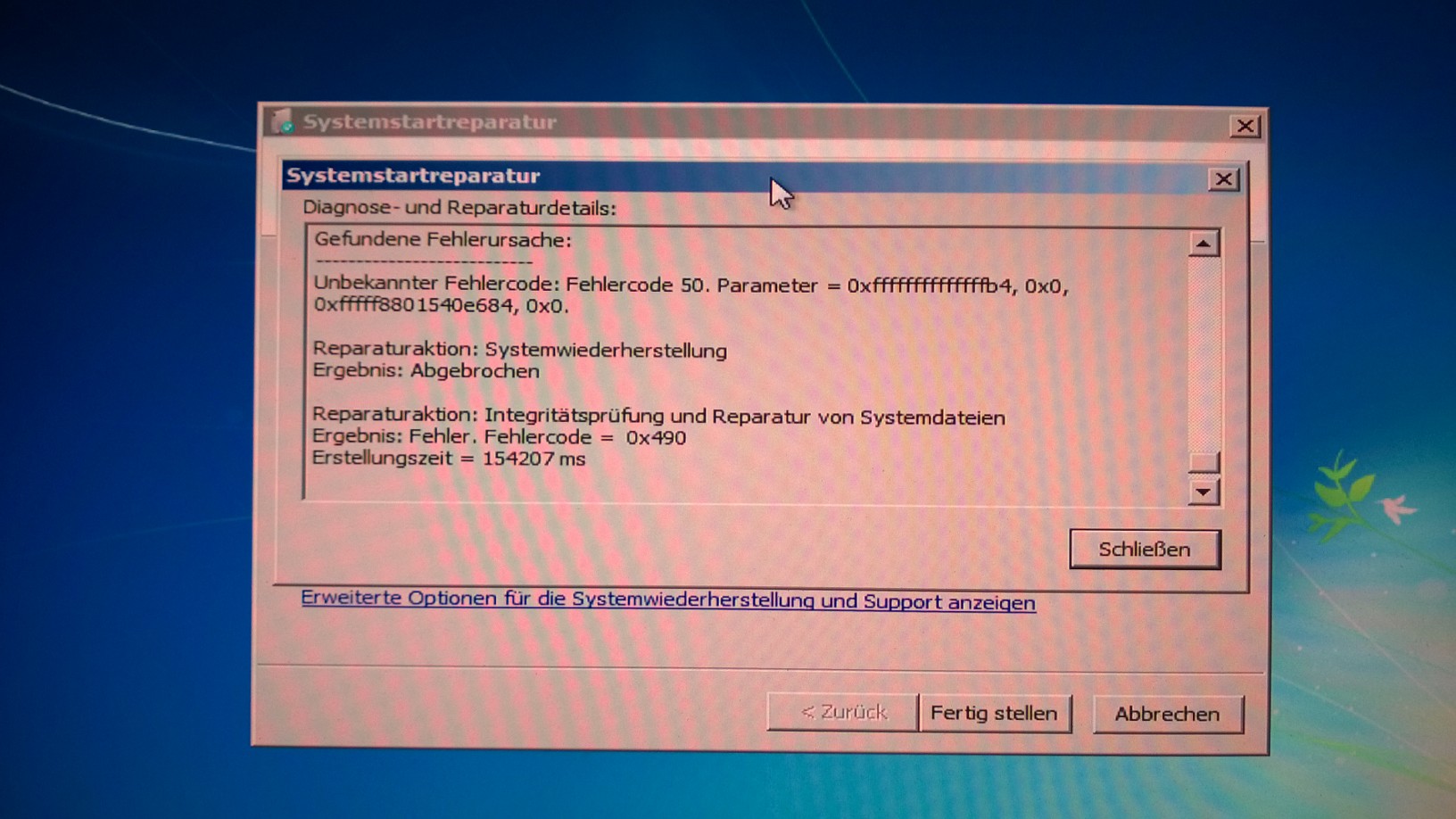
To disable verifier.exe, I restarted the PC in safe mode, where I am greeted by Startup Repair, which, after a couple of minutes, fails. The repair error details window shows this:

pChGNq4.jpg


After which now I can't even start in safe mode. Bollards!

Ok, eventually, I got into Windows again, where I disabled verifier.exe.
 
Last edited:

My Computer My Computer

At a glance

Microsoft Windows 7 Professional 64-Bit 7601 ...Intel(R) Core(TM) i7-3930K CPU @ 3.20 Steppin...Kingston KHX1600C9D3K4/16GX 16 GB DDR3 9-9-9-27AMD FirePro V4900 (FireGL V)
Computer type
PC/Desktop
Computer Manufacturer/Model Number
Custom build 01/06/2012, rebuilt 10/24/2014
OS
Microsoft Windows 7 Professional 64-Bit 7601 Multiprocessor Free Service Pack 1
CPU
Intel(R) Core(TM) i7-3930K CPU @ 3.20 Stepping 6 Revision C1
Motherboard
ASUSTeK COMPUTER INC. P9X79 BIOS 4608
Memory
Kingston KHX1600C9D3K4/16GX 16 GB DDR3 9-9-9-27
Graphics Card(s)
AMD FirePro V4900 (FireGL V)
Sound Card
(1) AMD High Definition Audio Device (2) Realtek High Defini
Monitor(s) Displays
HP LP2475w
Screen Resolution
1920 x 1200
Hard Drives
(1) ATA SAMSUNG HD204UI SCSI Disk Device
(2) ATA SAMSUNG SSD 830 SCSI Disk Device
PSU
CORSAIR HX650W
Case
fractal design DEFINE R4
Cooling
Noctua NH-D14 SE2011 and 2 x NF-A14 PWM
Keyboard
FILCO Majestouch 2 Ninja
Antivirus
Microsoft Security Essentials
Browser
IE11
Other Info
TP-LINK 150Mbps-Wireless-N-PCI-Adapter TL-WN751ND
Bump...
 

My Computer My Computer

At a glance

Microsoft Windows 7 Professional 64-Bit 7601 ...Intel(R) Core(TM) i7-3930K CPU @ 3.20 Steppin...Kingston KHX1600C9D3K4/16GX 16 GB DDR3 9-9-9-27AMD FirePro V4900 (FireGL V)
Computer type
PC/Desktop
Computer Manufacturer/Model Number
Custom build 01/06/2012, rebuilt 10/24/2014
OS
Microsoft Windows 7 Professional 64-Bit 7601 Multiprocessor Free Service Pack 1
CPU
Intel(R) Core(TM) i7-3930K CPU @ 3.20 Stepping 6 Revision C1
Motherboard
ASUSTeK COMPUTER INC. P9X79 BIOS 4608
Memory
Kingston KHX1600C9D3K4/16GX 16 GB DDR3 9-9-9-27
Graphics Card(s)
AMD FirePro V4900 (FireGL V)
Sound Card
(1) AMD High Definition Audio Device (2) Realtek High Defini
Monitor(s) Displays
HP LP2475w
Screen Resolution
1920 x 1200
Hard Drives
(1) ATA SAMSUNG HD204UI SCSI Disk Device
(2) ATA SAMSUNG SSD 830 SCSI Disk Device
PSU
CORSAIR HX650W
Case
fractal design DEFINE R4
Cooling
Noctua NH-D14 SE2011 and 2 x NF-A14 PWM
Keyboard
FILCO Majestouch 2 Ninja
Antivirus
Microsoft Security Essentials
Browser
IE11
Other Info
TP-LINK 150Mbps-Wireless-N-PCI-Adapter TL-WN751ND
Grump...

Deinstalled everything AMD/ATI related down to the registry. Still, I get BSOD 0x0000001e and 0x0000000a and, of course, no minidump file written. I'm running the PC in safe mode now and try stressing it with IntelBurnTest on maximum setting and the maxwell equation light simulation software I'm running on it.
 

My Computer My Computer

At a glance

Microsoft Windows 7 Professional 64-Bit 7601 ...Intel(R) Core(TM) i7-3930K CPU @ 3.20 Steppin...Kingston KHX1600C9D3K4/16GX 16 GB DDR3 9-9-9-27AMD FirePro V4900 (FireGL V)
Computer type
PC/Desktop
Computer Manufacturer/Model Number
Custom build 01/06/2012, rebuilt 10/24/2014
OS
Microsoft Windows 7 Professional 64-Bit 7601 Multiprocessor Free Service Pack 1
CPU
Intel(R) Core(TM) i7-3930K CPU @ 3.20 Stepping 6 Revision C1
Motherboard
ASUSTeK COMPUTER INC. P9X79 BIOS 4608
Memory
Kingston KHX1600C9D3K4/16GX 16 GB DDR3 9-9-9-27
Graphics Card(s)
AMD FirePro V4900 (FireGL V)
Sound Card
(1) AMD High Definition Audio Device (2) Realtek High Defini
Monitor(s) Displays
HP LP2475w
Screen Resolution
1920 x 1200
Hard Drives
(1) ATA SAMSUNG HD204UI SCSI Disk Device
(2) ATA SAMSUNG SSD 830 SCSI Disk Device
PSU
CORSAIR HX650W
Case
fractal design DEFINE R4
Cooling
Noctua NH-D14 SE2011 and 2 x NF-A14 PWM
Keyboard
FILCO Majestouch 2 Ninja
Antivirus
Microsoft Security Essentials
Browser
IE11
Other Info
TP-LINK 150Mbps-Wireless-N-PCI-Adapter TL-WN751ND
Bump... bump... bump...

So, no minidumps for me, whatever I tried (how is that at all possible?). In safe mode with network drivers, IntelBurnTest runs ok on its maximum setting, while the software I use also runs. I just continue letting both run overnight to see, whether yet another BSOD occurs (all previous BSODs occurred in "normal" mode). If not - where should I go from there?

Could someone have a look at the last SF-folder attached above? Maybe some clues can be found there, even without fresh minidumps?

Thanks!
 

My Computer My Computer

At a glance

Microsoft Windows 7 Professional 64-Bit 7601 ...Intel(R) Core(TM) i7-3930K CPU @ 3.20 Steppin...Kingston KHX1600C9D3K4/16GX 16 GB DDR3 9-9-9-27AMD FirePro V4900 (FireGL V)
Computer type
PC/Desktop
Computer Manufacturer/Model Number
Custom build 01/06/2012, rebuilt 10/24/2014
OS
Microsoft Windows 7 Professional 64-Bit 7601 Multiprocessor Free Service Pack 1
CPU
Intel(R) Core(TM) i7-3930K CPU @ 3.20 Stepping 6 Revision C1
Motherboard
ASUSTeK COMPUTER INC. P9X79 BIOS 4608
Memory
Kingston KHX1600C9D3K4/16GX 16 GB DDR3 9-9-9-27
Graphics Card(s)
AMD FirePro V4900 (FireGL V)
Sound Card
(1) AMD High Definition Audio Device (2) Realtek High Defini
Monitor(s) Displays
HP LP2475w
Screen Resolution
1920 x 1200
Hard Drives
(1) ATA SAMSUNG HD204UI SCSI Disk Device
(2) ATA SAMSUNG SSD 830 SCSI Disk Device
PSU
CORSAIR HX650W
Case
fractal design DEFINE R4
Cooling
Noctua NH-D14 SE2011 and 2 x NF-A14 PWM
Keyboard
FILCO Majestouch 2 Ninja
Antivirus
Microsoft Security Essentials
Browser
IE11
Other Info
TP-LINK 150Mbps-Wireless-N-PCI-Adapter TL-WN751ND
We cant do much without DMP Files.

However here is some information on the 0x50 Bugcheck you are receiving.

Code:
[B][U][COLOR="Red"]PAGE_FAULT_IN_NONPAGED_AREA[/COLOR][/U][/B] (50)

   Tip


:warn: Win32k.sys - page_fault_in_nonpaged_area - :warn:

A stop message that occurs when the demanded data is not found in memory. The system produces a fault, which usually specifies that the system looks for data in the paging file. The system cannot locate the data and recover it.

:warn: why? :warn:

An Antivirus program, damaged hardware, a buggy system service and a ruined NTFS volume can all generate this type of error message.

:warn: New Hardware? :warn:

If the BSOD is after the installation of new hardware, In order to fix this issue, remove the hardware to see if the error reappears, if the hardware has been added to the system newly. If the existing hardware is at fault, remove or change the faulty component and run the hardware diagnostics.


   Warning

Please make sure all of your drivers are up to date before continuing!

:info::warn: http://www.sevenforums.com/tutorials/314096-drivers-find-update-outdated-drivers.html :info::warn:

Scan the system for possible virus infection with the following programs.
 

My Computer My Computer

At a glance

Windows 7 Ultimate 64-bitIntel G3420 3.2GHZ Dual CoreKingson 8GB 1600mhzMSI R7970 TF 3GD5/OC BE
Computer type
PC/Desktop
Computer Manufacturer/Model Number
Custom Build
OS
Windows 7 Ultimate 64-bit
CPU
Intel G3420 3.2GHZ Dual Core
Motherboard
Gigabyte H87-HD3
Memory
Kingson 8GB 1600mhz
Graphics Card(s)
MSI R7970 TF 3GD5/OC BE
Monitor(s) Displays
21" LG & "19 Vertical Samsung
Hard Drives
120GB SSD - Boot
1TB WD
350GB External
2TB External (Wireless)
PSU
Corsair CX 500 modular
Case
Zalman Z11 Plus (modified)
Cooling
Corsair H55, 2x 120mm SP Corsair, 1x 140 Coolermaster
Keyboard
Corsair K50
Mouse
CSL Gaming
Internet Speed
164Mbps
Antivirus
Avast, Malwarebytes
Browser
Google Chrome, IE, Firefox
How can I get the PC to write minidumps though? The settings are ok. There is much SSD space. What I also can't figure is: Why did minidump writing fail from 23rd August onwards? No hardware has been removed or added. No new software installed (apart from some of the diagnostic tools recommended here).
 

My Computer My Computer

At a glance

Microsoft Windows 7 Professional 64-Bit 7601 ...Intel(R) Core(TM) i7-3930K CPU @ 3.20 Steppin...Kingston KHX1600C9D3K4/16GX 16 GB DDR3 9-9-9-27AMD FirePro V4900 (FireGL V)
Computer type
PC/Desktop
Computer Manufacturer/Model Number
Custom build 01/06/2012, rebuilt 10/24/2014
OS
Microsoft Windows 7 Professional 64-Bit 7601 Multiprocessor Free Service Pack 1
CPU
Intel(R) Core(TM) i7-3930K CPU @ 3.20 Stepping 6 Revision C1
Motherboard
ASUSTeK COMPUTER INC. P9X79 BIOS 4608
Memory
Kingston KHX1600C9D3K4/16GX 16 GB DDR3 9-9-9-27
Graphics Card(s)
AMD FirePro V4900 (FireGL V)
Sound Card
(1) AMD High Definition Audio Device (2) Realtek High Defini
Monitor(s) Displays
HP LP2475w
Screen Resolution
1920 x 1200
Hard Drives
(1) ATA SAMSUNG HD204UI SCSI Disk Device
(2) ATA SAMSUNG SSD 830 SCSI Disk Device
PSU
CORSAIR HX650W
Case
fractal design DEFINE R4
Cooling
Noctua NH-D14 SE2011 and 2 x NF-A14 PWM
Keyboard
FILCO Majestouch 2 Ninja
Antivirus
Microsoft Security Essentials
Browser
IE11
Other Info
TP-LINK 150Mbps-Wireless-N-PCI-Adapter TL-WN751ND
The display freezes in safe mode with network drivers eventually : (

I could see from the clock in the task bar when the display froze, but there is nothing in the event viewer relating even remotely to that time hours before or after. I scanned for rootkit viruses and with Microsoft's software as per above but found nothing.

That leaves "only" the non-Microsoft network drivers loaded in safe mode and hardware as main culprits, right?

Besides - how could I ever get my PC to write minidumps again?
 
Last edited:

My Computer My Computer

At a glance

Microsoft Windows 7 Professional 64-Bit 7601 ...Intel(R) Core(TM) i7-3930K CPU @ 3.20 Steppin...Kingston KHX1600C9D3K4/16GX 16 GB DDR3 9-9-9-27AMD FirePro V4900 (FireGL V)
Computer type
PC/Desktop
Computer Manufacturer/Model Number
Custom build 01/06/2012, rebuilt 10/24/2014
OS
Microsoft Windows 7 Professional 64-Bit 7601 Multiprocessor Free Service Pack 1
CPU
Intel(R) Core(TM) i7-3930K CPU @ 3.20 Stepping 6 Revision C1
Motherboard
ASUSTeK COMPUTER INC. P9X79 BIOS 4608
Memory
Kingston KHX1600C9D3K4/16GX 16 GB DDR3 9-9-9-27
Graphics Card(s)
AMD FirePro V4900 (FireGL V)
Sound Card
(1) AMD High Definition Audio Device (2) Realtek High Defini
Monitor(s) Displays
HP LP2475w
Screen Resolution
1920 x 1200
Hard Drives
(1) ATA SAMSUNG HD204UI SCSI Disk Device
(2) ATA SAMSUNG SSD 830 SCSI Disk Device
PSU
CORSAIR HX650W
Case
fractal design DEFINE R4
Cooling
Noctua NH-D14 SE2011 and 2 x NF-A14 PWM
Keyboard
FILCO Majestouch 2 Ninja
Antivirus
Microsoft Security Essentials
Browser
IE11
Other Info
TP-LINK 150Mbps-Wireless-N-PCI-Adapter TL-WN751ND
Just follow the tutorial, many people have done it.

you must be missing something.
 

My Computer My Computer

At a glance

Windows 7 Ultimate 64-bitIntel G3420 3.2GHZ Dual CoreKingson 8GB 1600mhzMSI R7970 TF 3GD5/OC BE
Computer type
PC/Desktop
Computer Manufacturer/Model Number
Custom Build
OS
Windows 7 Ultimate 64-bit
CPU
Intel G3420 3.2GHZ Dual Core
Motherboard
Gigabyte H87-HD3
Memory
Kingson 8GB 1600mhz
Graphics Card(s)
MSI R7970 TF 3GD5/OC BE
Monitor(s) Displays
21" LG & "19 Vertical Samsung
Hard Drives
120GB SSD - Boot
1TB WD
350GB External
2TB External (Wireless)
PSU
Corsair CX 500 modular
Case
Zalman Z11 Plus (modified)
Cooling
Corsair H55, 2x 120mm SP Corsair, 1x 140 Coolermaster
Keyboard
Corsair K50
Mouse
CSL Gaming
Internet Speed
164Mbps
Antivirus
Avast, Malwarebytes
Browser
Google Chrome, IE, Firefox
You're referring to the minidump tutorial? Well, the PC always wrote minidumps until a BSOD on the 23rd August. Since then, it just stopped. The PC is set to write minidumps as per what I found recommended on sevenforums. I spent several hours looking around why minidumps, kernel dumps, etc. can't be written but found nothing pertaining to my situation : (

I did it via [HKEY_LOCAL_MACHINE\SYSTEM\CurrentControlSet\Control\CrashControl] “CrashDumpEnabled”=dword:00000003 and all combinations here

xnx15xn.png
 

My Computer My Computer

At a glance

Microsoft Windows 7 Professional 64-Bit 7601 ...Intel(R) Core(TM) i7-3930K CPU @ 3.20 Steppin...Kingston KHX1600C9D3K4/16GX 16 GB DDR3 9-9-9-27AMD FirePro V4900 (FireGL V)
Computer type
PC/Desktop
Computer Manufacturer/Model Number
Custom build 01/06/2012, rebuilt 10/24/2014
OS
Microsoft Windows 7 Professional 64-Bit 7601 Multiprocessor Free Service Pack 1
CPU
Intel(R) Core(TM) i7-3930K CPU @ 3.20 Stepping 6 Revision C1
Motherboard
ASUSTeK COMPUTER INC. P9X79 BIOS 4608
Memory
Kingston KHX1600C9D3K4/16GX 16 GB DDR3 9-9-9-27
Graphics Card(s)
AMD FirePro V4900 (FireGL V)
Sound Card
(1) AMD High Definition Audio Device (2) Realtek High Defini
Monitor(s) Displays
HP LP2475w
Screen Resolution
1920 x 1200
Hard Drives
(1) ATA SAMSUNG HD204UI SCSI Disk Device
(2) ATA SAMSUNG SSD 830 SCSI Disk Device
PSU
CORSAIR HX650W
Case
fractal design DEFINE R4
Cooling
Noctua NH-D14 SE2011 and 2 x NF-A14 PWM
Keyboard
FILCO Majestouch 2 Ninja
Antivirus
Microsoft Security Essentials
Browser
IE11
Other Info
TP-LINK 150Mbps-Wireless-N-PCI-Adapter TL-WN751ND
Back
Top