

Ivo
New member
Hi, everybody.
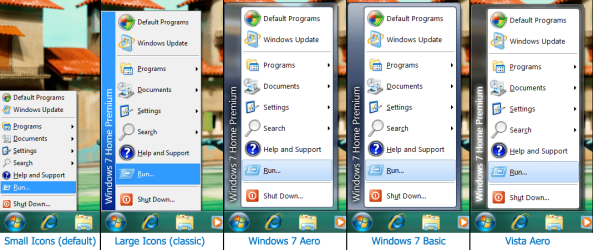
After 2 weeks of coding I finally have skinning support for the classic start menu. Use one of the 5 default skins or make your own (to match that shiny Windows theme of yours). You can change images, fonts and colors as you like. See the attached screenshot.
Get it while it's hot: http://classicshell.sourceforge.net/
If you want to create your own skin, first read the tutorial: http://classicshell.sourceforge.net/skintutorial.html
Disclaimer: I am NOT an artist. The current skins are the best I can do . I'm sure there are many talanted people on this forum that can do far better
  .
.
P.S. If you are not familiar with Classic Shell - it is a shell extension for Windows 7 and Vista that has a classic start menu, a toolbar for Explorer, and other features.
After 2 weeks of coding I finally have skinning support for the classic start menu. Use one of the 5 default skins or make your own (to match that shiny Windows theme of yours). You can change images, fonts and colors as you like. See the attached screenshot.
Get it while it's hot: http://classicshell.sourceforge.net/
If you want to create your own skin, first read the tutorial: http://classicshell.sourceforge.net/skintutorial.html
Disclaimer: I am NOT an artist. The current skins are the best I can do
. I'm sure there are many talanted people on this forum that can do far better . P.S. If you are not familiar with Classic Shell - it is a shell extension for Windows 7 and Vista that has a classic start menu, a toolbar for Explorer, and other features.
Attachments
My Computer
At a glance
Windows 7 Home 64, Vista Ultimate 64
- Computer Manufacturer/Model Number
- Me :) I build all my PCs
- OS
- Windows 7 Home 64, Vista Ultimate 64

