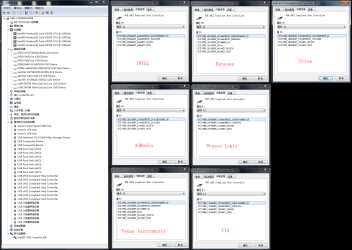
I am trying to dual boot windows 10 and windows 7, but I have just one issue. Windows 7 itself (using the msi smart tool) works perfectly fine. For installation, that is. The setup restarts, and then all of a sudden, I can no longer move my mouse a use my keyboard. Now, in my BIOS menu, I can't seem to find anything relating to "keyboard and mouse emulator/simulator", but I think my BIOS are out of date and need to be updated. However, if keyboard and mouse emulator/simulator still isn't there, then I feel like something is wrong with either my USB ports being 3.0 and 3.1 since windows 7 doesn't have native support for those, or my motherboard/chipset, since PS/2 devices weren't working either, and I swear I also have USB 2.0 ports on this, but maybe I'm just crazy. Although the red lights on the bottom were turning on (For PS/2 mouse). Any help, maybe with drivers or how to get keyboard and mouse emulator/simulator on this? Thanks!
(EDIT: By the way, after installation, it gets stuck on the create user account screen.)
(EDIT: By the way, after installation, it gets stuck on the create user account screen.)
My Computer
At a glance
Windows 10 Home 20H2 64x, Windows 7 Ultimate ...AMD Ryzen 3 1200 Quad-Core Processor (3.10 GHz)NVIDIA GeForce GT 730
- Computer type
- PC/Desktop
- Computer Manufacturer/Model Number
- It says "to be filled by O.E.M", same with model number.
- OS
- Windows 10 Home 20H2 64x, Windows 7 Ultimate x64 (dual booting)
- CPU
- AMD Ryzen 3 1200 Quad-Core Processor (3.10 GHz)
- Motherboard
- ASRock A320M-HDV atleast.. I think that's it.
- Graphics Card(s)
- NVIDIA GeForce GT 730
- Monitor(s) Displays
- 2
- Screen Resolution
- 1920x1080 (although I swear its 1920x1024), 1280x1024
- Hard Drives
- I don't know how to check, all I know is that I don't have an SSD.
- Mouse
- G502 Hero (Wired)
- Antivirus
- AVG Antivirus, Malwarebytes
- Browser
- Chromium based Microsoft Edge, Google Chrome