
Getting your Nikon Coolscan to work on W7 x64

Hi Cygnus 21.

Hi Naturephoto welcome to sevenforums. BTW its sygnus21 :)

but I cannot get it to accept a twain source. It will only use a temporary folder and when I try to save a large file I get a message that the temporary file is full.

When you say you can't get it to accept a twain source what do you mean? Are you trying to use another program to import an image directly from the scanner? If so, I'm not so sure this can be done under Windows 7 as there are no WIA drivers for the scanner under 7 or Vista 64-bit, therefor twain won't work with the scanner. See this post - http://www.sevenforums.com/drivers/44994-getting-your-nikon-coolscan-work-w7-x64-23.html#post1192378

Perhaps some better clarification from you can help clear things up?

Thanks.
 

My Computer My Computer

At a glance

Windows 10 ProIntel Core i7-4770K (3.5Ghz)32 gig Corsair Dominator Platinum (4x8Gig)Sapphire Tri-X R9 Fury
Computer type
PC/Desktop
Computer Manufacturer/Model Number
Custom built by me.
OS
Windows 10 Pro
CPU
Intel Core i7-4770K (3.5Ghz)
Motherboard
Gigabyte G1 Sniper 5 (F10 Bios)
Memory
32 gig Corsair Dominator Platinum (4x8Gig)
Graphics Card(s)
Sapphire Tri-X R9 Fury
Sound Card
Soundblaster ZXR
Monitor(s) Displays
NEC PA242W 24" LCD Monitor
Screen Resolution
1920 x 1200
Hard Drives
Primary - Samsung 850 Pro (512gig), Samsung 840 Pro (256gig), 2TB WD Caviar Black.
PSU
EVGA Supernova 1000 G2
Case
Cooler Master HAF X
Cooling
Corsair H100i with Corsair Air Series SP120 Quiet Fans
Keyboard
Logitech Wireless Wave
Mouse
Logitech Performance MX
Internet Speed
High Speed Cable
Antivirus
Norton Security
Browser
IE11
Other Info
Memory Timings - 1866MHz @ 9-9-9-27-1T @ 1.5 volts
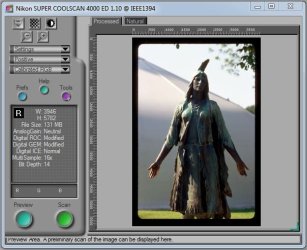
Thanks for the quick reply. The scanner works perfectly. Yes, I am trying to import the image directly into Photoshop CS5 from the scan. The scanner does not recognize Photoshop or any other program as a twain source. I can save images scanned up to 500mg to a file of my choice, but anything larger and I get a message that the temporary file is full. Hope this explanation helps. I see that you stated that 7 has no WIA driver support so that if probably my problem. Is there a way to enlarge my temporary file to accept larger files? Sorry for the wrong spelling on the name.

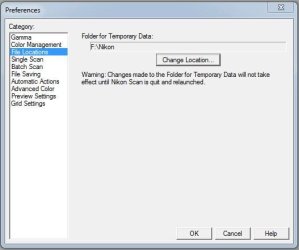
In the preferences section under files location it shows the location under Folder for Temporary Data.
 
Last edited:

My Computer My Computer

At a glance

Windows 7 Ultimate x64
OS
Windows 7 Ultimate x64
Yes, I am trying to import the image directly into Photoshop CS5 from the scan. The scanner does not recognize Photoshop or any other program as a twain source.

I see that you stated that 7 has no WIA driver support so that if probably my problem. Is there a way to enlarge my temporary file to accept larger files?

Yeah I run CS5 too and no, you can't import directly from the scanner since as I said earlier there are no WIA (twain) drivers for the scanner. You'll have to scan the images directly from the scanner to a save location than open them from that location in CS5 or whatever photo editing program you use. Sorry.

And when I say there are no WIA support I mean for our Nikon Scanners. Windows 7 does use WIA it just doesn't support our scanners. Blame Nikon for that since they refuse to provide drivers for Windows 7 - thus the hack drivers provided here.

I can save images scanned up to 500mg to a file of my choice, but anything larger and I get a message that the temporary file is full. Hope this explanation helps.

Never noticed that since I've never scanned a file larger than 500MB. I only scan slides and negatives which in tiff format using the all the bells and whistles with a scan resolution of 4000DPI my max is 135MB or less.

Scan size.JPG

Why do you need such a large file? Are you doing large format scans?

Is there a way to enlarge my temporary file to accept larger files?

The temps size is what they are. Have you checked to see that you have enough drive space for all your temp files? 10 files at 500+ MB can easily amount to about 5gig of space. You may have to change to a temp location/drive that has more space.

I moved mine to a more spacious location.....

File Locations.JPG

Hope this helps
 

My Computer My Computer

At a glance

Windows 10 ProIntel Core i7-4770K (3.5Ghz)32 gig Corsair Dominator Platinum (4x8Gig)Sapphire Tri-X R9 Fury
Computer type
PC/Desktop
Computer Manufacturer/Model Number
Custom built by me.
OS
Windows 10 Pro
CPU
Intel Core i7-4770K (3.5Ghz)
Motherboard
Gigabyte G1 Sniper 5 (F10 Bios)
Memory
32 gig Corsair Dominator Platinum (4x8Gig)
Graphics Card(s)
Sapphire Tri-X R9 Fury
Sound Card
Soundblaster ZXR
Monitor(s) Displays
NEC PA242W 24" LCD Monitor
Screen Resolution
1920 x 1200
Hard Drives
Primary - Samsung 850 Pro (512gig), Samsung 840 Pro (256gig), 2TB WD Caviar Black.
PSU
EVGA Supernova 1000 G2
Case
Cooler Master HAF X
Cooling
Corsair H100i with Corsair Air Series SP120 Quiet Fans
Keyboard
Logitech Wireless Wave
Mouse
Logitech Performance MX
Internet Speed
High Speed Cable
Antivirus
Norton Security
Browser
IE11
Other Info
Memory Timings - 1866MHz @ 9-9-9-27-1T @ 1.5 volts
Thanks again for the quick response. I actually created a new folder in c drive C:\Nikon scan temporary folder. There is 265 G of free space in C drive. I need huge files for my 6x17 scans. I scan two 6x9 frames with one offset. Than I merge them together in Photoshop CS5. Scanned at 3000ppi saved as 16bit tif files are large, but even with a single scan over 500mgs the system will automatically shut down. I'll just keep my size below 500mg and save the scan, close out and start over. It's just a lot of extra steps, but at least my scanner works and I'm grateful for that! Thanks again for all your help.
 

My Computer My Computer

At a glance

Windows 7 Ultimate x64
OS
Windows 7 Ultimate x64

My Computer My Computer

At a glance

Windows 10 ProIntel Core i7-4770K (3.5Ghz)32 gig Corsair Dominator Platinum (4x8Gig)Sapphire Tri-X R9 Fury
Computer type
PC/Desktop
Computer Manufacturer/Model Number
Custom built by me.
OS
Windows 10 Pro
CPU
Intel Core i7-4770K (3.5Ghz)
Motherboard
Gigabyte G1 Sniper 5 (F10 Bios)
Memory
32 gig Corsair Dominator Platinum (4x8Gig)
Graphics Card(s)
Sapphire Tri-X R9 Fury
Sound Card
Soundblaster ZXR
Monitor(s) Displays
NEC PA242W 24" LCD Monitor
Screen Resolution
1920 x 1200
Hard Drives
Primary - Samsung 850 Pro (512gig), Samsung 840 Pro (256gig), 2TB WD Caviar Black.
PSU
EVGA Supernova 1000 G2
Case
Cooler Master HAF X
Cooling
Corsair H100i with Corsair Air Series SP120 Quiet Fans
Keyboard
Logitech Wireless Wave
Mouse
Logitech Performance MX
Internet Speed
High Speed Cable
Antivirus
Norton Security
Browser
IE11
Other Info
Memory Timings - 1866MHz @ 9-9-9-27-1T @ 1.5 volts
Yes, I do use the 64-bit side of CS5. Thanks for your help. I'll try the two sites you mentioned. Thanks again.
 

My Computer My Computer

At a glance

Windows 7 Ultimate x64
OS
Windows 7 Ultimate x64
Good. And keep me posted if you find anything. May help someone else in your shoes later.

Thanks.
 

My Computer My Computer

At a glance

Windows 10 ProIntel Core i7-4770K (3.5Ghz)32 gig Corsair Dominator Platinum (4x8Gig)Sapphire Tri-X R9 Fury
Computer type
PC/Desktop
Computer Manufacturer/Model Number
Custom built by me.
OS
Windows 10 Pro
CPU
Intel Core i7-4770K (3.5Ghz)
Motherboard
Gigabyte G1 Sniper 5 (F10 Bios)
Memory
32 gig Corsair Dominator Platinum (4x8Gig)
Graphics Card(s)
Sapphire Tri-X R9 Fury
Sound Card
Soundblaster ZXR
Monitor(s) Displays
NEC PA242W 24" LCD Monitor
Screen Resolution
1920 x 1200
Hard Drives
Primary - Samsung 850 Pro (512gig), Samsung 840 Pro (256gig), 2TB WD Caviar Black.
PSU
EVGA Supernova 1000 G2
Case
Cooler Master HAF X
Cooling
Corsair H100i with Corsair Air Series SP120 Quiet Fans
Keyboard
Logitech Wireless Wave
Mouse
Logitech Performance MX
Internet Speed
High Speed Cable
Antivirus
Norton Security
Browser
IE11
Other Info
Memory Timings - 1866MHz @ 9-9-9-27-1T @ 1.5 volts
Hi Sygnus and thanks for your guide!my name is Marco and I'm trying to manage my Nikon coolscan ls-4000ed (firewire ) to work with windows 7 (32bit)..
The operating system says "the device is working properly" but Nikonscan 4.0.3 can't see it.
Can you help me please?I know that here you are talking about a dfferent OS architecture,but I found no solutions all over the web.
Thank you in advance!Regards.
Marco
 

My Computer My Computer

At a glance

Windows 7 (x86)
OS
Windows 7 (x86)
Hi I've just installed win 7 x64 to see if the guide workes for me..
Unfortunately doesn't :cry:
nikon scan continues to say:'Nikon scan was unable to find any active device'.
Could it be broken?!In device manager it is recognized correctly..I hear the usual sound of disconnection/connection of the peripheral when I power off/on the scanner even if windows doesn't check automatically for drivers when I plug it in:for this reason I think that the cable and the pci fw slot are working..Can anybody help me please?

EDIT:In 'printes and devices' appears my nikon scan without warnings,but if i click on it,windows says:''You need a WIA driver''
 
Last edited:

My Computer My Computer

At a glance

Windows 7 (x86)
OS
Windows 7 (x86)
EDIT:In 'printes and devices' appears my nikon scan without warnings,but if i click on it,windows says:''You need a WIA driver''

Even though the scanner shows up under Devices and Printers clicking on the scanner won't work because there are no WIA drivers for the scanner under Windows 7. This is normal. See this post on WIA - http://www.sevenforums.com/drivers/44994-getting-your-nikon-coolscan-work-w7-x64-27.html#post1254562

However I'm not understanding why you can't get your LS4000 to work. We have the same scanner and mine works fine.

Please look over the instructions again and make sure you're choosing and using the correct folders and files.
 

My Computer My Computer

At a glance

Windows 10 ProIntel Core i7-4770K (3.5Ghz)32 gig Corsair Dominator Platinum (4x8Gig)Sapphire Tri-X R9 Fury
Computer type
PC/Desktop
Computer Manufacturer/Model Number
Custom built by me.
OS
Windows 10 Pro
CPU
Intel Core i7-4770K (3.5Ghz)
Motherboard
Gigabyte G1 Sniper 5 (F10 Bios)
Memory
32 gig Corsair Dominator Platinum (4x8Gig)
Graphics Card(s)
Sapphire Tri-X R9 Fury
Sound Card
Soundblaster ZXR
Monitor(s) Displays
NEC PA242W 24" LCD Monitor
Screen Resolution
1920 x 1200
Hard Drives
Primary - Samsung 850 Pro (512gig), Samsung 840 Pro (256gig), 2TB WD Caviar Black.
PSU
EVGA Supernova 1000 G2
Case
Cooler Master HAF X
Cooling
Corsair H100i with Corsair Air Series SP120 Quiet Fans
Keyboard
Logitech Wireless Wave
Mouse
Logitech Performance MX
Internet Speed
High Speed Cable
Antivirus
Norton Security
Browser
IE11
Other Info
Memory Timings - 1866MHz @ 9-9-9-27-1T @ 1.5 volts
Thank you for your reply Sygnus!
Today I tryed to install it on another pc with windows 7 with the same result:''Nikon scan was unable to find any active device''.
I'll try to buy a different cable tomorrow,but I actually think that my scanner is broken.
Thank you anyway.Goodnight
 

My Computer My Computer

At a glance

Windows 7 (x86)
OS
Windows 7 (x86)
Nikon 8000 device cannot start error

Nikon Super Coolscan 8000 ED (IEEE 1394). I created the directory with the 2 files including the dll from NikonScan 4.0.3 and updated the driver. The device shows under Imaging Devices in Device Manager but it cannot start: "This device cannot start. (Code 10)". Of course the scanning software cannot find it.

Tried all sequences of installing, rebooting, etc. and this problem persists. Firewire is onboard controller on Supermicro x8da3 board "Texas Instruments 1394 OHCI Compliant Host Controller" and driver is up-to-date. Also tried different cables.

The scanner is operational under WinXP 32.

I've seen a few other posts on other sites with a similar problem but no resolution. Any idea how to get around this?
 

My Computer My Computer

At a glance

Win7 x64 Pro/Ult2 x X565012GB triple interleavedgtx570
OS
Win7 x64 Pro/Ult
CPU
2 x X5650
Motherboard
supermicro x8da3
Memory
12GB triple interleaved
Graphics Card(s)
gtx570
Monitor(s) Displays
HP zr30w, NEC PA271w
Screen Resolution
2560x1600,2560x1440
Hard Drives
Intel SSD
WD Caviar black
Case
Coolermaster HAF-X 942

My Computer My Computer

At a glance

Windows 10 ProIntel Core i7-4770K (3.5Ghz)32 gig Corsair Dominator Platinum (4x8Gig)Sapphire Tri-X R9 Fury
Computer type
PC/Desktop
Computer Manufacturer/Model Number
Custom built by me.
OS
Windows 10 Pro
CPU
Intel Core i7-4770K (3.5Ghz)
Motherboard
Gigabyte G1 Sniper 5 (F10 Bios)
Memory
32 gig Corsair Dominator Platinum (4x8Gig)
Graphics Card(s)
Sapphire Tri-X R9 Fury
Sound Card
Soundblaster ZXR
Monitor(s) Displays
NEC PA242W 24" LCD Monitor
Screen Resolution
1920 x 1200
Hard Drives
Primary - Samsung 850 Pro (512gig), Samsung 840 Pro (256gig), 2TB WD Caviar Black.
PSU
EVGA Supernova 1000 G2
Case
Cooler Master HAF X
Cooling
Corsair H100i with Corsair Air Series SP120 Quiet Fans
Keyboard
Logitech Wireless Wave
Mouse
Logitech Performance MX
Internet Speed
High Speed Cable
Antivirus
Norton Security
Browser
IE11
Other Info
Memory Timings - 1866MHz @ 9-9-9-27-1T @ 1.5 volts
Hello,

I was not able to go through this entire topic in details, so I'm not sure if my findings have been discussed here or not. Forgive me please if my problem is kind of old news...

I was trying to get to work my Coolscan 4000 ED with Windows 7 Pro 64bit SP1 installed on Dell Optiplex 960. I used installation procedure described in this topic. Everything sems to go ok (software installation , restarts, driver mods. and installation ...etc) up to the moment when I tried to run Nikon Scan 4.03 Vista.This software hanged during initial scanner detection (the only way to close it was using Task manager). I tried all the magic advices given in this topic like unistall, clean registry, install again, reboot, plug and pray ...;) but nothing worked in fact. I was 100% sure about the scaner hardware because I was able to run it without any problem on my son's computer with Windows XP 32 bit SP3. In desperation I also tried to install Vue scan with it's own 4000ED driver - but as I said, on W7 64bit nothing worked (Vuescan detected scanner but was not able to operate -prescan)

All these problems pointed my attention to the last piece of the puzzles - which is Firewire PCI card.
I did some simple tests moving Firewire cards between computers in our home. Most of these cards have been correctly detected and installed (generic driver) by Windows 7 64bit but apparentnly not each of them wanted to work with Coolscan 4000 ED !

I decided to share my experience by creating list of this what is working and this what not.
List includes PCI Firewiere card model, IEEE ports count, chipset model, and information if it works with W7 64bit SP1 and Coolscan 4000 ED or not.

I hope you find it usefull:

-USB/Firewire combo, 3xUSB, 2xIEEE, Chipset ALI M5271 - DOES NOT WORK !!!!

-Firewire, 3x IEEE, Chipset VIA VT6308P - work on WinXP x32, DOES NOT WORK on W7 x64 SP1

-Firewire, 2x IEEE, Chipset NEC D72872 - work like charm on W7 x64 SP1


... to be continueed ( I'm going to test few other PCI Firewiere cards taken from computers of my friends)
 

My Computer My Computer

At a glance

Windows 7 PRO x64p5 quad core4GBIntel
Computer Manufacturer/Model Number
Microsoft
OS
Windows 7 PRO x64
CPU
p5 quad core
Motherboard
Dell
Memory
4GB
Graphics Card(s)
Intel
Sound Card
AC
Monitor(s) Displays
Samsung
Hard Drives
1.5TB
PSU
Dell
Case
Tower
Cooling
Dell
First off drivers and system setup can have an effect on whether a card works in your system or not. Point is just because it's not working in yours doesn’t mean it won't work in others. Just keep that in mind.

Also, before you install any piece of hardware in your system you should always check for compatibility and driver issues before hand. With that said, if the firewire card works in your system, it will work with your scanner.

Now.....

Most modern systems today have firewire ports already built into the motherboard (mine does) so there's no need to install a firewire card unless you don't have enough firewire ports. In fact I would recommend you not install the firewire card that came with the scanner if your motherboard already has firewire ports due to driver issues.

Most of those firewire cards that came with the scanners probably don't have drivers for Windows 7 to begin with, though I've never used mine so I honestly can't say that for sure, but we know there aren't drivers for the scanner itself.

At any rate, and again, if your motherboard already has firewire ports use them, and don't install the card that came with the scanner if you don't have to. However, If you must install a firewire card, make sure it's Windows 7 compatible.

Anyway thanks for sharing your experiences.
 

My Computer My Computer

At a glance

Windows 10 ProIntel Core i7-4770K (3.5Ghz)32 gig Corsair Dominator Platinum (4x8Gig)Sapphire Tri-X R9 Fury
Computer type
PC/Desktop
Computer Manufacturer/Model Number
Custom built by me.
OS
Windows 10 Pro
CPU
Intel Core i7-4770K (3.5Ghz)
Motherboard
Gigabyte G1 Sniper 5 (F10 Bios)
Memory
32 gig Corsair Dominator Platinum (4x8Gig)
Graphics Card(s)
Sapphire Tri-X R9 Fury
Sound Card
Soundblaster ZXR
Monitor(s) Displays
NEC PA242W 24" LCD Monitor
Screen Resolution
1920 x 1200
Hard Drives
Primary - Samsung 850 Pro (512gig), Samsung 840 Pro (256gig), 2TB WD Caviar Black.
PSU
EVGA Supernova 1000 G2
Case
Cooler Master HAF X
Cooling
Corsair H100i with Corsair Air Series SP120 Quiet Fans
Keyboard
Logitech Wireless Wave
Mouse
Logitech Performance MX
Internet Speed
High Speed Cable
Antivirus
Norton Security
Browser
IE11
Other Info
Memory Timings - 1866MHz @ 9-9-9-27-1T @ 1.5 volts
Nikon 8000 - Still no success on Win 7 64 or 32 bit

Sygnus, I went through the posts you linked (again) and I believe I've followed all the steps correctly.

Even before I read the earlier thread about IEEE1394 compatibility issues, I was wondering whether this is the problem. I am using the onboard controller on Supermicro X8DA3 board, which seems to be a very common model (the TI, see earlier post).

As I said earlier, I am getting the "device cannot start" notation in device manager, but the system event log contains this error:
"The driver has detected a device with old or out-of-date firmware. The device will not be used."
I loaded the earlier version of Nikon Scan on the XP 32 box where this was working, which is required to update the firmware, thinking that I needed to update it to 1.11. However, it already is at 1.11, which appears to be the most current version available.

Next thing I tried was installing a 32-bit Windows 7 Professional OS with Nikon Scan 4.0.3 on the same box as the X64 version (dual boot). This raises the same error in the event log and will not start the device, even though I confirmed it is using the original driver that came with 4.0.3. I suppose I could install XP 32 on this box, but I'm running out of patience and may just stick with the box where it's currently working, but I'd sure like to get this all running on the same box, preferably Win 7 X64, but that possibility seems to be fading.

Thanks for the help.
 

My Computer My Computer

At a glance

Win7 x64 Pro/Ult2 x X565012GB triple interleavedgtx570
OS
Win7 x64 Pro/Ult
CPU
2 x X5650
Motherboard
supermicro x8da3
Memory
12GB triple interleaved
Graphics Card(s)
gtx570
Monitor(s) Displays
HP zr30w, NEC PA271w
Screen Resolution
2560x1600,2560x1440
Hard Drives
Intel SSD
WD Caviar black
Case
Coolermaster HAF-X 942
Can you list a link to your motherboard? - Manufacture's site.

Also can you post an image of device manager with the error showing?

If you don't know how to post images see this post - A Preferred Method of Uploading/Posting Screen Shots

And to be clear - you're saying the scanner has the latest firmware installed?

Also, is this an on-board firewire connector, or stand alone (one you installed). I just need to be clear.

Thanks.
 

My Computer My Computer

At a glance

Windows 10 ProIntel Core i7-4770K (3.5Ghz)32 gig Corsair Dominator Platinum (4x8Gig)Sapphire Tri-X R9 Fury
Computer type
PC/Desktop
Computer Manufacturer/Model Number
Custom built by me.
OS
Windows 10 Pro
CPU
Intel Core i7-4770K (3.5Ghz)
Motherboard
Gigabyte G1 Sniper 5 (F10 Bios)
Memory
32 gig Corsair Dominator Platinum (4x8Gig)
Graphics Card(s)
Sapphire Tri-X R9 Fury
Sound Card
Soundblaster ZXR
Monitor(s) Displays
NEC PA242W 24" LCD Monitor
Screen Resolution
1920 x 1200
Hard Drives
Primary - Samsung 850 Pro (512gig), Samsung 840 Pro (256gig), 2TB WD Caviar Black.
PSU
EVGA Supernova 1000 G2
Case
Cooler Master HAF X
Cooling
Corsair H100i with Corsair Air Series SP120 Quiet Fans
Keyboard
Logitech Wireless Wave
Mouse
Logitech Performance MX
Internet Speed
High Speed Cable
Antivirus
Norton Security
Browser
IE11
Other Info
Memory Timings - 1866MHz @ 9-9-9-27-1T @ 1.5 volts
Nikon 8000 scanner on Win 7 X64 - SOLVED

I am happy to report that this is now working! The problem was the IEEE 1394 chipset.

Huge thanks to euklides for testing and posting the IEEE 1394 chipset results. You can add the TI chipset to the list of those that don't work, at least in Windows 7 32/64 bit. After reading your post, I got a Syba SD-NEC-4F card with the NEC chipset (about $12 from an online retailer with a poultry-related name), hooked up the scanner without making any other changes to the prior configuration, and it worked.

To clarify, the scanner did have the most current firmware (1.11), so the message in the application event log was misleading.

Thanks again for everyone's help. I hope my experience can help someone else someday.

Windows 7 Ultimate X64, SuperMicro X8DA3 motherboard with dual X5650 CPUs.(Super Micro Computer, Inc. - Products | Motherboards | Xeon Boards | X8DA3).
 
Last edited:

My Computer My Computer

At a glance

Win7 x64 Pro/Ult2 x X565012GB triple interleavedgtx570
OS
Win7 x64 Pro/Ult
CPU
2 x X5650
Motherboard
supermicro x8da3
Memory
12GB triple interleaved
Graphics Card(s)
gtx570
Monitor(s) Displays
HP zr30w, NEC PA271w
Screen Resolution
2560x1600,2560x1440
Hard Drives
Intel SSD
WD Caviar black
Case
Coolermaster HAF-X 942
Coolscan 5000

Hi Sygnus21
Just to let you know that I followed your instructions and have successfully installed the drivers for my Nikon Coolscan 5000 which is now working perfectly on Windows 7 x64.

Thanks a million for your help and for sharing your expertise!

John in Ireland:thumbsup:
 

My Computer My Computer

At a glance

Windows 7 Ultimate x64
OS
Windows 7 Ultimate x64
Thanks Johnnyboyb, glad to hear its working for you.

Happy scanning :)
 

My Computer My Computer

At a glance

Windows 10 ProIntel Core i7-4770K (3.5Ghz)32 gig Corsair Dominator Platinum (4x8Gig)Sapphire Tri-X R9 Fury
Computer type
PC/Desktop
Computer Manufacturer/Model Number
Custom built by me.
OS
Windows 10 Pro
CPU
Intel Core i7-4770K (3.5Ghz)
Motherboard
Gigabyte G1 Sniper 5 (F10 Bios)
Memory
32 gig Corsair Dominator Platinum (4x8Gig)
Graphics Card(s)
Sapphire Tri-X R9 Fury
Sound Card
Soundblaster ZXR
Monitor(s) Displays
NEC PA242W 24" LCD Monitor
Screen Resolution
1920 x 1200
Hard Drives
Primary - Samsung 850 Pro (512gig), Samsung 840 Pro (256gig), 2TB WD Caviar Black.
PSU
EVGA Supernova 1000 G2
Case
Cooler Master HAF X
Cooling
Corsair H100i with Corsair Air Series SP120 Quiet Fans
Keyboard
Logitech Wireless Wave
Mouse
Logitech Performance MX
Internet Speed
High Speed Cable
Antivirus
Norton Security
Browser
IE11
Other Info
Memory Timings - 1866MHz @ 9-9-9-27-1T @ 1.5 volts
Back
Top