Installing video driver for Intel 855 Centrino Chipset

Worked Like a Champ!

Flaming Homer,

I am the author of that tutorial. I tried to post it here for all to use but it said that administrator has to evalutate it. I guess someone deleted it!!!!

Anyway,

It is nice that the tutorial worked for you :) . It took me a while to figure this mess out.

I would advise you to do STEP 6 to bring the vgapnp.sys to usuable state.

Lexxion

This worked the first time on my Dell Inspiron 710m. Still can't believe that Intel wants to abandon their support for this chipset!
 

My Computer

OS
Windows 7
I agree. Intel pushed Centrino so hard when it came out, and the majority of budget and mid-range laptops used that chipset during that period. So the fact that they've just yanked support for something that's less than 10 years old (7 years, by my count), seems like a bad move.

However, maybe they figured that, because the built-in SVGA drivers would work for most users, the "few" of us that actually care about the driver (or, like in my case, REQUIRE it for proper functioning of my tablet) are acceptable collateral damage.
 

My Computer

Computer Manufacturer/Model Number
Toshiba Satellite R15-S829
OS
Windows 7 :)
Thanks for great tutorial lexxion! All worked just fine except after the last boot some of my colors went crazy. Desktop looks like 32bit color but the mouse pointer is somewhat close to 16-256 colors. Any suggestions how to fix this?
 

My Computer

OS
Windows 7 x32bit
Thanks for great tutorial lexxion! All worked just fine except after the last boot some of my colors went crazy. Desktop looks like 32bit color but the mouse pointer is somewhat close to 16-256 colors. Any suggestions how to fix this?

I wish I could help but I did not experience this behavior when I installed it on my laptop. I would suggest do video driver install before using any bios patches / bootloaders.

Try to reinstall the driver again.
 

My Computer

OS
Win XP / Win 7
VGA --> Proper Intel Graphics Driver

@lexxion

Thanks a lot! I thought, this graphic issue will bother me forever, typical M$ style! Your tutorial worked superbly! :D

Just registered to say so. ;)
 

My Computer

Computer Manufacturer/Model Number
Benq Joybook 2100
OS
Windows 7 Professional
CPU
Intel Pentium M 1,6 GHz
Memory
2 GB
Graphics Card(s)
Intel 82852/82855 GM/GME Graphics Controller
Sound Card
Realtek AC '97
Thank you SO much my Dell 700m video working again

:D Geniuos, You make my Dell 700m laptop re-live again with window 7, thank you very much.........


Flaming Homer,

I am the author of that tutorial. I tried to post it here for all to use but it said that administrator has to evalutate it. I guess someone deleted it!!!!

Anyway,

It is nice that the tutorial worked for you :) . It took me a while to figure this mess out.

I would advise you to do STEP 6 to bring the vgapnp.sys to usuable state.

Lexxion
 

My Computer

OS
xp
Sony Vaio VGN-T140p t150 t1xx Intel 855 Driver Windows7

Hi All,
Just want to add my two cents. I have a fairly oldy, but goody vaio vgn-t140p (7 years old and the same specs as "netbooks" sold now for 1/5 the price ;)

I love XP, never even looked at vista. But, the itch hit. So after trying a flaky Kubuntu release (because i want so hard to love it) and having it die when sleeping, I decided to bite the bullet with Windows 7.

The install was smooth, it roasted the Master Boot Record that Kubuntu has put Grub2 onto. And it took all my XP stuff and put it in a windows.old folder nicely.

Most of the drivers did not work. Then I did a windows update, and voila, the option to install most the drivers I needed was there.

I had to hack a few of them like the alps touchpad. Hotkeys still don't work.

But the video was a killer. max was 1024x768. ick.

After trying a bunch of things on these forums and elsewhere, this post did the trick for installing the Intel 855GM driver.

Install 855GM Series Video Driver on Windows 7 - Tutorial

Many thanks to Lexxion! I now have pretty 1280 x 768. Of course Aero does not work, but you can't milk blood from stone.

I hope this helps anyone else out there with the Vaio T Series and 855GM video cards.

~david
 

My Computer

Computer Manufacturer/Model Number
sony vaio vgn-t140p
OS
win7 (prev xpsp2)
Memory
1gb
Graphics Card(s)
Intel 855gm
The Install 8XXGM Series Video Driver on Windows 7 - Tutorial really rocks! Major kudos to Lexxion! I searched hours for a solution to this.

Now, can anyone provide a driver routine for the Integrated 10/100 Ethernet LAN
and Integrated Wireless LAN (Intel 802.11bg) that accompanied this chipset in my Toshiba laptop?
 

My Computer

Computer type
PC/Desktop
Computer Manufacturer/Model Number
Custom
OS
7 x64 Ultimate
CPU
AMD Ryzen 5
Motherboard
Gigabyte GA-AB350-Gaming
Memory
16GB DDR4
Graphics Card(s)
Radeon R7 360
Monitor(s) Displays
2 x Dell U2518D
Screen Resolution
2560x1440 2560x1440
Hard Drives
WD 500GB x2
Samsung SSD 128MB (OS)
XPG SX8200 Pro M.2 2280 1TB
PSU
Antec 500
Cooling
Hyper 212 EVO
Keyboard
Logitech cordless K800
Mouse
Logitech M510
Antivirus
Avira
I think I may be back on track. I installed "Notebook Hardware Control" (at Notebook Hardware Control (NHC) - Homepage, Downloads, Help, Docu, FAQ, News - www.pbus-167.com) and decreased the CPU voltage so that my system runs about 10 degrees cooler (in celsius). So far today I have not had a crash and also just completed a burn-in test using Sandra.

Fingers crossed that this is a work around.

Please post here if anyone has success with this method.

Can you post your Voltage setting in the NHC with different Multiplier? Thanks!
 

My Computer

OS
Windows 7 x64 and x86
CPU
Q8200
Motherboard
Gigabyte EP45-UD3P
Memory
Patriot 6400LL 2GBx4 ddr2-800
Graphics Card(s)
ASUS 9600GSO
Monitor(s) Displays
Sony 19
Screen Resolution
1280x1024
Hard Drives
WD 80G SATA I
Seagate 80G SATA I
PSU
Antec SmartPower 350w
Case
Antec
Cooling
Intel box cpu cooling
Keyboard
Lenovo 101
Mouse
Microsoft Wireless IntelliMouse Explorer 2.0
Internet Speed
slow dsl
Extend Desktop to TV?

Thanks for the solution! I had been working on this for a few months before stumbling upon something that works.

One question:

I get the right resolution, but video play back is about half as good as it was in XP, especially when playing video on a TV.

Does anyone else have this problem, or should I start over?
 

My Computer

OS
Windows 7
There are few things that are not perfect in windows 7 with 855GM video. One of the things is movie (any format) playback. If you use windows media player and for example maximize the player the screen freezes. The solution is to stop/pause first and then maximize and play again from whatever point you left of.

Some people have sleep/hibernate problem but that is more with the hardware than video driver because same driver on my laptop works with sleep/hibernate and other people have problems.

Remember this is very old video driver and new drivers are hard to get it to work. Some people were lucky to import vista drivers and get it to work but it did not work for me plus I do not know if they have any issues either.
 

My Computer

OS
Win XP / Win 7
Windows restores Files

Hi Lexxion,

if I change the file as you write, Windows 7 restors it after restart! I tried ta add an x or to change a letter. I tried to rename it, I chanced the date I changed the version - but always Windows 7 restores the File. What can I do?
 

My Computer

OS
Windows 7
Hi Lexxion,

if I change the file as you write, Windows 7 restors it after restart! I tried ta add an x or to change a letter. I tried to rename it, I chanced the date I changed the version - but always Windows 7 restores the File. What can I do?


You cannot rename the actual file itself because Windows will restore it. What you need to do is follow my instructions precisely. First command prompt as administrator and then those 2 commands to take complete ownership of the file. Then you need to edit the file to make it unusable and Windows should not restore it. It worked for me and many other people.
 

My Computer

OS
Win XP / Win 7
Resolution

Hi Guy`s!

Lexxion! Thank you very much for tutorial. I used your tutorial successfully to install Intel 855GM graphics on my laptop after trying :sarc: plenty other methods....
I have got 1024x768 resolution and everything working fine. However, my laptop optimal resolution is 1280x800 (wide screen) what installed driver version is not supporting (ver 6.14.10.3772). Any idea, how to "force" video to get 1280x800 resolution!!??
:cry::cry::mad::mad:

Still didn't find solution. Any advise?
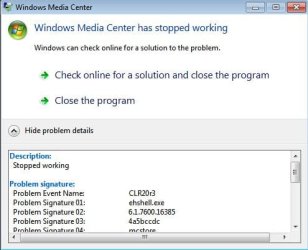
Other problem - with starting WMC (first few times was ok!) now coming following
message:
 

Attachments

  • ScreenShot002.jpg
    ScreenShot002.jpg
    32.9 KB · Views: 31
Last edited:

My Computer

OS
xp
Quick question on the procedure

I've noted that after following your steps exactly and reaching the new win2000 install step and restarting, that the device manager still shows two broken devices: video controller and video (VGA)... the install doesn't 'take'... argh.

Once it does work and I'm up to the point of fixing the VGAPNP file back (removing the X), what is this step for? Is there a requirement to put this sys file back into operation?

David
 

My Computer

OS
Windows 7
Worked for me - Inspiron 710m

searched on Bing for this exact problem, and found this solution - thanks Lexxion. So far so good, and I'm not a major user....so thanks for the easy instructions.

One thing i noted:
after all the steps, and finally installing the Win2000 driver...it was working and then the screen went blank...for a long time. I finally just hard booted the thing, and figured I'd have to system restore. But it booted up fine in normal mode and looks great.

Question: I get that overheating can make the system fail and power down. are there any safety issues with that? this 710m is more of the family laptop, so want to monitor if this is a heat issue i need to be concerned with, or more just internal workings that may cause the system to crash.
 

My Computer

Computer Manufacturer/Model Number
Inspiron 710m
OS
Win 7
quotation marks!

Lexxion,

Thanks a lot man! My jurassic Acer Travelmate 4502LMi now has working intel drivers.

Just a tip to your tutorial: When typing the command line for cacls, the username must be between quotation marks (in your tutorial, "peter"). If the username is written without them, the prompt returns the error reported by ericle37 in his post:

http://www.sevenforums.com/drivers/...intel-855-centrino-chipset-13.html#post328203

"no mapping between account names and security ids was done."

With the quotation marks, the confirmation question appears, as expected. I used Windows 7 Ultimate in PT_BR, so I don't know if in the English version the quotation marks are not necessary.

Thank you again and hugs from Brazil!
 

My Computer

OS
Windows 7
Hi Lexxion, I followed you steps but I am stuck on Step 3

When I use cacls, I get "Invalid Arguments"
When I use Icacls, I get "Invalid parameter"/G""

Now unlike your username mine is first and last name "Jane Choi"
Is this causing the problem?

Nevermind it was the problem. I created a new user name. Logged into that account then followed your steps. Thank You So Much for this. I went to the Microsoft Store in Southern California and the guy there spent an hour with my 700m trying to figure it out with no luck. Thanks again.
 
Last edited:

My Computer

OS
Windows 7 Ult
Another success!

Thanks so much Lexxion - it worked beautifully for me.

My computer is as follows:
Acer Travelmate 4000 with 2Gb RAM and 160Gb drive. It was running XP before.

I was wondering if you had any solutions to the one remaining issue I have found (not especially essential in my case but that would round out all the issues I have found). The battery monitoring driver.

I am not a techno-wiz but have been around computers for a while and wondered if the same technique as you created for the video card, which is really "elegant" might work. The battery monitor is not recognized due to an ACPI driver I believe. Microsoft ACPI-Compliant Embedded Controller.

The only solution I have found involves modifying the BIOS which is perhaps a bit risky!
 

My Computer

Computer Manufacturer/Model Number
Acer Travelmate 4000 (have others!)
OS
Windows 7
CPU
Pentioum M 1.6 Ghz
Motherboard
Intel i855GM
Memory
2Gb
Graphics Card(s)
Integrated
Sound Card
Integrated
Monitor(s) Displays
Integrated
Hard Drives
160Gb
Back
Top