Solved Dead Space 2 Controls. Does The Game Support Mouse and Keyboard??

BeKure

New member
Member
VIP
Local time
12:11 AM
Messages
117
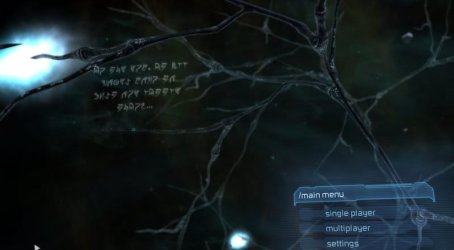
I just downloaded Dead Space 2 from Amazon.com for $18 and the PC controls are acting really weird. The game is unplayable. Even though my mouse and G13 are in a neutral position, the game menus are offset. I tried starting a new game which took forever to do because the offset menus make it really difficult to determine what you are actually selecting in the menu.
The game seemed to behave as if it was actually on a console opposed to an actually PC game. The menu tabs were labeled with "A", "X" and "B" as if the game recognized a 360 controller or something. (I don't have a controller plugged into my PC).
The camera spun a constant 360 degrees when I finally did get the game to start. All while my G13 and Mouse were in a neutral position. The game is unplayable at best and I'm pretty upset that I just spent money on a game that is unplayable. Has anyone experienced this issue before? Any help would be appreciated.

Thank you.
 

Attachments
  • deadspace2 2011-09-05 11-00-34-19.jpg
    deadspace2 2011-09-05 11-00-34-19.jpg
    29.2 KB · Views: 86
  • deadspace2 2011-09-05 11-00-43-59.jpg
    deadspace2 2011-09-05 11-00-43-59.jpg
    29.7 KB · Views: 66

My Computer My Computer

OS
Windows 7 [64-Bit]
CPU
AMD Phenom II X6 1100T Black Edition Thuban 3.3GHz, 3.7GHz
Motherboard
GIGABYTE GA-990XA-UD3 AM3+ AMD
Memory
G.SKILL Ripjaws X Series 8GB 240-Pin DDR3 SDRAM DDR3 186
Graphics Card(s)
ATI Radeon HD 5870 1GB DDR5 PCI-Express Card
Sound Card
N/A (On-board Sound)
Monitor(s) Displays
HANNSpree 42" Class LCD 1080p 120Hz HDTV
Screen Resolution
1920 x 1080
Hard Drives
SSD: Crucial M4 CT064M4SSD2 2.5" 64GB SATA

HDD 1: Western Digital Caviar Blue WD5000AAKS 2TB 7200 RPM 16MB Cache

HDD 2: Western Digital Caviar Blue WD5000AAKS 1TB 7200 RPM 16MB Cache

HDD 3: Western Digital Caviar Blue WD5000AAKS 500GB 7200 R
PSU
Antec High Current Gamer Series HCG-900 900W
Case
NZXT Phantom PHAN-001WT Red Steel / Plastic Enthusiast ATX
Cooling
FANS: 140MM (x1), 120MM (x3), 200MM (x2)
Keyboard
Logitech G13 & Steelseries Merc Stealth
Mouse
Cyborg M.M.O. 7 Gaming Mouse, Logitech G700 & Steelseries Wo
Internet Speed
25 Mbps Download / 2 Mbps Upload
The control part is a known issue a few experience.

Unplug any un-needed periphials you may have.
This includes other Gamepads, Steering wheels etc. All of these can cause what you are experiencing, if not being used.

Also, anything like a iPod, Zune, or other Mobile Devices should be unplugged before launching the game.
There have been issues reported at Steam that a iPod being connected can cause DS2 to do wierd things such as this.


You may also try getting to the menu and resetting everything to default. Controls, graphics, everything. It is also possible theres a bad key mapping, or wrong resolution set.
Then set everythign to where it should be for your setup.


Let us know if any of this helps resolve your issue.
 

My Computer My Computer

Computer Manufacturer/Model Number
Custom (Self Build)
OS
Windows 7 Home Premium 64bit
CPU
Intel Core i7 2700k
Motherboard
eVGA P67 SLI
Memory
8GB Mushkin Redline Ridgebacks @1866
Graphics Card(s)
EVGA GTX570 SC
Sound Card
XiFi Titanium HD
Monitor(s) Displays
LG W2453V
Screen Resolution
1920x1080
Hard Drives
Intel 320 80GB -- Intel X25-V 40GB --WD Black 1TB x2 -- WD Blue 640GB
PSU
Seasonic x750
Case
Corsair 600T SE White
Cooling
eVGA Superclocked CPU Cooler
Keyboard
Saitek Cyborg
Antivirus
Kaspersky
Browser
IE
Other Info
LG BD/DVD
there is a setting in the Ini file you have to change, it is one of the joystick settings.
I had to do it on my setup a few weeks ago and I'll find out what setting you change in a sec, can't remember offhand.

http://forum.ea.com/eaforum/posts/list/4747246.page
Apparently EA doesn't learn from their mistakes. Dead Space had a very common issue where Isaac was always spinning in circles. Fortunately, the fix was a simple blank “joypad.txt” file inserted into the Dead Space folder.

Well, EA did it again with the same issue for Dead Space 2! After searching (a big thanks to mario2 at www.techarena.in for getting me started!) and testing, I found a solution that worked for me and hopefully for anyone having this problem.

For Windows 7 (my version is 64bit) navigate to folder:

C:\Program Files (x86)\EA Games\Dead Space 2

Change the file name of "joypad_example.txt" to “joypad.txt” (as always make a back-up of the original).

Open “joypad.txt” and delete the following entries:

Pad.RightStick.X = Z-Axis
Pad.RightStick.Y = Z-Rotation

Save and hopefully you will be good to go!

As a bonus, this also fixed another issue of the main menus drifting off screen!
Shame on EA for shirking their duties to the PC fans! Makes me think twice about buying Crysis 2!
 

My Computer My Computer

Computer Manufacturer/Model Number
HAL-9000
OS
Windows 7 Ultimate 64bit
CPU
Intel i7 3770K
Motherboard
Asus Sabertooth Z77
Memory
16GB DDR3 1333 Corsair XMS3
Graphics Card(s)
XFX HD6950 2GB EyeFinity
Sound Card
Logitech G35 & Sennheiser PC135 & VIA HD
Monitor(s) Displays
23" HP 2310e, 23" Samsung B2230, 21.5" Viewsonic
Screen Resolution
5760x1080
Hard Drives
16TB of Storage
128GB & 256GB Crucial M4 SSD's, 2X 1TB WD Black, 3x 2TB WD, 3x 2TB Samsung F4, 1.5TB Seagate, WD 500GB,
PSU
Antec True Power New 650watt
Case
Cooler Master HAF-932
Cooling
Corsair H60 Hydro Cooler, 3x 230mm Fans, 2x120mm Fan
Keyboard
Logitech G15 and G13
Mouse
Logitech G700 Gaming Mouse
Internet Speed
50/10 Mbit
Other Info
Speakers : Alesis M1 Active Mk2 Studio Monitors , APC RS 1200 UPS, HP 4500DN Color Laser, HP P1006 mono Laser, Kodak 8500 Dye-Sub, Epson 1280 inkjet, Epson Worforce 610 MFC
I figured it out. It was a problem with the Logitech G13. For some reason DS2 mistakes the G13 for a 360 gamepad. Go figure...

I actually used a different method. I went to Device Manager >Human Interface Devices >HID Compliant Game Controller > and I disabled it. I will try the method that you guys recommended though and see if that works too.
Thanks for responding. This is my favorite forum by far :-)
 
Last edited:

My Computer My Computer

OS
Windows 7 [64-Bit]
CPU
AMD Phenom II X6 1100T Black Edition Thuban 3.3GHz, 3.7GHz
Motherboard
GIGABYTE GA-990XA-UD3 AM3+ AMD
Memory
G.SKILL Ripjaws X Series 8GB 240-Pin DDR3 SDRAM DDR3 186
Graphics Card(s)
ATI Radeon HD 5870 1GB DDR5 PCI-Express Card
Sound Card
N/A (On-board Sound)
Monitor(s) Displays
HANNSpree 42" Class LCD 1080p 120Hz HDTV
Screen Resolution
1920 x 1080
Hard Drives
SSD: Crucial M4 CT064M4SSD2 2.5" 64GB SATA

HDD 1: Western Digital Caviar Blue WD5000AAKS 2TB 7200 RPM 16MB Cache

HDD 2: Western Digital Caviar Blue WD5000AAKS 1TB 7200 RPM 16MB Cache

HDD 3: Western Digital Caviar Blue WD5000AAKS 500GB 7200 R
PSU
Antec High Current Gamer Series HCG-900 900W
Case
NZXT Phantom PHAN-001WT Red Steel / Plastic Enthusiast ATX
Cooling
FANS: 140MM (x1), 120MM (x3), 200MM (x2)
Keyboard
Logitech G13 & Steelseries Merc Stealth
Mouse
Cyborg M.M.O. 7 Gaming Mouse, Logitech G700 & Steelseries Wo
Internet Speed
25 Mbps Download / 2 Mbps Upload
Thanks for letting us know.

I've heard of many different periphials causing such issues, but not the KB one.

I also didn't know about the fix Zepher suggested. Sounds as if that may be the root of all these periphial issues being mistaken for a controller.
 

My Computer My Computer

Computer Manufacturer/Model Number
Custom (Self Build)
OS
Windows 7 Home Premium 64bit
CPU
Intel Core i7 2700k
Motherboard
eVGA P67 SLI
Memory
8GB Mushkin Redline Ridgebacks @1866
Graphics Card(s)
EVGA GTX570 SC
Sound Card
XiFi Titanium HD
Monitor(s) Displays
LG W2453V
Screen Resolution
1920x1080
Hard Drives
Intel 320 80GB -- Intel X25-V 40GB --WD Black 1TB x2 -- WD Blue 640GB
PSU
Seasonic x750
Case
Corsair 600T SE White
Cooling
eVGA Superclocked CPU Cooler
Keyboard
Saitek Cyborg
Antivirus
Kaspersky
Browser
IE
Other Info
LG BD/DVD
I can't disable my G13 since that is what I use to play with.
 

My Computer My Computer

Computer Manufacturer/Model Number
HAL-9000
OS
Windows 7 Ultimate 64bit
CPU
Intel i7 3770K
Motherboard
Asus Sabertooth Z77
Memory
16GB DDR3 1333 Corsair XMS3
Graphics Card(s)
XFX HD6950 2GB EyeFinity
Sound Card
Logitech G35 & Sennheiser PC135 & VIA HD
Monitor(s) Displays
23" HP 2310e, 23" Samsung B2230, 21.5" Viewsonic
Screen Resolution
5760x1080
Hard Drives
16TB of Storage
128GB & 256GB Crucial M4 SSD's, 2X 1TB WD Black, 3x 2TB WD, 3x 2TB Samsung F4, 1.5TB Seagate, WD 500GB,
PSU
Antec True Power New 650watt
Case
Cooler Master HAF-932
Cooling
Corsair H60 Hydro Cooler, 3x 230mm Fans, 2x120mm Fan
Keyboard
Logitech G15 and G13
Mouse
Logitech G700 Gaming Mouse
Internet Speed
50/10 Mbit
Other Info
Speakers : Alesis M1 Active Mk2 Studio Monitors , APC RS 1200 UPS, HP 4500DN Color Laser, HP P1006 mono Laser, Kodak 8500 Dye-Sub, Epson 1280 inkjet, Epson Worforce 610 MFC
there is a setting in the Ini file you have to change, it is one of the joystick settings.
I had to do it on my setup a few weeks ago and I'll find out what setting you change in a sec, can't remember offhand.

EA Forums
Apparently EA doesn't learn from their mistakes. Dead Space had a very common issue where Isaac was always spinning in circles. Fortunately, the fix was a simple blank “joypad.txt” file inserted into the Dead Space folder.

Well, EA did it again with the same issue for Dead Space 2! After searching (a big thanks to mario2 at Site off-line | Techarena for getting me started!) and testing, I found a solution that worked for me and hopefully for anyone having this problem.

For Windows 7 (my version is 64bit) navigate to folder:

C:\Program Files (x86)\EA Games\Dead Space 2

Change the file name of "joypad_example.txt" to “joypad.txt” (as always make a back-up of the original).

Open “joypad.txt” and delete the following entries:

Pad.RightStick.X = Z-Axis
Pad.RightStick.Y = Z-Rotation

Save and hopefully you will be good to go!

As a bonus, this also fixed another issue of the main menus drifting off screen!
Shame on EA for shirking their duties to the PC fans! Makes me think twice about buying Crysis 2!

I just tried this and it worked flawlessly. Thank you for all your help. :D
 

My Computer My Computer

OS
Windows 7 [64-Bit]
CPU
AMD Phenom II X6 1100T Black Edition Thuban 3.3GHz, 3.7GHz
Motherboard
GIGABYTE GA-990XA-UD3 AM3+ AMD
Memory
G.SKILL Ripjaws X Series 8GB 240-Pin DDR3 SDRAM DDR3 186
Graphics Card(s)
ATI Radeon HD 5870 1GB DDR5 PCI-Express Card
Sound Card
N/A (On-board Sound)
Monitor(s) Displays
HANNSpree 42" Class LCD 1080p 120Hz HDTV
Screen Resolution
1920 x 1080
Hard Drives
SSD: Crucial M4 CT064M4SSD2 2.5" 64GB SATA

HDD 1: Western Digital Caviar Blue WD5000AAKS 2TB 7200 RPM 16MB Cache

HDD 2: Western Digital Caviar Blue WD5000AAKS 1TB 7200 RPM 16MB Cache

HDD 3: Western Digital Caviar Blue WD5000AAKS 500GB 7200 R
PSU
Antec High Current Gamer Series HCG-900 900W
Case
NZXT Phantom PHAN-001WT Red Steel / Plastic Enthusiast ATX
Cooling
FANS: 140MM (x1), 120MM (x3), 200MM (x2)
Keyboard
Logitech G13 & Steelseries Merc Stealth
Mouse
Cyborg M.M.O. 7 Gaming Mouse, Logitech G700 & Steelseries Wo
Internet Speed
25 Mbps Download / 2 Mbps Upload
Back
Top