Solved How to Turn-Off 360 Wireless Controller on PC?

boogieboy

Mmmmeeeh!
Guru
Gold Member
VIP
Local time
5:03 AM
Messages
3,458
Location
Lahore, Pakistan
Anyway to turn-off the damn controller on PC? got the Wireless Receiver from my Cousin and installed it and it's running fine but can't find a way to turn-off the controller except taking out the batteries... :huh:
 

My Computer

Computer type
PC/Desktop
Computer Manufacturer/Model Number
Self Built
OS
Windows 10 Pro
CPU
Core i5 9600K
Motherboard
ASUS ROG Strix Z390-F Gaming
Memory
Corsair Vengeance Pro 2x 8GB (16GB) 3200MHz DDR4
Graphics Card(s)
MSI GTX 1070 Gaming X 8GB
Sound Card
ASRock A-Style Purity Sound
Monitor(s) Displays
ASUS VX239H IPS
Screen Resolution
1920x1080
Hard Drives
XPG SPECTRIX S40G 2566GB M.2 NVMe | Patriot P210 512GB SSD | Seagate BarraCuda 4TB 5400RPM
PSU
Thermaltake Smart 600w RGB 80Plus
Case
NZXT H500 with 3x Corsair HD120 RGB w/Node Pro
Cooling
Cryorig H7
Keyboard
Corsair K70 RapidFire RGB (Cherry MX Speed)
Mouse
Logitech G402 Hyperion Fury
Internet Speed
20MB Cable Broadband
Browser
Chrome
Other Info
Corsair MM300 Extended Anti-Fray Mouse Pad | Edifier C2 2.1ch Sound System | XBOX One S Controller | XBOX 360 Wireless Controller for Windows | APC SUA1000i Smart-UPS | PS4 Slim 500GB [Region 1 - USA]
yes, it's a really crap design.

i believe it turns off automatically after a few minutes of idleness.

if it's a GFWL game, then you can turn it off from the control panel.
 

My Computer

Computer Manufacturer/Model Number
mickey megabyte 1234
OS
ultimate 64 sp1
CPU
i5 2500K [email protected]
Motherboard
MSI P67A-GD53
Memory
8 gigs GSkill Ripjaws 1600
Graphics Card(s)
amd hd6950
Sound Card
creative x-fi gamer
Monitor(s) Displays
samsung 24"
Screen Resolution
1920x1080
Hard Drives
ocz vertex 2e 60 gig, samsung f3 1tb, buffalo 2tb ext
PSU
antec 550
Case
antec three hundred
Cooling
i'm a cooling fan
Keyboard
saitek eclipse ii
Mouse
logitech g3
Internet Speed
about 4 Mbps
Other Info
i love win7
Aaaarrrghhhh not good Microsoft what are you doing with PC gamers? :busted::sa:

aaah yeah it turned it self off after few mins... well that ain't so bad :sarc: at least it's better than taking out the batteries manually buh!

Oh but what about the Wireless Receiver? it'll not turn it self off?
 

My Computer

Computer type
PC/Desktop
Computer Manufacturer/Model Number
Self Built
OS
Windows 10 Pro
CPU
Core i5 9600K
Motherboard
ASUS ROG Strix Z390-F Gaming
Memory
Corsair Vengeance Pro 2x 8GB (16GB) 3200MHz DDR4
Graphics Card(s)
MSI GTX 1070 Gaming X 8GB
Sound Card
ASRock A-Style Purity Sound
Monitor(s) Displays
ASUS VX239H IPS
Screen Resolution
1920x1080
Hard Drives
XPG SPECTRIX S40G 2566GB M.2 NVMe | Patriot P210 512GB SSD | Seagate BarraCuda 4TB 5400RPM
PSU
Thermaltake Smart 600w RGB 80Plus
Case
NZXT H500 with 3x Corsair HD120 RGB w/Node Pro
Cooling
Cryorig H7
Keyboard
Corsair K70 RapidFire RGB (Cherry MX Speed)
Mouse
Logitech G402 Hyperion Fury
Internet Speed
20MB Cable Broadband
Browser
Chrome
Other Info
Corsair MM300 Extended Anti-Fray Mouse Pad | Edifier C2 2.1ch Sound System | XBOX One S Controller | XBOX 360 Wireless Controller for Windows | APC SUA1000i Smart-UPS | PS4 Slim 500GB [Region 1 - USA]
i dunno about the receiver, it's powered by usb. i suppose it's always awake, waiting for the controller to talk to it.
 

My Computer

Computer Manufacturer/Model Number
mickey megabyte 1234
OS
ultimate 64 sp1
CPU
i5 2500K [email protected]
Motherboard
MSI P67A-GD53
Memory
8 gigs GSkill Ripjaws 1600
Graphics Card(s)
amd hd6950
Sound Card
creative x-fi gamer
Monitor(s) Displays
samsung 24"
Screen Resolution
1920x1080
Hard Drives
ocz vertex 2e 60 gig, samsung f3 1tb, buffalo 2tb ext
PSU
antec 550
Case
antec three hundred
Cooling
i'm a cooling fan
Keyboard
saitek eclipse ii
Mouse
logitech g3
Internet Speed
about 4 Mbps
Other Info
i love win7
Yeah :D also it's not something that gets heat up or something :p
 

My Computer

Computer type
PC/Desktop
Computer Manufacturer/Model Number
Self Built
OS
Windows 10 Pro
CPU
Core i5 9600K
Motherboard
ASUS ROG Strix Z390-F Gaming
Memory
Corsair Vengeance Pro 2x 8GB (16GB) 3200MHz DDR4
Graphics Card(s)
MSI GTX 1070 Gaming X 8GB
Sound Card
ASRock A-Style Purity Sound
Monitor(s) Displays
ASUS VX239H IPS
Screen Resolution
1920x1080
Hard Drives
XPG SPECTRIX S40G 2566GB M.2 NVMe | Patriot P210 512GB SSD | Seagate BarraCuda 4TB 5400RPM
PSU
Thermaltake Smart 600w RGB 80Plus
Case
NZXT H500 with 3x Corsair HD120 RGB w/Node Pro
Cooling
Cryorig H7
Keyboard
Corsair K70 RapidFire RGB (Cherry MX Speed)
Mouse
Logitech G402 Hyperion Fury
Internet Speed
20MB Cable Broadband
Browser
Chrome
Other Info
Corsair MM300 Extended Anti-Fray Mouse Pad | Edifier C2 2.1ch Sound System | XBOX One S Controller | XBOX 360 Wireless Controller for Windows | APC SUA1000i Smart-UPS | PS4 Slim 500GB [Region 1 - USA]
i tend to just pop the button when i want to turn it off, pressing the battery release button will pull the batteries away from the contact and it's a lot quicker than pressing the home button anyway(as reference to switching it off on console).
 

My Computer

Computer type
PC/Desktop
Computer Manufacturer/Model Number
Custom Build
OS
Windows 7 Ultimate x64 SP1
CPU
Intel Q6600 @ 2.6Ghz
Motherboard
Evga NF78-CK-132-A 3-Way SLI
Memory
4Gb DDR2 Corsair Dominator @ 800Mhz 5-5-5-15
Graphics Card(s)
EVGA 560 GTX SC FTW 1GB
Sound Card
Realtek HD 7.1 Audio, Plantronics GameCom780 7.1 Headset
Monitor(s) Displays
Dell S2409W
Screen Resolution
1920 x 1080
Hard Drives
SanDisk SDSSDHII-120G-G25 120GB SSD
Samsung 7200RPM 750Gb SATA
Samsung 850 EVO 120GB SSD
Western Digital Green 1TB 7200RPM
PSU
Xigmatek 750W Quad sli quad core 80% eff
Case
Antec 900 Gaming Case
Cooling
Zalman CNPS9700-NT NVIDIA Tritium
Keyboard
Logitech generic keyboard, MS wireless keyboard
Mouse
Razor Lachesis Banshee V2 Blue, 4000DPI, MS wireless mouse
Internet Speed
152Mb Virgin Media Fibre Optic
Antivirus
Microsoft Security Essentials
Browser
Google Chrome
Other Info
Wireless Gaming Receiver for Windows, Wireless Xbox 360 Pad
Application to turn-off Xbox 360 Wireless Controller on PC

I have just finish the pre-pre-pre-Alpha version of tiny application, which should turn off the first Xbox 360 Wireless Controller connected to PC.

Since I have not that device (I gave it as a present and then found that design bug), I would like to ask to check whether it functions. Simply pressing the button with XBOX logo should turn off the Xbox 360 Wireless Controller No. 1 connected to PC.

The application should be stable, but I cannot check the turn-off.

Please let me know your result and if you find it helpfull also comments what should be added or modified.

Thank you in advance.
 

Attachments

My Computer

OS
Windows 7 Ultimate x86
hi ccr64k, and welcome to sevenforums - nice first post!

i've just tested your program, and it works as expected. :party:

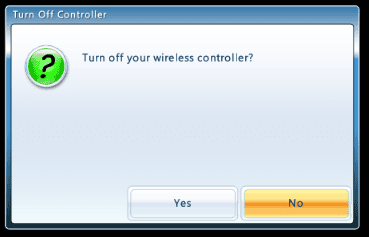
btw, if the horrendous games for windows live is running, then an alternative method of switching off the controller is to press and hold the so-called 'guide' button (the big one in the centre with the X), then a pop-up should appear confirming you want to switch the controller off.
 

My Computer

Computer Manufacturer/Model Number
mickey megabyte 1234
OS
ultimate 64 sp1
CPU
i5 2500K [email protected]
Motherboard
MSI P67A-GD53
Memory
8 gigs GSkill Ripjaws 1600
Graphics Card(s)
amd hd6950
Sound Card
creative x-fi gamer
Monitor(s) Displays
samsung 24"
Screen Resolution
1920x1080
Hard Drives
ocz vertex 2e 60 gig, samsung f3 1tb, buffalo 2tb ext
PSU
antec 550
Case
antec three hundred
Cooling
i'm a cooling fan
Keyboard
saitek eclipse ii
Mouse
logitech g3
Internet Speed
about 4 Mbps
Other Info
i love win7
To mickey megabyte

Thank you for confirming answer. Next step is to prove that you can switch off any of four XBOX 360 Wireless Controllers. Do you or anybody you know more than one Controller?

Next version will enable to switch off up to 4 XBOX 360 Wireless Controllers connected to PC.

Furthermore, do you have a screen of that popup from that game? Switching off directly from Controller using Guide button would be much more comfortable. I am a programmer not a player, so your feedback is valuable for me.
 

My Computer

OS
Windows 7 Ultimate x86
i could probably borrow a friend's controller to test with, but not sure when.

here's the popup from gfwl:

xbbbb.PNG
 

My Computer

Computer Manufacturer/Model Number
mickey megabyte 1234
OS
ultimate 64 sp1
CPU
i5 2500K [email protected]
Motherboard
MSI P67A-GD53
Memory
8 gigs GSkill Ripjaws 1600
Graphics Card(s)
amd hd6950
Sound Card
creative x-fi gamer
Monitor(s) Displays
samsung 24"
Screen Resolution
1920x1080
Hard Drives
ocz vertex 2e 60 gig, samsung f3 1tb, buffalo 2tb ext
PSU
antec 550
Case
antec three hundred
Cooling
i'm a cooling fan
Keyboard
saitek eclipse ii
Mouse
logitech g3
Internet Speed
about 4 Mbps
Other Info
i love win7
Application to turn-off Xbox 360 Wireless Controllers on PC

Here is the pre-pre-Alpha version of tiny application (file version 0.0.0.1), which should turn off the Xbox 360 Wireless Controllers connected to PC. There can be up to four controllers, so there are four buttons numbered 1, 2, 3 and 4.

Simply pressing the respective button with XBOX logo or a key '1', '2', '3' or '4' on normal or numeric keyboard should turn off the Xbox 360 Wireless Controller with corresponding number connected to PC. Instead of mouse, you can use 'Tab' and 'Shift'+'Tab' key to cycle among buttons forth and back. 'Spacebar' selects the highlighted button.

The application is stable and it functions for the first controller.

Please check whether it is possible to turn off second, third and fourth controller.

Please let me know your result and if you find it helpfull also comments what should be added or modified.

Thank you in advance.
 

Attachments

Last edited:

My Computer

OS
Windows 7 Ultimate x86
To mickey megabyte

How one can navigate in that Turn off controller box in gfwl with the controller?
 

My Computer

OS
Windows 7 Ultimate x86
you navigate by using either the left joystick or the d-pad. (the right joystick doesn't do anything in that particular dialogue.) then you press the 'A' button to 'accept' or 'B' to 'abort'.

you can also use the arrow keys on the keyboard, followed by 'enter', or just use the mouse.

sorry, i've not managed to borrow another controller to test your new program.
 

My Computer

Computer Manufacturer/Model Number
mickey megabyte 1234
OS
ultimate 64 sp1
CPU
i5 2500K [email protected]
Motherboard
MSI P67A-GD53
Memory
8 gigs GSkill Ripjaws 1600
Graphics Card(s)
amd hd6950
Sound Card
creative x-fi gamer
Monitor(s) Displays
samsung 24"
Screen Resolution
1920x1080
Hard Drives
ocz vertex 2e 60 gig, samsung f3 1tb, buffalo 2tb ext
PSU
antec 550
Case
antec three hundred
Cooling
i'm a cooling fan
Keyboard
saitek eclipse ii
Mouse
logitech g3
Internet Speed
about 4 Mbps
Other Info
i love win7
hi ccr64k

thanks for uploading that xboxoff utility. I have 4 wireless xbox controllers connected to my pc via one ms windows xbox receiver and it used to work perfectly.

however now, what used to be controller 1 now lights up the green sync quadrant 3. and what was 2 now lights up 4. Controllers that used to be 3 & 4 now dont light up at all but joy.cpl Properties in win 7 x64 seem to show windows recognizes them and they work in that config panel.

i was hoping you could help as your utility seems to work and turns off the lights on the ones with lights.

I'm trying to get all 4 recognized and lit properly again, but reboots and taking batteries out and using your app has no effect in reordering them, as what used to be 1 now only can connect as #3.

Any ideas on resetting their id numbers and getting the sync lights to work properly again?

Thanks very much for any help, and i'll be happy to test any utility you make :)
 

My Computer

OS
win 7 x64
XboxExt

Hi!

If you don't mind, I would like to share my application, called Xbox 360 Controller Manager .

The first version was made, when I bought my controller, and after 2 days, I started to find out, how to detect GUIDE button, and how to turn off the controller.

You can download my application from Xbox 360 Controller Manager

You just need to run it, and press the GUIDE button about 2 secs.

I hope, you think it useful :)

--
Pety
 

My Computer

OS
Windows 7 Ultimate x64
thanks for the app djpety i will definitely check it once my rig will be completed ;) much appreciated
 

My Computer

Computer type
PC/Desktop
Computer Manufacturer/Model Number
Self Built
OS
Windows 10 Pro
CPU
Core i5 9600K
Motherboard
ASUS ROG Strix Z390-F Gaming
Memory
Corsair Vengeance Pro 2x 8GB (16GB) 3200MHz DDR4
Graphics Card(s)
MSI GTX 1070 Gaming X 8GB
Sound Card
ASRock A-Style Purity Sound
Monitor(s) Displays
ASUS VX239H IPS
Screen Resolution
1920x1080
Hard Drives
XPG SPECTRIX S40G 2566GB M.2 NVMe | Patriot P210 512GB SSD | Seagate BarraCuda 4TB 5400RPM
PSU
Thermaltake Smart 600w RGB 80Plus
Case
NZXT H500 with 3x Corsair HD120 RGB w/Node Pro
Cooling
Cryorig H7
Keyboard
Corsair K70 RapidFire RGB (Cherry MX Speed)
Mouse
Logitech G402 Hyperion Fury
Internet Speed
20MB Cable Broadband
Browser
Chrome
Other Info
Corsair MM300 Extended Anti-Fray Mouse Pad | Edifier C2 2.1ch Sound System | XBOX One S Controller | XBOX 360 Wireless Controller for Windows | APC SUA1000i Smart-UPS | PS4 Slim 500GB [Region 1 - USA]
Thanks for XboxExt.exe
 

My Computer

Computer Manufacturer/Model Number
Intel
OS
Windows 7 32 bit
CPU
G530
Motherboard
MSI
Memory
DDR3 2GB
Graphics Card(s)
HD6570
Sound Card
NO
Monitor(s) Displays
LED 19''
Hard Drives
WD 320GB 2,5''
PSU
300W
Case
HOME MADE
Cooling
NO
ccr64k - Thanks for initiative. :)
djpety - Thanks for the App. :D
 

My Computer

OS
Windows 7 Ultimate x64
fix/makes the program better

ccr64k have you thought to add a button to the notification bar to turn off the controller????
 

My Computer

OS
windows 7 home premium 64bit
i tend to just pop the button when i want to turn it off, pressing the battery release button will pull the batteries away from the contact and it's a lot quicker than pressing the home button anyway(as reference to switching it off on console).

That is what I do when watching Netflix or Hulu on my Xbox...lol.
 

My Computer

Computer Manufacturer/Model Number
HP C2N70UA#ABA Laptop
OS
Windows 8 64-bit (6.2, Build 9200) (9200.win8_rtm.120725-1247)
CPU
AMD Quad-Core A10-4600M APU 2.3Ghz Turbo to 3.4
Memory
8GB DDR3
Graphics Card(s)
AMD Radeon HD 7660G
Sound Card
Altec Lansing with SRS Premium Sound
Monitor(s) Displays
17" Laptop HD Display (720p)
Screen Resolution
1600*900
Hard Drives
750GB (5400 RPM), with smart protect
Western Digital 1TB Passport
Cooling
HP Cool Sense
Keyboard
Island Style
Mouse
Logitech 625 Wireless
Internet Speed
30MBps
Back
Top