How to get Halo 2 working under Windows 7

sygnus21

New member
Finally!!! A fix for getting Halo 2 working under Windows 7....

Credit for this find goes to this video... Halo 2 for Windows 7 Installation Tutorial 100% Fix - YouTube. I'm just making the fix easier to find, clarifying the instructions, and providing images.

Now... I’m aware that there are a lot of pirated copies of this game out there so be warned we do not support or condone pirating and that discussion of pirated material gets a ban. I'm just stating the rules.

That said, I can’t say this works for pirated copies of the game, but it does work for legitimate copies.

Alright, first thing you want to do is get an older version of Games For Windows Live (LIVE 3.5.50.0) here Freeware Files.com - Download. OK….

1 – Install your copy of Halo 2 by doing a Customize Game install...
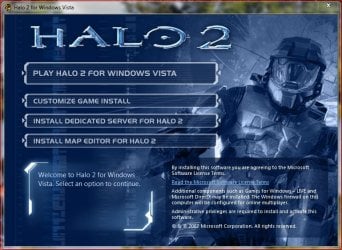
Halo 2 Install Screen.JPG

MAKE SURE you choose Full install only, do not start...
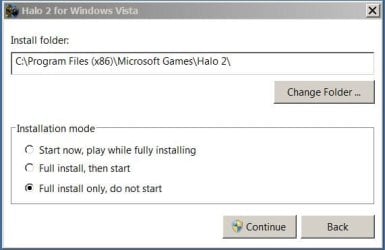
Halo 2 Install Mode.JPG

2- You will be asked to Activate the game, choose Activate later
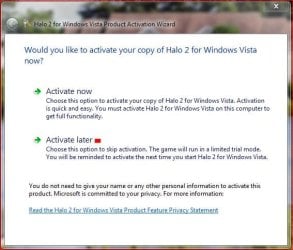
Halo 2 Activation Screen.JPG

Game will begin installing...

Halo 2 install process.JPG

3- Once game is finished installing you should be done for now...
Halo 2 Successful install.JPG

however if it asks again to be activated, again, choose Activate later.

Halo 2 Activation Screen.JPG

BTW YOU WILL have to activate the game so those without a Product Key.... you're wasting your time here!

4- Now... Go to the Control Panel, Programs and Features, and look for Microsoft Games For Windows - LIVE Redistributable. This is the version that was installed with Halo 2 and NEEDS to be uninstalled!

GFWL Redist removal.JPG

Do not, repeat, do not uninstall Microsoft Games For Windows Market Place! This is the latest version that should have been/should be installed on Windows 7.... AND, Halo 2 will require it as you'll have to be signed into live to play or update the game!

5- Anyway once the old version of GFWL is uninstalled, install the version you downloaded earlier....

GFWL Install.JPG

Once you're done with installing the file you've downloaded you can start the game. You will be required to activated and register the game. And you will be asked to sign into Games For Windows Live (Market Place). Bottom line follow the on-screen prompts and enjoy the game. I just finished part of the first level and the game looked and ran well thus far.

Things to note....

1- For me the game is running in full screen at a resolution of 1920 x 1080
2- I'm not running in any type of compatibility mode or Admin mode.
3- You can install on a different drive (I did).
4- The game just works :)

Good Luck :cool:
 
Last edited:

My Computer

Computer type
PC/Desktop
Computer Manufacturer/Model Number
Custom built by me.
OS
Windows 10 Pro
CPU
Intel Core i7-4770K (3.5Ghz)
Motherboard
Gigabyte G1 Sniper 5 (F10 Bios)
Memory
32 gig Corsair Dominator Platinum (4x8Gig)
Graphics Card(s)
Sapphire Tri-X R9 Fury
Sound Card
Soundblaster ZXR
Monitor(s) Displays
NEC PA242W 24" LCD Monitor
Screen Resolution
1920 x 1200
Hard Drives
Primary - Samsung 850 Pro (512gig), Samsung 840 Pro (256gig), 2TB WD Caviar Black.
PSU
EVGA Supernova 1000 G2
Case
Cooler Master HAF X
Cooling
Corsair H100i with Corsair Air Series SP120 Quiet Fans
Keyboard
Logitech Wireless Wave
Mouse
Logitech Performance MX
Internet Speed
High Speed Cable
Antivirus
Norton Security
Browser
IE11
Other Info
Memory Timings - 1866MHz @ 9-9-9-27-1T @ 1.5 volts
Good guide this will help some people
 

My Computer

Computer type
PC/Desktop
Computer Manufacturer/Model Number
custom build
OS
Windows 10 64bit
CPU
AMD Phenom II X4 925 (Deneb)(2.8GHz) OC 3.4GHz
Motherboard
M5A78L-MLX Plus
Memory
Corsair Vengeance DDR3 4GBX2 (8192MB)
Graphics Card(s)
XFX HD 6870 1GB (OC)- 940MHz core, mem 1150MHz
Monitor(s) Displays
Vizio 26' 1920x1080 / Acer 1336x768
Screen Resolution
1920x1080 60Hz /1336x768
Hard Drives
Kingston Digital 60GB SSDNow V300/500gb HDD Western Digital 7200rpm (/WD 160GB HDD 7200rpm
PSU
CORSAIR CX600 600w
Case
AZZA Orion 202 EVO
Cooling
cooler master hyper TX3 cpu cooler
Keyboard
Razer DeathStalker
Mouse
Logitech Optical Gaming Mouse G400
Antivirus
Defualt on win 10
Browser
Firefox
Other Info
cpu is overclocked in bios
Nice guide =)
 

My Computer

Computer type
PC/Desktop
Computer Manufacturer/Model Number
Custom
OS
Windows 7 Ultimate SP1 x64
CPU
Intel Core I5-3570K
Motherboard
Gigabyte Z77-D3H
Memory
16GB Corsair Vengeance DDR3 1600 MHz
Graphics Card(s)
Evga Geforce GTX 660
Sound Card
Integrated
Monitor(s) Displays
HP 2009m
Screen Resolution
1600x900
Hard Drives
2 Internal 500 GB
1 External 3TB
1 120GB SSD (OS)
PSU
750 Watt
Case
Thermaltake VM600M1W2Z Dokker Tower Case
Keyboard
Razer Deathstalker Ultimate
Mouse
Roccat Kova+
Antivirus
Kaspersky Antivirus 2013
Browser
Mozilla Firefox
Thanks.

Don't know how many posts I've seen over the years of people trying to find a way to get Halo 2 working under 7. Now we have instructions that actually work. Finally :)
 

My Computer

Computer type
PC/Desktop
Computer Manufacturer/Model Number
Custom built by me.
OS
Windows 10 Pro
CPU
Intel Core i7-4770K (3.5Ghz)
Motherboard
Gigabyte G1 Sniper 5 (F10 Bios)
Memory
32 gig Corsair Dominator Platinum (4x8Gig)
Graphics Card(s)
Sapphire Tri-X R9 Fury
Sound Card
Soundblaster ZXR
Monitor(s) Displays
NEC PA242W 24" LCD Monitor
Screen Resolution
1920 x 1200
Hard Drives
Primary - Samsung 850 Pro (512gig), Samsung 840 Pro (256gig), 2TB WD Caviar Black.
PSU
EVGA Supernova 1000 G2
Case
Cooler Master HAF X
Cooling
Corsair H100i with Corsair Air Series SP120 Quiet Fans
Keyboard
Logitech Wireless Wave
Mouse
Logitech Performance MX
Internet Speed
High Speed Cable
Antivirus
Norton Security
Browser
IE11
Other Info
Memory Timings - 1866MHz @ 9-9-9-27-1T @ 1.5 volts
Thnxs!! Now I Can Install It Now To My Brothers Laptop :))
 

My Computer

Computer type
PC/Desktop
Computer Manufacturer/Model Number
AsusTEK Computer INC.
OS
Windows Ultimate 32-bit x86 Service-Pack-1
CPU
Intel Pentium Dual Core CPU E5400 @2.70 Ghz 2.70Ghz
Motherboard
Asus P5G41T-M LX3
Memory
2.00 GB Kingston RAM
Graphics Card(s)
Nvidia Geforce GT 630 2GB DDR3
Sound Card
RealTek Audio HD Manager
Monitor(s) Displays
ViewSonic V1616wSERIES
Screen Resolution
1366x768
Hard Drives
WDC WD1600AAJS-00WAA0 ATA Drive - Old Hard Drive = 120 GB
Hitachi HDS721050DLE630ATA Drive - New Hard Drive = 500 GB
PSU
I Think Hitachi PSU
Case
HiP Case w/ Power Supply
Cooling
Intel Fan - CPU - Integrated Fan - GPU - Chassis Fan -
Keyboard
Cruiser Keyboard
Mouse
iMega Plus Mouse
Internet Speed
1.9 Mbps Up :D And 1.0 Upload/s :D
Antivirus
avast! Antivirus
Browser
Mozilla FireFox - Google Chrome 28 - Opera - Safari
Other Info
Games: 2000 - 2008 - Some (2014)

avast! 2038 = Paid!
Thanks.

Please let me know if you have any issues with the instructions.
 

My Computer

Computer type
PC/Desktop
Computer Manufacturer/Model Number
Custom built by me.
OS
Windows 10 Pro
CPU
Intel Core i7-4770K (3.5Ghz)
Motherboard
Gigabyte G1 Sniper 5 (F10 Bios)
Memory
32 gig Corsair Dominator Platinum (4x8Gig)
Graphics Card(s)
Sapphire Tri-X R9 Fury
Sound Card
Soundblaster ZXR
Monitor(s) Displays
NEC PA242W 24" LCD Monitor
Screen Resolution
1920 x 1200
Hard Drives
Primary - Samsung 850 Pro (512gig), Samsung 840 Pro (256gig), 2TB WD Caviar Black.
PSU
EVGA Supernova 1000 G2
Case
Cooler Master HAF X
Cooling
Corsair H100i with Corsair Air Series SP120 Quiet Fans
Keyboard
Logitech Wireless Wave
Mouse
Logitech Performance MX
Internet Speed
High Speed Cable
Antivirus
Norton Security
Browser
IE11
Other Info
Memory Timings - 1866MHz @ 9-9-9-27-1T @ 1.5 volts
I have done all up tostep 3 but in step 4 I do not see Microsoft Games For Windows - LIVE Redistributable. to uninstall. I have a new comp. with windows 7??
 

My Computer

Computer type
PC/Desktop
Computer Manufacturer/Model Number
Asus essentioCM6730 ac2
OS
Windows 7 Home Premium 64bit.
CPU
Intel Core i5-2320 Processor 3.0 GHz
Memory
6GB SDRAM DDR3
Graphics Card(s)
nvidia Geforce 9400gt
Hard Drives
1000 GB 7200 rpm Hard Drive
You'll probably have to install it then.
 

My Computer

Computer Manufacturer/Model Number
Custom
OS
Windows 7 Ultimate 32-Bit
CPU
Intel(R) Core(TM) i7 CPU 920 @ 2.67GHz
Motherboard
Gigabyte Technology Co., Ltd. EX58-UD3R
Memory
Corsair DDR3 4Gb
Graphics Card(s)
Nvidia Ge-Force GTS250
Sound Card
High Definition Audio Device
Monitor(s) Displays
Envision 19 inch
Screen Resolution
1280x1024
Hard Drives
2 physical hard drives (4 letter drives) that equal up to 626.3 gigs of space all together. I think both are Maxtors, but primary is a SATA drive, secondary is a SATA, too.
Case
"Elite" style case
Cooling
"Cooler Master"
Mouse
Microsoft Optical USB Mouse.
Internet Speed
Verizon DSL Internet
So o should install it then uninstall it??
 

My Computer

Computer type
PC/Desktop
Computer Manufacturer/Model Number
Asus essentioCM6730 ac2
OS
Windows 7 Home Premium 64bit.
CPU
Intel Core i5-2320 Processor 3.0 GHz
Memory
6GB SDRAM DDR3
Graphics Card(s)
nvidia Geforce 9400gt
Hard Drives
1000 GB 7200 rpm Hard Drive
I have done all up tostep 3 but in step 4 I do not see Microsoft Games For Windows - LIVE Redistributable. to uninstall. I have a new comp. with windows 7??

So o should install it then uninstall it??

If you've installed Halo then....

4- Now... Go to the Control Panel, Programs and Features, and look for Microsoft Games For Windows - LIVE Redistributable. This is the version that was installed with Halo 2 and NEEDS to be uninstalled!

So yeah, uninstall the Redistributable version, follow the rest of the instructions listed.


Once you start the game whatever needs to be updated just do so and go from there.

Let me know.
 

My Computer

Computer type
PC/Desktop
Computer Manufacturer/Model Number
Custom built by me.
OS
Windows 10 Pro
CPU
Intel Core i7-4770K (3.5Ghz)
Motherboard
Gigabyte G1 Sniper 5 (F10 Bios)
Memory
32 gig Corsair Dominator Platinum (4x8Gig)
Graphics Card(s)
Sapphire Tri-X R9 Fury
Sound Card
Soundblaster ZXR
Monitor(s) Displays
NEC PA242W 24" LCD Monitor
Screen Resolution
1920 x 1200
Hard Drives
Primary - Samsung 850 Pro (512gig), Samsung 840 Pro (256gig), 2TB WD Caviar Black.
PSU
EVGA Supernova 1000 G2
Case
Cooler Master HAF X
Cooling
Corsair H100i with Corsair Air Series SP120 Quiet Fans
Keyboard
Logitech Wireless Wave
Mouse
Logitech Performance MX
Internet Speed
High Speed Cable
Antivirus
Norton Security
Browser
IE11
Other Info
Memory Timings - 1866MHz @ 9-9-9-27-1T @ 1.5 volts
I have gone to the control panal, programs and features and I don't see microsoft games for windows. I have uninstalled halo2 and tried again and still nothing?
 

My Computer

Computer type
PC/Desktop
Computer Manufacturer/Model Number
Asus essentioCM6730 ac2
OS
Windows 7 Home Premium 64bit.
CPU
Intel Core i5-2320 Processor 3.0 GHz
Memory
6GB SDRAM DDR3
Graphics Card(s)
nvidia Geforce 9400gt
Hard Drives
1000 GB 7200 rpm Hard Drive
OK, first did you follow the instructions, install the game, and then download and install the file I told you to download?
Alright, first thing you want to do is get an older version of Games For Windows Live (LIVE 3.5.50.0) here Freeware Files.com - Download. OK….

Anyway if you don't have the redistributable files installed, skip that part and just install the downloaded version I mentioned and go from there.

BTW do you have "Microsoft Games for Windows Marketplace" installed? If not, you might have to download and install that before doing anything in my instructions. Get it here: Download the Games for Windows Client | PC Games Client - Xbox.com

BTW if the the game isn't legit/pirated (i'm just saying) there's going to be issues.
 

My Computer

Computer type
PC/Desktop
Computer Manufacturer/Model Number
Custom built by me.
OS
Windows 10 Pro
CPU
Intel Core i7-4770K (3.5Ghz)
Motherboard
Gigabyte G1 Sniper 5 (F10 Bios)
Memory
32 gig Corsair Dominator Platinum (4x8Gig)
Graphics Card(s)
Sapphire Tri-X R9 Fury
Sound Card
Soundblaster ZXR
Monitor(s) Displays
NEC PA242W 24" LCD Monitor
Screen Resolution
1920 x 1200
Hard Drives
Primary - Samsung 850 Pro (512gig), Samsung 840 Pro (256gig), 2TB WD Caviar Black.
PSU
EVGA Supernova 1000 G2
Case
Cooler Master HAF X
Cooling
Corsair H100i with Corsair Air Series SP120 Quiet Fans
Keyboard
Logitech Wireless Wave
Mouse
Logitech Performance MX
Internet Speed
High Speed Cable
Antivirus
Norton Security
Browser
IE11
Other Info
Memory Timings - 1866MHz @ 9-9-9-27-1T @ 1.5 volts
OK I first downloaded the 3.5 file but did not install it then followed the rest of the instructions til I got to step 4 and could not find the games for windows live file. so I should just install the 3.5 file I downloaded?
 

My Computer

Computer type
PC/Desktop
Computer Manufacturer/Model Number
Asus essentioCM6730 ac2
OS
Windows 7 Home Premium 64bit.
CPU
Intel Core i5-2320 Processor 3.0 GHz
Memory
6GB SDRAM DDR3
Graphics Card(s)
nvidia Geforce 9400gt
Hard Drives
1000 GB 7200 rpm Hard Drive
Again, if you don't see the redistributable files to uninstall, just install the 3.5 file I told you to download and go from there. In short follow the instructions, but skip step 4, and go to step 5. Go from there.
 

My Computer

Computer type
PC/Desktop
Computer Manufacturer/Model Number
Custom built by me.
OS
Windows 10 Pro
CPU
Intel Core i7-4770K (3.5Ghz)
Motherboard
Gigabyte G1 Sniper 5 (F10 Bios)
Memory
32 gig Corsair Dominator Platinum (4x8Gig)
Graphics Card(s)
Sapphire Tri-X R9 Fury
Sound Card
Soundblaster ZXR
Monitor(s) Displays
NEC PA242W 24" LCD Monitor
Screen Resolution
1920 x 1200
Hard Drives
Primary - Samsung 850 Pro (512gig), Samsung 840 Pro (256gig), 2TB WD Caviar Black.
PSU
EVGA Supernova 1000 G2
Case
Cooler Master HAF X
Cooling
Corsair H100i with Corsair Air Series SP120 Quiet Fans
Keyboard
Logitech Wireless Wave
Mouse
Logitech Performance MX
Internet Speed
High Speed Cable
Antivirus
Norton Security
Browser
IE11
Other Info
Memory Timings - 1866MHz @ 9-9-9-27-1T @ 1.5 volts
OK thanks I will give it a try
 

My Computer

Computer type
PC/Desktop
Computer Manufacturer/Model Number
Asus essentioCM6730 ac2
OS
Windows 7 Home Premium 64bit.
CPU
Intel Core i5-2320 Processor 3.0 GHz
Memory
6GB SDRAM DDR3
Graphics Card(s)
nvidia Geforce 9400gt
Hard Drives
1000 GB 7200 rpm Hard Drive
thanks for all your help got it working. I think the problem was there was no wwindowss market place I thought halo 2 was to install it? Oh well. Also once I got that sorted out my product key was corrupt so a call to mocrosoft and they gave me a new one. Again thanks it seems to be working fine.
 

My Computer

Computer type
PC/Desktop
Computer Manufacturer/Model Number
Asus essentioCM6730 ac2
OS
Windows 7 Home Premium 64bit.
CPU
Intel Core i5-2320 Processor 3.0 GHz
Memory
6GB SDRAM DDR3
Graphics Card(s)
nvidia Geforce 9400gt
Hard Drives
1000 GB 7200 rpm Hard Drive
So to help others out, and to make sure my instructions are correct....

1. You never had Marketplace installed to begin with?

2. And in order to fix your issue, you had to first install Microsoft Marketplace?

Thanks.
 

My Computer

Computer type
PC/Desktop
Computer Manufacturer/Model Number
Custom built by me.
OS
Windows 10 Pro
CPU
Intel Core i7-4770K (3.5Ghz)
Motherboard
Gigabyte G1 Sniper 5 (F10 Bios)
Memory
32 gig Corsair Dominator Platinum (4x8Gig)
Graphics Card(s)
Sapphire Tri-X R9 Fury
Sound Card
Soundblaster ZXR
Monitor(s) Displays
NEC PA242W 24" LCD Monitor
Screen Resolution
1920 x 1200
Hard Drives
Primary - Samsung 850 Pro (512gig), Samsung 840 Pro (256gig), 2TB WD Caviar Black.
PSU
EVGA Supernova 1000 G2
Case
Cooler Master HAF X
Cooling
Corsair H100i with Corsair Air Series SP120 Quiet Fans
Keyboard
Logitech Wireless Wave
Mouse
Logitech Performance MX
Internet Speed
High Speed Cable
Antivirus
Norton Security
Browser
IE11
Other Info
Memory Timings - 1866MHz @ 9-9-9-27-1T @ 1.5 volts
yes that would be it, halo 2 didn't install them
 

My Computer

Computer type
PC/Desktop
Computer Manufacturer/Model Number
Asus essentioCM6730 ac2
OS
Windows 7 Home Premium 64bit.
CPU
Intel Core i5-2320 Processor 3.0 GHz
Memory
6GB SDRAM DDR3
Graphics Card(s)
nvidia Geforce 9400gt
Hard Drives
1000 GB 7200 rpm Hard Drive
True... Halo 2 wouldn't install Microsoft Marketplace.

Thanks.
 

My Computer

Computer type
PC/Desktop
Computer Manufacturer/Model Number
Custom built by me.
OS
Windows 10 Pro
CPU
Intel Core i7-4770K (3.5Ghz)
Motherboard
Gigabyte G1 Sniper 5 (F10 Bios)
Memory
32 gig Corsair Dominator Platinum (4x8Gig)
Graphics Card(s)
Sapphire Tri-X R9 Fury
Sound Card
Soundblaster ZXR
Monitor(s) Displays
NEC PA242W 24" LCD Monitor
Screen Resolution
1920 x 1200
Hard Drives
Primary - Samsung 850 Pro (512gig), Samsung 840 Pro (256gig), 2TB WD Caviar Black.
PSU
EVGA Supernova 1000 G2
Case
Cooler Master HAF X
Cooling
Corsair H100i with Corsair Air Series SP120 Quiet Fans
Keyboard
Logitech Wireless Wave
Mouse
Logitech Performance MX
Internet Speed
High Speed Cable
Antivirus
Norton Security
Browser
IE11
Other Info
Memory Timings - 1866MHz @ 9-9-9-27-1T @ 1.5 volts
Another thing to try

For what its worth, I couldn't get Halo to work following these instructions - kept getting an error at the very beginning about system policy - there was a mention about the redists subdirectory.

BUT....
The way I got it to work was to go to the redists sub directory on the installation disk and install the vcredist.msi separately before I run the halo "Startup.exe" (I used Vista compatibility and "run as administrator"). I assume the startup checks for the vcredist being already installed and skips it - so I get past the point that was failing. The rest of the install worked fine.
 

My Computer

OS
Windows 7 Ultimate 64
Back
Top