
Solved All icons are one program file....Please help.

sauska0

New member
Local time
8:15 AM
Messages
19
At first all my files tried to open with adobe or something then i tried "open with" and clicked a diffrent program and it will change all the icons to that...

This only happens with program files ... luckely i had firefox open during the time this happend but i have no idea how to fix this....
Please help

Thank You
 
Last edited:

My Computer My Computer

Computer Manufacturer/Model Number
Toshiba Satellite....
OS
Windows 7 (may switch to a linux distro)
Memory
3.00
Hard Drives
I have a terabyte......and then what ever is in my laptop

My Computer My Computer

Computer type
PC/Desktop
Computer Manufacturer/Model Number
Self built custom
OS
64-bit Windows 11 Pro for Workstations
CPU
Intel i7-8700K OC'd to 5 GHz
Motherboard
ASUS ROG Maximus XI Formula Z390
Memory
64 GB (4x16GB) G.SKILL TridentZ RGB DDR4 3600 MHz
Graphics Card(s)
ASUS ROG-STRIX-GTX1080TI-O11G-GAMING
Sound Card
Integrated
Monitor(s) Displays
2 x Samsung Odyssey G7 27"
Screen Resolution
2560x1440
Hard Drives
1TB Samsung 990 PRO M.2,
4TB Samsung 990 PRO PRO M.2,
TerraMaster F8 SSD Plus NAS
PSU
Seasonic Prime Titanium 850W
Case
Thermaltake Core P3
Cooling
Corsair Hydro H115i
Keyboard
Logitech wireless K800
Mouse
Logitech MX Master 4
Internet Speed
2 Gb/s Download and 100 Mb/s Upload
Antivirus
Malwarebyte Anti-Malware Premium
Browser
Google Chrome
Other Info
Logitech Z625 speaker system,
Logitech BRIO 4K Pro webcam,
HP Color LaserJet Pro MFP M477fdn,
APC SMART-UPS RT 1000 XL - SURT1000XLI,
Galaxy S23 Plus phone
Hello Brink!

Well it's not only shortcuts but i can open the file if i click it and click "open with" when i go to my program files and find it say photoshop then click ok open with photoshop then it will try to open with photoshop but also several other files will have their default program changed to photoshop.....

.exe

basically

when i change one programs default file they all the programs change to which ever one i choose.
 

Attachments

Last edited:

My Computer My Computer

Computer Manufacturer/Model Number
Toshiba Satellite....
OS
Windows 7 (may switch to a linux distro)
Memory
3.00
Hard Drives
I have a terabyte......and then what ever is in my laptop
Is it files, shortcuts, or both? If so what are the file extensions for them?

Go ahead and use the lnk option above for the shortcuts, and we'll go from there with the file extensions. :)
 

My Computer My Computer

Computer type
PC/Desktop
Computer Manufacturer/Model Number
Self built custom
OS
64-bit Windows 11 Pro for Workstations
CPU
Intel i7-8700K OC'd to 5 GHz
Motherboard
ASUS ROG Maximus XI Formula Z390
Memory
64 GB (4x16GB) G.SKILL TridentZ RGB DDR4 3600 MHz
Graphics Card(s)
ASUS ROG-STRIX-GTX1080TI-O11G-GAMING
Sound Card
Integrated
Monitor(s) Displays
2 x Samsung Odyssey G7 27"
Screen Resolution
2560x1440
Hard Drives
1TB Samsung 990 PRO M.2,
4TB Samsung 990 PRO PRO M.2,
TerraMaster F8 SSD Plus NAS
PSU
Seasonic Prime Titanium 850W
Case
Thermaltake Core P3
Cooling
Corsair Hydro H115i
Keyboard
Logitech wireless K800
Mouse
Logitech MX Master 4
Internet Speed
2 Gb/s Download and 100 Mb/s Upload
Antivirus
Malwarebyte Anti-Malware Premium
Browser
Google Chrome
Other Info
Logitech Z625 speaker system,
Logitech BRIO 4K Pro webcam,
HP Color LaserJet Pro MFP M477fdn,
APC SMART-UPS RT 1000 XL - SURT1000XLI,
Galaxy S23 Plus phone
Very sorry for this late reply i am trying to help a friend over the phone for a virus he has called antinalware doctor and i cant find how to help him because i have to tell him everthing over the phone and the suggestions they say to get rid of it are very hard to do when he cant open up internet explorer to download anything and.... lol if you have any ways that i could tell him what to do over the phone please help with this also...ill probably make a thread later about it...


I tried the INK option u suggested but i don't think it did anything but here is a picture that i think will work...to explain better

I suspect this is my folders making the .exe file the default file for that folder but im not 100% sure
 

Attachments

  • Untitled.png
    Untitled.png
    35 KB · Views: 226
Last edited:

My Computer My Computer

Computer Manufacturer/Model Number
Toshiba Satellite....
OS
Windows 7 (may switch to a linux distro)
Memory
3.00
Hard Drives
I have a terabyte......and then what ever is in my laptop
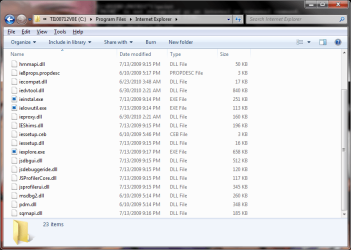
No problem.

I agree. It appears to be the exe file extension. You can download the exe option in the same tutorial above to restore all of it's default associations to hopefully have it fixed afterwards.
 

My Computer My Computer

Computer type
PC/Desktop
Computer Manufacturer/Model Number
Self built custom
OS
64-bit Windows 11 Pro for Workstations
CPU
Intel i7-8700K OC'd to 5 GHz
Motherboard
ASUS ROG Maximus XI Formula Z390
Memory
64 GB (4x16GB) G.SKILL TridentZ RGB DDR4 3600 MHz
Graphics Card(s)
ASUS ROG-STRIX-GTX1080TI-O11G-GAMING
Sound Card
Integrated
Monitor(s) Displays
2 x Samsung Odyssey G7 27"
Screen Resolution
2560x1440
Hard Drives
1TB Samsung 990 PRO M.2,
4TB Samsung 990 PRO PRO M.2,
TerraMaster F8 SSD Plus NAS
PSU
Seasonic Prime Titanium 850W
Case
Thermaltake Core P3
Cooling
Corsair Hydro H115i
Keyboard
Logitech wireless K800
Mouse
Logitech MX Master 4
Internet Speed
2 Gb/s Download and 100 Mb/s Upload
Antivirus
Malwarebyte Anti-Malware Premium
Browser
Google Chrome
Other Info
Logitech Z625 speaker system,
Logitech BRIO 4K Pro webcam,
HP Color LaserJet Pro MFP M477fdn,
APC SMART-UPS RT 1000 XL - SURT1000XLI,
Galaxy S23 Plus phone
TYVM Brinks!!!

it worked lol i actually dowloaded the .exe file u gave out but forgot that registration changes do not take effect until restart...

THANKS!!!
 

My Computer My Computer

Computer Manufacturer/Model Number
Toshiba Satellite....
OS
Windows 7 (may switch to a linux distro)
Memory
3.00
Hard Drives
I have a terabyte......and then what ever is in my laptop
You're most welcome Sauska0. I'm happy to hear that you got it sorted. :)
 

My Computer My Computer

Computer type
PC/Desktop
Computer Manufacturer/Model Number
Self built custom
OS
64-bit Windows 11 Pro for Workstations
CPU
Intel i7-8700K OC'd to 5 GHz
Motherboard
ASUS ROG Maximus XI Formula Z390
Memory
64 GB (4x16GB) G.SKILL TridentZ RGB DDR4 3600 MHz
Graphics Card(s)
ASUS ROG-STRIX-GTX1080TI-O11G-GAMING
Sound Card
Integrated
Monitor(s) Displays
2 x Samsung Odyssey G7 27"
Screen Resolution
2560x1440
Hard Drives
1TB Samsung 990 PRO M.2,
4TB Samsung 990 PRO PRO M.2,
TerraMaster F8 SSD Plus NAS
PSU
Seasonic Prime Titanium 850W
Case
Thermaltake Core P3
Cooling
Corsair Hydro H115i
Keyboard
Logitech wireless K800
Mouse
Logitech MX Master 4
Internet Speed
2 Gb/s Download and 100 Mb/s Upload
Antivirus
Malwarebyte Anti-Malware Premium
Browser
Google Chrome
Other Info
Logitech Z625 speaker system,
Logitech BRIO 4K Pro webcam,
HP Color LaserJet Pro MFP M477fdn,
APC SMART-UPS RT 1000 XL - SURT1000XLI,
Galaxy S23 Plus phone
I'm infinitely sorry to revive this post. However, this is the reason I joined this forum. I installed Blue stacks emulator a few minutes ago and when I tried to open an APK file with it's in-built handler, I ran into the problem detailed in thr OP. All icons and links to shortcuts changed to the handler's. After un-installing the blustax hadnler, the problem persisted. It reporduced itself with every file I tried to open. Luckily forefox opened thru. another game shorcut (link to the maker's site) and saw the above solution.

Downloaded the registry ZIP file from the troubleshooting link and just executed the 'default reg for .LNK' and logged off and logged in. Voila. Sanity restored. Life can continue.

Thanks a ton Brink for your invaluable suggestion :D
 

My Computer My Computer

Computer type
PC/Desktop
Computer Manufacturer/Model Number
Samsung
OS
Win7 Ultimate 64-Bit
CPU
Core - i5 (3rd Gen)
Motherboard
Intel HM75 (Panther Point)
Memory
4GB DDR3 SD RAM (A-Data)
Graphics Card(s)
Intel HD 4000 (On Board)
Hard Drives
500GB
Antivirus
Eset Nod32
Browser
Firefox
Back
Top