
Solved All Control Panels Icon on Desktop

It's not possible for the .reg file to add a desktop icon since it only deletes the registry entries for the Control Panel desktop icon.

Export the keys below, and upload them here. I'll be happy to take a look to see what the icon may be from.

HKEY_CURRENT_USER\Software\Microsoft\Windows\CurrentVersion\Explorer\HideDesktopIcons\NewStartPanel

HKEY_CURRENT_USER\Software\Microsoft\Windows\CurrentVersion\Explorer\HideDesktopIcons\ClassicStartMenu
 

My Computer My Computer

Computer type
PC/Desktop
Computer Manufacturer/Model Number
Self built custom
OS
64-bit Windows 11 Pro for Workstations
CPU
Intel i7-8700K OC'd to 5 GHz
Motherboard
ASUS ROG Maximus XI Formula Z390
Memory
64 GB (4x16GB) G.SKILL TridentZ RGB DDR4 3600 MHz
Graphics Card(s)
ASUS ROG-STRIX-GTX1080TI-O11G-GAMING
Sound Card
Integrated
Monitor(s) Displays
2 x Samsung Odyssey G7 27"
Screen Resolution
2560x1440
Hard Drives
1TB Samsung 990 PRO M.2,
4TB Samsung 990 PRO PRO M.2,
TerraMaster F8 SSD Plus NAS
PSU
Seasonic Prime Titanium 850W
Case
Thermaltake Core P3
Cooling
Corsair Hydro H115i
Keyboard
Logitech wireless K800
Mouse
Logitech MX Master 4
Internet Speed
2 Gb/s Download and 100 Mb/s Upload
Antivirus
Malwarebyte Anti-Malware Premium
Browser
Google Chrome
Other Info
Logitech Z625 speaker system,
Logitech BRIO 4K Pro webcam,
HP Color LaserJet Pro MFP M477fdn,
APC SMART-UPS RT 1000 XL - SURT1000XLI,
Galaxy S23 Plus phone
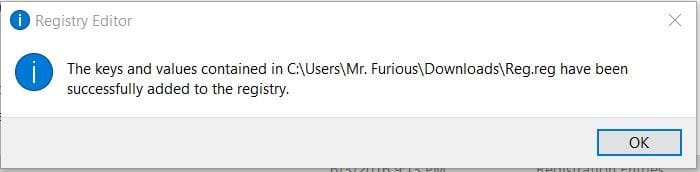
It's not possible for the .reg file to add a desktop icon since it only deletes the registry entries for the Control Panel desktop icon.

Export the keys below, and upload them here. I'll be happy to take a look to see what the icon may be from.

HKEY_CURRENT_USER\Software\Microsoft\Windows\CurrentVersion\Explorer\HideDesktopIcons\NewStartPanel

HKEY_CURRENT_USER\Software\Microsoft\Windows\CurrentVersion\Explorer\HideDesktopIcons\ClassicStartMenu

Here you go.
 

Attachments

My Computer My Computer

Computer type
PC/Desktop
Computer Manufacturer/Model Number
Custom Build
OS
Windows 7 Pro
CPU
Intel [email protected]
Motherboard
ASUS Z97-A
Memory
Kingston Hyper-X FURY 32GB
Graphics Card(s)
ASUS GTX750Ti
Hard Drives
Kingston SSD 250GB
3 Western Digital Caviar Green 2TB
Antivirus
Norton Security Deluxe Version
Browser
FireFox 46.0.1
It looks like you didn't successfully merge the previous .reg file since those entries are still there.

If you like, download, merge, and approve the .reg file below to remove it.

View attachment Reg.reg
 

My Computer My Computer

Computer type
PC/Desktop
Computer Manufacturer/Model Number
Self built custom
OS
64-bit Windows 11 Pro for Workstations
CPU
Intel i7-8700K OC'd to 5 GHz
Motherboard
ASUS ROG Maximus XI Formula Z390
Memory
64 GB (4x16GB) G.SKILL TridentZ RGB DDR4 3600 MHz
Graphics Card(s)
ASUS ROG-STRIX-GTX1080TI-O11G-GAMING
Sound Card
Integrated
Monitor(s) Displays
2 x Samsung Odyssey G7 27"
Screen Resolution
2560x1440
Hard Drives
1TB Samsung 990 PRO M.2,
4TB Samsung 990 PRO PRO M.2,
TerraMaster F8 SSD Plus NAS
PSU
Seasonic Prime Titanium 850W
Case
Thermaltake Core P3
Cooling
Corsair Hydro H115i
Keyboard
Logitech wireless K800
Mouse
Logitech MX Master 4
Internet Speed
2 Gb/s Download and 100 Mb/s Upload
Antivirus
Malwarebyte Anti-Malware Premium
Browser
Google Chrome
Other Info
Logitech Z625 speaker system,
Logitech BRIO 4K Pro webcam,
HP Color LaserJet Pro MFP M477fdn,
APC SMART-UPS RT 1000 XL - SURT1000XLI,
Galaxy S23 Plus phone
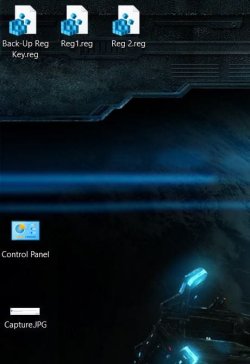
Downloaded, merged and approved...and the Control Panel Icon is back on my desktop.
 

Attachments

  • Capture.JPG
    Capture.JPG
    19.3 KB · Views: 16
  • Capture2.JPG
    Capture2.JPG
    36.4 KB · Views: 16

My Computer My Computer

Computer type
PC/Desktop
Computer Manufacturer/Model Number
Custom Build
OS
Windows 7 Pro
CPU
Intel [email protected]
Motherboard
ASUS Z97-A
Memory
Kingston Hyper-X FURY 32GB
Graphics Card(s)
ASUS GTX750Ti
Hard Drives
Kingston SSD 250GB
3 Western Digital Caviar Green 2TB
Antivirus
Norton Security Deluxe Version
Browser
FireFox 46.0.1
Double check the registry to make sure the two values below are deleted.

Code:
[HKEY_CURRENT_USER\SOFTWARE\Microsoft\Windows\CurrentVersion\Explorer\HideDesktopIcons\ClassicStartMenu]
"[B]{5399E694-6CE5-4D6C-8FCE-1D8870FDCBA0}[/B]"=-
 
 
[HKEY_CURRENT_USER\SOFTWARE\Microsoft\Windows\CurrentVersion\Explorer\HideDesktopIcons\NewStartPanel]
"[B]{5399E694-6CE5-4D6C-8FCE-1D8870FDCBA0}[/B]"=-
 

My Computer My Computer

Computer type
PC/Desktop
Computer Manufacturer/Model Number
Self built custom
OS
64-bit Windows 11 Pro for Workstations
CPU
Intel i7-8700K OC'd to 5 GHz
Motherboard
ASUS ROG Maximus XI Formula Z390
Memory
64 GB (4x16GB) G.SKILL TridentZ RGB DDR4 3600 MHz
Graphics Card(s)
ASUS ROG-STRIX-GTX1080TI-O11G-GAMING
Sound Card
Integrated
Monitor(s) Displays
2 x Samsung Odyssey G7 27"
Screen Resolution
2560x1440
Hard Drives
1TB Samsung 990 PRO M.2,
4TB Samsung 990 PRO PRO M.2,
TerraMaster F8 SSD Plus NAS
PSU
Seasonic Prime Titanium 850W
Case
Thermaltake Core P3
Cooling
Corsair Hydro H115i
Keyboard
Logitech wireless K800
Mouse
Logitech MX Master 4
Internet Speed
2 Gb/s Download and 100 Mb/s Upload
Antivirus
Malwarebyte Anti-Malware Premium
Browser
Google Chrome
Other Info
Logitech Z625 speaker system,
Logitech BRIO 4K Pro webcam,
HP Color LaserJet Pro MFP M477fdn,
APC SMART-UPS RT 1000 XL - SURT1000XLI,
Galaxy S23 Plus phone
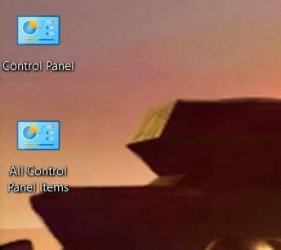
No, they were not. Still there and the values were set to 1. I manually set them to 0 and I'm going to see what happens after a reboot.

EDIT: Still came back, so I searched the registry for any reference to
5399E694-6CE5-4D6C-8FCE-1D8870FDCBA0 and found several others that still had a value of 1. Set them to 0 and rebooting.

EDIT 2: And....no. Reboot reinstates previous values and items still are on desktop. I don't know what to do now, I've exhausted all my options to fix this. I know I could do registry tweaks in Win 7 Pro, so it's not my A/V that's the cause. There's something in Win 10 Pro that prevents tweaking of the registry.
 

Attachments

  • Capture.JPG
    Capture.JPG
    15.6 KB · Views: 8
Last edited:

My Computer My Computer

Computer type
PC/Desktop
Computer Manufacturer/Model Number
Custom Build
OS
Windows 7 Pro
CPU
Intel [email protected]
Motherboard
ASUS Z97-A
Memory
Kingston Hyper-X FURY 32GB
Graphics Card(s)
ASUS GTX750Ti
Hard Drives
Kingston SSD 250GB
3 Western Digital Caviar Green 2TB
Antivirus
Norton Security Deluxe Version
Browser
FireFox 46.0.1
Do you have any all-in-one tweaking type programs installed that may be adding it back from a rouge setting in it?
 

My Computer My Computer

Computer type
PC/Desktop
Computer Manufacturer/Model Number
Self built custom
OS
64-bit Windows 11 Pro for Workstations
CPU
Intel i7-8700K OC'd to 5 GHz
Motherboard
ASUS ROG Maximus XI Formula Z390
Memory
64 GB (4x16GB) G.SKILL TridentZ RGB DDR4 3600 MHz
Graphics Card(s)
ASUS ROG-STRIX-GTX1080TI-O11G-GAMING
Sound Card
Integrated
Monitor(s) Displays
2 x Samsung Odyssey G7 27"
Screen Resolution
2560x1440
Hard Drives
1TB Samsung 990 PRO M.2,
4TB Samsung 990 PRO PRO M.2,
TerraMaster F8 SSD Plus NAS
PSU
Seasonic Prime Titanium 850W
Case
Thermaltake Core P3
Cooling
Corsair Hydro H115i
Keyboard
Logitech wireless K800
Mouse
Logitech MX Master 4
Internet Speed
2 Gb/s Download and 100 Mb/s Upload
Antivirus
Malwarebyte Anti-Malware Premium
Browser
Google Chrome
Other Info
Logitech Z625 speaker system,
Logitech BRIO 4K Pro webcam,
HP Color LaserJet Pro MFP M477fdn,
APC SMART-UPS RT 1000 XL - SURT1000XLI,
Galaxy S23 Plus phone
Please forgive my intrusion here but I have found this thread very interesting (perhaps i need to get a life:)
I assumed Furious 1964 was runnineg Windows 7 but he/she is referring to Windows 10 in the latest post. Also there is a different desktop image in the last post. Probably all insignificant but thought I would just raise it!
 

My Computer My Computer

Computer type
PC/Desktop
OS
Microsoft Windows 7 Home Premium 64-bit 7601 Multiprocessor Free Service Pack 1
CPU
Intel(R) Core(TM) i7-3770 CPU @ 3.40GHz
Motherboard
ASUSTeK COMPUTER INC. P8H77-M
Memory
8.00 GB
Graphics Card(s)
Intel(R) HD Graphics 4000
Sound Card
On Board
Monitor(s) Displays
Dell 24"
Screen Resolution
1920 x 1080
Hard Drives
(1) INTEL SSDSC2CT180A3 ATA Device (2) ST500DM002-1BD142 ATA Device (3) WDC WD3200AAKS-75L9A0 ATA Device (4) Generic- Compact Flash USB Device (5) Generic- MS/MS-Pro USB Device (6) Generic- SD/MMC USB Device (7) Generic- SM/xD-Picture USB
PSU
500w Corsair
Case
Cooler Master
Cooling
3 Fans
Keyboard
Logitech MK300
Mouse
Logitech WOM
Internet Speed
75Mb
Antivirus
Norton 360
Browser
Firefox, Opera, IE
Do you have any all-in-one tweaking type programs installed that may be adding it back from a rouge setting in it?

No, I don't have anything like that either installed or running in the background. I have Norton Utilities, but it has to be started manually as no scheduled tasks are set for it. And as I previously stated, Norton Security (my A/V and Firewall) doesn't prevent me from editing the registry since it never did in Win 7 Pro.
 

My Computer My Computer

Computer type
PC/Desktop
Computer Manufacturer/Model Number
Custom Build
OS
Windows 7 Pro
CPU
Intel [email protected]
Motherboard
ASUS Z97-A
Memory
Kingston Hyper-X FURY 32GB
Graphics Card(s)
ASUS GTX750Ti
Hard Drives
Kingston SSD 250GB
3 Western Digital Caviar Green 2TB
Antivirus
Norton Security Deluxe Version
Browser
FireFox 46.0.1
Please forgive my intrusion here but I have found this thread very interesting (perhaps i need to get a life:)
I assumed Furious 1964 was runnineg Windows 7 but he/she is referring to Windows 10 in the latest post. Also there is a different desktop image in the last post. Probably all insignificant but thought I would just raise it!

Upgraded to Win 10 Pro last weekend. Did a clean install on my laptop, but just an upgrade on my main PC. Both, however, have the same recurring problem.

As for the desktop background, I have it set to cycle several pictures as the background every 10 minutes.
 

My Computer My Computer

Computer type
PC/Desktop
Computer Manufacturer/Model Number
Custom Build
OS
Windows 7 Pro
CPU
Intel [email protected]
Motherboard
ASUS Z97-A
Memory
Kingston Hyper-X FURY 32GB
Graphics Card(s)
ASUS GTX750Ti
Hard Drives
Kingston SSD 250GB
3 Western Digital Caviar Green 2TB
Antivirus
Norton Security Deluxe Version
Browser
FireFox 46.0.1
So as your first post here was 23 hours ago can I assume that the problem you have now has only occured since you upgraded to Windows 10? I see that one was an upgrade and the other machine was a clean install. Can I ask where the disk came from for the clean install and did you make a backup of your systems before the new install to Win 10?
 

My Computer My Computer

Computer type
PC/Desktop
OS
Microsoft Windows 7 Home Premium 64-bit 7601 Multiprocessor Free Service Pack 1
CPU
Intel(R) Core(TM) i7-3770 CPU @ 3.40GHz
Motherboard
ASUSTeK COMPUTER INC. P8H77-M
Memory
8.00 GB
Graphics Card(s)
Intel(R) HD Graphics 4000
Sound Card
On Board
Monitor(s) Displays
Dell 24"
Screen Resolution
1920 x 1080
Hard Drives
(1) INTEL SSDSC2CT180A3 ATA Device (2) ST500DM002-1BD142 ATA Device (3) WDC WD3200AAKS-75L9A0 ATA Device (4) Generic- Compact Flash USB Device (5) Generic- MS/MS-Pro USB Device (6) Generic- SD/MMC USB Device (7) Generic- SM/xD-Picture USB
PSU
500w Corsair
Case
Cooler Master
Cooling
3 Fans
Keyboard
Logitech MK300
Mouse
Logitech WOM
Internet Speed
75Mb
Antivirus
Norton 360
Browser
Firefox, Opera, IE
So as your first post here was 23 hours ago can I assume that the problem you have now has only occured since you upgraded to Windows 10? I see that one was an upgrade and the other machine was a clean install. Can I ask where the disk came from for the clean install and did you make a backup of your systems before the new install to Win 10?

Downloaded the ISO directly from Microsoft a few weeks ago and the clean install of my laptop was done 3 to 4 weeks ago. That problem has been occurring on my laptop since the upgrade. Don't have a back-up of Win 7 Pro for it, but I have the disk and all the hp programs...so reinstalling Win 7 Pro on my laptop is no problem. I didn't have many programs on it as it was a gaming laptop. My main I can revert to Win 7 Pro if I want to go back.

When I made the install disk, I had the program write and verify it. Everything came up perfect.
 

My Computer My Computer

Computer type
PC/Desktop
Computer Manufacturer/Model Number
Custom Build
OS
Windows 7 Pro
CPU
Intel [email protected]
Motherboard
ASUS Z97-A
Memory
Kingston Hyper-X FURY 32GB
Graphics Card(s)
ASUS GTX750Ti
Hard Drives
Kingston SSD 250GB
3 Western Digital Caviar Green 2TB
Antivirus
Norton Security Deluxe Version
Browser
FireFox 46.0.1
Brink is still online so perhaps he will have a view now we seem to have established that it appears to be a Windows 10 problem!
 

My Computer My Computer

Computer type
PC/Desktop
OS
Microsoft Windows 7 Home Premium 64-bit 7601 Multiprocessor Free Service Pack 1
CPU
Intel(R) Core(TM) i7-3770 CPU @ 3.40GHz
Motherboard
ASUSTeK COMPUTER INC. P8H77-M
Memory
8.00 GB
Graphics Card(s)
Intel(R) HD Graphics 4000
Sound Card
On Board
Monitor(s) Displays
Dell 24"
Screen Resolution
1920 x 1080
Hard Drives
(1) INTEL SSDSC2CT180A3 ATA Device (2) ST500DM002-1BD142 ATA Device (3) WDC WD3200AAKS-75L9A0 ATA Device (4) Generic- Compact Flash USB Device (5) Generic- MS/MS-Pro USB Device (6) Generic- SD/MMC USB Device (7) Generic- SM/xD-Picture USB
PSU
500w Corsair
Case
Cooler Master
Cooling
3 Fans
Keyboard
Logitech MK300
Mouse
Logitech WOM
Internet Speed
75Mb
Antivirus
Norton 360
Browser
Firefox, Opera, IE
Furious,

Do you notice the desktop icon appearing after any specific action?

What happens when you delete the desktop icon? Does it still reappear again later?

If yes to the 2nd question, then as a test, create a new account and sign in to it to see if the desktop icon shows up on it as well.
 

My Computer My Computer

Computer type
PC/Desktop
Computer Manufacturer/Model Number
Self built custom
OS
64-bit Windows 11 Pro for Workstations
CPU
Intel i7-8700K OC'd to 5 GHz
Motherboard
ASUS ROG Maximus XI Formula Z390
Memory
64 GB (4x16GB) G.SKILL TridentZ RGB DDR4 3600 MHz
Graphics Card(s)
ASUS ROG-STRIX-GTX1080TI-O11G-GAMING
Sound Card
Integrated
Monitor(s) Displays
2 x Samsung Odyssey G7 27"
Screen Resolution
2560x1440
Hard Drives
1TB Samsung 990 PRO M.2,
4TB Samsung 990 PRO PRO M.2,
TerraMaster F8 SSD Plus NAS
PSU
Seasonic Prime Titanium 850W
Case
Thermaltake Core P3
Cooling
Corsair Hydro H115i
Keyboard
Logitech wireless K800
Mouse
Logitech MX Master 4
Internet Speed
2 Gb/s Download and 100 Mb/s Upload
Antivirus
Malwarebyte Anti-Malware Premium
Browser
Google Chrome
Other Info
Logitech Z625 speaker system,
Logitech BRIO 4K Pro webcam,
HP Color LaserJet Pro MFP M477fdn,
APC SMART-UPS RT 1000 XL - SURT1000XLI,
Galaxy S23 Plus phone
All I have to do is boot up and it's there. When I delete it, it may randomly come back when I work on the PC. But that's a small random chance. Will try to create a new account and see what happens.
 

My Computer My Computer

Computer type
PC/Desktop
Computer Manufacturer/Model Number
Custom Build
OS
Windows 7 Pro
CPU
Intel [email protected]
Motherboard
ASUS Z97-A
Memory
Kingston Hyper-X FURY 32GB
Graphics Card(s)
ASUS GTX750Ti
Hard Drives
Kingston SSD 250GB
3 Western Digital Caviar Green 2TB
Antivirus
Norton Security Deluxe Version
Browser
FireFox 46.0.1
Back
Top