Solved All Control Panels Icon on Desktop

downindm

New member
Local time
3:27 AM
Messages
8
Computer is an Acer Aspire 5720Z running Windows 7 SP1 (with all current updates). Somehow I have ended up with an "All Control Panel Items" icon on my desktop that I can't get rid of. I went in to the Desktop Icons panel and verified that "Control Panel" and "Allow themes to change desktop icons" were both unchecked. They are. So I checked both, applied (at which point ANOTHER All Control Panel Items" icon appeared on my desktop for a total of 2 of them), then unchecked both and applied (and the duplicate disappeared) - still leaving one on the desktop. I also have tried switching themes, and no mater what is selected, the control panel icon remains. I found a MS article on it and also ran a virus scan on the system with Avira AV Premium 2012 as well as SuperAntiSpyware (system is clean).

Any ideas on how to get rid of it? It is functional and takes me to the "classic view" of control panels.
 

My Computer My Computer

OS
Windows 7 Home Premium 32bit

My Computer My Computer

Computer type
PC/Desktop
Computer Manufacturer/Model Number
Self built custom
OS
64-bit Windows 11 Pro for Workstations
CPU
Intel i7-8700K OC'd to 5 GHz
Motherboard
ASUS ROG Maximus XI Formula Z390
Memory
64 GB (4x16GB) G.SKILL TridentZ RGB DDR4 3600 MHz
Graphics Card(s)
ASUS ROG-STRIX-GTX1080TI-O11G-GAMING
Sound Card
Integrated
Monitor(s) Displays
2 x Samsung Odyssey G7 27"
Screen Resolution
2560x1440
Hard Drives
1TB Samsung 990 PRO M.2,
4TB Samsung 990 PRO PRO M.2,
TerraMaster F8 SSD Plus NAS
PSU
Seasonic Prime Titanium 850W
Case
Thermaltake Core P3
Cooling
Corsair Hydro H115i
Keyboard
Logitech wireless K800
Mouse
Logitech MX Master 4
Internet Speed
2 Gb/s Download and 100 Mb/s Upload
Antivirus
Malwarebyte Anti-Malware Premium
Browser
Google Chrome
Other Info
Logitech Z625 speaker system,
Logitech BRIO 4K Pro webcam,
HP Color LaserJet Pro MFP M477fdn,
APC SMART-UPS RT 1000 XL - SURT1000XLI,
Galaxy S23 Plus phone
Hello Downindm, and welcome to Seven Forums.

You might see if using the REG file from step 15 in OPTION TWO in the tutorial below may be able to remove the Control Panel icon for you afterwards.

Yes, I had tried that as well (the one for all users) - applied and restarted, and no change.
 

My Computer My Computer

OS
Windows 7 Home Premium 32bit
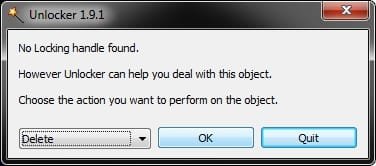
In that case, you might see if using the free program Unlocker on it may be able to delete it.
 

My Computer My Computer

Computer type
PC/Desktop
Computer Manufacturer/Model Number
Self built custom
OS
64-bit Windows 11 Pro for Workstations
CPU
Intel i7-8700K OC'd to 5 GHz
Motherboard
ASUS ROG Maximus XI Formula Z390
Memory
64 GB (4x16GB) G.SKILL TridentZ RGB DDR4 3600 MHz
Graphics Card(s)
ASUS ROG-STRIX-GTX1080TI-O11G-GAMING
Sound Card
Integrated
Monitor(s) Displays
2 x Samsung Odyssey G7 27"
Screen Resolution
2560x1440
Hard Drives
1TB Samsung 990 PRO M.2,
4TB Samsung 990 PRO PRO M.2,
TerraMaster F8 SSD Plus NAS
PSU
Seasonic Prime Titanium 850W
Case
Thermaltake Core P3
Cooling
Corsair Hydro H115i
Keyboard
Logitech wireless K800
Mouse
Logitech MX Master 4
Internet Speed
2 Gb/s Download and 100 Mb/s Upload
Antivirus
Malwarebyte Anti-Malware Premium
Browser
Google Chrome
Other Info
Logitech Z625 speaker system,
Logitech BRIO 4K Pro webcam,
HP Color LaserJet Pro MFP M477fdn,
APC SMART-UPS RT 1000 XL - SURT1000XLI,
Galaxy S23 Plus phone
Downloaded and installed "Unlocker". It brought up a dialogue to choose a location... I went to the user folder > desktop and it brought up 2 explorer.exe processes (with different ids). Is this normal or should I choose something else? Never used this before and it's not exactly self explanatory.

I checked the task manager and only see one instance of explorer.exe running in the process list.
 

My Computer My Computer

OS
Windows 7 Home Premium 32bit
After installing Unlocker, you should be able to right click on the Control Panel shortcut, click on Unlocker, click on Yes for UAC if prompted, select Delete, and click on OK to delete it.

unlocker.jpg
 

My Computer My Computer

Computer type
PC/Desktop
Computer Manufacturer/Model Number
Self built custom
OS
64-bit Windows 11 Pro for Workstations
CPU
Intel i7-8700K OC'd to 5 GHz
Motherboard
ASUS ROG Maximus XI Formula Z390
Memory
64 GB (4x16GB) G.SKILL TridentZ RGB DDR4 3600 MHz
Graphics Card(s)
ASUS ROG-STRIX-GTX1080TI-O11G-GAMING
Sound Card
Integrated
Monitor(s) Displays
2 x Samsung Odyssey G7 27"
Screen Resolution
2560x1440
Hard Drives
1TB Samsung 990 PRO M.2,
4TB Samsung 990 PRO PRO M.2,
TerraMaster F8 SSD Plus NAS
PSU
Seasonic Prime Titanium 850W
Case
Thermaltake Core P3
Cooling
Corsair Hydro H115i
Keyboard
Logitech wireless K800
Mouse
Logitech MX Master 4
Internet Speed
2 Gb/s Download and 100 Mb/s Upload
Antivirus
Malwarebyte Anti-Malware Premium
Browser
Google Chrome
Other Info
Logitech Z625 speaker system,
Logitech BRIO 4K Pro webcam,
HP Color LaserJet Pro MFP M477fdn,
APC SMART-UPS RT 1000 XL - SURT1000XLI,
Galaxy S23 Plus phone
That works for other icons on my desktop, however when right clicking on the control panels icon, the only options I get are "Open" and "Create Shortcut" - nothing else. I'm no windows expert, but I am wondering, is it possible I have a duplicate entry in the registry somewhere (I'd have no idea where to look though)?
 

My Computer My Computer

OS
Windows 7 Home Premium 32bit
You could use the Find and Find Next feature in regedit to search for all {5399E694-6CE5-4D6C-8FCE-1D8870FDCBA0} entries.

If {5399E694-6CE5-4D6C-8FCE-1D8870FDCBA0} is found in the left pane of regedit, then ignore it and use "Find Next" to continue searching.

If {5399E694-6CE5-4D6C-8FCE-1D8870FDCBA0} is found in the right pane of regedit, then make sure it's "Data" value is set to 1 instead of 0.
 

My Computer My Computer

Computer type
PC/Desktop
Computer Manufacturer/Model Number
Self built custom
OS
64-bit Windows 11 Pro for Workstations
CPU
Intel i7-8700K OC'd to 5 GHz
Motherboard
ASUS ROG Maximus XI Formula Z390
Memory
64 GB (4x16GB) G.SKILL TridentZ RGB DDR4 3600 MHz
Graphics Card(s)
ASUS ROG-STRIX-GTX1080TI-O11G-GAMING
Sound Card
Integrated
Monitor(s) Displays
2 x Samsung Odyssey G7 27"
Screen Resolution
2560x1440
Hard Drives
1TB Samsung 990 PRO M.2,
4TB Samsung 990 PRO PRO M.2,
TerraMaster F8 SSD Plus NAS
PSU
Seasonic Prime Titanium 850W
Case
Thermaltake Core P3
Cooling
Corsair Hydro H115i
Keyboard
Logitech wireless K800
Mouse
Logitech MX Master 4
Internet Speed
2 Gb/s Download and 100 Mb/s Upload
Antivirus
Malwarebyte Anti-Malware Premium
Browser
Google Chrome
Other Info
Logitech Z625 speaker system,
Logitech BRIO 4K Pro webcam,
HP Color LaserJet Pro MFP M477fdn,
APC SMART-UPS RT 1000 XL - SURT1000XLI,
Galaxy S23 Plus phone
All entries found in the right pane of regedit were already set to "1" as they should be.
 

My Computer My Computer

OS
Windows 7 Home Premium 32bit
Hmm, well I'm about stumped. You could try doing a system restore using a restore point (if available) dated before this shortcut appeared on your desktop to hopefully remove it.
 

My Computer My Computer

Computer type
PC/Desktop
Computer Manufacturer/Model Number
Self built custom
OS
64-bit Windows 11 Pro for Workstations
CPU
Intel i7-8700K OC'd to 5 GHz
Motherboard
ASUS ROG Maximus XI Formula Z390
Memory
64 GB (4x16GB) G.SKILL TridentZ RGB DDR4 3600 MHz
Graphics Card(s)
ASUS ROG-STRIX-GTX1080TI-O11G-GAMING
Sound Card
Integrated
Monitor(s) Displays
2 x Samsung Odyssey G7 27"
Screen Resolution
2560x1440
Hard Drives
1TB Samsung 990 PRO M.2,
4TB Samsung 990 PRO PRO M.2,
TerraMaster F8 SSD Plus NAS
PSU
Seasonic Prime Titanium 850W
Case
Thermaltake Core P3
Cooling
Corsair Hydro H115i
Keyboard
Logitech wireless K800
Mouse
Logitech MX Master 4
Internet Speed
2 Gb/s Download and 100 Mb/s Upload
Antivirus
Malwarebyte Anti-Malware Premium
Browser
Google Chrome
Other Info
Logitech Z625 speaker system,
Logitech BRIO 4K Pro webcam,
HP Color LaserJet Pro MFP M477fdn,
APC SMART-UPS RT 1000 XL - SURT1000XLI,
Galaxy S23 Plus phone
Thanks for all the help (I'm actually a Mac guy - this is my girlfriend's computer)... One final thing occurred to me - is this an actual program that perhaps got moved from it's original location (maybe somewhere in the windows folder)? And the checkbox to display it on the desktop simply creates some sort of symbolic link or shortcut to the actual program? That might explain the behavior I'm seeing.
 

My Computer My Computer

OS
Windows 7 Home Premium 32bit
You're welcome.

From your description, it sounds like the normal "Control Panel" desktop icon, but it does have me wonder why you do not have a "Delete" option and if your's is named "All Control Panel Items" instead of like below.
desktop-icon.jpg
I attached a REG file that will also remove the other type of Control Panel shortcuts that it may be from the desktop. If it doesn't remove it after merging the REG and restarting the computer, then if you like, please export the keys below from your registry and upload them. I'll be happy to take a look at them to see if one of the entries may be the culprit.


HKEY_CURRENT_USER\Software\Microsoft\Windows\CurrentVersion\Explorer\HideDesktopIcons\NewStartPanel

HKEY_CURRENT_USER\Software\Microsoft\Windows\CurrentVersion\Explorer\HideDesktopIcons\ClassicStartMenu

HKEY_LOCAL_MACHINE\SOFTWARE\Microsoft\Windows\CurrentVersion\Explorer\HideDesktopIcons\NewStartPanel

HKEY_LOCAL_MACHINE\SOFTWARE\Microsoft\Windows\CurrentVersion\Explorer\HideDesktopIcons\ClassicStartMenu
 

Attachments

My Computer My Computer

Computer type
PC/Desktop
Computer Manufacturer/Model Number
Self built custom
OS
64-bit Windows 11 Pro for Workstations
CPU
Intel i7-8700K OC'd to 5 GHz
Motherboard
ASUS ROG Maximus XI Formula Z390
Memory
64 GB (4x16GB) G.SKILL TridentZ RGB DDR4 3600 MHz
Graphics Card(s)
ASUS ROG-STRIX-GTX1080TI-O11G-GAMING
Sound Card
Integrated
Monitor(s) Displays
2 x Samsung Odyssey G7 27"
Screen Resolution
2560x1440
Hard Drives
1TB Samsung 990 PRO M.2,
4TB Samsung 990 PRO PRO M.2,
TerraMaster F8 SSD Plus NAS
PSU
Seasonic Prime Titanium 850W
Case
Thermaltake Core P3
Cooling
Corsair Hydro H115i
Keyboard
Logitech wireless K800
Mouse
Logitech MX Master 4
Internet Speed
2 Gb/s Download and 100 Mb/s Upload
Antivirus
Malwarebyte Anti-Malware Premium
Browser
Google Chrome
Other Info
Logitech Z625 speaker system,
Logitech BRIO 4K Pro webcam,
HP Color LaserJet Pro MFP M477fdn,
APC SMART-UPS RT 1000 XL - SURT1000XLI,
Galaxy S23 Plus phone
Yes, I just noticed the one stuck on the desktop is called "All Control Panel Items" whereas the one that appears or disappears with the checkbox is simply labeled "Control Panels". That was the key in finding the solution! I found the answer here:

Windows 7 - How do I get rid of an "All Control Panel Items" - Microsoft Answers

From that page:
Code:
Open Registry Editor (Regedit.exe) and navigate to:

[HKEY_LOCAL_MACHINE\SOFTWARE\Microsoft\Windows\CurrentVersion\Explorer\Desktop\NameSpace]

Backup the key by exporting to a REG file.

Expand the above branch, and delete the following subkey:

[B]{21EC2020-3AEA-1069-A2DD-08002B30309D}
[/B](The above is the GUID for "All Control Panel Items" Namespace)

Similarly, delete the entry here (if found)

[HKEY_CURRENT_USER\SOFTWARE\Microsoft\Windows\CurrentVersion\Explorer\Desktop\NameSpace]

Refresh the Desktop

I too used Laplink Image Assistant to do the upgrade from Vista to 7. Looks like that may have been the culprit!
 

My Computer My Computer

OS
Windows 7 Home Premium 32bit
That's great news. I'm happy to hear that you got it sorted. :)

Yep, that's the one I was thinking it was. It's included in the REG file above to remove it if anyone else needs to remove it.
 

My Computer My Computer

Computer type
PC/Desktop
Computer Manufacturer/Model Number
Self built custom
OS
64-bit Windows 11 Pro for Workstations
CPU
Intel i7-8700K OC'd to 5 GHz
Motherboard
ASUS ROG Maximus XI Formula Z390
Memory
64 GB (4x16GB) G.SKILL TridentZ RGB DDR4 3600 MHz
Graphics Card(s)
ASUS ROG-STRIX-GTX1080TI-O11G-GAMING
Sound Card
Integrated
Monitor(s) Displays
2 x Samsung Odyssey G7 27"
Screen Resolution
2560x1440
Hard Drives
1TB Samsung 990 PRO M.2,
4TB Samsung 990 PRO PRO M.2,
TerraMaster F8 SSD Plus NAS
PSU
Seasonic Prime Titanium 850W
Case
Thermaltake Core P3
Cooling
Corsair Hydro H115i
Keyboard
Logitech wireless K800
Mouse
Logitech MX Master 4
Internet Speed
2 Gb/s Download and 100 Mb/s Upload
Antivirus
Malwarebyte Anti-Malware Premium
Browser
Google Chrome
Other Info
Logitech Z625 speaker system,
Logitech BRIO 4K Pro webcam,
HP Color LaserJet Pro MFP M477fdn,
APC SMART-UPS RT 1000 XL - SURT1000XLI,
Galaxy S23 Plus phone
Thanks again for all the help!!! These forums are a great resource!
 

My Computer My Computer

OS
Windows 7 Home Premium 32bit
This didn't work for me as I don't have that entry. Any suggestions?
 

My Computer My Computer

Computer type
PC/Desktop
Computer Manufacturer/Model Number
Custom Build
OS
Windows 7 Pro
CPU
Intel [email protected]
Motherboard
ASUS Z97-A
Memory
Kingston Hyper-X FURY 32GB
Graphics Card(s)
ASUS GTX750Ti
Hard Drives
Kingston SSD 250GB
3 Western Digital Caviar Green 2TB
Antivirus
Norton Security Deluxe Version
Browser
FireFox 46.0.1

My Computer My Computer

Computer type
PC/Desktop
Computer Manufacturer/Model Number
Self built custom
OS
64-bit Windows 11 Pro for Workstations
CPU
Intel i7-8700K OC'd to 5 GHz
Motherboard
ASUS ROG Maximus XI Formula Z390
Memory
64 GB (4x16GB) G.SKILL TridentZ RGB DDR4 3600 MHz
Graphics Card(s)
ASUS ROG-STRIX-GTX1080TI-O11G-GAMING
Sound Card
Integrated
Monitor(s) Displays
2 x Samsung Odyssey G7 27"
Screen Resolution
2560x1440
Hard Drives
1TB Samsung 990 PRO M.2,
4TB Samsung 990 PRO PRO M.2,
TerraMaster F8 SSD Plus NAS
PSU
Seasonic Prime Titanium 850W
Case
Thermaltake Core P3
Cooling
Corsair Hydro H115i
Keyboard
Logitech wireless K800
Mouse
Logitech MX Master 4
Internet Speed
2 Gb/s Download and 100 Mb/s Upload
Antivirus
Malwarebyte Anti-Malware Premium
Browser
Google Chrome
Other Info
Logitech Z625 speaker system,
Logitech BRIO 4K Pro webcam,
HP Color LaserJet Pro MFP M477fdn,
APC SMART-UPS RT 1000 XL - SURT1000XLI,
Galaxy S23 Plus phone
Every now and then, randomly, the "All Control Panel Items" Icon shows up on the desktops of both my main PC and my laptop. I would like to know how to stop that behavior. I tried the suggestion, but I don't have the entry listed.
 

My Computer My Computer

Computer type
PC/Desktop
Computer Manufacturer/Model Number
Custom Build
OS
Windows 7 Pro
CPU
Intel [email protected]
Motherboard
ASUS Z97-A
Memory
Kingston Hyper-X FURY 32GB
Graphics Card(s)
ASUS GTX750Ti
Hard Drives
Kingston SSD 250GB
3 Western Digital Caviar Green 2TB
Antivirus
Norton Security Deluxe Version
Browser
FireFox 46.0.1

My Computer My Computer

Computer type
PC/Desktop
Computer Manufacturer/Model Number
Self built custom
OS
64-bit Windows 11 Pro for Workstations
CPU
Intel i7-8700K OC'd to 5 GHz
Motherboard
ASUS ROG Maximus XI Formula Z390
Memory
64 GB (4x16GB) G.SKILL TridentZ RGB DDR4 3600 MHz
Graphics Card(s)
ASUS ROG-STRIX-GTX1080TI-O11G-GAMING
Sound Card
Integrated
Monitor(s) Displays
2 x Samsung Odyssey G7 27"
Screen Resolution
2560x1440
Hard Drives
1TB Samsung 990 PRO M.2,
4TB Samsung 990 PRO PRO M.2,
TerraMaster F8 SSD Plus NAS
PSU
Seasonic Prime Titanium 850W
Case
Thermaltake Core P3
Cooling
Corsair Hydro H115i
Keyboard
Logitech wireless K800
Mouse
Logitech MX Master 4
Internet Speed
2 Gb/s Download and 100 Mb/s Upload
Antivirus
Malwarebyte Anti-Malware Premium
Browser
Google Chrome
Other Info
Logitech Z625 speaker system,
Logitech BRIO 4K Pro webcam,
HP Color LaserJet Pro MFP M477fdn,
APC SMART-UPS RT 1000 XL - SURT1000XLI,
Galaxy S23 Plus phone
Now I'm pissed. You said to download that reg file to get rid of it and all it did was add ANOTHER icon that I had to delete.
 

My Computer My Computer

Computer type
PC/Desktop
Computer Manufacturer/Model Number
Custom Build
OS
Windows 7 Pro
CPU
Intel [email protected]
Motherboard
ASUS Z97-A
Memory
Kingston Hyper-X FURY 32GB
Graphics Card(s)
ASUS GTX750Ti
Hard Drives
Kingston SSD 250GB
3 Western Digital Caviar Green 2TB
Antivirus
Norton Security Deluxe Version
Browser
FireFox 46.0.1
Back
Top