Reset all accounts and start account wizard on next start.

Psyfer9983

New member
Local time
1:27 AM
Messages
1
Hello, first off I'm new. Second and the reason for this post is that I work on PC. I do system reloads, rebuilds, and build new custom systems. I would like to know if any body knows how to delete all accounts and start the account wizard that runs when Windows starts for the first time. The reason for this is that I have to make an account to install drivers, programs, etc.. before the end user receives the final product. I would like a way to delete all accounts and start the account wizard, like it does for the first time run of Windows, for the end user. Any help would be great. Also, if this is in the wrong place, please direct me to the correct category. THANKS!!!
 

My Computer My Computer

At a glance

Windows 7 Home Premium x64Intel Core i7-740Qm, 1.73-3GHz6GBNvidia GeForce GTX 460M, 1.5GB (dedicated card)
Computer Manufacturer/Model Number
ASUS G53Jw
OS
Windows 7 Home Premium x64
CPU
Intel Core i7-740Qm, 1.73-3GHz
Memory
6GB
Graphics Card(s)
Nvidia GeForce GTX 460M, 1.5GB (dedicated card)
Monitor(s) Displays
15.6" FHD/LED BL (HD 1080p)
Why not just create a new admin account in the owner's name, delete the one you made, then let the customer add others as required.
 

My Computer My Computer

At a glance

Win7 H.Prem. 32bit+SP1
Computer Manufacturer/Model Number
Look in my Signature.
OS
Win7 H.Prem. 32bit+SP1
Why not just create a new admin account in the owner's name, delete the one you made, then let the customer add others as required.

Because most customers will never do this and just end up running the admin account instead...which is kinda unsafe if they're not Windows experts... :zip:
 

My Computer My Computer

At a glance

Windows 7 Professional SP1 32-bitIntel Core 2 Duo E6600 2.4GHz4GB DDR2-667 (4x1GB in dual-channel config)nVidia GeForce 9800 GT
Computer type
PC/Desktop
Computer Manufacturer/Model Number
Custom-built
OS
Windows 7 Professional SP1 32-bit
CPU
Intel Core 2 Duo E6600 2.4GHz
Motherboard
Asus PL5D2
Memory
4GB DDR2-667 (4x1GB in dual-channel config)
Graphics Card(s)
nVidia GeForce 9800 GT
Sound Card
Creative X-Fi XtremeMusic
Monitor(s) Displays
Acer P236H
Screen Resolution
1920x1200 (DVI)
Hard Drives
OCZ SSD Vertex Plus 60GB SATA (Firmware 3.55), 64MB cache
Hitachi HD321KJ SATA, 320GB, 7200rpm, 16MB cache
PSU
Antec TruePower 2.0
Case
Cooler Master Centurion
Cooling
Too many fans
Keyboard
Standard
Mouse
Microsoft wireless optical mouse
Internet Speed
AT&T U-verse (18mbit/sec)
Antivirus
Microsoft Security Essentials
Browser
Firefox
Other Info
Other devices:
Compaq CQ-60 laptop
Google Nexus 7 (2012) tablet
Nvidia SHIELD tablet (US/LTE)
Hardkernel ODROID-XU single-board computer (Samsung Exynos 5420)
Every OS must have at least one admin account, its up to the owner to decide otherwise.
 

My Computer My Computer

At a glance

Win7 H.Prem. 32bit+SP1
Computer Manufacturer/Model Number
Look in my Signature.
OS
Win7 H.Prem. 32bit+SP1
True, you got me there. But I can just see customers complaining about whichever generic account name they end up with and wanting to know how they can change the name. :sarc:

Anyway, I don't even know how to get the account wizard to run again other than by using SysPrep. I'm not familiar with it and only understand it's used to generalize an existing system and make it hardware-independent, so it can be transferred to different hardware and allowed to re-detect all necessary drivers. (Part of that process also involves making Windows become "virgin" again and run like it does for the first time.)
 

My Computer My Computer

At a glance

Windows 7 Professional SP1 32-bitIntel Core 2 Duo E6600 2.4GHz4GB DDR2-667 (4x1GB in dual-channel config)nVidia GeForce 9800 GT
Computer type
PC/Desktop
Computer Manufacturer/Model Number
Custom-built
OS
Windows 7 Professional SP1 32-bit
CPU
Intel Core 2 Duo E6600 2.4GHz
Motherboard
Asus PL5D2
Memory
4GB DDR2-667 (4x1GB in dual-channel config)
Graphics Card(s)
nVidia GeForce 9800 GT
Sound Card
Creative X-Fi XtremeMusic
Monitor(s) Displays
Acer P236H
Screen Resolution
1920x1200 (DVI)
Hard Drives
OCZ SSD Vertex Plus 60GB SATA (Firmware 3.55), 64MB cache
Hitachi HD321KJ SATA, 320GB, 7200rpm, 16MB cache
PSU
Antec TruePower 2.0
Case
Cooler Master Centurion
Cooling
Too many fans
Keyboard
Standard
Mouse
Microsoft wireless optical mouse
Internet Speed
AT&T U-verse (18mbit/sec)
Antivirus
Microsoft Security Essentials
Browser
Firefox
Other Info
Other devices:
Compaq CQ-60 laptop
Google Nexus 7 (2012) tablet
Nvidia SHIELD tablet (US/LTE)
Hardkernel ODROID-XU single-board computer (Samsung Exynos 5420)
I have never heard of an account wizard, unless its on other OS types other than Windows.
 

My Computer My Computer

At a glance

Win7 H.Prem. 32bit+SP1
Computer Manufacturer/Model Number
Look in my Signature.
OS
Win7 H.Prem. 32bit+SP1
Hi Psyfer, welcome to the Seven Forums.

This is in fact quite easy procedure. Do like this:

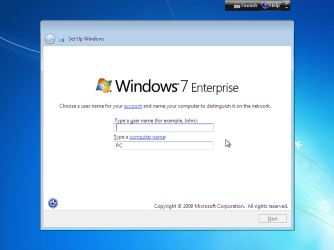
  • When Windows 7 installation, after a few reboots, reaches the point where it asks credentials for the initial account and computer name (see the screenshot below), instead of creating an account just press CTRL + SHIFT + F3:
    .
    Audit_1.png
    .
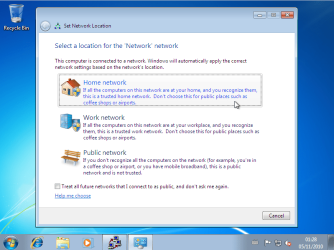
  • This makes Windows to reboot into a so called Audit Mode. No user accounts are created, Windows is now using the built-in Administrator account. When Audit Mode starts, choose your preferred network and click Cancel when asked if you want to create / join Homegroup (notice that these two steps are shown only if the PC is connected to the network / Internet. If not, proceed from next step):
    .
    Audit_4.png
    .
    audit_5.png
    .
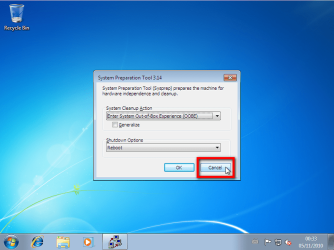
  • Click Cancel to close System Preparation Tool for now:
    .
    Audit_3.png
    .
  • Do all your modifications, install / uninstall what you want to prepare the computer for the customer
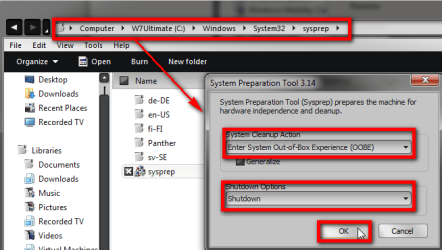
  • When done, right click C:\Windows\System32\Sysprep\Sysprep.exe and choose Run as administrator to open System Preparation Tool (sysprep):
    .
    Audit_2.PNG
    .
  • Select Out-of-Box Experience in System Cleanup Action
  • Select Shutdown in Shutdown Options
  • Click OK
Computer shuts down, and next time it is booted it is so called first boot (Out-of-Box Experience), stopping to ask initial user profile name and computer name. This way you can prepare the PC without creating any user accounts or naming the PC, letting the end user to do that.

That's it.

Kari

Read more: Customize Windows in Audit Mode
 
Last edited:

My Computer My Computer

At a glance

Windows 10 Pro x64 EN-GB1.6 GHz Intel Core i7-720QM Processor6 GBATI Mobility Radeon HD 5850 Graphics
Computer type
Laptop
Computer Manufacturer/Model Number
HP ENVY 17-1150eg
OS
Windows 10 Pro x64 EN-GB
CPU
1.6 GHz Intel Core i7-720QM Processor
Memory
6 GB
Graphics Card(s)
ATI Mobility Radeon HD 5850 Graphics
Sound Card
Beats sound system with integrated subwoofer
Monitor(s) Displays
17" laptop display, 22" LED and 32" Full HD TV through HDMI
Screen Resolution
1600*900 (1), 1920*1080 (2&3)
Hard Drives
Internal: 2 x 500 GB SATA Hard Disk Drive 7200 rpm
External: 2TB for backups, 3TB USB3 network drive for media
Cooling
As Envy runs a bit warm, I have it on a Cooler Master pad
Keyboard
Logitech diNovo Media Desktop Laser (bluetooth)
Mouse
Logitech Performance Mouse MX
Internet Speed
50/10 Mbps VDSL
Antivirus
Windows Defender 4.3.9431.0
Browser
Maxthon 3.5.2., IE11
Great post Kari. Though I knew about the sysprep tool, the audit mode was new to me.
 

My Computer My Computer

At a glance

Windows® 8 Pro (64-bit)Intel® Core™ i5 Processor 2467M (1.60GHz, 3MB...6GB DDR3 System Memory at 1,333MHz (on BD 4GB...AMD Radeon™ HD7550M 1GB DDR3 (Ext. Graphic)
Computer Manufacturer/Model Number
Samsung NP530U4B-S02IN
OS
Windows® 8 Pro (64-bit)
CPU
Intel® Core™ i5 Processor 2467M (1.60GHz, 3MB L3 Cache)
Motherboard
Samsung Electronics
Memory
6GB DDR3 System Memory at 1,333MHz (on BD 4GB + 2GB x 1)
Graphics Card(s)
AMD Radeon™ HD7550M 1GB DDR3 (Ext. Graphic)
Sound Card
Realtek High Definition Audio
Monitor(s) Displays
35.56cm (14.0) SuperBright 300nit HD LED Display
Screen Resolution
1366x768
Hard Drives
1TB S-ATA II Hard Drive (5400RPM) with ExpressCache 16GB SSD
Internet Speed
sucks
Antivirus
Microsoft Security Essentials
Browser
Google Chrome (Sync enabled)

My Computer My Computer

At a glance

Windows 10 Pro x64 EN-GB1.6 GHz Intel Core i7-720QM Processor6 GBATI Mobility Radeon HD 5850 Graphics
Computer type
Laptop
Computer Manufacturer/Model Number
HP ENVY 17-1150eg
OS
Windows 10 Pro x64 EN-GB
CPU
1.6 GHz Intel Core i7-720QM Processor
Memory
6 GB
Graphics Card(s)
ATI Mobility Radeon HD 5850 Graphics
Sound Card
Beats sound system with integrated subwoofer
Monitor(s) Displays
17" laptop display, 22" LED and 32" Full HD TV through HDMI
Screen Resolution
1600*900 (1), 1920*1080 (2&3)
Hard Drives
Internal: 2 x 500 GB SATA Hard Disk Drive 7200 rpm
External: 2TB for backups, 3TB USB3 network drive for media
Cooling
As Envy runs a bit warm, I have it on a Cooler Master pad
Keyboard
Logitech diNovo Media Desktop Laser (bluetooth)
Mouse
Logitech Performance Mouse MX
Internet Speed
50/10 Mbps VDSL
Antivirus
Windows Defender 4.3.9431.0
Browser
Maxthon 3.5.2., IE11
Back
Top