
You are using an out of date browser. It may not display this or other websites correctly.
You should upgrade or use an alternative browser.
You should upgrade or use an alternative browser.
How to copy a file from 1 pc to another pc in network using batch file
- Thread starter abbynard
- Start date
Yes I want to copy files from PC1 to PC2 over the network...
PC1's Drive E:\Online Games\Battle of Immortals\Battle of the Immortals
to
PC2's Drive E:\Online Games\Battle of Immortals\Battle of the Immortals
PC1's Drive E:\Online Games\Battle of Immortals\Battle of the Immortals
to
PC2's Drive E:\Online Games\Battle of Immortals\Battle of the Immortals
My Computer
- OS
- Windows 7 Professional 32bit

why not share the file in your source system and get it trough the network
see these:
http://www.sevenforums.com/tutorials/4367-homegroup-link-your-online-id-share-files.html
http://www.sevenforums.com/tutorials/44464-homegroup-change-file-folder-sharing-settings.html
http://www.sevenforums.com/tutorials/24232-sharing-permissions.html
if there is any problem use team viewer to do so, get it from teamviewer.com
see these:
http://www.sevenforums.com/tutorials/4367-homegroup-link-your-online-id-share-files.html
http://www.sevenforums.com/tutorials/44464-homegroup-change-file-folder-sharing-settings.html
http://www.sevenforums.com/tutorials/24232-sharing-permissions.html
if there is any problem use team viewer to do so, get it from teamviewer.com
My Computer
- OS
- Windows 7 Ultimate x64
- CPU
- core i7.

why not share the file in your source system and get it trough the network
see these:
http://www.sevenforums.com/tutorials/4367-homegroup-link-your-online-id-share-files.html
http://www.sevenforums.com/tutorials/44464-homegroup-change-file-folder-sharing-settings.html
http://www.sevenforums.com/tutorials/24232-sharing-permissions.html
if there is any problem use team viewer to do so, get it from teamviewer.com
Hi there
This is TOTAL overkill for what the OP wants
Here's the CORRECT answer
get into notepad editor and enter statements like this with all the files you want to copy one line for each
and then save the file as either a cmd or bat file
then get into a command prompt, change to the directory where you've stored the cmd or bat file and type the name in
your batch file should run.
Note you can use wild cards such as d*gshy*e for example
have a look at a few more DOS cmds like XCOPY as this might be better for what you want.
copy C:\source.txt C:\destination.txt
the first C is the source directory -- the 2nd C is the target directory -- if you are on a network the directory will be something like \\mynetwork_directory\subdirectory\filename.
If you are lucky enough to have mounted the network directory as a local drive say Q: then instead of the network file directory (the \\part) you can simply use a drive letter Q: for example.
Have a look at this tutorial for more information on commands and batch files.
MS-DOS help and commands
cheers
jimbo
My Computer
- Computer type
- PC/Desktop
- Computer Manufacturer/Model Number
- Custom built, several laptops HP/ASUS
- OS
- Linux CENTOS 7 / various Windows OS'es and servers
- CPU
- Intel i7 Intel i5
- Memory
- 8GB, 16GB
- Graphics Card(s)
- On Motherboard
- Sound Card
- Realtek HD audio
- Monitor(s) Displays
- Apple Cinema display, Samsung LCD
- Screen Resolution
- 1920 X 1080
- Hard Drives
- 4 X 1TB SATA
- Mouse
- Toshiba wireless laser
- Internet Speed
- > 20MB up
Map a network drive.
and then do what --- ?? don't think you've answered the question here.
I refer you back to my previous post in this thread.
BTW on addition to my first post BOTH computers need to be on the LAN that you want to copy the file(s) from.
If only 1 computer is available or connected to the lan then the easiest way is to copy the file(s) on to a USB stick with windows explorer from computer 1 --then copy the USB stick data to computer 2.
(another easy way is often to compress the files with 7-z or similar then EMAIL to the relevant computers -- change the .exe to something like .zzz as a lot of email systems won't allow sending or receiving .exe files --especially office ./ corporate lans).
Cheers
jimbo
My Computer
- Computer type
- PC/Desktop
- Computer Manufacturer/Model Number
- Custom built, several laptops HP/ASUS
- OS
- Linux CENTOS 7 / various Windows OS'es and servers
- CPU
- Intel i7 Intel i5
- Memory
- 8GB, 16GB
- Graphics Card(s)
- On Motherboard
- Sound Card
- Realtek HD audio
- Monitor(s) Displays
- Apple Cinema display, Samsung LCD
- Screen Resolution
- 1920 X 1080
- Hard Drives
- 4 X 1TB SATA
- Mouse
- Toshiba wireless laser
- Internet Speed
- > 20MB up
thanks mmkarimi... but the reason i want to make a batch file is to help my brother update the online games in 20 computers by overwriting or copying big files in one click from 1 source computer...
instead of turning on all 20 computers and updating all online games, he'll just have to update one computer and just copy the update or overwrite the old files in all 19 computers...
instead of turning on all 20 computers and updating all online games, he'll just have to update one computer and just copy the update or overwrite the old files in all 19 computers...
My Computer
- OS
- Windows 7 Professional 32bit
go to the destination computer, type://SourceComputerName,then type the user/pass and get your files
the most simplest solution would be teamviewer and it always work without any network problems. you can even do much more than copping files
so use sky drive, it gives you 7Gb shared information in the web, you upload your files and it will sync all your computer at ones
see this: skydrive.live.com/
My Computer
- OS
- Windows 7 Ultimate x64
- CPU
- core i7.
Hi there
the Batch solution then -- that's how to do it easily
Cheers
jimbo
the Batch solution then -- that's how to do it easily
Cheers
jimbo
My Computer
- Computer type
- PC/Desktop
- Computer Manufacturer/Model Number
- Custom built, several laptops HP/ASUS
- OS
- Linux CENTOS 7 / various Windows OS'es and servers
- CPU
- Intel i7 Intel i5
- Memory
- 8GB, 16GB
- Graphics Card(s)
- On Motherboard
- Sound Card
- Realtek HD audio
- Monitor(s) Displays
- Apple Cinema display, Samsung LCD
- Screen Resolution
- 1920 X 1080
- Hard Drives
- 4 X 1TB SATA
- Mouse
- Toshiba wireless laser
- Internet Speed
- > 20MB up

I have to agree that a batch file will be your quickest solution. just make sure that the drives are shared first.
My Computer
- OS
- Windows 7 Ultimate x64
Yes, but you could try accessing your hidden share on the E drive using
\\PC-Name\E$\Online Games\Battle of Immortals\Battle of the Immortals
Even with that you will have to make sure you have the correct permissions to access the files.
\\PC-Name\E$\Online Games\Battle of Immortals\Battle of the Immortals
Even with that you will have to make sure you have the correct permissions to access the files.
My Computer
- OS
- Windows 7 Ultimate x64
can you please help me make the codes...
My Drives are:
C: Windows
D: Files
E: Online Games
My PC's name is ABJanine
Should it looks like this?
copy \\ABJanine\E:\Online Games\Battle of Immortals\Battle of the Immortals
is that the correct and complete code?
My Drives are:
C: Windows
D: Files
E: Online Games
My PC's name is ABJanine
Should it looks like this?
copy \\ABJanine\E:\Online Games\Battle of Immortals\Battle of the Immortals
is that the correct and complete code?
My Computer
- OS
- Windows 7 Professional 32bit
copy "E:\Online Games\Battle of Immortals\Battle of the Immortals" "\\ABJanine\E:\Online Games\Battle of Immortals\Battle of the Immortals"
Its also a single line just didnt show up that way. (update I cant type today lol)
This will copy the Battle of the Immortals folder to the ADJanine PC. You need to quotes since there are spaces in the name.
Its also a single line just didnt show up that way. (update I cant type today lol)
This will copy the Battle of the Immortals folder to the ADJanine PC. You need to quotes since there are spaces in the name.
My Computer
- OS
- Windows 7 Ultimate x64
how bout if there's just a new update and i want to copy only the update and overwrite the old file?
copy "E:\Online Games\Battle of Immortals\Battle of the Immortals" "\\ABJanine\E:\Online Games\Battle of Immortals\Battle of the Immortals" /overwriteolder
is that the correct codes?
copy "E:\Online Games\Battle of Immortals\Battle of the Immortals" "\\ABJanine\E:\Online Games\Battle of Immortals\Battle of the Immortals" /overwriteolder
is that the correct codes?
My Computer
- OS
- Windows 7 Professional 32bit
I'm not sure if thats an option with the copy command, but it can be done with robocopy with the /mir option.
robocopy "E:\Online Games\Battle of Immortals\Battle of the Immortals" "\\ABJanine\E:\Online Games\Battle of Immortals\Battle of the Immortals" /e /mir
Warning
Use the /MIR option with caution - it has the ability to delete a file from both the source and destination under certain conditions.
This typically occurs if a file/folder in the destination has been deleted, causing ROBOCOPY to mirror the source to the destination. The result is that the same files in the source folder are also deleted. To avoid this situation, never delete any files/folders from the destination - delete them from the source, and then run the backup to mirror the destination to the source.
If in doubt, do not use the /MIR option, but be aware that backups will take longer.
source:
http://www.sevenforums.com/tutorials/187346-robocopy-create-backup-script.html
-update-
I would also test this out before you submit it to your actually game file. Remember that this will replace everything in the folder that is considered newer. I could see how replacing the wrong file will cause the game to quit working. Are there specific files that you need to keep updated?
robocopy "E:\Online Games\Battle of Immortals\Battle of the Immortals" "\\ABJanine\E:\Online Games\Battle of Immortals\Battle of the Immortals" /e /mir
Code:
/e = copy all sub-folders, even empty ones
/mir = mirror (check the files in the destination, and only copy newer files)
Warning
Use the /MIR option with caution - it has the ability to delete a file from both the source and destination under certain conditions.
This typically occurs if a file/folder in the destination has been deleted, causing ROBOCOPY to mirror the source to the destination. The result is that the same files in the source folder are also deleted. To avoid this situation, never delete any files/folders from the destination - delete them from the source, and then run the backup to mirror the destination to the source.
If in doubt, do not use the /MIR option, but be aware that backups will take longer.
source:
http://www.sevenforums.com/tutorials/187346-robocopy-create-backup-script.html
-update-
I would also test this out before you submit it to your actually game file. Remember that this will replace everything in the folder that is considered newer. I could see how replacing the wrong file will cause the game to quit working. Are there specific files that you need to keep updated?
My Computer
- OS
- Windows 7 Ultimate x64
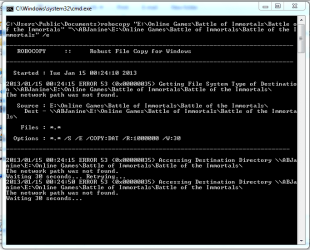
if you go to a explorer and and go to
\\ABJanine\E:\Online Games\Battle of Immortals\Battle of the Immortals
do you get a permission denied error.
or can you even access \\ABJanine
\\ABJanine\E:\Online Games\Battle of Immortals\Battle of the Immortals
do you get a permission denied error.
or can you even access \\ABJanine
My Computer
- OS
- Windows 7 Ultimate x64
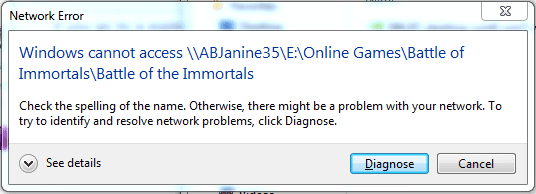
did you go into the \\ABJanine35 PC and share the folder? Is the location might be "\\ABJanine35\Battle of Immortals"
Sorry i had a brain fart about that.
Sorry i had a brain fart about that.
My Computer
- OS
- Windows 7 Ultimate x64
Similar threads
- Replies
- 2
- Views
- 16K
- Replies
- 3
- Views
- 6K
- Replies
- 2
- Views
- 4K

- Replies
- 2
- Views
- 5K