
Solved Is it OK to recover 100MB System Reserved partition?

bbinnard

New member
Pro User
Local time
1:42 AM
Messages
238
I did a standard Win7-64 installation on a 128GB SSD and have no problems. My question is, can I merge the 100MB System Reserved partition that the Win7 Installer creates into my normal boot partition. Right now that 100MB is just wasted space and I'd like to get it back into use.

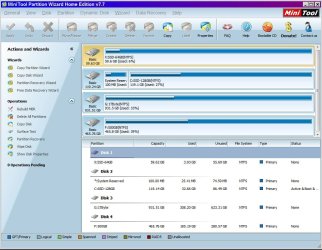
I have MiniTool Partition Wizard and this screen shot shows my current configuration.
Capture.JPG

My concern is that my system won't boot if I merge the 2 partitions because the new partition starting place will be different from where it is now, and I'm not clear on what to do about Boot Manager or how to get it to point to the proper place.

I do have the MiniTool boot CD and I have verified that this works OK, but I can't find any info on whether or not trouble will happen if I merge the 2 partitions on my boot drive.

What is that "System Reserved" partition supposed to be used for anyway?
 

My Computer My Computer

At a glance

Win7-64Intel i7-3770S16GBnVidia GT630
Computer type
PC/Desktop
Computer Manufacturer/Model Number
Custom built
OS
Win7-64
CPU
Intel i7-3770S
Motherboard
ASUS P8Z77-M
Memory
16GB
Graphics Card(s)
nVidia GT630
Sound Card
onboard
Monitor(s) Displays
dual
Screen Resolution
1920x1200 (primary) 1050x1680 (secondary)
Hard Drives
128GB SSD (boot)
64GB SSD (Temp/My Documents)
500GB (photos/videos)
1TB (rendered video, backups)
PSU
650W
Case
Thermaltake A30
Cooling
Thermaltake
Keyboard
Logitech Lighted
Mouse
Kensington Expert Mouse (trackball)
Internet Speed
FIOS 35/35
Antivirus
MS Security Essentials
Browser
Chrome (beta)

My Computer My Computer

At a glance

Windows 10x64 Build 1709Intel i7 7700HQ Kaby Lake16 GB DDR4 @2400Nvidia Geforce GTX 1060
Computer type
Laptop
Computer Manufacturer/Model Number
MSI GE72VR Apache Pro-416
OS
Windows 10x64 Build 1709
CPU
Intel i7 7700HQ Kaby Lake
Motherboard
Micro-Star Intl. MS-179B (U3C1)
Memory
16 GB DDR4 @2400
Graphics Card(s)
Nvidia Geforce GTX 1060
Screen Resolution
1920x1080 120Hz
Hard Drives
256 GB Nvme M.2 SSD

1TB HDD@7200
Cooling
Cooler Blast 4
Keyboard
Steel Series
Antivirus
Bit Defender Free
Browser
Edge

My Computer My Computer

At a glance

Win7-64Intel i7-3770S16GBnVidia GT630
Computer type
PC/Desktop
Computer Manufacturer/Model Number
Custom built
OS
Win7-64
CPU
Intel i7-3770S
Motherboard
ASUS P8Z77-M
Memory
16GB
Graphics Card(s)
nVidia GT630
Sound Card
onboard
Monitor(s) Displays
dual
Screen Resolution
1920x1200 (primary) 1050x1680 (secondary)
Hard Drives
128GB SSD (boot)
64GB SSD (Temp/My Documents)
500GB (photos/videos)
1TB (rendered video, backups)
PSU
650W
Case
Thermaltake A30
Cooling
Thermaltake
Keyboard
Logitech Lighted
Mouse
Kensington Expert Mouse (trackball)
Internet Speed
FIOS 35/35
Antivirus
MS Security Essentials
Browser
Chrome (beta)
I do it all the time. Use Partition Wizard to create your partition and MARK IT ACTIVE. Windows will not create the SR partition. If you don`t need it, it`s a waste of a primary partition. IMO.

Once you mark the partition active you will have to run startup repair with your windows install dvd to write the boot files to your windows partition, it usually only takes 1 time.

http://www.sevenforums.com/tutorials/681-startup-repair.html

http://www.sevenforums.com/tutorials/668-system-recovery-options.html

In your case you already have your partitions, so just mark the windows partition active with PW, merge the 2 and reboot and run startup repair.

With just a 119 GB hard drive you really have nothing to gain here, but it`s a good lesson to learn for future installs, so the SR partition isn`t made in the 1st place. 6 of this 12 of that :)
 

My Computer My Computer

At a glance

Windows 10 Pro x64Intel Core i7 6700KGSkill TridentZ RGB 16GB 3600 16-16-16-36EVGA GTX 980 Ti SC x2
Computer type
PC/Desktop
Computer Manufacturer/Model Number
Skylake Special #666
OS
Windows 10 Pro x64
CPU
Intel Core i7 6700K
Motherboard
Asus Sabertooth Z170 Mark 1
Memory
GSkill TridentZ RGB 16GB 3600 16-16-16-36
Graphics Card(s)
EVGA GTX 980 Ti SC x2
Sound Card
Realtek High Definition
Monitor(s) Displays
AOC G2460PG
Screen Resolution
1920 x 1080 144Hz
Hard Drives
Samsung 860 Pro 256GB, Seagate Barracuda 4TB x2
PSU
EVGA 1000 P2, EVGA White Custom Braided Cables
Case
Corsair Vengeance C70 Gunmetal Black
Cooling
Corsair H100i v2, Corsair ML120 x2, Thermal Grizzly Kryonaut
Keyboard
Logitech G910 Orion Spectrum
Mouse
Logitech G700s
Internet Speed
Verizon Fios Quantum Gateway 75/75
Antivirus
Windows Defender, Malwarebytes Free 3.8.3
Browser
Chrome
Other Info
Corsair SP120 x4, LG Blu-ray Drive, Durabrand HT-395 100 Watt Dolby Digital Amp, Corsair H2100 Wireless 7.1 Headset

My Computer My Computer

At a glance

Microsoft Windows 7 Home Premium 64-bit Servi...Intel(R) Core(TM) i3 CPU M 330 @ 2.13GHz8 GB DDR3Intel(R) HD Graphics
Computer type
Laptop
Computer Manufacturer/Model Number
Hewlett-Packard/G62-107SA Notebook
OS
Microsoft Windows 7 Home Premium 64-bit Service Pack 1
CPU
Intel(R) Core(TM) i3 CPU M 330 @ 2.13GHz
Motherboard
Hewlett-Packard 1425
Memory
8 GB DDR3
Graphics Card(s)
Intel(R) HD Graphics
Sound Card
Realtek High Definition Audio
Monitor(s) Displays
Builtin
Screen Resolution
1366 x 768 x 32 bits (4294967296 colors) @ 60 Hz
Hard Drives
250 GB SATA Hard Disk Drive 7200 rpm
2TB Seagate GoFlex USB 2 Drive
1TB Iomega Prestige USB 2 Drive
1.5TB Iomega Prestige USB 2 Drive (Samsung)
2TB WD MyBook Live NAS.
Mouse
Logitech Anywhere MX
Internet Speed
152 Mbs download 10 Mbs upload
Antivirus
Norton 360
Browser
Chrome
Thanks. After a bit of Googling I found this:


1) Open a command prompt with administrator privileges (right click => run as administrator)

Type:

bcdboot c:\windows /s c:

You should get a message similar to:

Boot files successfully created.

2) Open the Disk Management GUI (you could use diskpart for scripts), locate the C:\ partition right-click and select “Mark Partition as Active”, select yes to the “do you want to continue message”

3) Reboot to confirm that everything is ok.

4) In Disk Management you can now delete the 100Mb System Reserved partition by right clicking on it and selecting “Delete volume”

Optional

5) To re-claim the 100Mb you can use a partitioning tool such as partition magic or gparted

My boot partition is already marked as Active; in fact, it is the only partition in my system that is Active. So it looks like all I have to do is run the

bcdboot c:\windows /s c:

command. Perhaps that will remove the Active spec from my boot partition; if it does I know how to use Disk Manager to put it back.

Do you think I'll still have to run a Startup Repair?
 

My Computer My Computer

At a glance

Win7-64Intel i7-3770S16GBnVidia GT630
Computer type
PC/Desktop
Computer Manufacturer/Model Number
Custom built
OS
Win7-64
CPU
Intel i7-3770S
Motherboard
ASUS P8Z77-M
Memory
16GB
Graphics Card(s)
nVidia GT630
Sound Card
onboard
Monitor(s) Displays
dual
Screen Resolution
1920x1200 (primary) 1050x1680 (secondary)
Hard Drives
128GB SSD (boot)
64GB SSD (Temp/My Documents)
500GB (photos/videos)
1TB (rendered video, backups)
PSU
650W
Case
Thermaltake A30
Cooling
Thermaltake
Keyboard
Logitech Lighted
Mouse
Kensington Expert Mouse (trackball)
Internet Speed
FIOS 35/35
Antivirus
MS Security Essentials
Browser
Chrome (beta)
Probly not, if you`re into command line, go for it. You won`t know til you try. :p
 

My Computer My Computer

At a glance

Windows 10 Pro x64Intel Core i7 6700KGSkill TridentZ RGB 16GB 3600 16-16-16-36EVGA GTX 980 Ti SC x2
Computer type
PC/Desktop
Computer Manufacturer/Model Number
Skylake Special #666
OS
Windows 10 Pro x64
CPU
Intel Core i7 6700K
Motherboard
Asus Sabertooth Z170 Mark 1
Memory
GSkill TridentZ RGB 16GB 3600 16-16-16-36
Graphics Card(s)
EVGA GTX 980 Ti SC x2
Sound Card
Realtek High Definition
Monitor(s) Displays
AOC G2460PG
Screen Resolution
1920 x 1080 144Hz
Hard Drives
Samsung 860 Pro 256GB, Seagate Barracuda 4TB x2
PSU
EVGA 1000 P2, EVGA White Custom Braided Cables
Case
Corsair Vengeance C70 Gunmetal Black
Cooling
Corsair H100i v2, Corsair ML120 x2, Thermal Grizzly Kryonaut
Keyboard
Logitech G910 Orion Spectrum
Mouse
Logitech G700s
Internet Speed
Verizon Fios Quantum Gateway 75/75
Antivirus
Windows Defender, Malwarebytes Free 3.8.3
Browser
Chrome
Other Info
Corsair SP120 x4, LG Blu-ray Drive, Durabrand HT-395 100 Watt Dolby Digital Amp, Corsair H2100 Wireless 7.1 Headset
I noticed that I have that 100mb partition on my drive but I don't see what the big deal about it when it's only 1/10 of a gig. If you delete it and make your partition active for the boot files, won't they use the same amount of space?
 

My Computer My Computer

At a glance

Windows 7 x64 Home PremiumIntel i3-2105Two 4gig Corsair Vengeance BlueSapphire Radeon HD 6670
Computer type
PC/Desktop
Computer Manufacturer/Model Number
Home Built
OS
Windows 7 x64 Home Premium
CPU
Intel i3-2105
Motherboard
Gigabyte B75M-HD3
Memory
Two 4gig Corsair Vengeance Blue
Graphics Card(s)
Sapphire Radeon HD 6670
Sound Card
Soundblaster Audigy
Monitor(s) Displays
AOC LM742
Screen Resolution
1280 x 1024
Hard Drives
Seagate Constellation 1TB
PSU
Seasonic M12II 520 Bronze
Case
Xigmatek Gigas cube
Cooling
Intel stock
It's not the waste of space that is the problem. It is usually the limit of 4 primary partitions.
 

My Computer My Computer

At a glance

Microsoft Windows 7 Home Premium 64-bit Servi...Intel(R) Core(TM) i3 CPU M 330 @ 2.13GHz8 GB DDR3Intel(R) HD Graphics
Computer type
Laptop
Computer Manufacturer/Model Number
Hewlett-Packard/G62-107SA Notebook
OS
Microsoft Windows 7 Home Premium 64-bit Service Pack 1
CPU
Intel(R) Core(TM) i3 CPU M 330 @ 2.13GHz
Motherboard
Hewlett-Packard 1425
Memory
8 GB DDR3
Graphics Card(s)
Intel(R) HD Graphics
Sound Card
Realtek High Definition Audio
Monitor(s) Displays
Builtin
Screen Resolution
1366 x 768 x 32 bits (4294967296 colors) @ 60 Hz
Hard Drives
250 GB SATA Hard Disk Drive 7200 rpm
2TB Seagate GoFlex USB 2 Drive
1TB Iomega Prestige USB 2 Drive
1.5TB Iomega Prestige USB 2 Drive (Samsung)
2TB WD MyBook Live NAS.
Mouse
Logitech Anywhere MX
Internet Speed
152 Mbs download 10 Mbs upload
Antivirus
Norton 360
Browser
Chrome
I noticed that I have that 100mb partition on my drive but I don't see what the big deal about it when it's only 1/10 of a gig. If you delete it and make your partition active for the boot files, won't they use the same amount of space?

Not really, if you look at that partition's contents, it's mostly empty with the actual boot files using up a tiny part of it, so you'll actually gain space, simplify backups and repairs on the disk and not waste an entry in the partition table. The only real use for it is BitLocker and Disk encryption, because both of them were horribly implemented to require this thing.
 

My Computer My Computer

At a glance

Windows 7 Ultimate x64Intel Core i7-740QM8 GB DDR3NVIDIA GeForce 330GT
Computer type
Laptop
Computer Manufacturer/Model Number
Toshiba Sattelite A665-S6092
OS
Windows 7 Ultimate x64
CPU
Intel Core i7-740QM
Memory
8 GB DDR3
Graphics Card(s)
NVIDIA GeForce 330GT
Screen Resolution
1366x768
Hard Drives
Samsung 840 SSD 500GB
1TB USB3 external HD
Cooling
Coolermaster Notepal U3 notebook cooling pad
Internet Speed
3mbps ASDL
Antivirus
ClamWin 0.98.7
Browser
Opera 12.17 x86 (main), Firefox 38 (sec), IE11 (last resort)
It's not the waste of space that is the problem. It is usually the limit of 4 primary partitions.

Exactly, and if you have a large drive you just may want 4 Primary Partitions.

If you don`t use those 2 features, what`s the point of having it.:confused:
 

My Computer My Computer

At a glance

Windows 10 Pro x64Intel Core i7 6700KGSkill TridentZ RGB 16GB 3600 16-16-16-36EVGA GTX 980 Ti SC x2
Computer type
PC/Desktop
Computer Manufacturer/Model Number
Skylake Special #666
OS
Windows 10 Pro x64
CPU
Intel Core i7 6700K
Motherboard
Asus Sabertooth Z170 Mark 1
Memory
GSkill TridentZ RGB 16GB 3600 16-16-16-36
Graphics Card(s)
EVGA GTX 980 Ti SC x2
Sound Card
Realtek High Definition
Monitor(s) Displays
AOC G2460PG
Screen Resolution
1920 x 1080 144Hz
Hard Drives
Samsung 860 Pro 256GB, Seagate Barracuda 4TB x2
PSU
EVGA 1000 P2, EVGA White Custom Braided Cables
Case
Corsair Vengeance C70 Gunmetal Black
Cooling
Corsair H100i v2, Corsair ML120 x2, Thermal Grizzly Kryonaut
Keyboard
Logitech G910 Orion Spectrum
Mouse
Logitech G700s
Internet Speed
Verizon Fios Quantum Gateway 75/75
Antivirus
Windows Defender, Malwarebytes Free 3.8.3
Browser
Chrome
Other Info
Corsair SP120 x4, LG Blu-ray Drive, Durabrand HT-395 100 Watt Dolby Digital Amp, Corsair H2100 Wireless 7.1 Headset
Ah, learn something every day. :geek:
 

My Computer My Computer

At a glance

Windows 7 x64 Home PremiumIntel i3-2105Two 4gig Corsair Vengeance BlueSapphire Radeon HD 6670
Computer type
PC/Desktop
Computer Manufacturer/Model Number
Home Built
OS
Windows 7 x64 Home Premium
CPU
Intel i3-2105
Motherboard
Gigabyte B75M-HD3
Memory
Two 4gig Corsair Vengeance Blue
Graphics Card(s)
Sapphire Radeon HD 6670
Sound Card
Soundblaster Audigy
Monitor(s) Displays
AOC LM742
Screen Resolution
1280 x 1024
Hard Drives
Seagate Constellation 1TB
PSU
Seasonic M12II 520 Bronze
Case
Xigmatek Gigas cube
Cooling
Intel stock
I am beginning to think that my large partition on my C: drive already has the necessary boot code in it (as a result of making it Active) because from what I've read the boot loader software looks for the first Active partition on the boot drive and loads the OS from there.

When I first created my SSD boot drive Win7 made the 2 partitions: the 100 MB one and the big one with Windows that took up all the remaining space. At that time the 100 MB partition was marked as Active; this coincides with the MS explanation of how this partition contains the necessary boot software.

But when I made the Windows partition Active using Disk Manager I think what happened was Disk Manager copied the boot stuff into the Windows partition (somewhere, but exactly where I don't know.) Since I now have only one Active partition I think my system must actually be booting from the Windows partition, and not the 100MB one.

If this is true I should be able to just delete the 100MB partition and then merge the space with the big partition. Of course this will only work if it's actually true that making a partition Active puts the boot code in that partition.

I can't tell if that's the case or not, even with those command line routines that list out what's in the boot sectors.
 

My Computer My Computer

At a glance

Win7-64Intel i7-3770S16GBnVidia GT630
Computer type
PC/Desktop
Computer Manufacturer/Model Number
Custom built
OS
Win7-64
CPU
Intel i7-3770S
Motherboard
ASUS P8Z77-M
Memory
16GB
Graphics Card(s)
nVidia GT630
Sound Card
onboard
Monitor(s) Displays
dual
Screen Resolution
1920x1200 (primary) 1050x1680 (secondary)
Hard Drives
128GB SSD (boot)
64GB SSD (Temp/My Documents)
500GB (photos/videos)
1TB (rendered video, backups)
PSU
650W
Case
Thermaltake A30
Cooling
Thermaltake
Keyboard
Logitech Lighted
Mouse
Kensington Expert Mouse (trackball)
Internet Speed
FIOS 35/35
Antivirus
MS Security Essentials
Browser
Chrome (beta)
You have to mark it active then run startup repair. Tooo many beers have been had.. nite nite..


:confused:
 

My Computer My Computer

At a glance

Windows 10 Pro x64Intel Core i7 6700KGSkill TridentZ RGB 16GB 3600 16-16-16-36EVGA GTX 980 Ti SC x2
Computer type
PC/Desktop
Computer Manufacturer/Model Number
Skylake Special #666
OS
Windows 10 Pro x64
CPU
Intel Core i7 6700K
Motherboard
Asus Sabertooth Z170 Mark 1
Memory
GSkill TridentZ RGB 16GB 3600 16-16-16-36
Graphics Card(s)
EVGA GTX 980 Ti SC x2
Sound Card
Realtek High Definition
Monitor(s) Displays
AOC G2460PG
Screen Resolution
1920 x 1080 144Hz
Hard Drives
Samsung 860 Pro 256GB, Seagate Barracuda 4TB x2
PSU
EVGA 1000 P2, EVGA White Custom Braided Cables
Case
Corsair Vengeance C70 Gunmetal Black
Cooling
Corsair H100i v2, Corsair ML120 x2, Thermal Grizzly Kryonaut
Keyboard
Logitech G910 Orion Spectrum
Mouse
Logitech G700s
Internet Speed
Verizon Fios Quantum Gateway 75/75
Antivirus
Windows Defender, Malwarebytes Free 3.8.3
Browser
Chrome
Other Info
Corsair SP120 x4, LG Blu-ray Drive, Durabrand HT-395 100 Watt Dolby Digital Amp, Corsair H2100 Wireless 7.1 Headset
Looking at the Partition Wizard screenshot provided we see that System Reserved is no longer Active or booting the system, as signified by the Active and Boot (same as System flag in Disk Mgmt) flags now being on C. So the boot files have already been moved and C is booting itself.

(You cut off the third flag on C, but check now that it is System, which in PW means that's what's booted at the moment - same as the Boot flag in Disk Mgmt).

So yes, judging by that screenshot you can delete SysReserved and resize C into its space: Partition Wizard Resize Partition - Video Help.

But first i would confirm with Disk Mgmt that there are no System Active labels on SysReserved and C is labeled boot meaning its the one booting.
 
Change completed - no sweat!

It was surprisingly easy to get rid of that old 100MB partition using the MinTool Patition Wizard :

1. Delete the 100MB partition and turn it into unallocated space
2. Reboot PC to verify my big partition is still bootable - it was
3. Expand Active/Boot partition to max size by absorbing the 100MB from Step 1
4. Commit changes which required reboot to change boot partition size
5. Wait for DOS Boot function to resize boot partition (about 4 min.)
6. Reboot back to normal Windows

The whole process took less than 10 min. Now my disks look like this:

Capture.JPG

In other words - perfect!

I think the key to my success was previously using Disk Manager to mark my main partition as Active. As I noted before, I believe this puts the required boot code somewhere in that partition. If I had not done this, and had not used

bcdboot c:\windows /s c: <== even though this is just one command I never used it

my sense is my system would not have booted since the required boot code would have been lost in Step 1 above.

A suggestion I have for every maker of partitioning software is to include a check that verifies that the boot code is in fact in the partition if that partition is the only one on the boot drive. I understand you can boot from the Windows Install CD to get this boot code back if it's gone, but it would be a lot cleaner of the partitioning software checked for this.

Thanks to everyone who contributed to this thread.
 

My Computer My Computer

At a glance

Win7-64Intel i7-3770S16GBnVidia GT630
Computer type
PC/Desktop
Computer Manufacturer/Model Number
Custom built
OS
Win7-64
CPU
Intel i7-3770S
Motherboard
ASUS P8Z77-M
Memory
16GB
Graphics Card(s)
nVidia GT630
Sound Card
onboard
Monitor(s) Displays
dual
Screen Resolution
1920x1200 (primary) 1050x1680 (secondary)
Hard Drives
128GB SSD (boot)
64GB SSD (Temp/My Documents)
500GB (photos/videos)
1TB (rendered video, backups)
PSU
650W
Case
Thermaltake A30
Cooling
Thermaltake
Keyboard
Logitech Lighted
Mouse
Kensington Expert Mouse (trackball)
Internet Speed
FIOS 35/35
Antivirus
MS Security Essentials
Browser
Chrome (beta)
If the System Active flags were originally on System Reserved partition as one would assume, then in order to move the boot files to C it requires not only moving the Active flag, but also the boot files while making it bootable. This is done best by running Startup Repair - Run up to 3 Separate Times which writes the boot files to the partition while making the necessary adjustments, testing all parameters to apply multiple fixes and commands.

This would not happen merely by moving the Active flag unless the System boot files had already been moved to C in some previous operation, or were moved at different times with a combination of moving the Active flag and running one or more Repairs. PW also has Rebuild MBR on its Disk tab which sometimes works but doesn't do the job completely as the Repairs do.

To know this is done completely as only the automated Startup Repairs can do, reboot and tap the F8 key to see if the Repair My Computer option is on the Advanced Boot Options menu. If not run the Repairs until it is.

These are not mysteries to us as we deal with them by the thousands here since before Win7 was released.
 
He did do it the long way.

If you`re good, mark the thread as solved.
 

My Computer My Computer

At a glance

Windows 10 Pro x64Intel Core i7 6700KGSkill TridentZ RGB 16GB 3600 16-16-16-36EVGA GTX 980 Ti SC x2
Computer type
PC/Desktop
Computer Manufacturer/Model Number
Skylake Special #666
OS
Windows 10 Pro x64
CPU
Intel Core i7 6700K
Motherboard
Asus Sabertooth Z170 Mark 1
Memory
GSkill TridentZ RGB 16GB 3600 16-16-16-36
Graphics Card(s)
EVGA GTX 980 Ti SC x2
Sound Card
Realtek High Definition
Monitor(s) Displays
AOC G2460PG
Screen Resolution
1920 x 1080 144Hz
Hard Drives
Samsung 860 Pro 256GB, Seagate Barracuda 4TB x2
PSU
EVGA 1000 P2, EVGA White Custom Braided Cables
Case
Corsair Vengeance C70 Gunmetal Black
Cooling
Corsair H100i v2, Corsair ML120 x2, Thermal Grizzly Kryonaut
Keyboard
Logitech G910 Orion Spectrum
Mouse
Logitech G700s
Internet Speed
Verizon Fios Quantum Gateway 75/75
Antivirus
Windows Defender, Malwarebytes Free 3.8.3
Browser
Chrome
Other Info
Corsair SP120 x4, LG Blu-ray Drive, Durabrand HT-395 100 Watt Dolby Digital Amp, Corsair H2100 Wireless 7.1 Headset
If the System Active flags were originally on System Reserved partition as one would assume, then in order to move the boot files to C it requires not only moving the Active flag, but also the boot files while making it bootable. This is done best by running Startup Repair - Run up to 3 Separate Times which writes the boot files to the partition while making the necessary adjustments, testing all parameters to apply multiple fixes and commands.

Yes, I understand this, but I originally created my 128GB SSD drive by cloning the older 64GB SSD boot drive on which I had done a clean WIn7-64 install. This install created the separate 100MB partition and, of course the requisite boot code.

After I cloned the 64GB SSD onto the 128GB SSD I changed my BIOS to boot off the 128GB SSD. I remember I did have to run the Win7 Startup Repair because for some odd reason the drive letters for all my drives got fouled up. I really don't understand how this happened or what caused it, but I assume it was because I had, at that time, 2 SSD's, each of which had their 100MB partition marked as Active.

That is when I learned that Active did not mean "online and running", but instead told the boot manager code which partition to boot from. So I used Disk Manager to take "Active" off both of the 100MB partitions on both SSDs and instead assign it only to the large partition on the 128GB SSD. After doing that my system booted A-OK off the 128GB SSD and I simply formatted the 64GB SSD.

That's what led me to the point of wanting the 100MB partition back. I see I was mistaken in my thinking that marking the 128GB SSD's large partition as Active is what put the required boot code into that partition. In fact, it was (as you said) the running of the Win7 Repair Disk that did that.
 

My Computer My Computer

At a glance

Win7-64Intel i7-3770S16GBnVidia GT630
Computer type
PC/Desktop
Computer Manufacturer/Model Number
Custom built
OS
Win7-64
CPU
Intel i7-3770S
Motherboard
ASUS P8Z77-M
Memory
16GB
Graphics Card(s)
nVidia GT630
Sound Card
onboard
Monitor(s) Displays
dual
Screen Resolution
1920x1200 (primary) 1050x1680 (secondary)
Hard Drives
128GB SSD (boot)
64GB SSD (Temp/My Documents)
500GB (photos/videos)
1TB (rendered video, backups)
PSU
650W
Case
Thermaltake A30
Cooling
Thermaltake
Keyboard
Logitech Lighted
Mouse
Kensington Expert Mouse (trackball)
Internet Speed
FIOS 35/35
Antivirus
MS Security Essentials
Browser
Chrome (beta)
Back
Top