
- Local time
- 6:06 AM
- Messages
- 95
I have a brand new SSD that I just installed Windows on using an Ultimate Upgrade Disk and followed the "Clean Install using an Upgrade Disk" tutorial on here, and also the "Relocate Users folders during Windows 7 Installation" tutorial after Windows was actually installed.
According to the first tutorial the Windows install SHOULD have created a system reserved partition since the whole SSD was unallocated space, yet it did not.
Now I DID have Ubuntu installed on another HDD which had a partition marked as Active, and for some reason one of my other drives was also marked as Active, since I reinstalled Windows I have now removed the Ubuntu Partitions and I have now set the other drive that wasn't meant to be Active, as Inactive, and set my "C" drive which is marked as Boot, as Active.
However before I go about reinstalling MORE software (so far just Flash Player and Antivirus software), I would rather format C and reinstall again if it would properly give me the 100Mb System Reserved Partition that is so useful when Windows breaks itself.
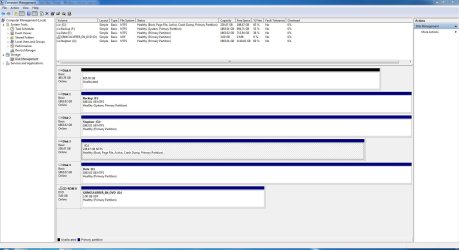
So can someone tell me by looking at the provided screenshot of Disk Management whether another fresh install will actually create the 100Mb System Reserved partition that I want on my drive.
According to the first tutorial the Windows install SHOULD have created a system reserved partition since the whole SSD was unallocated space, yet it did not.
Now I DID have Ubuntu installed on another HDD which had a partition marked as Active, and for some reason one of my other drives was also marked as Active, since I reinstalled Windows I have now removed the Ubuntu Partitions and I have now set the other drive that wasn't meant to be Active, as Inactive, and set my "C" drive which is marked as Boot, as Active.
However before I go about reinstalling MORE software (so far just Flash Player and Antivirus software), I would rather format C and reinstall again if it would properly give me the 100Mb System Reserved Partition that is so useful when Windows breaks itself.
So can someone tell me by looking at the provided screenshot of Disk Management whether another fresh install will actually create the 100Mb System Reserved partition that I want on my drive.
Attachments
My Computer
At a glance
Windows 7 Ultimate x64Intil i7-86016Gb Corsair XMS3 1600MHzMSI N470GTXTwin FrozR II
- Computer type
- PC/Desktop
- Computer Manufacturer/Model Number
- Self Built
- OS
- Windows 7 Ultimate x64
- CPU
- Intil i7-860
- Motherboard
- Gigabyte GA-P55a-UD6
- Memory
- 16Gb Corsair XMS3 1600MHz
- Graphics Card(s)
- MSI N470GTXTwin FrozR II
- Monitor(s) Displays
- Samsung S23A700D
- Hard Drives
- 1x Samsung 840Pro SSD 256Gb for Windows
2x WD Green 2Tb (for Storage)
1x Western Digital Caviar Black 2 TB 7200 RPM (also for storage)
1x Samsung HD501LJ 500Gb for Ubuntu
- PSU
- Antec TruePower New Blue Modular 750W
- Case
- Antec 300
- Cooling
- Cosair H70
- Internet Speed
- 60Mb/s DL, 3Mb/s UL
- Antivirus
- Norton Internet Security
- Browser
- IE, FF, Chrome


