Tool to showing hidden files and folder

VeasnaYim

Banned
Local time
2:45 PM
Messages
32
Before, i have a small tool to enable virus hidden all files and folders to show it up back by hitting that utility bat. I lost this tool so can any body let me know or provide me that tool?
Sorry for my English because it's not my native
Thanks
 

My Computer My Computer

At a glance

TEXAS
Computer type
PC/Desktop
OS
TEXAS
So you want us to find a tool that shows files infected by hidden virus's?
 

My Computer My Computer

At a glance

Windows 7 Home Premium 64BitAMD A6-3420M 1.5GHZ OC - 2.0GHZ4GB DDR3 1600MHZAMD RADEON 6520G+AMD RADEON HD7470M 1GB DDR3
Computer type
Laptop
Computer Manufacturer/Model Number
Packard Bell
OS
Windows 7 Home Premium 64Bit
CPU
AMD A6-3420M 1.5GHZ OC - 2.0GHZ
Memory
4GB DDR3 1600MHZ
Graphics Card(s)
AMD RADEON 6520G+AMD RADEON HD7470M 1GB DDR3
Screen Resolution
1366x768
Hard Drives
500GB SATA
Internet Speed
18Mb Unlimited
Antivirus
AVAST!
Browser
MOZILLA FIREFOX
Unless I don't understand, you don't need a tool.
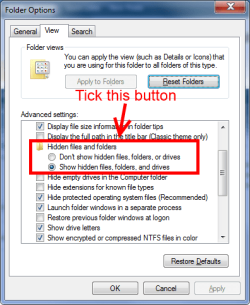
Go to Control Panel\All Control Panel Items\Folder Options open the View tab, see the snip, click Apply when done.

folder.png
 

My Computer My Computer

At a glance

Windows 7 Ultimate X64 SP1Intel i5-2550K, Differing ~4.4-4.8GHz No buil...16GB G.Skill Sniper 1866MHz @ 2133MHz 2x8GBASUS GTX650TIB-DC2OC-2GD5, (650TI Boost)
Computer type
PC/Desktop
Computer Manufacturer/Model Number
Home Built Desktop By DataTech
OS
Windows 7 Ultimate X64 SP1
CPU
Intel i5-2550K, Differing ~4.4-4.8GHz No built in GPU
Motherboard
ASUS P8Z68-V PRO/GEN3
Memory
16GB G.Skill Sniper 1866MHz @ 2133MHz 2x8GB
Graphics Card(s)
ASUS GTX650TIB-DC2OC-2GD5, (650TI Boost)
Sound Card
Onboard Realtek 5-1
Monitor(s) Displays
Samsung P2570HD
Screen Resolution
1920x1080
Hard Drives
Samsung 840 Pro 256GB SSD for OS, 500GB Seagate Constellation (Enterprise drive) for Data
PSU
Corsair HX650W
Case
Inwin Dragon Rider
Cooling
Hyper 212 EVO w/two Noctua fans, push-pull, @1300 RPM
Keyboard
E-Z Eyes, bright yellow keys with large characters
Mouse
steelseries SENSEI Laser Pro Gaming
Internet Speed
48-51Mbs Mbs down, 11 Mbs up Xfinity Cable
Antivirus
Norton Internet Security 2013
Browser
IE 10, Opera, Pale Moon if needed
Other Info
4 case fans, LG BluRay-RE, ASUS DVD-RW, Mr. Fusion power supply, 1.21 gigawatts.
"So you want us to find a tool that shows files infected by hidden virus's? " Yes

And one more thing, after virus attack, it's will hide multi folders and we not easy to show one by one, so can you provide a tool just click only one to show all folders that hidden?
This is mean, even we show hidden file and folder in Folder option, but when we disable show hiden file and folder in folder option, that folders hide by virus will hide again.

Sorry for my english.
 

My Computer My Computer

At a glance

TEXAS
Computer type
PC/Desktop
OS
TEXAS
Unless I don't understand, you don't need a tool.
Go to Control Panel\All Control Panel Items\Folder Options open the View tab, see the snip, click Apply when done.

View attachment 305316

Yeah this method lets you see all hidden folders etc

Adwcleaner and JRT are really useful as well as malwarebytes and RogueKiller, do any of these names ring any bells?

To run Adwcleaner follow this:

Please download AdwCleaner by Xplode and save to your Desktop.
  • Double click on AdwCleaner.exe to run the tool.
    Vista/Windows 7/8 users right-click and select Run As Administrator.
  • Click on the Scan button.
  • AdwCleaner will begin...be patient as the scan may take some time to complete.
  • After the scan has finished, click on the Report button...a logfile (AdwCleaner[R#].txt) will open in Notepad for review (where the largest value of # represents the most recent report).
  • The contents of the log file may be confusing. Unless you see a program name that you know should not be removed, don't worry about it. If you see an entry you want to keep, let me know about it.
  • Copy and paste the contents of that logfile in your next reply.
  • A copy of all logfiles are saved in the C:\AdwCleaner folder which was created when running the tool.
To run JRT(Junkware Removal Tool) Follow this:


Please download Junkware Removal Tool to your desktop.


  • Shut down your protection software now to avoid potential conflicts.
  • Run the tool by double-clicking it. If you are using Windows Vista, 7, or 8; instead of double-clicking, right-mouse click JRT.exe and select "Run as Administrator".
  • The tool will open and start scanning your system.
  • Please be patient as this can take a while to complete depending on your system's specifications.
  • On completion, a log (JRT.txt) is saved to your desktop and will automatically open.
  • Post the contents of JRT.txt into your next message.
To use RogueKiller download from here Download RogueKiller - MajorGeeks and run the program.


If these weren't what you were meaning then i apologize.
 

My Computer My Computer

At a glance

Windows 7 Home Premium 64BitAMD A6-3420M 1.5GHZ OC - 2.0GHZ4GB DDR3 1600MHZAMD RADEON 6520G+AMD RADEON HD7470M 1GB DDR3
Computer type
Laptop
Computer Manufacturer/Model Number
Packard Bell
OS
Windows 7 Home Premium 64Bit
CPU
AMD A6-3420M 1.5GHZ OC - 2.0GHZ
Memory
4GB DDR3 1600MHZ
Graphics Card(s)
AMD RADEON 6520G+AMD RADEON HD7470M 1GB DDR3
Screen Resolution
1366x768
Hard Drives
500GB SATA
Internet Speed
18Mb Unlimited
Antivirus
AVAST!
Browser
MOZILLA FIREFOX
Let me explain some that i still remember they write some command in notepad and save into *.bat
here is command that they wrote in notepad

-s -t -r etc...

and they save it into *.bat
after that, i choose that *.bat file and i go to location that hidden folder by virus and i past that *.bat file, after that, i run *.bat file, all folders are showing up.
Thanks
 

My Computer My Computer

At a glance

TEXAS
Computer type
PC/Desktop
OS
TEXAS
Hello Sir,
Thanks for your help and now this is that i mean:
attrib -h -r -s /s /d *.*

And Mr.Devlin1888's is great i will following his instruction.

best regards,
 

My Computer My Computer

At a glance

TEXAS
Computer type
PC/Desktop
OS
TEXAS
Rather than finding folders you think a virus hid, get rid of the virus? follow Devlin's suggestions.
 

My Computer My Computer

At a glance

Windows 7 Ultimate X64 SP1Intel i5-2550K, Differing ~4.4-4.8GHz No buil...16GB G.Skill Sniper 1866MHz @ 2133MHz 2x8GBASUS GTX650TIB-DC2OC-2GD5, (650TI Boost)
Computer type
PC/Desktop
Computer Manufacturer/Model Number
Home Built Desktop By DataTech
OS
Windows 7 Ultimate X64 SP1
CPU
Intel i5-2550K, Differing ~4.4-4.8GHz No built in GPU
Motherboard
ASUS P8Z68-V PRO/GEN3
Memory
16GB G.Skill Sniper 1866MHz @ 2133MHz 2x8GB
Graphics Card(s)
ASUS GTX650TIB-DC2OC-2GD5, (650TI Boost)
Sound Card
Onboard Realtek 5-1
Monitor(s) Displays
Samsung P2570HD
Screen Resolution
1920x1080
Hard Drives
Samsung 840 Pro 256GB SSD for OS, 500GB Seagate Constellation (Enterprise drive) for Data
PSU
Corsair HX650W
Case
Inwin Dragon Rider
Cooling
Hyper 212 EVO w/two Noctua fans, push-pull, @1300 RPM
Keyboard
E-Z Eyes, bright yellow keys with large characters
Mouse
steelseries SENSEI Laser Pro Gaming
Internet Speed
48-51Mbs Mbs down, 11 Mbs up Xfinity Cable
Antivirus
Norton Internet Security 2013
Browser
IE 10, Opera, Pale Moon if needed
Other Info
4 case fans, LG BluRay-RE, ASUS DVD-RW, Mr. Fusion power supply, 1.21 gigawatts.
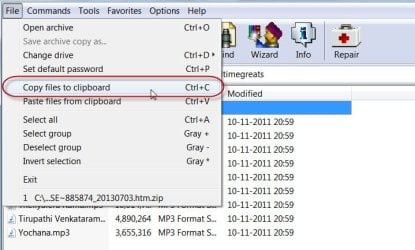
If you want to see all hidden and super-hidden files just use WinRAR, navigate to the location in WinRAR and explore.

You can even copy and paste the folders/files to a different location on your PC or an external drive(CTRL+C and then CTRL+V in the new location).

08-02-2014 08-21-45.jpg

WinRAR can be used to find and eliminate short-cut virus. http://www.sevenforums.com/hardware-devices/283735-usb-virus.html#post2339150
 
Last edited:

My Computer My Computer

At a glance

Windows 7 Home Premium 32 bit
OS
Windows 7 Home Premium 32 bit
Back
Top