Solved Search bar doesn't find program

Anselme

New member
Local time
10:26 AM
Messages
6
Hello,
my problem is simple, windows is installed on my first hard drive, i use the search bar a lot to launch programs to avoid filling my desktop with icons, and the search bar won't find some programs.

For example, when i try to launch Eclipse (Which is not in the list of installed programs, it's an "unzip" installation), which files are located in my second hard drive, i launched it manually several times, but the search bar won't "quick access" it.

So here's my question :
Is there any way to manually index one program on windows 7 ?

Edit : Or is there any way to select where windows searches for programs?
 

My Computer

Computer type
PC/Desktop
Computer Manufacturer/Model Number
Custom build
OS
Windows 7 Ultimate x64
CPU
AMD Athlon II x3 445 3.10 GHz
Memory
4 Go RAM
Graphics Card(s)
NVidia GTX 660
Hard Drives
500 Go Hard drive with dual boot Windows 7 / Fedora
+ 1000 Go Hard drive
Antivirus
Avast free
Browser
Chrome

My Computer

Computer type
PC/Desktop
Computer Manufacturer/Model Number
Custom Built
OS
Windows 10 Pro
CPU
AMD Ryzen 5 2400G Processor with Radeon RX Vega 11 Graphics
Motherboard
ASRock X470 Master SLI/AC AM4 AMD Promontory X470 SATA 6Gb/s
Memory
G.SKILL Ripjaws V Series 16GB (2 x 8GB) 288-Pin DDR4 SDRAM D
Graphics Card(s)
2047MB NVIDIA GeForce GTX 1060 6GB (EVGA)
Sound Card
Motherboard Built in
Monitor(s) Displays
Acer R240HY bidx 23.8-Inch IPS HDMI DVI VGA (1920 x 1080) Wi
Screen Resolution
1920 x 1080
Hard Drives
1TB Sandisk SSD PLUS (Main drive)
500 GB Seagate 7200 RPM (Games)
500 GB Western Digital 7200 RPM (Virtual Machines)
PSU
CORSAIR TX Series TX650M 650W 80+ Gold Modular Power Supply
Case
CORSAIR CARBIDE SPEC-02 Mid-Tower Gaming Case, Red LED Fan
Cooling
220mm, two 120mm, and four 60mm fans
Keyboard
Wired Dell keyboard
Mouse
Wireless Logitech mouse
Internet Speed
250mb down, 30mb up
Antivirus
Panda Cloud Antivirus
Browser
Chrome-ish x64
Other Info
Your awesome for reading this.
I think i found what i wanted, i added my second hard drive to the list of locations to index, and i'm rebuiding the index, i think that will do the trick.

Thanks.

P.S. : I am curious about something, does indexing affects only user searches, or it is used for other functionnalities?
 

My Computer

Computer type
PC/Desktop
Computer Manufacturer/Model Number
Custom build
OS
Windows 7 Ultimate x64
CPU
AMD Athlon II x3 445 3.10 GHz
Memory
4 Go RAM
Graphics Card(s)
NVidia GTX 660
Hard Drives
500 Go Hard drive with dual boot Windows 7 / Fedora
+ 1000 Go Hard drive
Antivirus
Avast free
Browser
Chrome
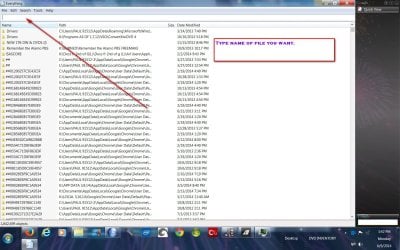
A program you might try - Everything Search Engine

Just type in the name (or even part of it) and it will find it in seconds.

I've got 6 hdds and this program is a lifesaver.
 

Attachments

  • everything pic 6,9,14.jpg
    everything pic 6,9,14.jpg
    231.3 KB · Views: 0

My Computer

Computer type
PC/Desktop
Computer Manufacturer/Model Number
Self-Built
OS
Windows 7 Professional X64
CPU
Core i7 (2nd gen) i7-2600K / 3.40GHz
Motherboard
ASUS P8Z77-V Intel 7 Series Motherboard
Memory
DDR3 2400MHz (OC) 16gb
Graphics Card(s)
Intel(R) HD Graphics 3000, -1988 Mb
Sound Card
8 ChannelsAudio Chipset Realtek ALC892
Monitor(s) Displays
LG 29UM65 Black 29"
Screen Resolution
2560 x 1080
Hard Drives
840 EVO 250 GB SSD ;2tb (2);Seagate;1tb Seagate; 750 gb Seagate; wd ext (2) 750 gb,WD 2tb X 2;WD 3TB Black
PSU
750 watt
Case
Thermaltake RX -1
Cooling
2120mm Fans Included 1Other Fan Ports 5x 200mm Fan Ports
Keyboard
Microsoft Digital Media Pro
Mouse
Microsoft Wireless 6000
Internet Speed
U-verse 18 mbps
Antivirus
MSE
Browser
Firefox, Chrome and my favorite: Pale Moon
Other Info
HdHomerun Dual Tuner.
SRS Audio Lab,
Pioneer BDR 208-DBK
PS3-What a difference in my Surround Sound Receiver!
HP 4540s - My new Toy.
Epson R280 Printer- To personalize my Dvds.
Canon MP 560 - For scanning.
I think i found what i wanted, i added my second hard drive to the list of locations to index, and i'm rebuiding the index, i think that will do the trick.

Thanks.

P.S. : I am curious about something, does indexing affects only user searches, or it is used for other functionnalities?

Indexing is mainly only used to speed up searches across windows explorer and the start menu. It also indexes the properties of the file. IMHO using the index makes it much faster to access all your files. I cannot confirm how true that is though. But I notice drives I do not have indexed take a little longer to open then ones that are indexed. But it might just be me.

From windows 7 built in help and support:

What is the search index and how can I change it?
Windows uses the index to perform very fast searches of the most common types of files on your computer. Instead of looking through your entire hard disk for a file name or property, Windows scans the index.

If you're searching in locations that aren't indexed, the search might be slow because Windows must inspect each file in those locations during the search. You can add those locations to the index to speed up future searches. For more information, see Improve Windows searches using the index: frequently asked questions.

To see the complete list of locations that are indexed, or to add locations to the index, open Indexing Options.

Click to open Indexing Options.

The indexed locations are displayed in the Index these locations list.

Notes
When you include a folder in a library, it's automatically added to the index. For more information, see Include folders in a library.

For privacy reasons, only your own files are added to the index, and so by default, *Windows won't search files belonging to other users on your computer.
 

My Computer

Computer type
PC/Desktop
Computer Manufacturer/Model Number
Custom Built
OS
Windows 10 Pro
CPU
AMD Ryzen 5 2400G Processor with Radeon RX Vega 11 Graphics
Motherboard
ASRock X470 Master SLI/AC AM4 AMD Promontory X470 SATA 6Gb/s
Memory
G.SKILL Ripjaws V Series 16GB (2 x 8GB) 288-Pin DDR4 SDRAM D
Graphics Card(s)
2047MB NVIDIA GeForce GTX 1060 6GB (EVGA)
Sound Card
Motherboard Built in
Monitor(s) Displays
Acer R240HY bidx 23.8-Inch IPS HDMI DVI VGA (1920 x 1080) Wi
Screen Resolution
1920 x 1080
Hard Drives
1TB Sandisk SSD PLUS (Main drive)
500 GB Seagate 7200 RPM (Games)
500 GB Western Digital 7200 RPM (Virtual Machines)
PSU
CORSAIR TX Series TX650M 650W 80+ Gold Modular Power Supply
Case
CORSAIR CARBIDE SPEC-02 Mid-Tower Gaming Case, Red LED Fan
Cooling
220mm, two 120mm, and four 60mm fans
Keyboard
Wired Dell keyboard
Mouse
Wireless Logitech mouse
Internet Speed
250mb down, 30mb up
Antivirus
Panda Cloud Antivirus
Browser
Chrome-ish x64
Other Info
Your awesome for reading this.
The result is the following : my second hard drive is now well indexed.
When i search for "eclipse" the first results are eclipse folders, so i have to type "eclipse.exe" to have the program in first choice in the search results, as a file, not as a program; and that search is quite slow...

Is there a way to identify a .exe file as an installed program? So Windows search would find it more quickly and without having to type the extension.
 

My Computer

Computer type
PC/Desktop
Computer Manufacturer/Model Number
Custom build
OS
Windows 7 Ultimate x64
CPU
AMD Athlon II x3 445 3.10 GHz
Memory
4 Go RAM
Graphics Card(s)
NVidia GTX 660
Hard Drives
500 Go Hard drive with dual boot Windows 7 / Fedora
+ 1000 Go Hard drive
Antivirus
Avast free
Browser
Chrome
Back
Top